RCS Messaging Explained: What It Is and How to Fix It
What RCS messaging is, how it differs from SMS and iMessage, which carriers support it, and how to fix "waiting for activation" and other RCS problems on iPhone and Android.
RCS messaging (Rich Communication Services) is the carrier-backed texting standard that's replacing SMS and MMS on Android and, since iOS 18, on iPhone too. It adds read receipts, typing indicators, high-resolution photo and video sharing, and group chat over Wi-Fi or mobile data instead of the old cellular signaling network SMS relies on. If you're seeing "RCS Messaging: Waiting for Activation" or RCS simply isn't turning on, the cause is almost always carrier-side registration, not your phone being broken — and there's a specific set of steps that clears it in most cases.
- What it is: A GSMA-defined messaging standard (Universal Profile) that replaces SMS/MMS with read receipts, typing indicators, large media, and group chat.
- iPhone support: Requires iOS 18 or later and a carrier that supports RCS; toggle it at Settings > Apps > Messages > RCS Messaging.
- Android support: Needs Google Messages as your default texting app, with RCS chats turned on in Messages settings.
- Encryption: End-to-end encryption between iPhone and Android is in beta, rolling out since iOS 26.5 (May 2026), on supported carriers only.
- "Waiting for activation": Usually a carrier-side number verification delay. Restarting, toggling RCS off/on, and waiting (sometimes up to 24 hours) resolves most cases.
What is RCS messaging?
RCS stands for Rich Communication Services. It's a messaging protocol developed under the GSM Association (GSMA), the industry body that represents mobile network operators worldwide. The GSMA published the first version of its "Universal Profile" for RCS in November 2016, giving carriers and phone makers a single, agreed-upon feature set to build against instead of dozens of incompatible carrier implementations.
Technically, RCS is built on the same IP Multimedia Subsystem (IMS) and Session Initiation Protocol (SIP) infrastructure carriers already use for voice-over-LTE calling, according to the technical background in Wikipedia's entry on RCS. That's why RCS messages can travel over Wi-Fi or mobile data rather than the older SS7 signaling channel that SMS depends on. In practice, that gives RCS messages SMS-style simplicity — no app download, no separate account, tied to your phone number — but with modern features layered on top: read receipts, typing indicators, large (high-resolution) photo and video attachments, group chat management, and no 160-character limit.
Google has been the driving force behind global RCS adoption on Android, operating its own "Jibe" backend that many carriers rely on instead of building their own RCS infrastructure. Apple held out for years — Tim Cook was famously dismissive of RCS as late as 2022 — before reversing course and announcing RCS support for iPhone in November 2023, which arrived with iOS 18 in September 2024.
RCS vs SMS vs iMessage: what's actually different
All three are ways to send a text message by phone number, but they behave very differently under the hood. SMS is the oldest and most universal — it works on literally any phone with cellular service, but it caps messages at 160 characters and pushes photos through MMS, which carriers often compress heavily. iMessage is Apple's proprietary system, end-to-end encrypted by default, but it only works between Apple devices. RCS sits in between: it's cross-platform like SMS, but with most of the features people associate with iMessage or WhatsApp.
| Feature | SMS / MMS | RCS | iMessage |
|---|---|---|---|
| Works between Android and iPhone | Yes | Yes | No (Apple devices only) |
| Read receipts / typing indicators | No | Yes | Yes |
| High-resolution photo/video sharing | No (compressed via MMS) | Yes | Yes |
| Group chat management | Very limited | Yes | Yes |
| Message character limit | 160 characters (concatenated for longer texts) | None | None |
| End-to-end encryption | No | Beta, cross-platform iPhone↔Android since iOS 26.5 on supported carriers; Google Messages has encrypted Android-to-Android RCS since 2021 | Yes, always |
| Needs an internet connection | No (uses the cellular signaling network) | Yes (Wi-Fi or mobile data) | Yes (Wi-Fi or mobile data) |
| Falls back automatically if unavailable | N/A | Yes, falls back to SMS/MMS | Yes, falls back to SMS/MMS or RCS |
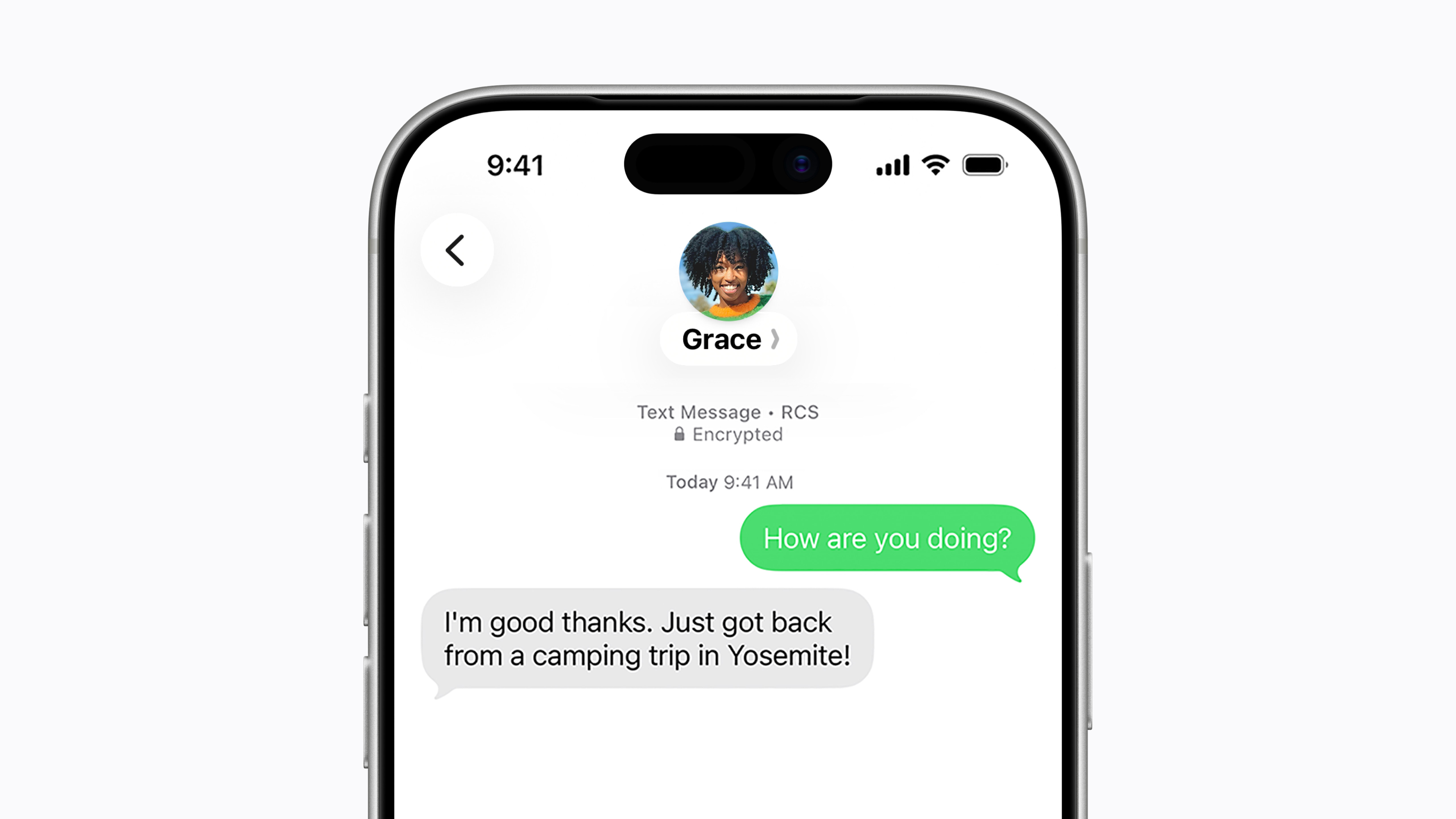
One nuance worth knowing: on an iPhone, RCS messages still show up in a green bubble, exactly like SMS/MMS always have. The bubble color doesn't change — what changes is the capability behind it. Apple's own support documentation confirms RCS conversations use delivery receipts, read receipts, and typing indicators, the same way iMessage does, just rendered in green rather than blue.
Which devices and carriers support RCS?
RCS support depends on three things lining up at once: your phone's software, your default messaging app, and your carrier's backend. On Android, that means having an RCS-capable phone, Google Messages installed and set as your default SMS app, and a carrier (or Google's own Jibe backend) that has activated RCS for your number and region. On iPhone, Apple's support page lists iOS 18 or later and "a cellular plan from a carrier that supports RCS messaging on iPhone" as the two requirements; carrier fees may apply depending on your plan.
In the US, the three major networks — AT&T, T-Mobile, and Verizon — support RCS on iPhone, along with a growing list of smaller carriers and MVNOs that Apple maintains on its carrier-support page. Coverage and feature parity (particularly end-to-end encryption) vary by carrier, so the only fully reliable way to check your specific plan is Apple's own list or your carrier's support site, since new carriers are added over time. If you're on a prepaid or regional carrier and RCS never seems to activate, that carrier may simply not support it yet rather than there being a fault with your device.
It's a similar story to eSIM rollout a few years ago: carrier backend support lagged behind phone hardware for a long time, as we covered in our guide to how eSIM actually works — RCS is following roughly the same adoption curve, just a few years behind.
Does iPhone support RCS? Apple's rules, explained
Yes — since iOS 18, launched in September 2024. Apple's support documentation (article 122195) describes RCS on iPhone as letting you "send texts, high-resolution photos and videos, and links" to both Apple and non-Apple devices when iMessage isn't being used, over Wi-Fi or cellular data. To use it you need:
- An iPhone running iOS 18 or later.
- A cellular plan from a carrier that supports RCS messaging on iPhone (carrier fees may apply).
To turn it on or off: open Settings > Apps > Messages > RCS Messaging, then flip the toggle. Apple notes there can be "a slight delay" the first time you turn it on — which is the normal activation window, not a bug. If the RCS Messaging option doesn't appear in Settings at all, Apple's guidance is that the feature isn't currently available for your carrier or plan.
Two additional iPhone-specific details worth knowing. First, some businesses can send order and shipping alerts over RCS; you can turn those off separately with the "RCS Business Messages" switch in the same menu, and report unwanted ones with Report Junk in the conversation. Second, as of iOS 26.5 (May 2026), Apple and Google began rolling out beta end-to-end encryption for RCS chats between iPhone and Android, on supported carriers only, shown with a lock icon in the conversation — a long-requested parity feature with iMessage's always-on encryption, though Apple's own messaging still recommends iMessage as the more private option "between Apple devices."
How to turn on RCS messaging on Android
On most Android phones, RCS runs through the Google Messages app. Google's own support documentation lays out the requirements and steps:
- Install the latest version of Google Messages from the Play Store and set it as your default SMS app.
- Open Google Messages, tap your profile photo, then Messages settings > RCS chats, and make sure it's turned on.
- If you have a dual-SIM phone with both SIMs active, make sure the SIM you use for calls is also set as your Data SIM, under Settings > Network & Internet — RCS needs that SIM to carry data.
- RCS only activates for a given conversation when every participant in it also has RCS enabled; otherwise it falls back to SMS/MMS automatically.
Some Android phone makers (Samsung in particular) layer their own messaging app and RCS stack on top of Google's, which can mean a slightly different settings path and, per several carrier forum reports, a longer re-registration window after you reset it.
How to turn on RCS messaging on iPhone
Go to Settings > Apps > Messages > RCS Messaging and toggle it on. If your carrier supports it, RCS should activate within a short time — Apple's documentation describes this as a "slight delay," typically a few minutes rather than hours. If you're on iOS 26 or later, you can also choose which app handles RCS, SMS, and MMS messages under the same Messages settings, in case you use a third-party texting app.
If the toggle is missing entirely, that's Apple's own signal that RCS "may not be available" on your current carrier or plan — check Apple's carrier-support list before assuming your phone is at fault.
Fixing "RCS Messaging: Waiting for Activation"
This is the single most common RCS complaint, on both iPhone and Android, and it shows up as a status under RCS Messaging / RCS chats that just sits on "Waiting for activation," "Connecting," or "Setting up" indefinitely. Based on Google's own troubleshooting guidance and recurring reports across carrier support communities (including threads on Verizon's, T-Mobile's, and EE's forums), here's the order to try fixes in:
- Give it real time first. Google's support page explicitly describes a "Connecting" state while your number is being verified, and flags that only "Trouble connecting. Awaiting retry…" lasting more than 30 minutes indicates an actual problem. Carrier-side RCS re-registration can reportedly take considerably longer — up to 24 hours in some cases described by carrier support staff — so a few hours of "waiting" isn't unusual.
- Toggle RCS off, then back on. On iPhone: Settings > Apps > Messages > RCS Messaging. On Android: Google Messages > Messages settings > RCS chats. This forces a fresh registration attempt with the carrier.
- Restart the phone. Verizon's own community support staff, in a thread about this exact status, recommended a restart as the first troubleshooting step.
- Check for a carrier settings update and the latest OS update. On iPhone, carrier settings updates usually prompt automatically but can be checked under Settings > General > About; keeping iOS current on the latest point release occasionally resolves messaging bugs that have nothing to do with RCS activation specifically but can still interfere with it.
- Confirm you can receive a regular SMS. Google Messages verifies your number by sending a confirmation text; if SMS itself is broken (no signal, SMS blocked by your plan, etc.), RCS verification will never complete.
- On dual-SIM Android phones, check your Data SIM setting. If your Call SIM and Data SIM are different, RCS activation can stall — set them to match under Network & Internet settings.
- If none of that works, it's probably on the carrier's side. Several carrier-forum threads about this exact "waiting for activation" message end with a carrier representative confirming it's a backend/account-level issue they have to escalate — not something fixable from the phone. If you've waited 24+ hours and tried the steps above, contact your carrier's support line directly.
RCS messaging not working at all? Other common fixes
If RCS was working and then stopped — or messages silently fall back to SMS/MMS — check these in order:
- Confirm your messaging app is set as default. On Android, RCS only runs through whichever app is set as your default SMS/MMS app (usually Google Messages). On iPhone, confirm RCS Messaging is still toggled on in Settings > Apps > Messages.
- Remember RCS needs both sides enabled. If you're messaging someone whose carrier doesn't support RCS, or who has it turned off, your conversation will automatically use SMS/MMS instead — that's expected behavior, not a bug on your end.
- Check "Automatically resend as text." Both Google Messages and iPhone's Messages app have a setting that falls back to SMS/MMS when RCS fails to send; leaving it on means a failed RCS message doesn't just disappear, but it can also mask an underlying RCS problem since everything still "works," just without the extra features.
- Clear cache / reinstall, as a last resort on Android. Clearing the cache for Google Messages and Carrier Services (Settings > Apps), or reinstalling Google Messages from the Play Store, has been reported by several troubleshooting guides to resolve stuck RCS connections.
- Check signal strength and network mode. RCS needs a working data connection; being stuck on a weak signal or an older network mode can prevent registration from completing, something Verizon support specifically flagged in user threads about this issue.
If you're frequently stuck juggling RCS fallbacks with friends on different platforms, it's also worth having a backup for sharing files directly — something like Quick Share and Nearby Share can move photos and videos between Android and iPhone without depending on your carrier's messaging backend at all.
Is RCS messaging encrypted?
It depends on who you're messaging and when you're reading this. Without end-to-end encryption, RCS traffic is still protected by TLS between your device and the carrier/Google's servers — better than plain SMS, but not end-to-end. Google Messages has offered end-to-end encryption for RCS chats between two Android users on Google Messages since 2021. The bigger gap — RCS between iPhone and Android — stayed unencrypted until Apple and Google jointly began rolling out beta end-to-end encryption on May 11, 2026, confirmed in Apple's own newsroom announcement. It requires iOS 26.5 or later on the iPhone side, the latest Google Messages on Android, and a supported carrier on both ends; encrypted chats show a small lock icon, and Apple says it will turn on automatically, by default, for both new and existing RCS conversations over time as rollout continues.
Worth noting: this encryption is still labeled "beta" by both companies, it depends on carrier support (not every carrier that supports basic RCS supports the encrypted version yet), and it doesn't apply to RCS business messages (A2P), which remain a separate category.
What to do next
If RCS is simply stuck on "Waiting for activation," give it a few hours, toggle it off and on, restart the phone, and make sure you can receive a plain SMS — that clears the great majority of cases, on both iPhone and Android. If it's been well over a day with no change, treat it as a carrier-side activation issue and contact your carrier's support line directly rather than troubleshooting the phone further. If RCS simply isn't available yet, check your carrier's own support page (or Apple's carrier list, if you're on iPhone) before assuming your device is the problem — in a lot of regions and on a lot of smaller carriers, basic RCS, let alone the new end-to-end encryption beta, genuinely hasn't rolled out yet. And if you're mixing Android and iPhone contacts regularly, don't rely on RCS alone: keeping SMS/MMS fallback turned on, and knowing tools like Quick Share/Nearby Share or a visual voicemail workaround for calls (as we outlined in our guide to fixing visual voicemail, another carrier-dependent feature with similar activation quirks), will keep you covered while carrier rollouts catch up.
Frequently asked questions
What does RCS messaging mean?
RCS stands for Rich Communication Services, a GSMA-defined messaging standard that replaces SMS/MMS with read receipts, typing indicators, high-resolution media, and group chat, sent over Wi-Fi or mobile data rather than the older cellular signaling network SMS uses.
How do I turn on RCS messaging on Android?
Open Google Messages, tap your profile photo, go to Messages settings > RCS chats, and turn it on. Google Messages must be set as your default SMS app, and on dual-SIM phones your Data SIM should match your Call SIM.
How do I turn on RCS messaging on iPhone?
On an iPhone running iOS 18 or later, go to Settings > Apps > Messages > RCS Messaging and toggle it on. You also need a cellular plan from a carrier that supports RCS on iPhone; carrier fees may apply.
Why does RCS messaging say "Waiting for Activation"?
This almost always means your carrier is still verifying your number with the RCS network. Give it a few hours (carrier-side registration can reportedly take up to 24 hours), then try toggling RCS off and on, restarting your phone, and confirming you can receive a normal SMS. If it persists beyond a day, contact your carrier.
Is RCS messaging encrypted?
RCS traffic is protected by TLS in transit by default. Google Messages has encrypted RCS chats between two Android users since 2021. End-to-end encryption between iPhone and Android is in beta as of iOS 26.5 (May 2026), and requires a supported carrier on both ends.
Why isn't RCS messaging working with someone on a different carrier or phone?
RCS only activates for a conversation when every participant has it enabled and their carrier supports it. If either side lacks RCS support, the conversation automatically falls back to SMS/MMS.
Sources
- Apple Support: Turn on RCS messaging on your iPhonesupport.apple.com
- Google Messages Help: About RCS chatssupport.google.com
- GSMA Newsroom: Initiative to drive global adoption of Universal Profile for RCSgsma.com
- Apple Newsroom: End-to-end encrypted RCS messaging begins rolling out today in betaapple.com
- Wikipedia: Rich Communication Servicesen.wikipedia.org
Nadia Osei covers mobile and consumer gadgets for Pandromeda: smartphones, tablets, smartwatches, earbuds and smart-home devices. She tracks launches, software updates and pricing across Apple, Google, Samsung and the rest, and builds comparisons from the manufacturers' published specifications.