Windows 11's New Search Update Adds Inline Quick Actions
A new WinUI 3 search experience is rolling out to Windows Insiders in the Experimental channel, adding inline quick actions and smarter typo and synonym matching.
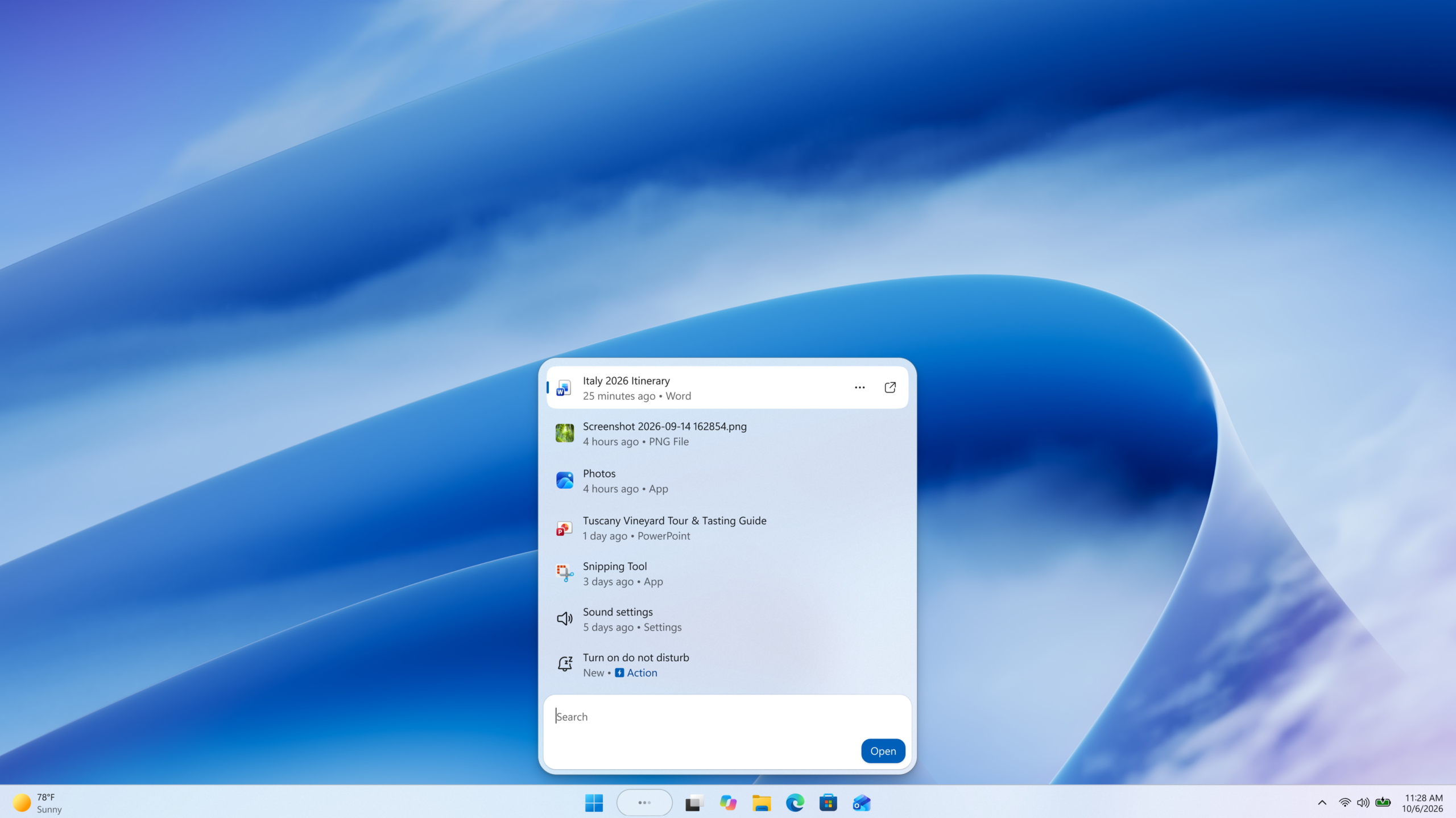
Microsoft has begun rolling out a redesigned Windows 11 search experience to Windows Insiders, and this one is not just a visual refresh. The new search, announced October 7, 2026 on the Windows Insider Blog, is rebuilt on WinUI 3 and adds inline "quick actions" that let you flip settings like dark mode, night light, and Bluetooth, or tell search to mute the volume, dim the screen, and arrange your open windows, all without leaving the search box. Search is also getting better at understanding typos and synonyms, a change Microsoft says it will keep tuning over the coming weeks.
The redesign is gradually rolling out starting today in the Experimental channel and the Experimental (26H1) channel, alongside a batch of new Beta and Experimental builds that Microsoft also published on October 7. Here is what actually changed, which builds and rings have it, and how to turn it on if you are already enrolled in the Windows Insider Program.
- Microsoft's new Windows Search experience, rebuilt on WinUI 3, started rolling out October 7, 2026.
- It adds inline quick actions: toggling dark mode, night light, and Bluetooth; "dim my screen" and "mute"; and window commands like "minimize all my windows" and "arrange windows on screen."
- Search gets improved typo and synonym matching, which Microsoft says will keep improving over the next several weeks.
- It is live now in the Experimental channel and the Experimental (26H1) channel on builds 26340.9616 and 28120.3181, respectively.
- The feature ships English-only at launch and is gated behind a Feature Flag toggle in Windows Update settings.
- Start menu search keeps its current experience for now; Microsoft says that update is planned for next year.
What actually changed in Windows Search
The headline change is architectural as much as visual. Microsoft says the new search experience was rebuilt from the ground up on WinUI 3, the company's modern native UI framework for Windows apps, and that the switch delivers meaningful gains in speed and memory use during the company's own early testing. The practical result, according to the blog post, is a single-list layout that puts search results in one scannable list instead of splitting the window between a results column and a large preview pane, a pane Microsoft says most people were not actually clicking into.
That detail matters because it explains why Microsoft chose to simplify rather than add more panes. For years, launching Windows Search (whether from the taskbar search box, the Start menu, or the Win + S keyboard shortcut) opened a window with a narrow list of results on one side and a large preview area on the other, showing a bigger icon, a snippet of file content, or web results for whatever was highlighted. Microsoft's own usage data, as described in the announcement, found that most interaction happened in that left-hand list rather than the preview pane, which is the justification the company gives for collapsing the layout into a single column.
Replacing that split-pane layout with inline actions is the bigger behavioral shift. Instead of opening a settings page to make a change, Insiders in the test rings can now type a command straight into search and have it execute immediately. Microsoft's post specifically calls out toggling dark mode, night light, and Bluetooth from the search box, along with phrases like "dim my screen" and "mute" for quick hardware adjustments, and window-management commands such as "minimize all my windows" and "arrange windows on screen." A demo in the announcement shows search being used to snap Microsoft Edge and Word into a split-screen layout, essentially using the search box as a shortcut for a Snap Layouts action that would otherwise take several mouse movements.
Microsoft frames this as a shift "from searching to doing," the title of its own announcement post, positioning search less as a launcher for other apps and more as a command interface in its own right. That framing echoes the broader direction Microsoft has pushed across Windows 11 over the past couple of years: reduce the number of discrete steps between wanting something to happen and it actually happening, rather than requiring a trip through Settings, Control Panel holdovers, or a specific app.
Smarter matching for typos and synonyms
Alongside the inline actions, Microsoft says the underlying search matching has been improved to better tolerate typos and recognize synonyms, so a slightly misspelled query or a different word for the same concept should still surface the right result. The company is explicit that this is an ongoing effort rather than a one-time fix, stating that it will continue fine-tuning the matching quality over the coming weeks as it collects feedback from Insiders using the new experience.
What Microsoft says is coming next
The October 7 post also previews features that have not shipped yet. Microsoft says inline file previews and richer file details are planned for later this year, as is a set of phone actions delivered through Phone Link, Microsoft's app for connecting an Android phone or iPhone to a Windows PC, such as sending a text message directly from the search box without opening Phone Link separately. The company additionally lists rich inline web previews, using examples like checking the weather or looking up the height of the Eiffel Tower without leaving search, plus filters built into the new single-pane layout, as later-in-the-year additions. None of these were available in the builds Microsoft shipped on October 7; they are stated goals for subsequent updates, and Microsoft gave no specific ship dates beyond "later this year."
Read together, the roadmap suggests Microsoft is treating this October 7 release as the first of several waves rather than a finished feature. The inline toggles and window commands shipping now cover system settings and basic window management; the previews Microsoft has promised next extend the same inline-action idea to file content, phone tasks, and live web data, which would make search function closer to a universal command bar than a traditional file-and-app launcher.
Which Insider channels and builds get it
The new search experience is tied to specific builds that Microsoft published the same day in its companion post, "Announcing new builds for 7 October 2026." That post lists new builds across several channels, though Microsoft only confirmed the search redesign for two of them.
| Channel | Build number | Gets new search? |
|---|---|---|
| Beta | 26220.9606 | No |
| Experimental | 26340.9616 | Yes |
| Beta (26H1) | 28020.3172 | No |
| Experimental (26H1) | 28120.3181 | Yes |
| Experimental (Future Platforms) | 29683.1000 | Not mentioned |
In other words, if you are on the Beta channel or Beta (26H1) channel, the October 7 build does not include the new search experience; Microsoft's post only names the Experimental and Experimental (26H1) channels as recipients. The Beta and Beta (26H1) builds published the same day, 26220.9606 and 28020.3172, focus on other fixes rather than the search redesign, and the Experimental (Future Platforms) build, 29683.1000, is not mentioned in connection with search at all.
The same build announcement also introduces a new Battery Status widget for the Experimental channel, which surfaces battery levels for the PC and connected peripherals, such as a wireless mouse or headset, in one view. Microsoft says it can be added from Widgets board > Add widgets > Battery Status and that it is intended for Insiders on newer builds. That widget is a separate feature from the search redesign and ships alongside it in the same release rather than being part of it.
How to try the new search if you are an Insider
Because the feature is being staged behind a flag, simply installing the right build is not enough to see it immediately. Microsoft's instructions, drawn from the announcement post, are:
- Make sure your PC is enrolled in the Windows Insider Program on the Experimental or Experimental (26H1) channel.
- Go to Settings > Windows Update > Windows Insider Program > Feature flags.
- Turn on "New Windows Search Experience."
- Go back to Windows Update and select Check for updates, then restart the PC.
- After restarting, the new search experience should appear automatically, since it rolls out gradually rather than to every eligible device at once.
Microsoft notes the new experience is English-only for this initial release, and that Start menu search is not affected yet; the company says the Start menu's search box will keep its current behavior in early previews, with its own redesign planned for next year.
Why this matters beyond the test rings
Search sits at the center of how most people actually use Windows 11 day to day, whether that is launching an app, opening a file, or jumping into a setting buried several menus deep. Collapsing common settings toggles and window commands into the search box, if it holds up through testing, could remove several clicks from routine tasks for the hundreds of millions of people who use Windows 11 search every day. It also mirrors a broader pattern in Microsoft's recent Windows 11 26H2 feature work, where the company has repeatedly tried to cut down the number of steps between wanting to do something and actually doing it.
The move to WinUI 3 is also notable on its own. Microsoft has been migrating pieces of the Windows shell to its modern UI framework for several releases, and a faster, lighter-weight search surface is a visible, easy-to-measure way to show that work paying off. Whether the performance gains Microsoft describes from its internal testing hold up once the feature reaches a broader population of Insider PCs, with their widely varying hardware and installed software, is something only a wider rollout will confirm.
There is also a keyboard-and-mouse efficiency argument buried in the simpler examples Microsoft chose to demo. "Mute," "dim my screen," and toggling Bluetooth are all actions that currently require either a Quick Settings flyout from the taskbar or a trip into the Settings app, depending on the exact control. If a typed command can reliably replace that flow, it is a small change that nonetheless touches an action many Windows 11 users perform multiple times a day. The window-arrangement commands point in a similar direction, offering a typed alternative to Snap Layouts for people who find a keyboard shortcut or typed phrase faster than dragging a window to a screen edge.
What could still change before general availability
It is worth being clear-eyed about where this stands. Microsoft explicitly frames the typo and synonym matching as a work in progress that will be tuned over the coming weeks, which suggests search quality in the first builds may be inconsistent. The company has also only confirmed Experimental-channel availability so far, and Experimental builds are, by design, the least stable and most likely to see features changed, delayed, or pulled entirely before they reach Beta, let alone the general Windows 11 Stable channel. Readers who tried earlier Insider changes, including the builds covered in Pandromeda's rundown of the September 25 Insider Preview builds, will recognize that features previewed in Experimental do not always ship on the timeline or in the exact form first announced.
What's next
For now, the redesigned Windows Search is limited to Windows Insiders on the Experimental and Experimental (26H1) channels who manually enable the "New Windows Search Experience" feature flag. Microsoft has committed to continuing to refine typo and synonym matching over the coming weeks and has previewed inline file previews, Phone Link actions, and rich web previews as later-in-the-year additions, alongside filters for the new single-pane layout. A Start menu version of the redesign is planned for next year rather than this cycle.
Anyone testing Windows 11 Insider builds who wants to weigh in can do so directly: Microsoft says feedback on the new search should go through Feedback Hub (Win + F) under Desktop Environment > Search. For background on how Windows Insider channels relate to one another and to the eventual Stable release, Wikipedia's overview of the Windows Insider Program is a useful primer, and Pandromeda will continue tracking how this search redesign evolves as it moves toward Beta and, eventually, general availability on Windows 11.
Frequently asked questions
What is the new Windows 11 search experience?
It is a redesigned version of Windows Search, rebuilt on WinUI 3, that Microsoft began rolling out to Windows Insiders on October 7, 2026. It replaces the old results-list-plus-preview-pane layout with a single scannable list and adds inline quick actions, such as toggling dark mode or Bluetooth, muting the volume, dimming the screen, or arranging windows, directly from the search box. It also includes improved matching for typos and synonyms.
Which Windows Insider channels have the new search right now?
Microsoft says the redesign is rolling out to the Experimental channel (build 26340.9616) and the Experimental (26H1) channel (build 28120.3181). The Beta and Beta (26H1) builds published the same day do not include it, based on Microsoft's own announcement.
How do I turn on the new Windows Search in Insider Preview?
On an eligible Experimental or Experimental (26H1) build, go to Settings > Windows Update > Windows Insider Program > Feature flags and turn on "New Windows Search Experience." Then check for updates in Windows Update and restart the PC. Because the rollout is gradual, it may not appear on every eligible device immediately after restarting.
What inline quick actions does the new search support?
Microsoft's announcement lists toggling dark mode, night light, and Bluetooth; adjusting the screen with "dim my screen"; muting the device; and window-management commands such as "minimize all my windows" and "arrange windows on screen," including snapping apps like Edge and Word into a split-screen layout.
When will the redesigned search reach the Windows 11 Start menu?
Microsoft says Start menu search will keep its current experience in early previews and that a Start menu version of the redesign is planned for next year, not in this round of builds.
Is the new Windows Search available in languages other than English?
Not yet. Microsoft's announcement says the initial release of the redesigned search experience is English-only.
Sources
- Windows Insider Blog: From searching to doing - Building a faster, more streamlined Windows Searchblogs.windows.com
- Windows Insider Blog: Announcing new builds for 7 October 2026blogs.windows.com
- Microsoft Learn: Windows Insider Program - Get startedlearn.microsoft.com
- Microsoft Learn: WinUI overviewlearn.microsoft.com
- Wikipedia: Windows Insideren.wikipedia.org
Felix Moreau writes Pandromeda's software coverage and how-to guides. He covers Windows, macOS and Linux updates, the apps people rely on, emulators and developer tools, and turns official documentation into clear, numbered steps that work on the current version.