VS Code 1.144 Update: Copilot Fusion GA and Cloud Sessions
Visual Studio Code's October 28 release makes Copilot Fusion GA, adds cloud session continuity, experimental Computer Use agents, and a preview of in-chat image generation.
VS Code 1.144 is out, and the headline change is that Copilot Fusion — the model-routing system that picks and orchestrates which AI model handles each request — has moved out of preview and is now generally available to everyone. Microsoft shipped the release on October 28, 2026, and alongside Fusion it bundles cloud-hosted Copilot sessions, an experimental "Computer Use" mode that lets agents operate desktop apps directly, a preview of in-chat image generation, and a long list of changes to how Copilot agents request permissions, remember context, and get customized. For developers who lean on GitHub Copilot inside the editor every day, 1.144 is one of the more consequential updates of the year.
Below is a rundown of what actually changed, which features are finished (GA) versus still rough around the edges (preview or experimental), and what to check first if you're updating today.
Copilot Fusion is now generally available
Copilot Fusion routes and orchestrates models on a per-request basis instead of locking a chat session to a single model. In 1.144 it graduates from preview to general availability, with three selectable effort levels: Standard, High, and Max. The higher tiers, High and Max, are limited to Pro+, Max, Business, and Enterprise Copilot plans. Microsoft is also running a 30% discount on Fusion usage for paid plans through November 30, 2026, which is worth knowing if you're budgeting Copilot spend for the rest of the year.
Fusion's GA launch sits next to a related, smaller change: side-by-side model comparisons are now enabled by default for eligible new sessions opened in the Agents window (controlled by the sessions.chat.compareAgents.enabled setting). The comparison view has also been extended to folderless chats and to repositories that don't have any commits yet — two cases it previously couldn't handle. It still isn't supported inside Dev Containers.
Session continuity: cloud sessions and remote environments
A big theme of 1.144 is decoupling a Copilot agent's work from whether your laptop is powered on. The release adds cloud sessions, which run Copilot tasks on GitHub's own infrastructure rather than your local machine. A cloud session requires a paid Copilot plan, runs in a separate workspace from your local checkout, and — importantly — does not copy over any uncommitted local changes, so it's best suited to tasks that start from a clean, committed state. You can check on a running cloud session from VS Code, from GitHub.com, or from the GitHub Mobile app, which makes it realistic to kick off a task and follow its progress away from your desk.
To manage where agents actually run, VS Code consolidates GitHub Environments, Dev Tunnels, WSL distributions, and SSH hosts into a single new Remote Environments dialog, opened via "Manage Remote Environments" in the environment picker. There's also a preview feature called Cloud Automations: scheduled or repository-event-triggered automations that execute on GitHub rather than locally. It's on by default, governed by the chat.automations.cloud.enabled setting, and admins can restrict which tools and filters an automation is allowed to use.
Underpinning all of this is the first published version of the Agent Host Protocol (v1.0) — the protocol VS Code uses to talk to agents whether they're running locally or remotely. You can register a websocket-based agent host yourself via the "Agents: Add Remote Agent Host..." command, and Microsoft has published client libraries for it in six languages, which opens the door to third-party and self-hosted agent backends.
Computer Use: agents that can operate your desktop apps (experimental)
One of the more eye-catching additions is Computer Use, an experimental capability that lets a Copilot agent see and control desktop applications directly on your own macOS or Windows machine, rather than being confined to the editor, terminal, and file system. It only works in Copilot harness sessions running locally. When a task needs it, the agent will ask to turn it on, or you can enable it yourself with the /computer on slash command (and disable it again with /computer off); it stays on until you turn it off. Given the label, treat it as early and unproven for production workflows — Microsoft's own documentation flags it as experimental, not a finished feature.
Canvases: a shared surface for you and the agent (preview)
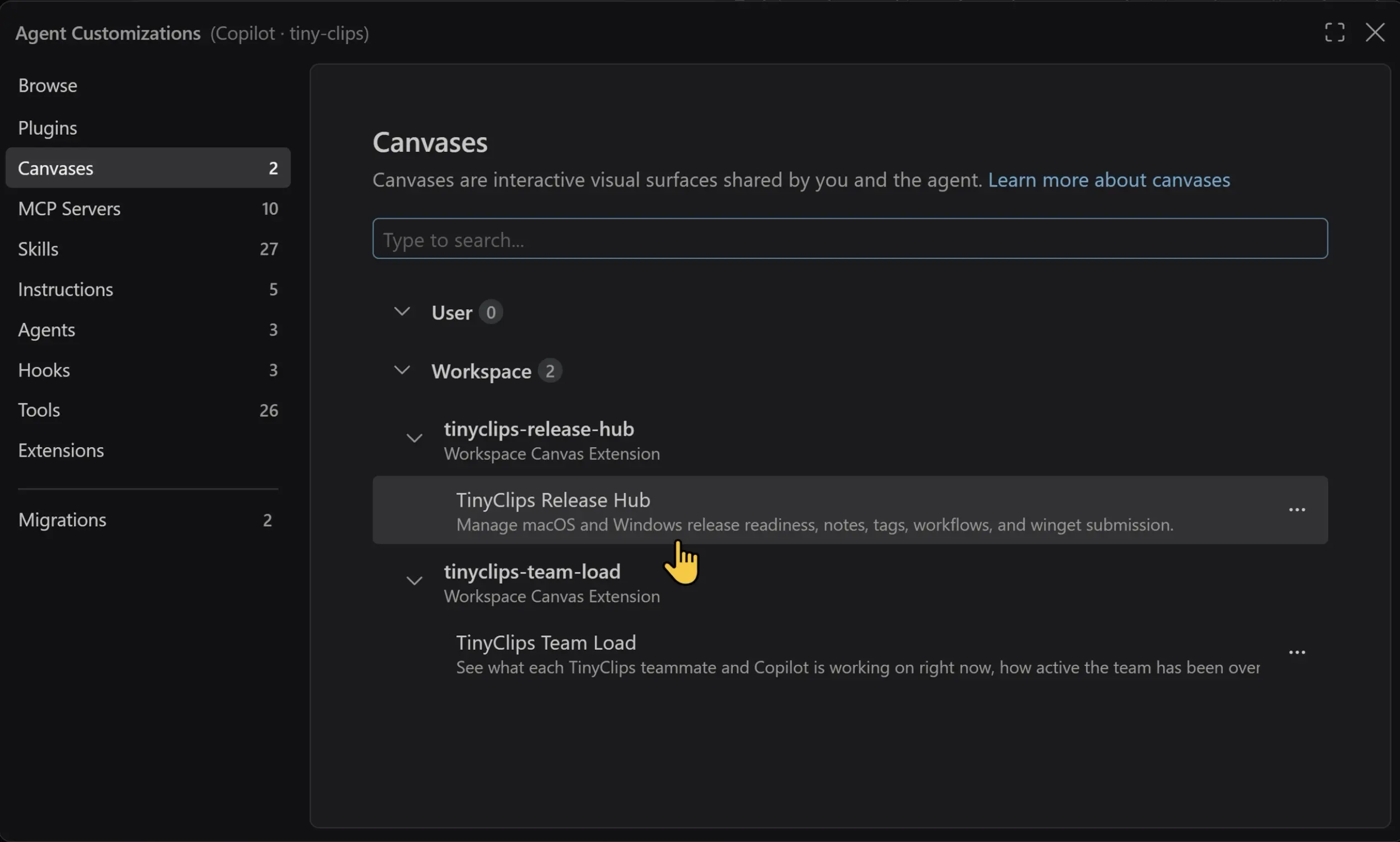
Canvases are a new preview feature: an interactive, shared surface that both you and a Copilot agent can work on together, separate from a normal chat transcript. They're managed from the Agent Customizations editor and opened through Add Context > Canvas. It's a lighter-weight complement to the chat-and-diff workflow most Copilot users are used to, and like Computer Use, it's explicitly a preview rather than a finished feature.
Assisted permissions reach general availability
Letting an agent run tool calls (editing files, running terminal commands, calling MCP servers) without constantly interrupting you for approval has been one of the trickier UX problems in agentic coding. In 1.144, "assisted permissions" — where an LLM performs a risk assessment on each individual tool call and automatically approves the ones it judges low-risk, while still requiring your explicit approval for anything higher-risk or ambiguous — reaches general availability for Copilot sessions. It requires folder isolation to be enabled, and organizations can restrict or disable it entirely through policy, which matters for regulated teams evaluating whether to turn it on by default.
Copilot Memory and the Copilot harness
Copilot harness sessions can now use Copilot Memory, the same cloud memory service already used by Copilot CLI, Copilot cloud agent, and Copilot code review. Agents recall relevant repository facts and your personal preferences when a session starts, and store new learnings as you work, so you don't have to re-explain the same context in every new conversation. Repository facts are shared with anyone who has access to that repository, while user preferences apply only to you, and everything respects whatever memory settings and organization policies a GitHub admin has configured.
This builds on the Copilot harness, which continues to be the default for new sessions in VS Code. It's built on the Copilot SDK and runs through the Agent Host, which is also what lets Copilot harness sessions keep running in the background and stay reachable from both the editor window and the Agents window. A few related, smaller agent changes rounded out the release: an experimental "working set" that records every edit an agent's tools make to a file so you can individually Keep or Undo them (terminal-command changes aren't tracked); an experimental worktree-storage manager that lists past worktrees with a workspace filter and suggests cleanup once local disk space drops under 5 GB free; and the ability to run, enable, and disable extensions directly from the Agents window.
Image generation lands in chat (preview)
VS Code's chat can now generate images directly in a conversation, using GPT Image 2.5 Flare by default. It's a preview feature that consumes AI credits, and Microsoft offers an optional watermark for generated images. If you'd rather not have it available at all, it can be switched off entirely via the chat.copilot.imageGeneration.model setting.
Voice conversations and chat upgrades (experimental)
Chat also picks up an experimental Voice Mode, which uses an OpenAI live voice model through your own API key (agents.voice.useBYOKVoiceModel), with session awareness enabled by default so the voice assistant knows what session it's attached to. A companion experimental feature adds localized voice approvals — so you can approve or reject an agent's requested actions by voice, with clearer connection status — in 25 languages, falling back to English when a language isn't supported.
Agent customization and the new marketplace features
Several changes target how teams configure and share custom agents. Copilot connectors, now in preview, are GitHub-managed MCP servers that connect services like Slack, Notion, and Microsoft Learn without any local setup — the browse screen shown in Microsoft's release notes also lists Port, Postman, Sentry, Statsig, and Work IQ as available connectors. They currently only work with the Copilot harness, and Business and Enterprise admins need to enable "Editor preview features" before their users can see them.
A new marketplace customizations preview combines the GitHub Feed with marketplace plugins in one browse page (not available in local sessions), and custom agent (.agent.md) files get real editing support — completions, hovers, and validation for the model, tools, and skills attributes, plus body placeholders. Agent files without an explicit target attribute now default to whatever harness is currently active instead of a hardcoded choice. Microsoft also added shareable vscode:// deep links that can install a marketplace, a plugin, or open a customization page directly (VS Code asks for confirmation before acting on one), plus three new slash commands — /plugin, /mcp, and /skills — for managing plugins, MCP servers, and skills straight from chat.
These agent-customization and connector changes track a broader, related shift in how Microsoft is positioning Copilot across its products; our earlier coverage of the upcoming GitHub Copilot model deprecations is a useful companion piece if you're trying to plan which models and configurations will still be supported heading into next year.
Session management, terminal, and enterprise changes
Session organization gets several smaller but practical upgrades: a preview feature to drag, promote, reorder, and undo moves of chats between sessions (chat.agentHost.moveChats.enabled, on by default only in VS Code Insiders); nested sessions that can each use a different folder, a new worktree, or no workspace at all, including inside quick chats; and custom icons and colors for workspace, environment, and custom session groups, which should help if you tend to have a lot of sessions open at once.
On Windows, a long-standing terminal annoyance is fixed: dialogs launched by console tools — Microsoft calls out Azure's Connect-AzAccount as an example — now open in front of VS Code instead of hiding behind it, controlled by terminal.integrated.windowsReparentConsoleWindow. The Issue Reporter also got simplified into an opt-in, single-page wizard that supports file and media attachments and opens in its own window by default.
For organizations managing fleets of VS Code installs, 1.144 keeps disabled permission modes visible in the UI with an explanation instead of just hiding them, adds organization-managed defaults for model choice, Fusion tier, and permission level, and shows managed-settings loading progress inline in chat so admins can tell when a policy push has actually applied.
On the extension side, the GitHub Pull Requests extension moved to version 0.174.0, where "Update stack" now uses the GitHub API directly and a banner suggests stacking related pull requests. Extension publishers also get Trusted Publishing for GitHub Actions: running vsce publish --oidc uses short-lived OIDC tokens instead of a long-lived personal access token, provided you're on @vscode/vsce 4.0.2 or later — a timely change given that Azure DevOps is retiring global PATs on December 1, 2026. It's part of a wider industry move away from standing credentials in publish pipelines, a theme we also touched on when covering npm's decision to disable install scripts by default.
| Feature | Status | What it does |
|---|---|---|
| Copilot Fusion | GA | Routes requests across models with Standard/High/Max effort levels |
| Cloud sessions | Requires paid plan | Runs Copilot tasks on GitHub's infrastructure, no local machine needed |
| Assisted permissions | GA | LLM auto-approves low-risk agent tool calls |
| Copilot Memory | Default-on | Remembers repo facts and preferences across sessions |
| Agent Host Protocol | v1.0 | First published protocol version for local/remote agent hosts |
| Computer Use | Experimental | Lets agents see and control desktop apps on macOS/Windows |
| Canvases | Preview | Shared interactive surface for user and agent |
| Image generation in chat | Preview | Generates images using GPT Image 2.5 Flare, costs AI credits |
| Voice conversations | Experimental | Voice Mode via your own OpenAI API key |
| Copilot connectors | Preview | GitHub-managed MCP servers for Slack, Notion, and more |
| Cloud Automations | Preview | Scheduled or event-triggered automations run on GitHub |
Quick facts: VS Code 1.144
- Released: October 28, 2026 (Stable channel)
- Biggest change: Copilot Fusion model routing reaches general availability
- Requires a paid Copilot plan: cloud sessions, and High/Max Fusion effort levels
- Still labeled experimental: Computer Use, voice conversations, working set, worktree cleanup, session composer controls
- Still labeled preview: Canvases, image generation, Copilot connectors, Cloud Automations, marketplace customizations, move-chats
How to update, and what to watch next
VS Code Stable updates itself automatically for most users, or you can trigger it manually from Help > Check for Updates (or the equivalent Code menu item on macOS). Because so much of this release is gated behind paid Copilot plans, organization policy, or an explicit opt-in setting, it's worth skimming the settings referenced above — particularly chat.agentHost.computerUse.enabled, chat.automations.cloud.enabled, and sessions.chat.compareAgents.enabled — rather than assuming everything described here is already active in your editor.
The clearest signal in 1.144 is the direction, not just the individual features: Microsoft is pushing Copilot agents toward running continuously, in the cloud, with less manual babysitting of permissions and more persistent memory of your codebase. Fusion's move to general availability, assisted permissions going GA, and Copilot Memory's arrival in the default harness are the three changes most likely to show up in your day-to-day editor experience immediately; Computer Use, Canvases, and voice conversations are the ones to treat as previews worth trying but not yet relying on.
Frequently asked questions
What's new in VS Code 1.144?
VS Code 1.144, released October 28, 2026, makes Copilot Fusion's model routing generally available, adds cloud-hosted Copilot sessions and an Agent Host Protocol v1.0, and introduces an experimental Computer Use mode plus preview features like Canvases and in-chat image generation.
Is Copilot Fusion free to use?
Fusion's Standard effort level is broadly available, but the High and Max effort levels are limited to Pro+, Max, Business, and Enterprise Copilot plans. Microsoft is running a 30% discount on paid-plan Fusion usage through November 30, 2026.
What is Computer Use in VS Code?
Computer Use is an experimental feature that lets a Copilot agent see and control desktop applications on your own macOS or Windows machine, in local Copilot harness sessions. It's opt-in via the /computer on slash command or the chat.agentHost.computerUse.enabled setting.
Do VS Code cloud sessions copy my local uncommitted changes?
No. Cloud sessions run Copilot tasks in a separate, managed workspace on GitHub's infrastructure, require a paid Copilot plan, and do not automatically copy over uncommitted local changes.
What does 'assisted permissions' do in Copilot sessions?
Assisted permissions, now generally available, has an LLM assess the risk of each tool call an agent wants to make and automatically approve low-risk calls, while still requiring your explicit approval for higher-risk or ambiguous ones. It requires folder isolation to be enabled.
How do I update to VS Code 1.144?
VS Code Stable updates automatically for most users, or you can check manually via Help > Check for Updates (or the Code menu on macOS).
Sources
- VS Code Release Notes — Version 1.144 (October 2026)code.visualstudio.com
- Visual Studio Code source repositorygithub.com
- GitHub Changeloggithub.blog
- Visual Studio Code — Wikipediaen.wikipedia.org
Felix Moreau writes Pandromeda's software coverage and how-to guides. He covers Windows, macOS and Linux updates, the apps people rely on, emulators and developer tools, and turns official documentation into clear, numbered steps that work on the current version.