What Is CI/CD? The CI/CD Pipeline Explained
CI stands for continuous integration, CD for continuous delivery or deployment. Together they form the automated pipeline that builds, tests, and ships code.
CI/CD stands for continuous integration and continuous delivery (or continuous deployment). Continuous integration (CI) is the practice of merging code changes into a shared repository frequently, with each merge automatically built and tested. Continuous delivery/deployment (CD) picks up where CI leaves off, automatically preparing — and in the "deployment" variant, actually releasing — that tested code to users. When the two run back-to-back as one automated sequence, the result is what engineers call a CI/CD pipeline: a repeatable path that takes a code change from commit to build to test to release with as little manual intervention as possible.
- CI (continuous integration): developers merge small code changes into a shared branch often, and each merge triggers an automatic build and test run.
- CD (continuous delivery): every change that passes CI is automatically packaged into a release-ready build, using a simple, repeatable deployment process — a human still approves the final release.
- CD (continuous deployment): a stricter variant where passing changes roll out to production automatically, with no manual approval step.
- Typical pipeline stages: build, test, deploy (sometimes split further into lint, unit test, integration test, staging, and production).
- Common platforms: GitHub Actions, GitLab CI/CD, Jenkins, and CircleCI, among others.
What does CI/CD actually mean?
CI/CD is shorthand for two related but distinct practices that are usually described together. Wikipedia's entry on the subject defines it as "the combined practices of continuous integration (CI) and continuous delivery (CD) or, less often, continuous deployment," and notes the whole bundle is sometimes called "continuous software development." In practice, most teams use "CI/CD" loosely to mean "the automated process that takes my code from a commit to something running in production," and that is a fair everyday definition — but the two halves do different jobs, and it helps to separate them.
Continuous integration (CI), explained
GitHub's documentation describes continuous integration as a practice that "requires frequently committing code to a shared repository." The idea is simple: instead of letting a feature branch drift for weeks and then merging a huge, risky batch of changes, developers integrate small changes constantly. Each commit can trigger an automatic build and a battery of tests — linters for style, security scans, code-coverage checks, functional tests, and whatever custom checks a team wants to run. Catching a broken build or a failing test minutes after a two-line commit is far cheaper than discovering it weeks later, buried inside a thousand-line merge.
CI servers (or CI features built into a hosting platform) watch a repository for new commits and pull requests, then run the configured checks automatically. GitHub Actions, for example, can run workflows on GitHub-hosted or self-hosted runners, trigger them from a push, a schedule, or a webhook, and post pass/fail results directly on the pull request so a reviewer can see at a glance whether a change is safe to merge.
Continuous delivery vs. continuous deployment
This is the distinction people most often get wrong, and it is worth being precise about it:
- Continuous delivery means every change that passes the pipeline's automated checks is automatically built into a release-ready artifact, using what Wikipedia calls "a simple, repeatable deployment process." The artifact could be deployed at any time — but a person still decides when, typically by clicking "approve" or "deploy."
- Continuous deployment goes one step further: there is no manual gate. Every change that passes the pipeline is released automatically, described there as the "automatic rollout of new software functionality."
Most organizations that say they do "CI/CD" are practicing continuous integration plus continuous delivery, not full continuous deployment — they still want a human to sign off before code reaches real users, especially for anything regulated, high-stakes, or customer-facing. Full continuous deployment is more common for internal tools, SaaS backends with strong automated test coverage, and teams with mature feature-flagging practices that let them ship code dark and turn it on later.
How a CI/CD pipeline actually works
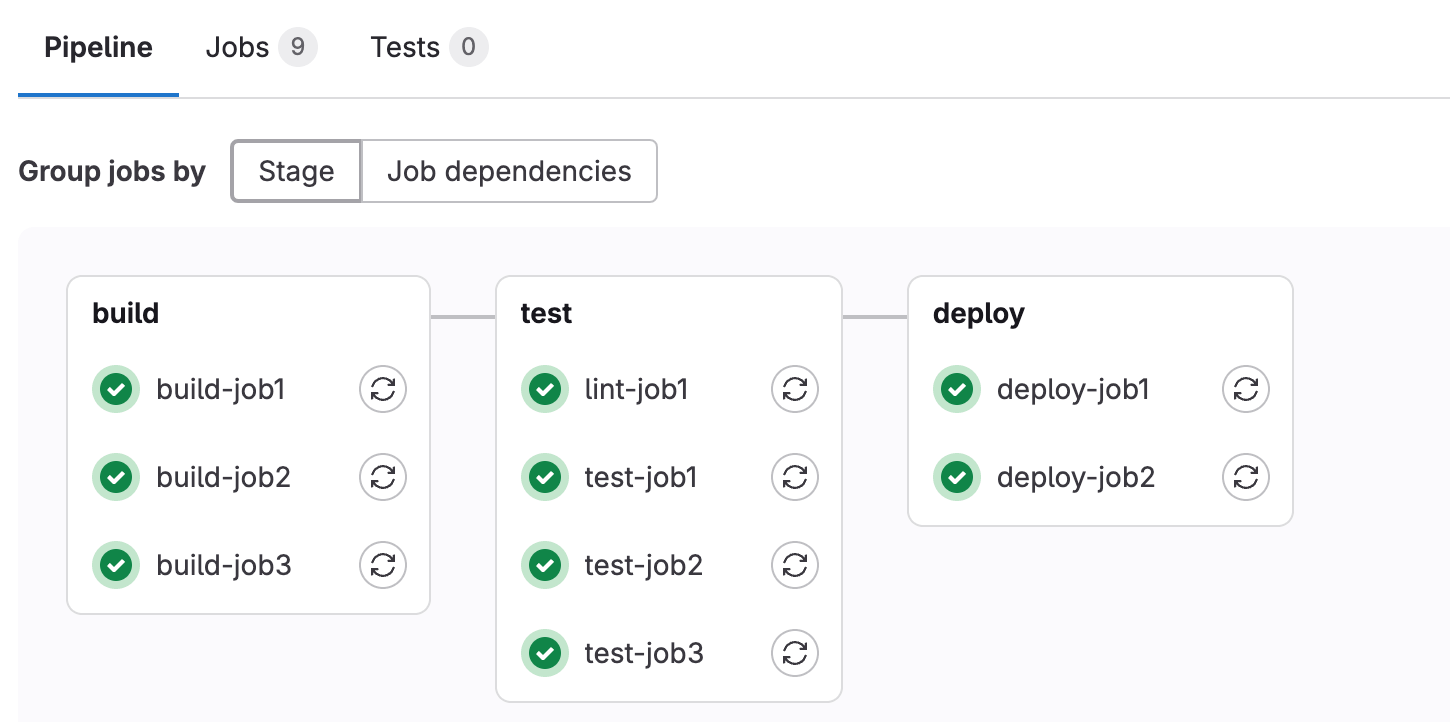
Strip away any one vendor's terminology and most CI/CD pipelines boil down to the same three stages, chained together and run automatically on every relevant change:
- Build: the pipeline compiles the code (or otherwise assembles it — bundling a frontend, building a container image) into something runnable.
- Test: automated tests run against that build — unit tests, integration tests, linters, security scans, and whatever else the team has configured.
- Deploy: if everything passes, the build is shipped — to a staging environment, to production, or both, depending on how the pipeline is configured and which CD model (delivery or deployment) the team uses.
GitLab's documentation on pipelines puts it plainly: "Stages define the order of execution" and "Jobs specify the tasks to be performed in each stage" — a job might compile code, or run a test suite, or push an artifact. A pipeline is triggered by an event (a commit, a merge request, a schedule, or someone clicking "run"), and a runner — the agent that actually executes the work, on a physical machine, a virtual instance, or a container — picks up each job and runs it. If any required job fails, the pipeline typically stops and flags the change as broken before it can move further down the line.
Configuration for all of this almost always lives as code, checked into the same repository as the project itself — a YAML file that defines the stages, the jobs in each stage, and the conditions under which they run. That "pipeline as code" approach means the build/test/deploy process is versioned, reviewable, and reproducible, not a fragile setup living only in one engineer's head or in manual server configuration.
Why teams use CI/CD instead of manual deployment
Before CI/CD became standard, many teams integrated large batches of changes and deployed them by hand on a schedule — a weekly release, a monthly release, sometimes worse. Wikipedia's entry on CI/CD contrasts this directly with the automated approach: traditional methods "integrated many software updates into one large batch" before deployment, which made it hard to know which change caused a given bug and turned every release into a high-stress event.
Manual deployment has a few specific, well-documented downsides that CI/CD is designed to remove:
- Slow feedback. If a bug is only discovered weeks after the code was written, the developer has to context-switch back into old work to fix it.
- Risky, infrequent releases. Bundling many changes into one release means more can go wrong at once, and it is harder to isolate which change broke what.
- Manual, error-prone steps. Hand-run build and deploy steps are inconsistent by nature — a step skipped once by a tired engineer at 11 p.m. is a step that will eventually be skipped again.
- No audit trail. A pipeline run leaves logs, test results, and a record of exactly what was deployed and when; a manual deploy often does not.
Wikipedia summarizes the motivation for CI/CD as bridging "gaps between teams, development, and operations by enforcing automation in building, testing, and deploying applications," with the stated goals of catching defects earlier, raising productivity, and shortening release cycles. Within DevOps specifically, that same Wikipedia entry describes the CI/CD pipeline as forming "the backbone of modern day DevOps operations" — it is the mechanical process that makes the DevOps goal of frequent, reliable releases actually achievable. Readers who want the broader cultural and organizational picture can see Pandromeda's plain-English explainer on serverless computing for a related infrastructure shift that often pairs with CI/CD pipelines, since many CD stages now deploy straight into serverless or container platforms rather than fixed servers.
A neutral tour of popular CI/CD tools
There is no single "right" CI/CD tool — the right choice depends on where a team's code already lives, what it is deploying to, and how much infrastructure it wants to manage itself. Four platforms come up constantly in this space, and each has published its own documentation describing how it works:
- GitHub Actions is built into GitHub itself. Its own docs describe it as a way to "automate, customize, and execute your software development workflows right in your repository," with workflows defined in YAML and run on GitHub-hosted or self-hosted runners, triggered by repository events, a schedule, or external webhooks.
- GitLab CI/CD is built into GitLab. GitLab's documentation defines CI/CD there as "a continuous method of software development, where you continuously build, test, deploy, and monitor iterative code changes," configured through a
.gitlab-ci.ymlfile and executed by GitLab-hosted or self-managed runners. - Jenkins is a long-standing, self-hosted, open-source automation server. Its official docs describe it as a tool to "automate all sorts of tasks related to building, testing, and delivering or deploying software," extended through what the project calls "a vast array of plugins," with Pipeline as its main feature for defining multi-stage jobs as code.
- CircleCI is a hosted (and self-hosted) CI/CD platform independent of any one source-code host. Its documentation frames its purpose simply: to help teams "build, test and deploy" software, using pipelines made up of workflows and jobs defined in a
config.ymlfile.
None of these is objectively "better" in every situation — GitHub Actions and GitLab CI/CD have the advantage of living next to the code with no separate account to manage, while Jenkins and CircleCI are built to work across any source host and offer deeper customization for teams with unusual infrastructure.
| Platform | Hosted by | Configuration | Typical use case |
|---|---|---|---|
| GitHub Actions | GitHub (cloud or self-hosted runners) | YAML workflow files in .github/workflows/ | Projects already hosted on GitHub |
| GitLab CI/CD | GitLab.com or self-managed GitLab | .gitlab-ci.yml at the repository root | Projects already hosted on GitLab |
| Jenkins | Self-hosted (any infrastructure, via JRE/Docker) | Jenkinsfile (Pipeline as code), plus plugins | Teams needing deep customization or on-prem control |
| CircleCI | CircleCI cloud or self-hosted server | config.yml defining pipelines, workflows, and jobs | Source-host-independent teams wanting a managed service |
How CI/CD fits into DevOps
CI/CD is frequently mentioned in the same breath as DevOps, and for good reason: it is the automated plumbing that makes DevOps practices possible rather than aspirational. DevOps as a philosophy is about breaking down the wall between the people who write software and the people who run it in production; CI/CD is the concrete pipeline that lets both groups trust that a change has been built, tested, and is safe to release without a lengthy manual hand-off. Readers who want the fuller cultural picture of that philosophy, separate from the pipeline mechanics covered here, can see Pandromeda's related coverage of DevOps practices and the tools that implement them, including GitHub's agentic workflows, which extend the same Actions infrastructure described above into more autonomous automation.
What it takes to set up a basic pipeline
Regardless of the platform, setting up a first CI/CD pipeline generally involves the same handful of steps:
- Pick a trigger. Most pipelines run on every push to a branch, every pull/merge request, or on a schedule (for example, a nightly build).
- Define the build step. Compile the code, install dependencies, or build a container image.
- Define the test step(s). Run unit tests at minimum; many teams add linting, security scanning, and integration tests.
- Define the deploy step. Push the build to a staging environment automatically, and to production either automatically (continuous deployment) or behind a manual approval (continuous delivery).
- Store secrets safely. Deployment steps usually need credentials (cloud API keys, registry tokens); every major platform provides an encrypted secrets or protected-variables mechanism rather than hardcoding credentials into the pipeline file.
Because the configuration lives as a file in the repository, a new team member can read the pipeline definition itself to understand exactly how the project gets built and shipped — no separate runbook required, and no undocumented manual steps hiding in someone's deployment checklist.
Common pitfalls teams run into
A few mistakes show up repeatedly as teams adopt CI/CD:
- Treating CI as "just tests." CI is also about integration frequency — merging small changes often. Running tests on huge, infrequent merges gets some of the benefit but misses the core idea.
- Skipping the "delivery" step of delivery. If passing builds just sit in an artifact registry and nobody ever actually deploys them, the pipeline is not delivering anything — it is just testing.
- Flaky tests that erode trust. If a pipeline fails intermittently for reasons unrelated to the code change, developers start ignoring failures altogether, which defeats the purpose.
- No rollback plan. Automating the forward path without a tested way to revert a bad deployment turns CD into a liability rather than an asset.
- Overbuilding too early. A five-person startup rarely needs Jenkins' full plugin ecosystem; a built-in option like GitHub Actions or GitLab CI/CD is often enough until the project's needs clearly outgrow it.
What to do next
If a team has no pipeline at all, the fastest path is usually to add CI first: wire up automatic builds and tests on every pull request using whatever is built into the existing source host (GitHub Actions or GitLab CI/CD require no new account). Once that is stable and trusted, add a deploy stage to a staging environment, and only move to automatic production deployment once test coverage and monitoring are solid enough to catch problems before real users do. For teams comparing specific infrastructure-as-code or deployment approaches that plug into a CI/CD pipeline's deploy stage, Pandromeda's guide on Terraform versus OpenTofu is a useful next read, since provisioning tooling is one of the most common things a pipeline's deploy stage actually calls.
Frequently asked questions
What does CI/CD stand for?
CI/CD stands for continuous integration and continuous delivery, or sometimes continuous deployment. CI is the practice of frequently merging and testing small code changes; CD is the automated process that prepares (delivery) or releases (deployment) that tested code.
What is the difference between continuous delivery and continuous deployment?
Continuous delivery automatically builds every passing change into a release-ready artifact, but a person still decides when to release it. Continuous deployment removes that manual step and releases every passing change to production automatically.
What are the stages of a typical CI/CD pipeline?
Most CI/CD pipelines use three core stages: build (compile or package the code), test (run automated tests and checks), and deploy (ship the build to staging or production). Teams often split these further into steps like lint, unit test, integration test, and release.
Is CI/CD the same thing as DevOps?
No. DevOps is a broader cultural and organizational philosophy about breaking down silos between development and operations teams. CI/CD is the automated pipeline tooling that makes DevOps goals like frequent, reliable releases practically achievable.
What tools are commonly used for CI/CD?
Widely used CI/CD platforms include GitHub Actions and GitLab CI/CD, which are built directly into their respective code-hosting platforms, plus Jenkins, a self-hosted open-source automation server, and CircleCI, a hosted CI/CD platform that works independently of any single source-code host.
Do I need a dedicated CI/CD tool like Jenkins if I already use GitHub or GitLab?
Not necessarily. GitHub Actions and GitLab CI/CD are built into those platforms and require no separate account, which is enough for many teams. Jenkins and CircleCI are typically chosen when a team needs deeper customization, works across multiple source hosts, or wants to self-host its automation server.
Sources
- GitHub Docs – About continuous integrationdocs.github.com
- GitHub Docs – GitHub Actionsdocs.github.com
- GitLab Docs – GitLab CI/CDdocs.gitlab.com
- Jenkins Docsjenkins.io
- CircleCI Docscircleci.com
- Wikipedia – CI/CDen.wikipedia.org
Felix Moreau writes Pandromeda's software coverage and how-to guides. He covers Windows, macOS and Linux updates, the apps people rely on, emulators and developer tools, and turns official documentation into clear, numbered steps that work on the current version.