Windows 11 Insider Builds for September 25: What’s New
Beta, Experimental, and 26H1 channel builds bring a scrollable Phone Companion pane, Energy Recommendations in Quick Settings, and a new low-vision Pointer Indicator.
Microsoft shipped four new Windows 11 Insider Preview builds on September 25, 2026 — Beta channel build 26220.9568, Experimental channel build 26340.9577, Beta (26H1) build 28020.3112, and Experimental (26H1) build 28120.3122 — bringing a scrollable Phone Companion pane to the Start menu, Energy Recommendations inside Quick Settings, a new low-vision Pointer Indicator setting, wider Narrator math support, a refreshed Storage settings page, and a Hyper-V fix for Linux VM folder sharing. These are pre-release, opt-in builds distributed only through the Windows Insider Program in Settings, not the mainstream cumulative update most PCs receive automatically.
That last point matters, because Pandromeda covered a different Windows 11 update just a day earlier: KB5124010, a production/Release Preview cumulative patch with its own build number and fix list. The Insider builds described here are a separate track entirely — flighted through the Beta, Experimental, Beta (26H1), and Experimental (26H1) channels — meant for Insiders who've explicitly enrolled to test features before they ever reach general release.
- Beta channel: build 26220.9568
- Experimental channel: build 26340.9577
- Beta (26H1) channel: build 28020.3112
- Experimental (26H1) channel: build 28120.3122
- Experimental (Future Platforms): no build released this round
- How to get it: Settings > Windows Update > Windows Insider Program (opt-in required)
Which build number did you get?
Microsoft's Windows Insider Blog post "Announcing new builds for 25 September 2026" confirms four builds went out simultaneously, each tied to a different Insider channel and each carrying its own slice of new features and fixes. The Experimental (Future Platforms) channel did not get a release this time around.
| Channel | Build number | Delivered via | Headline addition |
|---|---|---|---|
| Beta | 26220.9568 | Windows 11, version 25H2 enablement package | Pointer Indicator accessibility setting, Phone Link hover previews, Magnifier contrast theme |
| Experimental | 26340.9577 | Windows 11, version 26H2 enablement package | Start menu Phone Companion scrollable pane, Energy Recommendations in Quick Settings, expanded Narrator math support |
| Beta (26H1) | 28020.3112 | 26H1 development channel | Hyper-V fix for Plan9 folder sharing with Linux VMs |
| Experimental (26H1) | 28120.3122 | 26H1 development channel | General stability fixes; no headline features noted this flight |
If you're on the Beta channel, your PC is still running on the Windows 11, version 25H2 codebase delivered through an enablement package — the same mechanism Microsoft has used to fast-track feature drops since 24H2. Anyone still deciding when to make that jump on a non-Insider PC can check our guide to upgrading from 24H2 to 25H2 before support ends. Experimental channel testers, meanwhile, are already on the 26H2 enablement track, which is where Microsoft tends to stage features furthest from general release.
Start menu Phone Companion gets a scrollable side pane
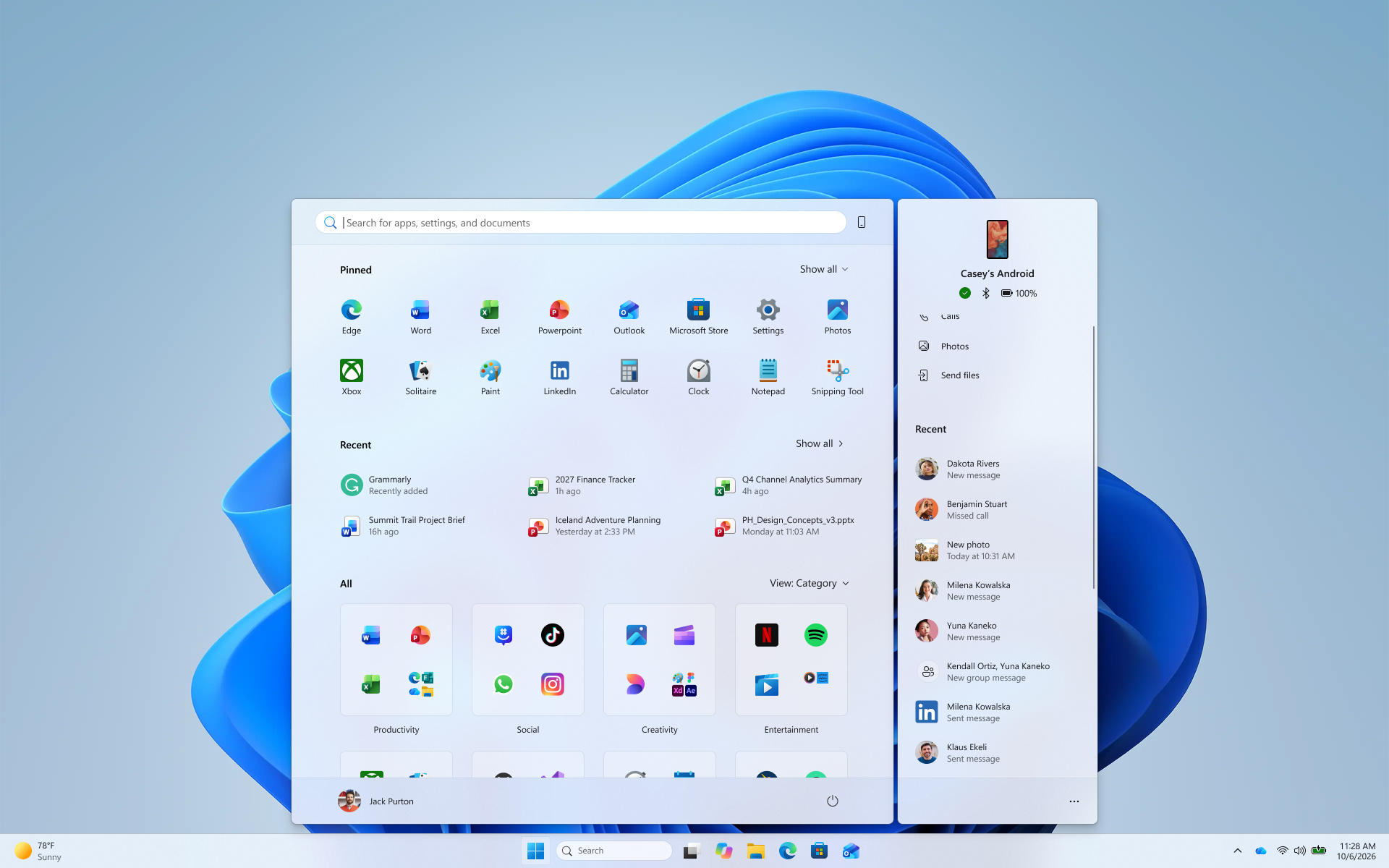
The most visible change lands in the Experimental channel build 26340.9577. The phone companion experience built into the Start menu — which surfaces recent activity from a paired Android or iPhone via Phone Link — now shows more of that activity at once, thanks to a new scrollable side pane. Instead of a short, fixed list, Insiders can scroll through additional recent messages and notifications from their phone without ever leaving the Start menu.
Microsoft frames this as a continuation of Start's push to surface phone activity directly on the desktop, following the hover-preview feature also shipping this round in the Beta channel (covered below). Together, these updates reflect Microsoft's continued effort to blur the line between your phone and your PC — a theme that shows up elsewhere too, including in cross-device security features like the passkeys you can now set up across iPhone, Android, and Windows.
Like most Experimental channel features, the scrollable Phone Companion pane is rolling out gradually via Controlled Feature Rollout technology, meaning it may not appear for every Insider on build 26340.9577 immediately.
Energy Recommendations move into Quick Settings
Also new in the Experimental channel: Energy Recommendations are now surfaced directly inside Quick Settings, the flyout you open from the taskbar's network/volume/battery cluster. Previously these energy-efficiency suggestions lived only in the Power & battery settings page; now Insiders get quicker access to "suggested actions" aimed at reducing energy consumption and improving device sustainability, without digging into Settings first.
As with the Phone Companion pane, this is a Controlled Feature Rollout feature in build 26340.9577, so Microsoft will monitor feedback from an initial subset of Insiders before expanding it to everyone on the Experimental channel. Microsoft's full changelog for this build, including exact rollout mechanics, is documented in its official release notes for Experimental build 26340.9577.
A new Pointer Indicator accessibility setting
Landing in the Beta channel build 26220.9568, the Pointer Indicator is a new accessibility feature aimed at Windows users with low vision who have trouble locating their mouse cursor on screen. Once enabled, it makes the cursor easier to spot and track, which Microsoft says helps improve productivity and efficiency for anyone who relies on visual cues to find the pointer.
To turn it on, go to Settings > Accessibility > Mouse pointer and touch and enable the Pointer Indicator toggle — or just search for "Pointer Indicator" from the Settings search box. Once it's on, you can flip it on or off at any time with the keyboard shortcut Windows logo key + Ctrl + Shift + X, without opening Settings again.
The same Beta build also brings a related accessibility addition to Magnifier: a new contrast theme toggle, available from the Magnifier toolbar and configurable under Settings > Accessibility > Magnifier. Unlike full color inversion, the contrast theme recolors the interface for a lower-glare, more comfortable view while leaving photos, videos, and charts in their original colors. Microsoft notes that zoom per display isn't yet available in the Beta channel version of this feature.
Narrator's math reading expands to six languages and the browser
Narrator's math reading and navigation support — first introduced in an earlier Experimental build (26340.9354) — gets broader language and browser coverage in build 26340.9577. Math reading now works in six languages: English (United States), English (United Kingdom), Traditional Chinese, Finnish, German, and Spanish, selectable under Narrator's Math reading settings.
Browser support has also expanded: math reading now works with supported web content in Microsoft Edge Stable version 153.0.4234.32 and later, and Chrome Stable version 153.0.8010.18 and later. That extends math reading beyond native Windows apps into the browser tabs where students and professionals are more likely to encounter equations day to day.
Storage settings get a visual refresh
Both the Beta and Experimental channel release notes mention the same small change: Microsoft made visual refinements to the design of the temporary files section under Settings > System > Storage. Microsoft's release notes don't go into further detail beyond describing it as a design refinement, so treat this as a cosmetic pass rather than a functional change to how temporary file cleanup works.
Other changes in the Beta channel build
Beyond Pointer Indicator and the Magnifier contrast toggle, build 26220.9568 carries a handful of smaller updates:
- Phone Link hover previews: hovering over a recent message or notification in Start's phone companion section now previews its content inline, so you don't need to pick up your phone or open the item to see what's new. This requires a minimum Phone Link app version of 1.26021.3.0, and can be managed under Phone Link > Settings > Start menu personalization.
- File Explorer: the Folder Options dialog now supports dark mode, closing a long-standing gap where that dialog stayed light-themed even on a dark desktop.
- Audio fix: Microsoft fixed an issue affecting certain USB Audio Class 1.0 devices, including some multichannel headsets, that could stop working correctly after installing recent updates.
Hyper-V fix for Linux VM folder sharing
The Beta (26H1) channel build 28020.3112 is a lighter release focused on stability. Its one documented change is a fix for developers and IT admins running HCS-managed virtual machines: some applications sharing host folders with Linux guest VMs over Plan9 previously found that those shared folders either didn't appear or couldn't be accessed inside the guest environment. That issue is now resolved in this build.
The Experimental (26H1) channel build 28120.3122, meanwhile, ships with what Microsoft describes only as "a small set of general improvements and fixes" — no specific new feature or named fix is called out in the release notes. Microsoft's own reminders for this channel note that Experimental (26H1) builds can be unstable and may ship with limited documentation, which tracks with the sparse changelog this time.
Taskbar persistence and other Experimental channel fixes
Rounding out the Experimental channel build 26340.9577, Microsoft says it improved the underlying state persistence of taskbar settings related to multiple monitors, so taskbar configuration should hold up more reliably across monitor connect and disconnect cycles. That build also carries the same USB Audio Class 1.0 fix documented for the Beta channel, since the two branches share a number of underlying components.
How to get these builds
None of this reaches a PC automatically — every build described here is exclusive to Windows Insiders who have opted in. To get them:
- Open Settings > Windows Update > Windows Insider Program and turn it on if you haven't already, choosing the Beta, Experimental, Beta (26H1), or Experimental (26H1) channel depending on which build you want.
- Return to Windows Update and select Check for updates to pull down the matching build for your channel.
- Restart when prompted to complete installation.
Because features in Experimental and Experimental (26H1) builds roll out gradually through Controlled Feature Rollout, being on the right build number doesn't guarantee you'll see every feature immediately — Microsoft phases most of these out to a subset of Insiders first and expands based on feedback. A desktop watermark in the lower-right corner is expected on all of these builds and simply confirms you're running pre-release software.
How this differs from the KB5124010 update
It's easy to conflate this release with KB5124010, the September 2026 preview cumulative update Pandromeda covered a day earlier — but the two are unrelated tracks. KB5124010 is a Release Preview / production-bound cumulative update carrying its own build number, aimed at the broader base of Windows 11 users who install optional preview updates through standard Windows Update. The builds in this article are Insider Program flights — Beta, Experimental, Beta (26H1), and Experimental (26H1) — reserved for Insiders testing features that haven't shipped broadly and, in some cases, may never ship in their current form. If you're not enrolled in the Windows Insider Program, none of the features above will appear on your PC through ordinary Windows Update.
What's next for Windows Insiders
Microsoft's own release notes are candid that features previewed in Insider builds — including everything described here — can change, get pulled, or never ship beyond the Insider Program at all. The Phone Companion pane and Energy Recommendations placement are both still gated behind Controlled Feature Rollout in the Experimental channel, so expect Microsoft to keep tuning both based on Insider feedback before any wider rollout decision. The Narrator math expansion and Pointer Indicator, by contrast, are accessibility features already further along and more likely to carry forward largely as-is. For admins and developers relying on Hyper-V with Linux guests, the Plan9 folder-sharing fix in Beta (26H1) build 28020.3112 is the most immediately useful change in this flight, since it resolves a functional bug rather than previewing a still-changing feature. Insiders can track which build lands in which channel next through Microsoft's Flight Hub, linked from every release-notes page on Microsoft Learn.
Frequently asked questions
What is the newest Windows 11 Insider build as of September 25, 2026?
Microsoft released four builds on September 25, 2026: Beta channel build 26220.9568, Experimental channel build 26340.9577, Beta (26H1) build 28020.3112, and Experimental (26H1) build 28120.3122.
How is this different from the KB5124010 update?
KB5124010 is a production/Release Preview cumulative update for the general Windows 11 user base. The builds covered here are Windows Insider Program flights — Beta, Experimental, Beta (26H1), and Experimental (26H1) — reserved for Insiders testing pre-release features.
How do I install these Insider builds?
Go to Settings > Windows Update > Windows Insider Program, opt in and pick a channel, then check for updates in Windows Update and restart when prompted.
What's new in the Experimental channel build 26340.9577?
The Start menu's Phone Companion gets a scrollable side pane for more recent mobile activity, Energy Recommendations now appear directly in Quick Settings, and Narrator's math reading expands to six languages and to Edge and Chrome browser content.
What does the new Pointer Indicator setting do?
It's a new accessibility feature in Beta channel build 26220.9568 that helps users with low vision locate the mouse cursor more easily. Enable it under Settings > Accessibility > Mouse pointer and touch, and toggle it with Windows key + Ctrl + Shift + X.
Does this update fix anything for Hyper-V or Linux VMs?
Yes. Beta (26H1) build 28020.3112 fixes an issue where HCS-managed virtual machines sharing host folders with Linux guests over Plan9 could fail to show or access those shared folders.
Sources
- Windows Insider Blog: Announcing new builds for 25 September 2026blogs.windows.com
- Microsoft Learn: Windows 11 Insider Beta Preview Build 26220.9568learn.microsoft.com
- Microsoft Learn: Windows 11 Insider Experimental Preview Build 26340.9577learn.microsoft.com
- Microsoft Learn: Windows 11 Insider Beta (26H1) Preview Build 28020.3112learn.microsoft.com
- Microsoft Learn: Windows 11 Insider Experimental (26H1) Preview Build 28120.3122learn.microsoft.com
Felix Moreau writes Pandromeda's software coverage and how-to guides. He covers Windows, macOS and Linux updates, the apps people rely on, emulators and developer tools, and turns official documentation into clear, numbered steps that work on the current version.