Windows 11 KB5124010: What’s New in the September 2026 Preview Update
Microsoft’s optional September preview brings Emoji 17.0, a Copilot key remap and new touchpad gestures, and it is the last preview update Windows 11 24H2 will get.
Microsoft released KB5124010, the optional September 2026 non-security preview update for Windows 11, on September 22, 2026. It moves version 25H2 to build 26200.9550 and version 24H2 to build 26100.9550, and brings Emoji 17.0, an “Open apps maximized” accessibility setting, a Copilot key remap option, new touchpad gestures and a long list of Bluetooth and File Explorer fixes. It is also the last preview update version 24H2 will ever get.
Key facts
- Update: KB5124010, optional non-security preview (“D” release)
- Released: September 22, 2026
- Builds: 26200.9550 (25H2) and 26100.9550 (24H2)
- Headline additions: Emoji 17.0, Open apps maximized, Copilot key remapping, Tips widget, single-finger and automatic touchpad scrolling
- Known issues: domain trust failures on some Credential Guard machines, USB Audio Class 1.0 devices showing Code 10
- 24H2 Home and Pro: end of updates on October 13, 2026
What is KB5124010?
KB5124010 is the cumulative preview update Microsoft ships in the fourth week of each month, the release its Windows 11 release information page labels “2026-09 D”. Preview updates are optional. They carry the non-security changes that will be folded into the next mandatory Patch Tuesday release, which for this batch is the October 2026 security update.
According to Microsoft’s KB5124010 release notes, the package applies to all editions of Windows 11 versions 25H2 and 24H2. It also includes a servicing stack update, KB5124009 (build 26100.9539), which Microsoft says improves the reliability of the update installation process itself.
As with other recent releases, Microsoft splits the notes into two parts. The “gradual rollout” section lists new features that reach devices in phases, so installing the update does not guarantee you will see all of them straight away. The “normal rollout” section lists fixes that land on every device that installs the package.
What’s new in the September 2026 preview update
This is a feature-heavy preview. These are the changes most people will notice.
Emoji 17.0 and redesigned emoji
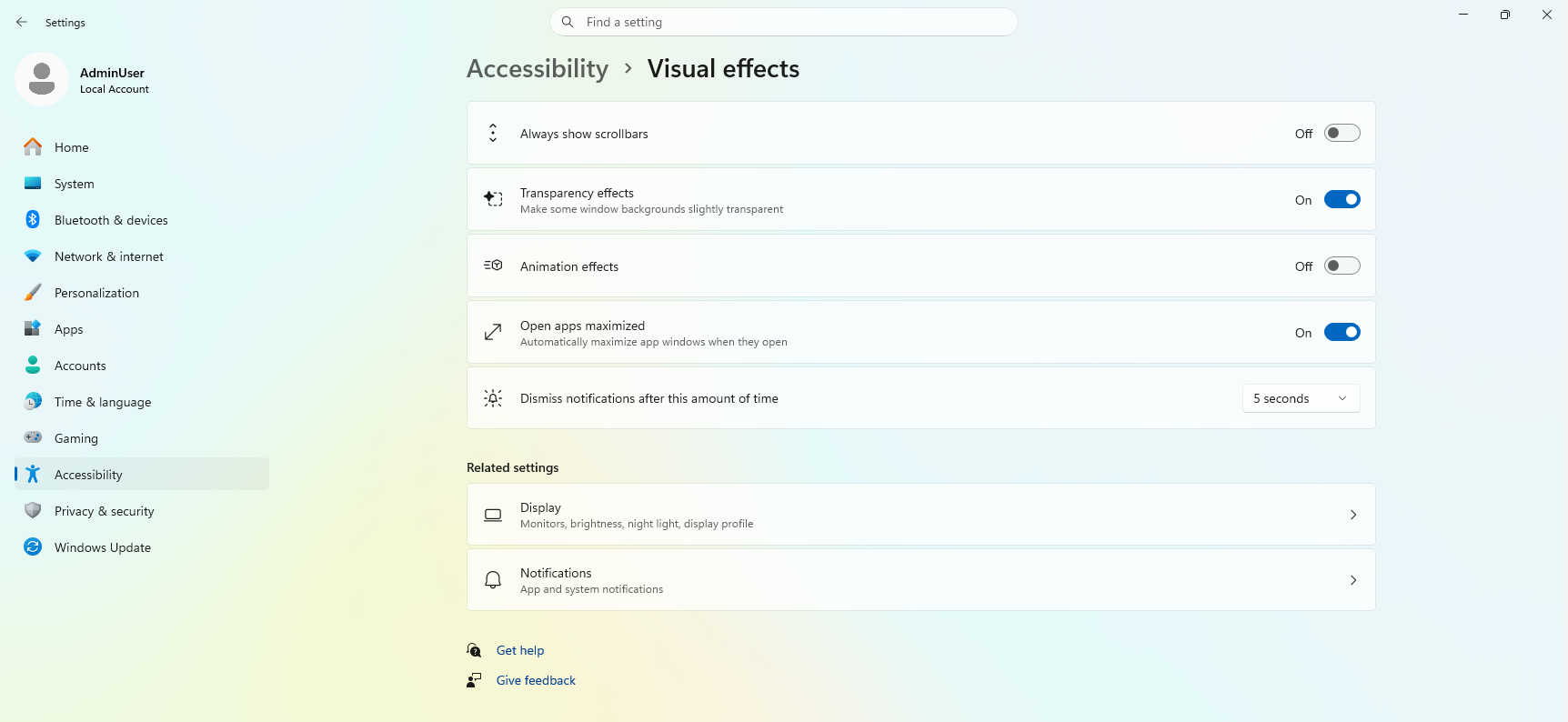
Windows 11 now supports Emoji 17.0, the latest emoji set from the Unicode Consortium. Microsoft names distorted face, fight cloud and hairy creature among the new additions; you insert them from the emoji panel with Windows key + period. Microsoft has also refined several existing designs for better consistency across platforms, including saluting face, face with peeking eye, goose, lotus and kissing cat.
Open apps maximized
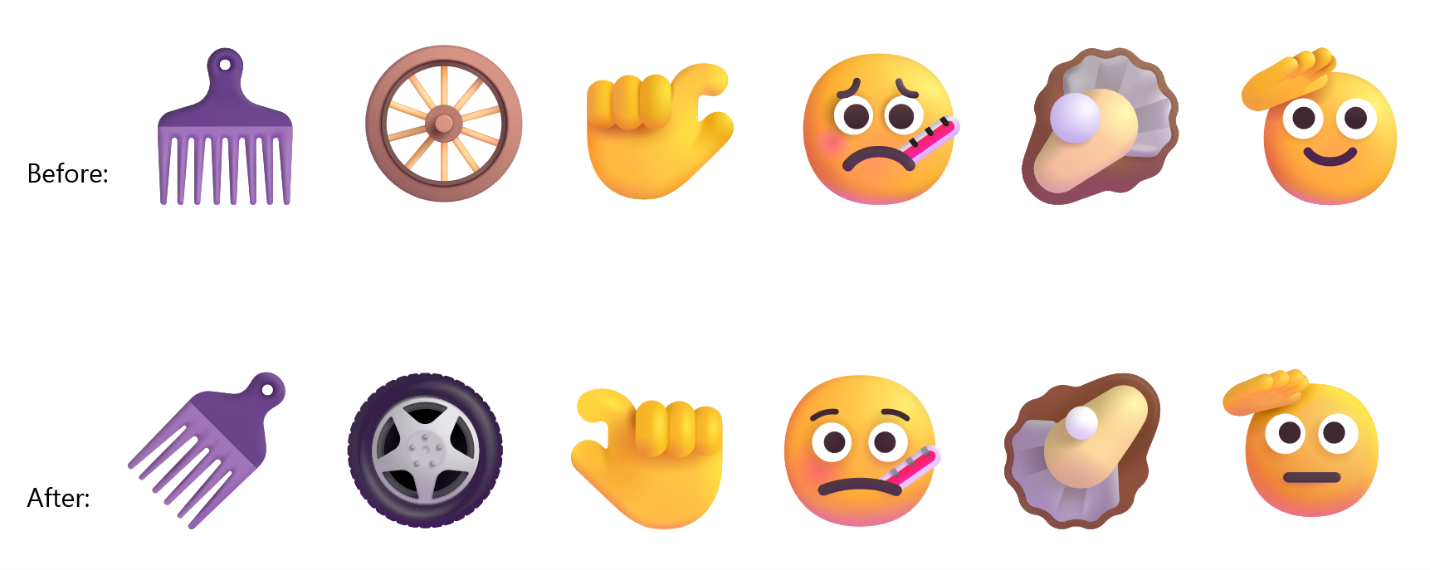
A new accessibility option makes every app window open maximized. Microsoft pitches it at screen reader and magnifier users, people working in tablet mode, and anyone who simply prefers a full-screen workspace. Turn it on under Settings > Accessibility > Visual effects > Open apps maximized.
Remap the Copilot key
Many recent Windows laptops ship with a dedicated Copilot key. KB5124010 adds a setting that lets you remap it to act as Right Ctrl or the Context Menu key. Microsoft says the goal is to preserve familiar keyboard shortcuts and accessibility workflows, and it documents the options on its Copilot key support page. For anyone who used right Ctrl for shortcuts or games, this is probably the most useful change in the update.
Touchpad gestures
Precision touchpads get two more options under Settings > Bluetooth & devices > Touchpad:
- Single-finger scrolling: scroll vertically with one finger, starting from the left or right edge of the touchpad.
- Automatic scrolling: keep scrolling without lifting your fingers by moving them near the edge of the touchpad.
They add to the scroll-speed, zoom-speed and scroll-acceleration controls Microsoft added in the July 2026 update, KB5101684.
File Explorer changes
- The preview pane now handles files downloaded from the web differently. PDFs and other non-HTML files preview automatically, while HTML files get a new Preview anyway button that acknowledges the security warning.
- File Explorer Home remembers whether each section was expanded or collapsed.
- Thumbnail previews for cloud files in the Details pane are more reliable, and the pane has been reorganized so file properties are easier to scan.
- A bug that could clear the address bar when you clicked near its right edge is fixed.
Widgets, Magnifier, fonts and Camera roll
- A new Tips widget offers short guidance about Windows features. You can add it to the Widgets board or, via Settings > Personalization > Lock screen, to the lock screen.
- The Magnifier toolbar gets updated icons and tighter spacing. Views, zoom controls, keyboard shortcuts and Read Aloud work as before.
- The Ebrima font adds the Garay and Beria Erfe scripts, which Microsoft says makes it the first Microsoft font to support both, and the Adlam glyphs have been refined.
- Camera roll backup appears in Settings for eligible users. It protects photos by backing them up to OneDrive, and setup is completed on a mobile phone by scanning a QR code.
Bluetooth, personalization and other fixes
Most of the fixes are in Bluetooth and desktop backgrounds. Among the items Microsoft lists:
- The volume flyout now appears during calls when you change volume from the buttons on a Bluetooth Classic Audio accessory.
- Windows shows a more accurate connection state for accessories that have disconnected.
- A mismatch where the Bluetooth radio was off but the Settings toggle said on is resolved.
- A crash with error code 0x139 while streaming Bluetooth audio is fixed, and LE Audio and shared audio are more reliable.
- DIB image files can now be used as desktop backgrounds, slideshow wallpapers work across multiple desktops, and background previews look sharper, including on portrait monitors.
- Settings > Apps > Installed apps now shows version numbers for packaged apps at the top level.
- The Settings time picker follows your 12-hour or 24-hour preference.
- Laptops that wrongly detected a switch from AC power to battery while plugged in should behave better.
In the normal rollout section, Microsoft fixes an issue where the built-in camera could stop working in the Camera app and other apps. It also fixes a known issue in which File History failed to back up or restore to an external drive or network location and wrongly showed a “Reconnect your drive” message. There are three Sysmon fixes as well, including one for false Event ID 25 alerts about the Session Manager process (smss.exe).
What Microsoft removed
One feature is going away. The PC-to-PC Migration option, which had been rolling out as a way to move files and settings directly from an old PC during setup, “is no longer available.” Microsoft now points people to Windows Backup for moving to a new PC.
A second change was pulled after the notes went out. A change-log entry dated September 22 says a WinRE feature that would reuse saved Wi-Fi profiles during recovery scenarios such as quick machine recovery “will roll out in a future date.”
Known issues in KB5124010
Microsoft lists two open problems, both carried over from the September 8 security update, KB5124008.
| Issue | Who is affected | Status |
|---|---|---|
| Domain-joined devices lose their trust relationship with the domain; interactive domain sign-in fails | Credential Guard-protected machine accounts previously set to enforce Machine Identity Isolation, in domains below Windows Server 2025 Domain Functional Level | Workaround available: disable Machine Identity Isolation, restart, repair the secure channel |
| USB Audio Class 1.0 devices fail with “This device cannot start (Code 10)” or produce no sound | USB Audio Class 1.0 devices only | Microsoft says it is working on a fix |
For the domain trust issue, Microsoft says admins should switch off Machine Identity Isolation using whichever method turned it on (Intune, Group Policy or the registry), restart, and then run Test-ComputerSecureChannel -Repair -Credential (Get-Credential) in PowerShell. A later update will temporarily block enforcement of the feature while Microsoft improves it.
The Windows 11 25H2 release health dashboard also shows that other September problems have been dealt with. Remote Desktop Services instability and missing Plan9 host folder shares in Hyper-V Linux VMs, both caused by KB5124008, were fixed by an out-of-band update, KB5129195, on September 14. Incorrect “Microsoft Defender Antivirus is turned off” notifications are also marked resolved.
How to install KB5124010
Because it is a preview, Windows Update will not install KB5124010 automatically. To get it manually:
- Open Settings > Windows Update > Advanced options > Optional updates.
- Under Optional updates available, select the September 2026 cumulative update and choose download and install.
- Restart when prompted, then check the build with
winver. You should see 26200.9550 on 25H2 or 26100.9550 on 24H2.
Admins can also download the standalone MSU packages from the Microsoft Update Catalog. Microsoft notes that the package requires a checkpoint cumulative update (KB5043080) to be installed first. You can double-click each MSU in order, or put them all in one folder and point DISM at the target package so it installs the checkpoint automatically. Anyone patching installation media with dynamic updates should make sure the boot.stl file is included, or devices may fail to boot from the media with error 0xc0430001.
The AI components bundled with the update (Image Search, Content Extraction, Semantic Analysis and Settings Model, all version 1.2608.951.0) only install on Copilot+ PCs.
Windows 11 24H2: last preview, three weeks of support left
This is the final preview update for version 24H2. Microsoft says Home and Pro editions reach end of updates on October 13, 2026, after which they will get no security fixes, time zone updates or technical support. Enterprise and Education editions are supported until October 12, 2027. Version 25H2 is supported until October 12, 2027 on Home and Pro and until October 10, 2028 on Enterprise and Education.
| Version | Build after KB5124010 | End of updates (Home/Pro) | End of updates (Enterprise/Education) |
|---|---|---|---|
| Windows 11 25H2 | 26200.9550 | October 12, 2027 | October 10, 2028 |
| Windows 11 24H2 | 26100.9550 | October 13, 2026 | October 12, 2027 |
| Windows 11 26H1 (new devices only) | 28000.3086 (via KB5124006) | March 14, 2028 | March 13, 2029 |
If you are still on 24H2, moving to 25H2 is a quick change: Microsoft delivers it as a small enablement package that needs only one restart. Version 26H1 is not an option for existing PCs. Microsoft says it is limited to new devices released in 2026 and is not offered as an in-place update from 24H2 or 25H2.
Should you install KB5124010?
For most home users, the only reason to install a preview update is a fix you need now: the Bluetooth audio crash, the camera bug, the File History failure, or the Copilot key remap. Everyone else can wait. The same changes are due in the October 2026 Patch Tuesday update, which Windows Update installs automatically.
Businesses should be more careful. The Credential Guard trust issue first appeared with the September security update, not with this preview, but IT teams using Machine Identity Isolation in domains below the Windows Server 2025 functional level should follow Microsoft’s workaround before rolling out anything from September onward. Owners of older USB audio interfaces and DACs that use USB Audio Class 1.0 may also want to hold off until Microsoft ships its fix.
Frequently asked questions
What is KB5124010?
KB5124010 is the optional September 2026 non-security preview update for Windows 11 versions 25H2 and 24H2, released on September 22, 2026. It updates PCs to builds 26200.9550 and 26100.9550.
Is KB5124010 safe to install?
Microsoft lists two known issues: domain trust failures on some Credential Guard-protected machines that enforce Machine Identity Isolation, and USB Audio Class 1.0 devices that show Code 10 or play no sound. Both started with the September 8 security update, KB5124008.
How do I get KB5124010?
Go to Settings > Windows Update > Advanced options > Optional updates and install it from the Optional updates available list. IT admins can download the MSU packages from the Microsoft Update Catalog.
Can I remap the Copilot key in Windows 11?
Yes. KB5124010 adds a setting that lets the Copilot key act as Right Ctrl or the Context Menu key. Features in this update roll out gradually, so the setting may not appear on every PC right away.
When does Windows 11 24H2 stop getting updates?
Windows 11 24H2 Home and Pro editions reach end of updates on October 13, 2026. Enterprise and Education editions are supported until October 12, 2027.
Sources
- Microsoft Support: September 22, 2026—KB5124010 (OS Builds 26200.9550 and 26100.9550) Previewsupport.microsoft.com
- Microsoft Learn: Windows 11 release informationlearn.microsoft.com
- Microsoft Learn: Windows 11, version 25H2 known issues and notificationslearn.microsoft.com
- Microsoft Support: Understand updates to the Copilot key on Windows devicessupport.microsoft.com
- Windows Insider Blog: Windows 11 Release Preview builds 26100.9539 and 26200.9539blogs.windows.com
Felix Moreau writes Pandromeda's software coverage and how-to guides. He covers Windows, macOS and Linux updates, the apps people rely on, emulators and developer tools, and turns official documentation into clear, numbered steps that work on the current version.