How to Upgrade Windows 11 24H2 to 25H2 Before Support Ends
Windows 11 24H2 Home and Pro stop getting security updates on October 13. Moving to 25H2 is free, takes one restart, and keeps your PC supported until October 2027.
Windows 11 version 24H2 Home and Pro stop receiving security updates on October 13, 2026, so any PC still on 24H2 should move to version 25H2 before then. For most PCs this is quick. Version 25H2 is delivered as a small enablement package (KB5054156) that switches on features already present in 24H2, and it needs only one restart. The steps below follow Microsoft’s documentation and cover Windows Update, the Installation Assistant and what to do if the update doesn’t appear.
Key facts
- Deadline: Windows 11 24H2 Home and Pro reach end of updates on October 13, 2026 (Enterprise and Education: October 12, 2027)
- Upgrade to: Windows 11 version 25H2 (the “Windows 11 2025 Update”, OS build 26200)
- How it installs: enablement package KB5054156, one restart
- Prerequisite: the August 29, 2025 update KB5064081 or any later cumulative update
- Cost: free
- 25H2 support: until October 12, 2027 for Home and Pro
Why you need to upgrade by October 13
Microsoft’s Windows 11 release information page lists the end-of-updates dates for each version. For 24H2, the date for Home, Pro, Pro Education and Pro for Workstations is October 13, 2026. Microsoft’s September release notes say that after that date, those devices “will no longer receive fixes for known issues, time zone updates, technical support, or monthly security and preview updates containing protections from the latest security threats.”
Each feature update restarts the support clock. According to Microsoft’s What’s new in Windows 11, version 25H2 page for IT pros, 25H2 is serviced for 24 months on Home and Pro and 36 months on Enterprise and Education. That puts Home and Pro support until October 12, 2027 and Enterprise until October 10, 2028.
| Windows 11 version | OS build | End of updates: Home/Pro | End of updates: Enterprise/Education |
|---|---|---|---|
| 25H2 (upgrade target) | 26200 | October 12, 2027 | October 10, 2028 |
| 24H2 | 26100 | October 13, 2026 | October 12, 2027 |
| 23H2 | 22631 | Already ended | November 10, 2026 |
| 26H1 (new devices only) | 28000 | March 14, 2028 | March 13, 2029 |
Version 26H1 is not an alternative for existing PCs. Microsoft says it is “scoped to support new devices that come to market in early 2026” and “is not offered as an in-place update from 24H2 or 25H2.” For a PC running 24H2 today, 25H2 is the only upgrade.
What is Windows 11 25H2, and how is it different?
Windows 11 25H2 is Microsoft’s 2025 annual feature update, officially the “Windows 11 2025 Update.” Microsoft began rolling it out on September 30, 2025. In the Windows Experience Blog announcement, John Cable, Microsoft’s vice president of product management for Windows servicing and delivery, explained that the two versions share a code base:
“Windows 11, version 25H2 will be delivered as an enablement package (eKB). This means that it contains all the recently announced features in Windows 11, version 24H2. Both versions use a shared code base and servicing branch, streamlining the update.”
In practice, you won’t get a big new interface. The 25H2 files are already on your PC through monthly updates, and some features are simply switched off. The KB5054156 support article calls the enablement package “a small, quick-to-install ‘master switch’ that activates the Windows 11, version 25H2 features,” and says it upgrades 24H2 to 25H2 “with a single restart.”
Two legacy tools are removed, so check scripts before you upgrade:
- PowerShell 2.0 is no longer included. Microsoft recommends moving to the latest version of PowerShell.
- WMIC (the Windows Management Instrumentation command-line tool) is uninstalled when 25H2 is installed. Microsoft says it can be reinstalled from optional features or with DISM but does not recommend doing so, because it will be removed entirely in the future.
Before you start: three quick checks
These take a couple of minutes and help you avoid problems.
- Confirm your version. The upgrade path below is for PCs on 24H2. If you are on 23H2 or earlier, Microsoft says you need a full operating system swap rather than the enablement package.
- Install pending updates. The enablement package requires the August 29, 2025 preview update, KB5064081 (build 26100.5074), or any later cumulative update. A 24H2 PC that is up to date with September 2026 patches already meets this.
- Back up. The enablement package is low risk, but back up important files to OneDrive, an external drive or Windows Backup before any feature update.
How to upgrade Windows 11 24H2 to 25H2 with Windows Update
This is the method Microsoft describes on its release health page, and it is the quickest because it uses the enablement package.
Step 1: Check which version you are running
Right-click Start, choose Settings, then go to System > About. Under Windows specifications, look at Version. If it says 24H2, carry on. If it already says 25H2, you are done. Microsoft’s guide to finding your Windows version describes the same path. Typing winver in the Start menu search shows the same information in a small window.
Step 2: Install the latest cumulative update
Go to Settings > Windows Update and select Check for updates. Install any pending monthly updates and restart if asked. This makes sure the KB5064081-or-later prerequisite is met.
Step 3: Turn on “Get the latest updates as soon as they’re available”
On the same Windows Update page, under More options, switch on Get the latest updates as soon as they’re available. When 25H2 launched, Microsoft offered it first to 24H2 users who had this toggle on. It is not strictly required now, but it does no harm.
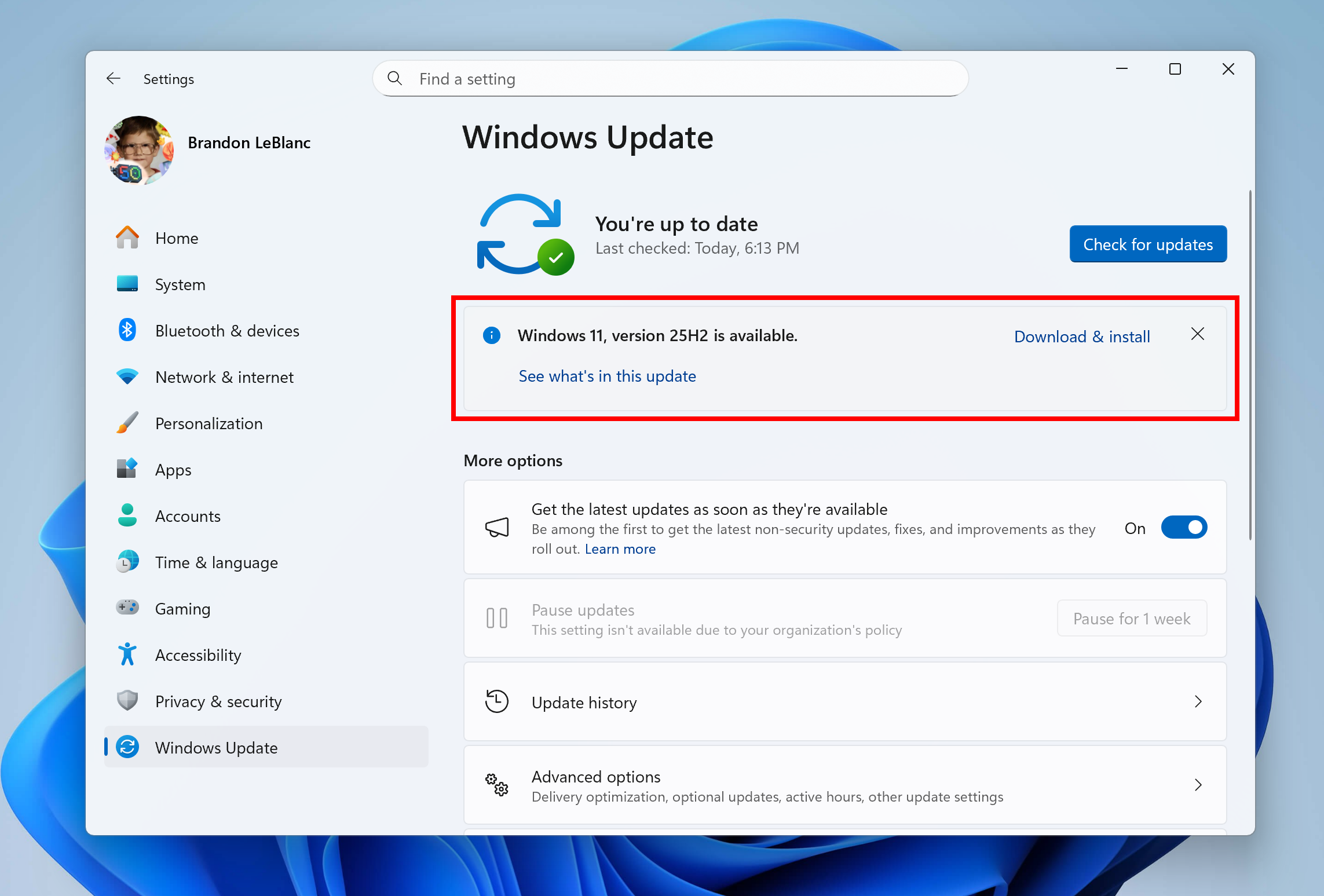
Step 4: Check for updates and select “Download and install”
Select Check for updates again. According to the Windows 11 25H2 release health page, the update “is now available for all eligible devices,” and if your device is ready, “you’ll see the option to Download and install Windows 11, version 25H2.” Select Download & install. The download is small because most of the files are already on your PC.
Step 5: Restart once
When the package has installed, Windows asks you to restart. KB5054156 needs one restart and no other steps. Save your work first. You can also schedule the restart from the Windows Update page.
Step 6: Confirm you are on 25H2
Go back to Settings > System > About or run winver. The version should read 25H2, with an OS build beginning 26200. On a PC with the September 2026 security update installed, that is build 26200.9445, or 26200.9550 if you also installed the optional September preview, KB5124010.
Alternative: use the Windows 11 Installation Assistant
If Windows Update doesn’t offer 25H2, or you want to upgrade right away, Microsoft’s Windows 11 download page lists the current release as the Windows 11 2025 Update, version 25H2, and offers three tools:
- Windows 11 Installation Assistant. Microsoft calls this “the best option for installing Windows 11 on the device you’re currently using.” It needs a Windows license, at least 9 GB of free disk space and administrator rights. After it checks your hardware, you accept the license terms, select Accept and Install, then Restart Now. It works only on x64 PCs, not Arm-based ones.
- Media Creation Tool. This creates a bootable USB drive (at least 8 GB) or an ISO for a reinstall or clean install. It also works only for x64 processors.
- Disk image (ISO). Separate ISOs are available for x64 and Arm64 devices.
Unlike the one-restart enablement package, Microsoft says installing this way “might take some time,” and the PC “will restart a few times.” Microsoft warns, “Make sure you don’t turn off your PC” during installation. Keep your files backed up.
What if 25H2 doesn’t show up in Windows Update?
There are a few common reasons:
- A safeguard hold. If Microsoft detects an app or driver incompatibility on your PC, it “may put a safeguard hold in place and not offer the update until that issue is resolved.” The release health page lists open issues and safeguard holds. Check the dashboard before upgrading manually with the Installation Assistant.
- A missing prerequisite. Install all pending cumulative updates and check again.
- A managed device. Work and school PCs get feature updates from IT. In Windows Server Update Services, the feature update appears as “Windows 11, version 25H2” under the Windows 11 product and the Upgrades classification. If your PC is managed, ask your IT department.
- Arm-based PCs. The Installation Assistant and Media Creation Tool don’t support Arm. Microsoft says Arm PCs should wait until Windows Update reports that the upgrade is ready, though it also publishes Arm64 ISOs.
Known issues to watch in September 2026
Because 24H2 and 25H2 share the same monthly updates, the same bugs affect both. The release health page currently lists two mitigated issues from the September 8 security update, KB5124008. Some Credential Guard-protected domain machines lose their trust relationship with the domain, and some USB Audio Class 1.0 devices fail with a Code 10 error or produce no sound. A Remote Desktop Services problem and missing Hyper-V Linux VM folder shares from the same update were fixed by the out-of-band update KB5129195 on September 14. None of these block the move to 25H2, but they are worth knowing about if you manage PCs in a domain or use older USB audio hardware.
Upgrading from Windows 10 instead?
The enablement package only works on PCs already running Windows 11 24H2. Windows 10 PCs that meet the Windows 11 hardware requirements, including a compatible 64-bit processor, 4 GB of RAM, 64 GB of storage, UEFI with Secure Boot and TPM 2.0, can go straight to 25H2. They can use Windows Update or the Installation Assistant, which requires Windows 10 version 2004 or later. The release health page says eligible Windows 10 devices will also see the Download and install option when they are ready.
If a Windows 10 PC doesn’t meet those requirements, Microsoft warns that installing Windows 11 anyway “is not recommended and may result in compatibility issues,” and that such a PC will no longer be supported. Those PCs can stay protected through the consumer Extended Security Updates program, which Microsoft now says runs until October 12, 2027.
Will I lose files or apps?
An in-place upgrade through Windows Update keeps your files, apps and settings, and because 25H2 is an enablement package, very little of the system changes. The main exceptions are the two removed tools: anything that depends on PowerShell 2.0 or WMIC needs updating. Microsoft points PowerShell 2.0 users to the latest version of PowerShell. Whichever method you use, keep a current backup.
Bottom line
If your PC shows 24H2 in Settings > System > About, upgrade before October 13. Check for updates, select Download & install next to Windows 11, version 25H2, and restart once. You get security updates until October 2027 without reinstalling anything. Microsoft is also pushing 25H2 automatically to unmanaged Home and Pro PCs through what it calls an “intelligent rollout,” so many machines will be offered it without any action. Doing it yourself now means you choose when the restart happens.
Frequently asked questions
When does Windows 11 24H2 end support?
Windows 11 24H2 Home, Pro, Pro Education and Pro for Workstations reach end of updates on October 13, 2026. Enterprise and Education editions are supported until October 12, 2027.
Is the Windows 11 25H2 update free?
Yes. Windows 11 25H2 is a free feature update for PCs running Windows 11, delivered through Windows Update or the Windows 11 Installation Assistant.
How long does it take to upgrade from 24H2 to 25H2?
On an up-to-date 24H2 PC it is usually quick, because 25H2 is delivered as a small enablement package, KB5054156, that needs a single restart.
Why is Windows 11 25H2 not showing in Windows Update?
Common reasons are a safeguard hold for an incompatible app or driver, missing cumulative updates, or a PC managed by an IT department. Check Microsoft's Windows release health dashboard for current holds.
What does Windows 11 25H2 remove?
Windows 11 25H2 removes PowerShell 2.0 and uninstalls the WMIC command-line tool. Microsoft recommends moving scripts to the latest version of PowerShell.
How long is Windows 11 25H2 supported?
Windows 11 25H2 is supported until October 12, 2027 for Home and Pro editions and until October 10, 2028 for Enterprise and Education.
Sources
- Microsoft Support: KB5054156 feature update to Windows 11, version 25H2 by using an enablement packagesupport.microsoft.com
- Microsoft Learn: Windows 11 release informationlearn.microsoft.com
- Microsoft Learn: Windows 11, version 25H2 known issues and notificationslearn.microsoft.com
- Windows Experience Blog: How to get the Windows 11 2025 Updateblogs.windows.com
- Microsoft Learn: What's new in Windows 11, version 25H2 for IT proslearn.microsoft.com
- Microsoft: Download Windows 11microsoft.com
Felix Moreau writes Pandromeda's software coverage and how-to guides. He covers Windows, macOS and Linux updates, the apps people rely on, emulators and developer tools, and turns official documentation into clear, numbered steps that work on the current version.