GitHub Issue Statuses and Repository Boards Enter Public Preview
GitHub issues move beyond Open and Closed with seven granular statuses and a new drag-and-drop board layout for repository saved views, now in public preview.
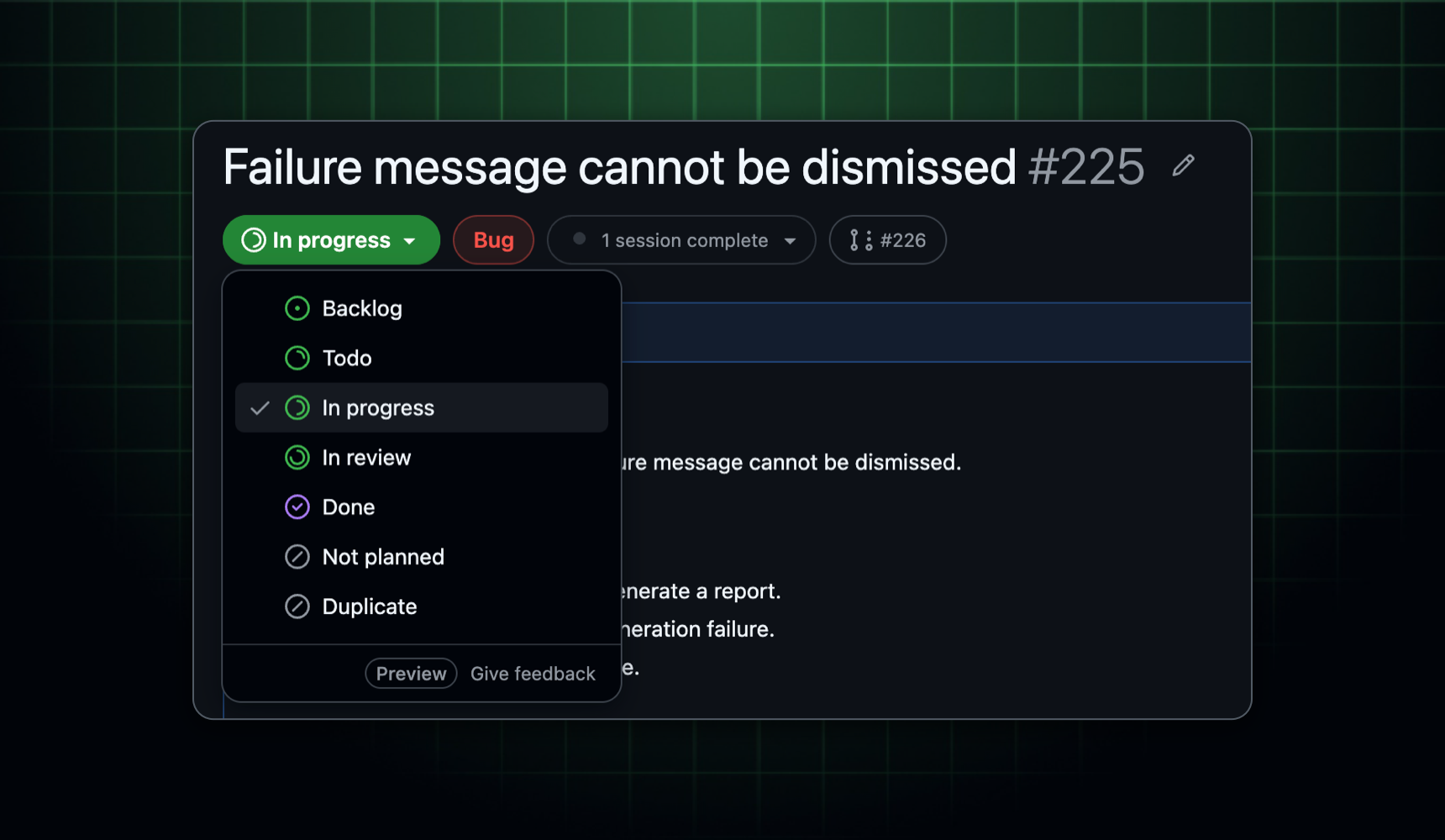
GitHub has started rolling out issue statuses and a board layout for repository saved views in public preview, the company announced on its changelog on November 23, 2026. Together, the two features let teams track work with more nuance than the old binary of Open or Closed, and let contributors drag issues between columns—Backlog, Todo, In progress, In review, Done, Not planned, or Duplicate—without ever leaving the repository or opening a separate GitHub Project.
Key facts
- What shipped: Issue statuses and repository boards, both in public preview as of November 23, 2026.
- Seven statuses: Backlog, Todo, In progress, In review, Done, Not planned, Duplicate.
- Automation: Linking a draft pull request, marking it ready for review, assigning a user, or assigning a coding agent can each move an issue's status automatically.
- Where to see it: Status icons on the issues page, the issues dashboard, and the new board layout for saved views; filter with
status:. - API access: GraphQL, REST, and the GitHub MCP server can all read and set status.
- Related change: Any issue field can now be added to any issue from the sidebar gear menu, no longer limited to fields mapped to a specific issue type.
- Still a preview: GitHub has not said when, or whether, this reaches general availability.
What GitHub announced
In its own words, GitHub's changelog post frames the problem plainly: open or closed doesn't always show where an issue actually stands. A ticket can be "open" because someone is actively coding against it, or "open" because it has sat untouched for six months. Issue statuses and repository boards, GitHub says, let "teams and agents share more specific context about work in progress and what to do next," with progress visible directly on a repository board.
The pairing is deliberate. Issue statuses give every issue a more descriptive state; repository boards give teams a visual surface—a kanban-style grid of columns—for watching those states change and moving work along by dragging cards, the way many teams already do inside GitHub Projects. The difference is that these boards live at the repository level, inside a saved view, rather than requiring a separate project to be created and maintained.
The seven issue statuses, and what triggers them
Where issues previously had exactly two states, they now support seven, and you can set one directly when creating an issue or change it any time from the issue header. GitHub says the status also now appears as an icon on the repository issues page, on the issues dashboard view across repositories, and on the new board layout.
What makes this more than a relabeling exercise is that several of the statuses update themselves based on what's already happening in the pull request and assignment workflow, rather than requiring someone to remember to flip a dropdown.
| Status | Meaning | Automatic trigger (if any) |
|---|---|---|
| Backlog | Not yet started or scheduled | Default/manual |
| Todo | Queued up, ready to be picked up | Assigning a user to the issue |
| In progress | Actively being worked | Linking a draft pull request; assigning an agent |
| In review | Work is up for review | Marking a linked draft PR "Ready for review"; linking an already-open PR |
| Done | Completed | Manual (or via a matching GitHub Projects status) |
| Not planned | Closed, won't be worked on | Manual |
| Duplicate | Closed as a duplicate of another issue | Manual |
GitHub also notes a two-way sync with GitHub Projects: if a Project has a status field whose values match the issue's built-in statuses, changing the status in either place updates the other. That matters for teams that already run heavier planning inside a Project but still want the lighter-weight repository-level view to reflect reality.
Automation extends to agents specifically. GitHub says assigning a coding agent to an issue moves it to "In progress" automatically, and status changes themselves can trigger Copilot automations—a small but telling sign of where GitHub expects issue tracking to head as more of the actual coding work gets delegated to agents rather than humans.
Filtering and finding issues by status
Because status is now a first-class, structured field rather than a label someone has to remember to apply, it's searchable. GitHub's post confirms a new status: qualifier that filters issues by their current status, usable in the repository issues list and the cross-repository issues dashboard. That puts status filtering on the same footing as filtering by label, assignee, or milestone.
Repository boards: kanban without leaving the repo
The second half of the announcement is the board layout for repository saved views. Saved views themselves aren't new—GitHub introduced them for repository issues in public preview earlier in 2026—but board layout is. Instead of a filtered list, a saved view can now render as a column-based board, grouped by status by default, where dragging an issue card from one column to another changes that issue's status.
GitHub's instructions for turning one on are short:
- Create a new saved view, or open an existing one.
- Open the View options menu (the gear icon).
- Switch the layout to "Board."
- Group by status (the default), then customize columns, swimlanes, visible fields, and sorting as needed.
GitHub is explicit that this isn't meant to replace its more fully featured product for planning across repositories: "for more advanced planning," the company still points teams to GitHub Projects, which supports custom fields, roadmaps, multiple repositories, and insights that a repository-scoped board does not attempt to replicate. The repository board is pitched as a lighter view for a single repository's own issue flow, not a Projects competitor.
A related change: issue fields are no longer tied to issue types
Alongside the two headline features, GitHub shipped a smaller but practically useful change to issue fields, the structured-metadata system it has been building out across 2026 (fields reached general availability back in July). Previously, any field other than Priority had to be mapped to a specific issue type before it could appear on an issue of that type. Now, GitHub says, any issue field can be added to any issue regardless of its type, through the gear menu in the fields section of the issue sidebar. Fields still appear by default only when they're pinned to a given type—this change just removes the hard requirement, so a field created for "Bug" issues can be manually attached to a "Feature" issue when it's useful, without redefining the type's schema.
API and MCP server support
GitHub built status into its existing API surfaces from the start of the preview rather than treating it as a UI-only feature. The changelog post and GitHub's REST documentation confirm that issue status is readable and settable through the GraphQL API, the REST API, and the GitHub MCP server, so automations and agents can read an issue's current status, change it, or set an initial status when creating a new issue programmatically.
On the REST side, GitHub's documentation for the new GET /repos/{owner}/{repo}/planning-statuses endpoint lists the selectable statuses for a repository, each returned with an id, name, and category. The docs note that clients should expect additional keys to be added later, and that statuses come back in the same fixed display order used in the UI: Backlog, Todo, In progress, In review, Done, Not planned, Duplicate. Reading the endpoint requires read access to the repository's issues, and the docs flag that the feature is restricted to accounts enrolled in the preview—repositories without access get a 404 rather than an empty list.
How to turn it on and use it
For individual issues, status is set the same way priority or other fields already are: pick a value from a dropdown when filing a new issue, or open an existing issue and change its status from the header at any time. No separate setup is required beyond having the preview enabled on the account or organization.
For boards, the path runs through saved views rather than a new menu item: open (or create) a saved view on the repository's issues page, click the gear-icon View options menu, and switch the layout to board. From there, grouping defaults to status, and columns, swimlanes, visible fields, and sort order are all configurable per view, so a team can tailor the board to however it already talks about its own backlog.
Why this fits GitHub's broader issue-tracking push
This announcement doesn't arrive in isolation. Across 2026, GitHub has been steadily building out structured metadata for issues—issue fields entered preview in the spring and reached general availability in July, followed by multi-select field support and new issue relationships like "Relates to" in August, and saved views for repository issues in June. It's part of a broader pattern of GitHub shipping features behind a public-preview flag before wider rollout; we covered a similar staged rollout when GitHub Event Streams entered public preview earlier this year. Issue statuses and repository boards are the next layer on that stack: once an issue can carry arbitrary structured fields, giving it a well-defined, automatable status and a visual board to manage those statuses is a natural next step. It's also consistent with GitHub's recent emphasis on agent-assisted development, where status changes that happen automatically as draft PRs move through review are exactly the kind of bookkeeping an autonomous or semi-autonomous coding agent benefits from not having to be told about separately.
It's worth distinguishing this from GitHub Projects, which has had board-style layouts, custom statuses, and kanban columns for years. What's new here is that a basic version of that workflow is now available directly inside a repository's own issues tab, without creating or maintaining a separate Project, and that the underlying status is a structured field exposed over the API rather than a Projects-only concept layered on top.
Who this is for
The two features are aimed less at solo maintainers—who generally know exactly what state their own open issues are in—and more at teams running a repository with several contributors, reviewers, and increasingly, coding agents working in parallel. In that setting, "open" has always been an overloaded signal: a maintainer scanning a long issue list has no quick way to tell which open items are actively being coded, which are waiting on a reviewer, and which have simply been sitting untouched for months. Granular status, surfaced as an icon and filterable with status:, replaces that guesswork with something a contributor can see at a glance without opening each issue.
Repository boards extend the same idea to planning. Teams that have resisted spinning up a full GitHub Project—because their workflow doesn't need custom fields, roadmaps, or cross-repository views—now get a lightweight kanban board scoped to the one repository they actually work in, built on a saved view rather than a separate object to maintain. For open source maintainers juggling contributions from volunteers, having that board double as a public, link-shareable view of what's actively in progress versus merely backlogged could cut down on the perennial "is anyone working on this?" comment.
What to watch next
Much like other GitHub client-side conveniences—such as the ability to juggle multiple accounts per host in GitHub Desktop—issue statuses and boards are aimed squarely at reducing day-to-day friction rather than adding a flashy new product. GitHub has not published a timeline for general availability, and the company's own framing—"preview," subject to change, enrollment-gated API access—suggests the feature set could still shift before it ships broadly. Worth watching: whether GitHub expands the fixed seven-status list or makes it customizable per repository, how deeply Copilot and coding-agent workflows end up relying on automatic status transitions, whether board layouts pick up more of the swimlane and field customization that Projects already offers, and when (or if) the two-way sync between repository status and Projects status fields becomes bidirectional in more scenarios than a simple name match. For now, teams that want to try it can enroll in the public preview and start setting statuses on individual issues today. If your team is still getting comfortable with GitHub's core workflow, it may help to start with the fundamentals covered in our explainer on Git versus GitHub before layering on statuses and boards.
Frequently asked questions
What are the new GitHub issue statuses?
GitHub issues can now carry one of seven statuses: Backlog, Todo, In progress, In review, Done, Not planned, or Duplicate. This replaces the old binary of Open and Closed with more granular, filterable states.
Is GitHub issue statuses generally available?
No. As of November 23, 2026, GitHub has issue statuses and repository boards in public preview only. GitHub has not announced a date for general availability, and the feature is limited to accounts enrolled in the preview.
How do issue statuses update automatically?
Several transitions happen without manual action: linking a draft pull request moves an issue to In progress, marking that draft PR ready for review (or linking an already-open PR) moves it to In review, and assigning a user moves it to Todo. Assigning a coding agent also moves the issue to In progress.
What is a GitHub repository board?
It's a new board (kanban-style) layout for repository saved views. You open a saved view, switch its layout to Board from the View options gear-icon menu, and it groups issues into columns by status, letting you drag issues between columns to change their status.
How is a repository board different from GitHub Projects?
A repository board is a lightweight, single-repository view built on top of saved views, aimed at quick status tracking. GitHub Projects remains the tool for more advanced planning, such as custom fields, roadmaps, and views spanning multiple repositories.
Can I access issue statuses through the API?
Yes. GitHub says issue status is available through the GraphQL API, the REST API (including a new planning-statuses endpoint), and the GitHub MCP server, so scripts, automations, and agents can read or set an issue's status.
Sources
- GitHub Changelog: Issue statuses and repository boards (public preview)github.blog
- GitHub REST API docs: Planning statusesdocs.github.com
- GitHub Changelog: Issue fields are now generally availablegithub.blog
- GitHub Changelog: Saved views for repository issues (public preview)github.blog
- GitHub Changelog: Connecting issues and multi-select field supportgithub.blog
Felix Moreau writes Pandromeda's software coverage and how-to guides. He covers Windows, macOS and Linux updates, the apps people rely on, emulators and developer tools, and turns official documentation into clear, numbered steps that work on the current version.