GitHub in Slack and Teams Reaches General Availability
The @GitHub app for Slack and Microsoft Teams has exited preview, bringing issue triage, PR review, and Copilot agent sessions straight into chat threads.
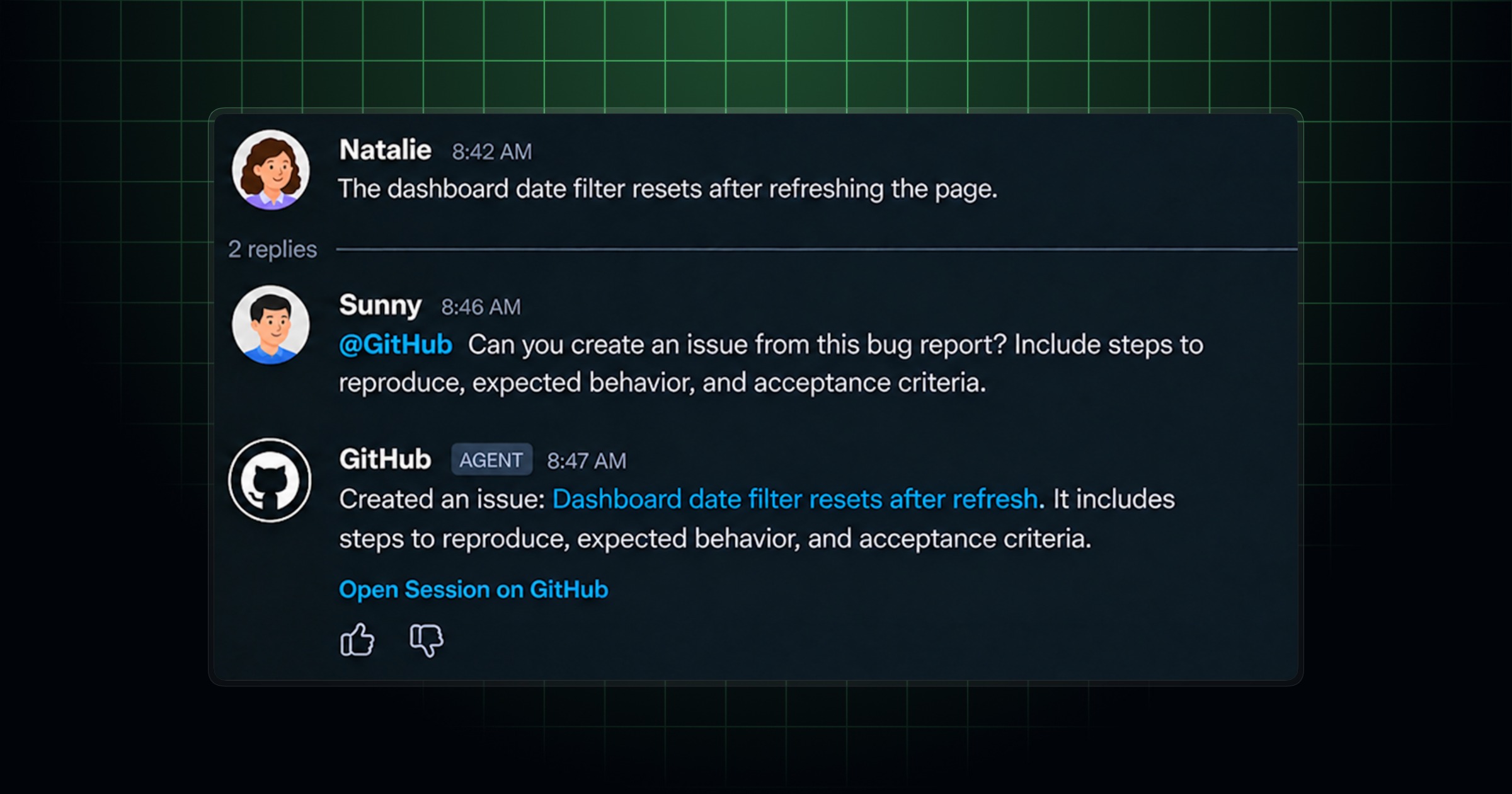
GitHub's chat-based @GitHub app for Slack and Microsoft Teams is now generally available in both platforms, GitHub confirmed in a changelog entry published November 6, 2026. The move takes the integration out of public preview and into full production status, meaning any team using Slack or Teams can now install it and rely on it as a supported, permanent part of their workflow — not a beta feature that could change or disappear. The app lets developers get GitHub notifications, triage issues, review pull requests, and invoke GitHub Copilot's cloud agent directly from a chat thread, without switching to a browser tab or the GitHub mobile app.
The GA announcement follows a steady run of preview-era upgrades through 2026, most notably an October 15 update that added support for working across multiple repositories in a single conversation. Combined, the two releases turn Slack and Teams into a genuine second surface for day-to-day GitHub work — what the industry has started calling "chat-ops" — rather than a notifications-only sidecar.
- GA status: @GitHub in Slack and Microsoft Teams exited public preview on November 6, 2026.
- Canvas in Teams: a new side-by-side view for reviewing implementation plans, code diffs, and previews without leaving the conversation.
- Faster onboarding: @GitHub now infers the repository from your message instead of always prompting you to pick one.
- Multi-repo sessions (added October 15, 2026): one conversation can now create issues, open pull requests, or investigate bugs across several repositories.
- Clearer attribution: issues and PRs opened via chat are now tagged with the Slack or Teams username that requested them.
- Legacy Teams app retiring: the older, notifications-only "GitHub" app in Teams is being renamed "GitHub (deprecated)" and retired November 16, 2026; everyone needs to move to the consolidated app.
What "generally available" actually changed
Until this release, the merged Copilot-plus-notifications experience in Slack and Teams had been rolling out in stages through 2026 — first as a notifications bot, then with an added Copilot cloud-agent layer that was gated behind public preview for Copilot Business and Enterprise customers. GitHub's November 6 changelog post, titled "@GitHub in Slack and Teams is generally available and more," confirms the app has now graduated out of that preview phase entirely in both chat platforms.
Practically, GA status means three things for IT and engineering leads evaluating the integration: it is covered by GitHub's normal support channels rather than preview-only feedback loops, it is stable enough to roll out org-wide instead of to a pilot group, and GitHub is treating it as a durable product surface it intends to keep maintaining — the same bar GitHub applied to the original GitHub-for-Teams notifications app back in 2021, before Copilot's cloud agent was layered in on top.
The November update itself also ships a handful of concrete fixes and additions alongside the GA label:
- Canvas in Teams — a new pane where you and teammates can review an implementation plan, inspect code changes, and look at previews generated by Copilot, refining the work together without losing the chat thread.
- Smarter repository detection — @GitHub now tries to identify which repository you mean directly from your message, cutting out a repeated "which repo?" prompt during onboarding, when you're not signed in, or when you want to switch repos mid-conversation.
- More reliable follow-ups — a fix addresses a bug that could silently block @GitHub from responding to a message later in the same thread.
- Visible attribution — issues and pull requests the app creates on your behalf are now labeled as coming from a specific Slack or Teams conversation and username, which matters for audit trails and code review context.
The October groundwork: multi-repo conversations
The GA milestone builds directly on an October 15, 2026 changelog entry, "Multi-repository support and other improvements for GitHub in Slack and Teams," which was arguably the bigger functional leap. Before that update, a single @GitHub conversation was effectively scoped to one repository at a time — useful for triage, but limiting for teams whose bugs or features span a frontend repo, a backend repo, and a shared library.
With multi-repo support, a single Slack or Teams thread can now:
- Create an issue in a different repository than the one the conversation started in, using context already present in the thread.
- Investigate a bug that touches both a frontend and a backend codebase in one pass, rather than requiring two separate sessions.
- List a user's open pull requests across every repository they work in and flag the ones that need attention.
- Fix an issue in one repo and open the resulting pull request, all from the same conversation that originally reported it.
The same update loosened how you address the bot — you can now @mention GitHub anywhere in a message rather than only at the start — and let Copilot draw on shared Slack messages and threads as additional context, instead of requiring you to paste details in manually. GitHub also shipped reliability fixes aimed at reducing task-start errors and improving recovery when a session gets interrupted.
What a dev team can actually do from chat
Strip away the release notes and the combined Slack/Teams app now covers most of the loop a developer runs through in a normal day, without leaving the conversation:
- Notifications. Subscribe a channel to a repository (
/github subscribe OWNER/REPOin Slack,@GitHub subscribe OWNER/REPOin Teams) and get pushed updates on issues, pull requests, and other repository events as they happen. - Issue and PR triage. @mention the app on a bug report or a thread discussing a problem, and it can investigate, open an issue, or create a pull request that addresses it — all while teammates watch and add context in real time.
- Code review from chat. Reviewers can look at the plan and the diff Copilot produced through the new Teams canvas, or by following links back to the pull request, before approving.
- Copilot cloud-agent sessions. Because the app is tied into GitHub Copilot's coding agent, teams with a paid Copilot plan can delegate investigation, planning, and implementation work to the agent and steer it with follow-up messages, correcting assumptions along the way. For background on the assistant itself (not the focus of this piece), see our coverage of Copilot's recent IDE integrations.
- Model and MCP server choice. Slack conversations can set a default model per channel with
/github settings, and sessions can connect configured MCP servers for extra context — relevant background for anyone tracking how webhook-driven integrations like this one are built under the hood. - Multi-repo context. As above, one conversation is no longer boxed into a single repository.
- CI and build visibility. Because the app sits on top of GitHub's standard notification and webhook plumbing, teams that wire up repository or workflow events continue to see CI run results and build status land in the same channel threads as code discussion, rather than in a separate dashboard.
GitHub's own documentation is explicit that guest and outside-collaborator accounts in Slack and Teams cannot start or steer agent sessions, and that cloud-agent work draws on paid Copilot plan usage — something admins rolling this out organization-wide will want to budget for.
| Capability | Slack | Microsoft Teams |
|---|---|---|
| Status as of Nov 6, 2026 | Generally available | Generally available |
| Repository notifications | Yes (/github subscribe) | Yes (@GitHub subscribe) |
| Issue / PR triage via @mention | Yes | Yes |
| Copilot cloud-agent sessions | Yes (paid Copilot plan required) | Yes (paid Copilot plan required) |
| Multi-repository conversations | Yes (since Oct 15, 2026) | Yes (since Oct 15, 2026) |
| Side-by-side plan/code review pane | No dedicated canvas | Yes — new "Canvas" (Nov 6, 2026) |
| Per-channel default model | Yes (/github settings) | Yes (via settings command) |
| Legacy app still active? | N/A | No — old app retires Nov 16, 2026 |
Setting it up in Slack
Installing the app is a workspace-level action that only needs to happen once:
- Go to slack.github.com and click "Add to Slack."
- Sign in and approve the requested workspace permissions (this step needs Slack admin rights).
- Add the app to a channel with
/invite @github. - @mention @GitHub in a message or thread and connect your GitHub account when prompted.
- Type
@GitHub helpin any thread to see the full list of available commands.
On Slack Enterprise Grid, admins or workspace owners install it once from Integrations > Install apps, then use "Add to more workspaces" to push it out org-wide. GitHub's own setup reference is the GitHub integration for Slack docs page.
Setting it up in Microsoft Teams
Teams installation follows a similar pattern, but with one important caveat right now: GitHub is in the middle of consolidating two separate Teams apps into one.
- Open the Teams app store and search for the GitHub app (or follow the install link from teams.github.com).
- Click Add, sign in to Teams, and approve the requested access.
- @mention the app in a channel or chat and connect your GitHub account.
- Type
@GitHub helpto see the available commands, or@GitHub settingsto set a default repository for that channel.
Anyone still running the older, notifications-only GitHub app in Teams should migrate now: GitHub is renaming that legacy app "GitHub (deprecated)" and retiring it on November 16, 2026, per the October 23 changelog post covering the consolidation. Existing notification subscriptions carry over once you're on the consolidated app, but teams need to actively reinstall or update rather than wait for an automatic switch. Full reference documentation lives on the GitHub integration for Teams docs page.
Requirements and permissions
A few prerequisites apply regardless of platform:
- A GitHub account, and write access to any repository you want an agent session to act on.
- A Slack workspace or Teams tenant where you (or an admin) can install apps.
- A paid GitHub Copilot plan for any cloud-agent work (triage-and-fix, PR generation); basic notifications and link previews don't require one.
- For organizations and enterprises, the "Copilot in the cloud" (cloud-agent) policy is on by default but can be switched off by an owner — worth checking before a company-wide rollout.
- Guest accounts and outside collaborators in Slack or Teams cannot start or steer agent sessions, per GitHub's documentation.
Why this matters: consolidating chat-ops
The broader significance of GA status is less about any single feature and more about what it signals: GitHub is explicitly betting that a meaningful share of day-to-day repository work — triage, review, quick fixes, status checks — happens faster when it's embedded in the tool teams are already using to talk to each other, rather than requiring a context switch to github.com. That's the same logic behind Git-driven deployment workflows and webhook-based automation generally: reduce the number of tools a human has to open to get something done.
For engineering managers, the practical upside is fewer dropped threads. A bug reported in a Teams channel, triaged by @GitHub, turned into a pull request, and reviewed via the new canvas never has to leave that channel's history — useful for later audits and for onboarding engineers who can scroll back through the thread to see exactly how an issue was resolved. The multi-repo update removes what had been a real friction point for teams with service-oriented architectures, where a single customer-facing bug routinely touches two or three repositories at once.
It's also a reminder that this app is distinct from GitHub Copilot's IDE and CLI experiences, which this site has covered extensively elsewhere — the Slack/Teams app is a delivery surface for some of that same agent capability, not a new AI model or pricing tier. Teams already paying for Copilot don't need a separate purchase to use the chat integration; they need only to install the app and connect their account.
What's next
Watch for two near-term dates: November 16, 2026, when GitHub retires the legacy, notifications-only Teams app in favor of the consolidated one, and the ongoing rollout of Copilot Memory — currently in public preview — which is meant to let @GitHub retain context across separate chat sessions rather than starting fresh each time. GitHub has also been shipping Copilot-adjacent updates to Slack and Teams roughly every three to four weeks through 2026 (file and image context in September, multi-repo in October, GA and Canvas in November), so further refinements to the chat experience — particularly around review workflows and CI visibility — are a reasonable bet in the coming months. Teams evaluating the integration today should install it in a pilot channel first, confirm Copilot licensing and cloud-agent policy settings with an admin, and plan the Teams app migration before the mid-November deadline.
Frequently asked questions
Is @GitHub in Slack and Teams generally available now?
Yes. GitHub confirmed general availability for the @GitHub app in both Slack and Microsoft Teams in a changelog post dated November 6, 2026, titled "@GitHub in Slack and Teams is generally available and more."
What can the @GitHub app do inside a chat thread?
It delivers repository notifications, lets you triage and create issues, open and review pull requests, and run GitHub Copilot's cloud agent to investigate bugs or implement changes, all without leaving Slack or Teams.
Does the app support working across multiple repositories?
Yes. GitHub added multi-repository support on October 15, 2026, so a single conversation can create issues, open pull requests, or investigate bugs that span more than one repository.
Do I need a paid Copilot plan to use this?
Basic notifications, link previews, and slash commands work without one, but Copilot cloud-agent features — investigating issues, writing code, and opening pull requests — require a paid GitHub Copilot plan.
What is happening to the old GitHub app in Microsoft Teams?
GitHub is retiring the legacy, notifications-only GitHub app in Teams, renaming it "GitHub (deprecated)" in the interim, with full retirement on November 16, 2026. Users need to move to the consolidated app.
Is this the same thing as GitHub Copilot?
No. The @GitHub app for Slack and Teams is a chat delivery surface that can invoke GitHub Copilot's cloud agent, but it is a distinct product milestone from Copilot's IDE integrations, pricing tiers, or underlying models.
Sources
- GitHub Changelog: @GitHub in Slack and Teams is generally available and more (Nov 6, 2026)github.blog
- GitHub Changelog: Multi-repository support and other improvements for GitHub in Slack and Teams (Oct 15, 2026)github.blog
- GitHub Changelog: Turn notifications into code with the GitHub app in Teams (Oct 23, 2026)github.blog
- GitHub Docs: About the GitHub integration for Slackdocs.github.com
- GitHub Docs: About the GitHub integration for Teamsdocs.github.com
Felix Moreau writes Pandromeda's software coverage and how-to guides. He covers Windows, macOS and Linux updates, the apps people rely on, emulators and developer tools, and turns official documentation into clear, numbered steps that work on the current version.