GitHub Copilot Now Lives Inside Xcode's Native Coding Assistant
GitHub has brought Copilot into Xcode's native Agents picker, letting iOS and macOS developers choose it alongside Apple's own coding assistants starting with Xcode 27.3 beta.
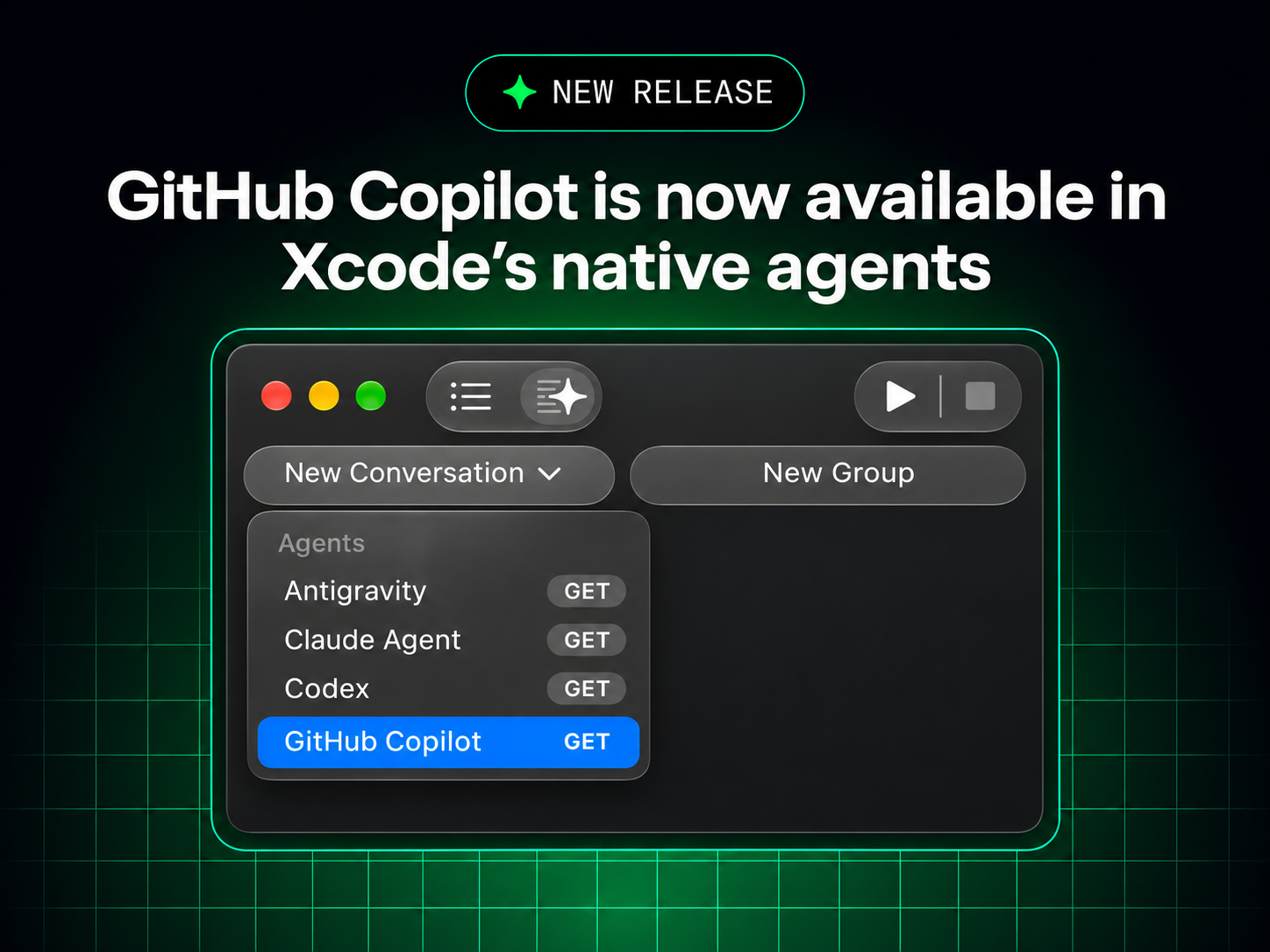
GitHub Copilot is now a selectable option inside Xcode's own built-in coding assistant, not just the separate third-party extension developers have used for years. GitHub confirmed the integration in a changelog post on November 4, 2026, describing it as a public preview available starting with Xcode 27.3 beta on Macs running macOS Tahoe 26.6 or later. Developers turn it on from Xcode's Settings, under the Intelligence pane, where Copilot now sits in the list of "Agents" next to Apple's own picks and other third-party options.
What GitHub actually announced
According to GitHub's official Changelog, the news is narrow but significant: "You can now work with GitHub Copilot directly in Xcode's built-in coding assistant, bringing Copilot into your native Xcode workflow." GitHub says the integration is in public preview and available starting with Xcode 27.3 beta, and that it gives developers "another way to use Copilot in Xcode" — distinct from the existing GitHub Copilot for Xcode extension, which GitHub says "remains a separate option."
The changelog entry is short on specifics beyond the setup mechanics. It does not name which underlying models power Copilot inside this new integration, and it does not break out availability by Copilot plan tier beyond stating flatly that "all Copilot plans are supported." Where a detail isn't confirmed on GitHub's own page, we've left it out rather than guess.
- Announced: November 4, 2026, via GitHub's official Changelog
- Status: Public preview
- Requires: Xcode 27.3 beta (from Apple Developer Downloads) and macOS Tahoe 26.6 or later
- Where to enable it: Xcode > Settings > Intelligence
- Copilot plans: GitHub states all Copilot plans are supported; no tier-specific limits are listed
- Relationship to the old extension: The existing GitHub Copilot for Xcode extension is unaffected and remains available separately
Two different ways to use Copilot in Xcode now
Developers who already use Copilot in Xcode have done so through the GitHub Copilot for Xcode extension, a separate app that hooks into Xcode as a source-editor extension. That tool isn't going away. GitHub's changelog is explicit that the new native option is additive: "This gives you another way to use Copilot in Xcode. The existing GitHub Copilot for Xcode extension remains a separate option, so you can choose the workflow that works best for you."
What's new is that Copilot now also plugs into Xcode's own first-party coding-assistant interface — the same Intelligence settings pane Apple uses to let developers pick between its own ChatGPT and Claude integrations and other agents. For a deeper look at how Copilot's agent features have evolved elsewhere, see Pandromeda's earlier coverage of GitHub's agentic workflows going generally available.
The older extension itself has kept getting updates on its own track. GitHub's changelog shows, for example, that back in April 2025 the GitHub Copilot for Xcode extension added @workspace context and support for Claude 3.7 Sonnet and GPT-4.5 in its Copilot Chat model selector, letting developers ask questions about an entire codebase rather than just the open file. That history underscores that the extension and the new native integration are genuinely separate products with separate update cadences — a feature added to one won't automatically show up in the other.
Requirements: what you need before you can turn it on
Per GitHub's changelog, getting the native integration running requires two pieces of up-to-date software:
- Xcode 27.3 beta — downloaded directly from Apple Developer Downloads, since it's a beta build and not yet on the general Mac App Store release channel.
- macOS Tahoe 26.6 or later — the underlying operating system requirement for running that Xcode beta.
GitHub's post links out to Apple's own Xcode 27.3 beta release notes for the full list of what else changed in that build, and to Apple's "Setting up coding intelligence" documentation for the general mechanics of enabling any agent.
How to set up Copilot as your Xcode coding assistant
The setup GitHub describes is short:
- Download Xcode 27.3 beta from Apple Developer Downloads.
- Open Xcode, go to Xcode > Settings, and select Intelligence in the sidebar.
- Set up GitHub Copilot as the coding assistant from that pane.
Apple's own documentation for this settings pane fills in more detail on the general flow any agent follows there. In the Intelligence settings, agents are listed under an "Agents" section; to enable one, a developer clicks "Get" next to it and then "Install" in the dialog that follows. If the agent requires an account — as Copilot does — the developer clicks the "More" button in the agent's Account row and signs in through a browser window that appears, entering their GitHub credentials there. Apple's documentation notes that after an agent is enabled, "the agent that you set up in the Intelligence settings may access your project files and other information when processing your requests," with a dedicated privacy link in that same settings pane for details on what's shared.
Where Copilot sits among Xcode's other native agents
GitHub's own launch graphic for the integration — titled "GitHub Copilot is now available in Xcode's native agents" — shows what that Agents list looks like in practice. In the screenshot, Xcode's Intelligence settings list four entries under "Agents," each with its own "Get" button: Antigravity, Claude Agent, Codex, and GitHub Copilot, with Copilot shown selected. That matches how Apple's documentation describes the feature generally: agents appear in a dedicated list, and developers can also add any agent that isn't pre-listed but supports the Agent Client Protocol (ACP) by clicking "Add an Agent" and entering its details manually.
Apple's documentation also describes a second, separate category in the same Intelligence settings: "Chat" providers. Two are described as built in by name — ChatGPT and "Claude Sonnet & Opus" — and developers can add further OpenAI Chat Completions API–compatible providers, hosted either on the internet or locally on the Mac, through an "Add a Chat Provider" option.
| Xcode Intelligence settings | What it covers | Named entries in Apple's docs / GitHub's screenshot |
|---|---|---|
| Agents | Full coding-assistant agents with access to Xcode capabilities like building and testing, enabled via Get/Install and optional ACP add-on support | Antigravity, Claude Agent, Codex, GitHub Copilot |
| Chat | Conversational model providers reachable from the coding assistant's chat interface | ChatGPT, Claude Sonnet & Opus, plus custom Chat Completions API–compatible providers |
Neither GitHub's changelog post nor Apple's documentation names the specific underlying model or models Copilot uses once selected as an Xcode agent — that detail simply isn't published on either company's page as of this writing, so we aren't speculating on it here.
What's confirmed — and not confirmed — about models and plans
It's tempting to assume Copilot's Xcode integration offers the same model picker familiar from Copilot Chat in Visual Studio Code, but GitHub's Xcode changelog entry doesn't say so. The only plan-related detail GitHub confirms is that "all Copilot plans are supported" for the new integration — it doesn't list the Free, Pro, Pro+, Business, or Enterprise tiers individually, and it doesn't mention usage limits specific to the Xcode agent. Developers who want to understand how their particular Copilot plan's model access currently works more broadly may want to check Pandromeda's coverage of Copilot's model deprecations taking effect November 16, since that explainer covers how GitHub manages which models are available to which plans elsewhere in the product.
Part of a broader push into third-party IDEs
The Xcode integration didn't land in isolation. One day earlier, on November 3, 2026, GitHub's Changelog announced that GitHub Copilot is now available in JetBrains Air, JetBrains' agentic coding tool, built on the same Agent Client Protocol that Apple's Xcode documentation references for adding custom agents. That integration lets developers pick Copilot in Air's agent selector for both local sessions in the IDE and cloud-based tasks run through Air Teams, drawing on an existing Copilot subscription rather than separate JetBrains AI credits.
Both moves follow GitHub's Universe 2026 event in late October, where the company pushed several Copilot updates at once, including Copilot Fusion for routing requests across models. Pandromeda covered Fusion's debut in VS Code's 1.144 update, where Copilot Fusion reached general availability alongside cloud-hosted Copilot sessions. Taken together, the pattern is consistent: rather than keeping Copilot confined to its own extensions and apps, GitHub is increasingly plugging it into the native agent or assistant frameworks that other IDE makers — JetBrains and now Apple — are building themselves.
Why it matters for Apple's developer ecosystem
For iOS and macOS developers, the practical change is about friction, not new capability. Copilot has been usable inside Xcode for years through its own extension. What's different now is that Copilot no longer needs a separate app sitting alongside Xcode's native assistant UI — it can be the coding assistant Xcode itself hands prompts to, governed by the same Settings pane, sign-in flow, and (per Apple's documentation) project-access permissions Apple applies to its own agents and to competitors like Codex and Anthropic's Claude Agent.
That also matters for how Apple is positioning Xcode generally. Apple's own documentation frames the Intelligence settings as a genuinely open extension point: beyond the agents it lists by name, it explicitly supports adding any agent that implements the Agent Client Protocol, and any chat provider that implements the OpenAI Chat Completions API, whether hosted on the internet or run locally on the Mac. Copilot joining the named list — rather than requiring developers to add it manually as a generic ACP agent — signals GitHub secured a more direct integration than the open protocol alone would require. Apple's documentation also notes that organizations managing fleets of Macs can turn the entire coding assistant off via mobile device management, by setting a CodingAssistantAllowExternalIntegrations key to false — a detail relevant to enterprises weighing whether to allow tools like Copilot on managed developer machines at all.
Limitations to keep in mind
A few caveats are worth flagging plainly, all drawn from GitHub's own wording:
- It's a public preview on a beta version of Xcode (27.3 beta), not a shipped feature of a stable Xcode release.
- It requires a beta OS-adjacent setup — macOS Tahoe 26.6 or later plus the Xcode beta itself, both of which carry the usual risks of beta software for a primary development machine.
- Model details aren't published. Neither GitHub nor Apple's linked documentation states which model or models back Copilot's responses inside this specific integration.
- Feedback channels are separate from support. GitHub directs issues to the GitHub Copilot for Xcode repository on GitHub or to Apple's Feedback Assistant, rather than offering a dedicated support path for the new integration itself.
What happens next
As a public preview tied to a beta release of Xcode, the integration's trajectory will likely follow Xcode 27.3's own path toward a stable release — GitHub's changelog doesn't commit to a timeline for when Copilot-in-Xcode might graduate out of preview or extend to the shipping version of Xcode. For now, the clearest path for interested developers is the one GitHub lays out directly: install the Xcode 27.3 beta from Apple Developer Downloads, confirm the Mac is running macOS Tahoe 26.6 or later, and enable Copilot from Xcode's Settings > Intelligence pane. Developers hitting problems, or wanting to weigh in on how the integration should evolve, can do so through the GitHub Copilot for Xcode repository or Apple's Feedback Assistant — the two channels GitHub names explicitly for this release.
Frequently asked questions
What is new about GitHub Copilot in Xcode?
GitHub Copilot can now be set up as the agent inside Xcode's own built-in coding assistant, under Xcode > Settings > Intelligence, rather than only through the separate GitHub Copilot for Xcode extension.
What do I need to use it?
Per GitHub's changelog, you need Xcode 27.3 beta, downloaded from Apple Developer Downloads, and a Mac running macOS Tahoe 26.6 or later. The feature is in public preview.
How do I turn it on?
Open Xcode, go to Xcode > Settings > Intelligence, and set up GitHub Copilot as the coding assistant from the Agents section, signing in with your GitHub account when prompted.
Does this replace the GitHub Copilot for Xcode extension?
No. GitHub says the existing GitHub Copilot for Xcode extension remains a separate, still-available option, so developers can choose either workflow.
Which Copilot plans work with the Xcode integration?
GitHub states that all Copilot plans are supported, without listing tier-specific limits for the Xcode agent.
Which AI models does Copilot use inside Xcode?
GitHub's changelog post does not name the underlying model or models for this integration, so that detail isn't confirmed.
Sources
- GitHub Changelog: GitHub Copilot is now available in Xcode's coding assistantgithub.blog
- GitHub Changelog: GitHub Copilot is now available in JetBrains Airgithub.blog
- Apple Developer Documentation: Setting up coding intelligencedeveloper.apple.com
- Apple Developer: Xcode 27.3 beta release notesdeveloper.apple.com
- GitHub Changelog: GitHub Copilot for Xcode adds @workspace and support for Claude 3.7 Sonnet and GPT-4.5github.blog
- GitHub repository: github/CopilotForXcodegithub.com
Felix Moreau writes Pandromeda's software coverage and how-to guides. He covers Windows, macOS and Linux updates, the apps people rely on, emulators and developer tools, and turns official documentation into clear, numbered steps that work on the current version.


