Should You Buy an SSD Now or Wait? A 2026 Buying Guide
NAND prices surged through 2026 and have not come back down. Here is how to choose the right SSD, and whether now is the time to buy or wait.
If you need storage right now — your drive is full, your new PC build is waiting on an SSD, or a laptop purchase is on the calendar — buy now. SSD prices rose sharply through the first half of 2026 and, as of this autumn, they have stopped climbing as fast but have not come back down, and nothing in the current supply data points to a near-term drop. If your purchase can wait six months or more and you're buying for future-proofing rather than necessity, it's reasonable to hold off and watch pricing, but don't expect a return to 2024-era prices any time soon. The rest of this guide explains why, and how to pick the right drive — Gen4 or Gen5, how much capacity, DRAM or DRAM-less, and what endurance ratings actually mean — whichever path you choose.
- Need an SSD now? Buy it. Waiting is unlikely to save you money in 2026, and supply constraints mean good deals can disappear fast.
- Can you wait 6+ months? You can watch and wait, but budget for today's prices — TrendForce's own data shows contract prices stabilizing at a high plateau, not reversing.
- Gen4 vs Gen5: Gen4 NVMe is the value sweet spot for most gaming PCs and laptops. Gen5 matters mainly for Gen5-capable motherboards, heavy content creation, or future-proofing.
- Capacity: 1TB is the realistic minimum in 2026; 2TB is the comfortable default for gaming or creative work.
- DRAM vs DRAM-less: A DRAM cache (or HMB on modern controllers) matters more for sustained, heavy workloads than for everyday use.
Why SSD prices haven't come back down
SSD prices didn't rise because of a one-off shortage — they rose because NAND flash manufacturers redirected production capacity toward the data-center and AI server markets, which pay more for the same wafers than client SSDs do. We covered the mechanics of this shift in detail in our earlier report on why SSD prices are surging in 2026 as AI squeezes NAND supply, and the numbers behind it are stark. TrendForce's press center raised its first-quarter 2026 NAND flash contract-price forecast to a 55–60% quarter-over-quarter increase, up from an already-large 33–38% estimate just weeks earlier, and called the accompanying 53–58% jump in enterprise SSD contract prices a record for a single quarter.
That was the steep part of the curve. By late summer, the picture had shifted from "spiking" to "stuck high." TrendForce's own NAND flash contract-price tracker, last updated in the second half of August 2026, still showed prices ticking upward, and the firm's accompanying commentary for that period said mainstream NAND pricing was "nearly flat" as buyers hit cost limits, while its September update described the market as having "entered a flat consolidation phase" — a direct result of supply remaining extremely scarce against a hard price ceiling. In plain terms: suppliers can't make enough NAND to meet demand, so prices climbed until buyers simply couldn't absorb more, and they've held near that ceiling since. TrendForce's February release also left the door open for more increases, noting that "further upward adjustments may still occur."
None of this is specific to one drive. It affects every tier — DRAM-less budget drives, mainstream TLC Gen4 drives, and flagship Gen5 drives alike — because they're all built from the same increasingly scarce NAND wafers.
PCIe Gen4 vs. Gen5 NVMe: what the speed numbers actually mean
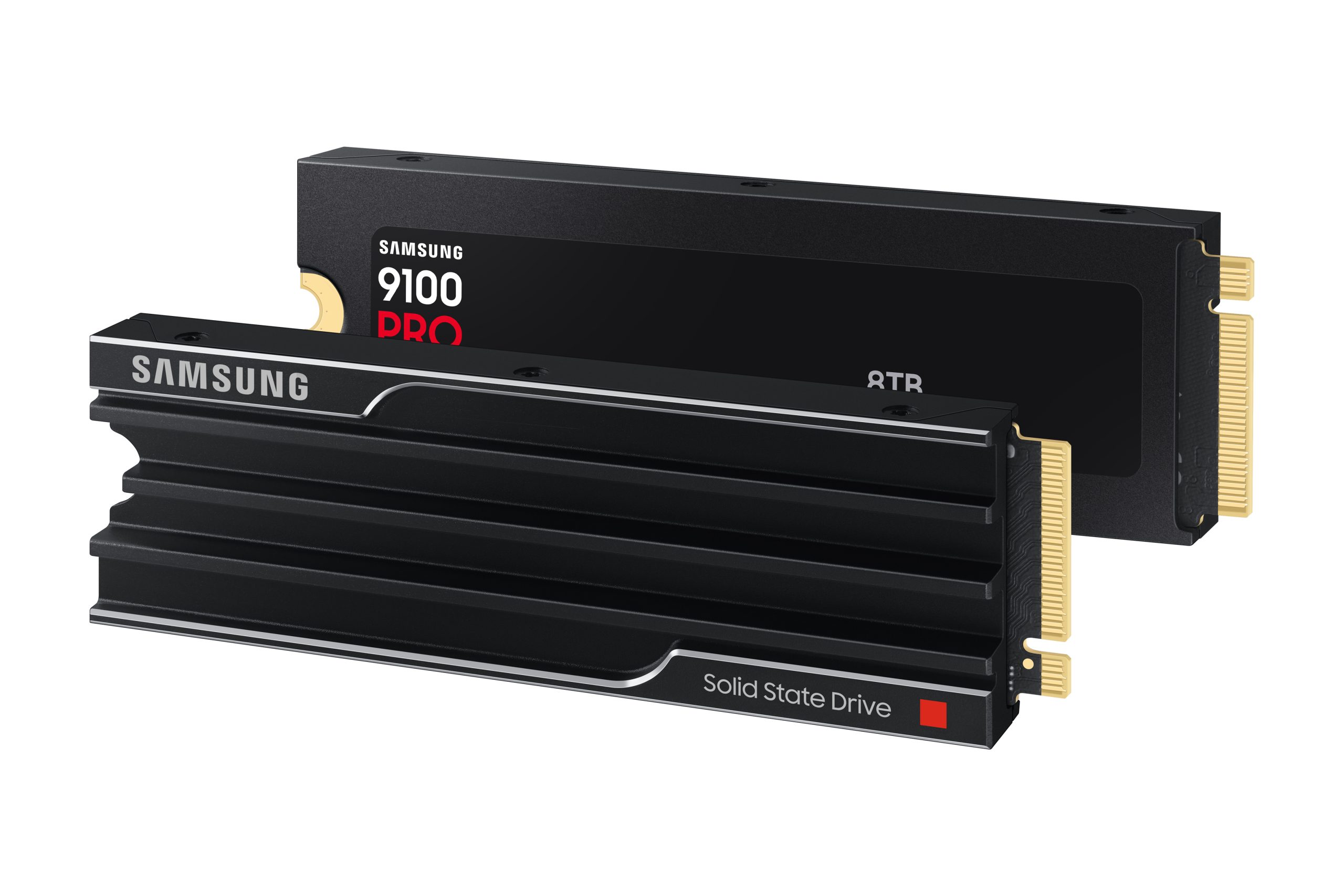
The interface generation determines the ceiling on how fast a drive can move data, but it's only one piece of the buying decision. PCIe 4.0 x4, the interface used by most mainstream NVMe SSDs today, has a theoretical sequential-read ceiling of around 8,000 MB/s — Samsung's own spec page for the 990 PRO cites that figure directly, noting its drive reaches 7,450 MB/s against it. PCIe 5.0 roughly doubles that per-lane bandwidth, and the fastest Gen5 drives on the market are now getting close to their own ceiling: Samsung's 9100 PRO is rated up to 14,800 MB/s read and 13,400 MB/s write, while SanDisk's Optimus GX PRO 8100 — the Gen5 drive previously sold as the WD_BLACK SN8100 before SanDisk's January 2026 brand overhaul — is rated up to 14,900 MB/s read and up to 14,000 MB/s write on its 2TB and 4TB models.
For most people, that gap is bigger on paper than in daily use. Boot times, game-level loads, and everyday file transfers are limited more by random 4K performance, the operating system, and whatever's bottlenecking elsewhere in the system than by raw sequential bandwidth. Gen5's advantage shows up clearly in large sequential transfers — big game installs, video export, dataset copying — and in systems that can actually push a drive hard enough to notice. If your motherboard only supports Gen4, or you're buying for a laptop, the Gen4 vs. Gen5 question answers itself.
| PCIe Gen4 NVMe | PCIe Gen5 NVMe | |
|---|---|---|
| Interface | PCIe 4.0 x4, NVMe 2.0 | PCIe 5.0 x4, NVMe 2.0 |
| Theoretical sequential ceiling | ~8,000 MB/s (per Samsung's own spec notes) | Roughly double Gen4, per PCIe 5.0's doubled per-lane data rate |
| Example drive: read / write | Samsung 990 PRO — up to 7,450 / 6,900 MB/s | Samsung 9100 PRO — up to 14,800 / 13,400 MB/s |
| Example drive: read / write | Crucial T500 (2TB) — up to 7,400 MB/s read | SanDisk Optimus GX PRO 8100 — up to 14,900 / 14,000 MB/s |
| TBW endurance, 2TB class | 1,200 TBW (990 PRO, T500) | 1,200 TBW (9100 PRO, Optimus GX PRO 8100) |
| Best for | Most gaming PCs, most laptops, mainstream desktops | Gen5-capable motherboards, heavy content creation, future-proofing |
| 2026 price position | Mature, broader supply, relatively better value | Newer, smaller allocation share, hit harder by the NAND shortage |
How much capacity do you actually need?
Capacity planning hasn't fundamentally changed in 2026, but the price-per-gigabyte penalty for guessing wrong has gotten steeper. A few rules of thumb still hold:
- 500GB–1TB: Only comfortable as a secondary drive or for a lightweight laptop used mainly for browsing and office work. As a primary gaming or creative drive, 1TB fills up fast once you account for the OS, a handful of modern games, and background application data.
- 2TB: The practical default for most gaming PCs, content-creation laptops, and primary desktop drives in 2026. It gives enough headroom that you're not constantly managing storage.
- 4TB and up: Worth it if you work with large media files, maintain a big game library without uninstalling titles, or run a workstation. At current NAND pricing, the jump from 2TB to 4TB carries a real cost premium rather than the near-linear scaling buyers got used to in cheaper years.
If you're deciding between two specific flagship drives rather than a category, our side-by-side on the WD_BLACK SN850X vs. Samsung 990 PRO digs into how two well-known Gen4 drives compare feature-for-feature — useful background once you've settled on a capacity and generation here.
DRAM cache vs. DRAM-less (HMB) drives
SSD controllers need somewhere to store the mapping table that tracks where every piece of data physically lives on the NAND. Drives with a DRAM cache — a small amount of dedicated memory on the drive itself — keep that table close at hand, which generally means more consistent performance under sustained, heavy, or random-access workloads. Samsung's 990 PRO, for example, pairs its controller with 4GB of onboard LPDDR4 DRAM, scaled to capacity.
DRAM-less drives skip that onboard memory and instead borrow a slice of the host system's RAM through a feature called Host Memory Buffer (HMB). Samsung's 990 EVO Plus is a current example: it has no onboard DRAM at all, relying on HMB instead, and still reaches up to 7,250 MB/s sequential read on its PCIe 4.0/5.0 hybrid interface. Modern DRAM-less drives with HMB support have closed much of the real-world performance gap for typical desktop and gaming use, though they can still fall behind DRAM-equipped drives on sustained writes that fill the drive's cache, or in server-style workloads with constant random access.
The practical takeaway: for a boot/game drive in a normal gaming PC or laptop, a well-reviewed DRAM-less drive with HMB is usually fine. For a primary work drive doing large, sustained file operations — video editing, large database work, bulk data processing — a DRAM-equipped drive is the safer choice.
Endurance and TBW: does it matter for you?
TBW (Terabytes Written) is the manufacturer's rated estimate of how much data you can write to a drive over its lifetime before the warranty no longer covers wear-related failure. It scales with capacity because larger drives spread writes across more NAND cells. Samsung rates its 9100 PRO line at 600 TBW on the 1TB model, scaling up to 4,800 TBW on the 8TB model, each backed by a 5-year warranty; the Crucial T500 2TB is rated at 1,200 TBW; SanDisk's Optimus GX PRO 8100 follows the same 600/1,200/2,400/4,800 TBW scaling by capacity as its Samsung Gen5 counterpart.
For almost all consumer use — gaming, general productivity, even most content creation — TBW ratings in the hundreds to low thousands are effectively a non-issue; you'd need to rewrite the entire drive's capacity many times a year, for years, to approach the rated limit. It matters more if you're running a workload that writes constantly and heavily: video surveillance recording, certain data-logging or caching setups, or running the drive as a scratch disk for large render jobs. For that kind of use, buy the highest TBW rating you can and lean toward DRAM-equipped drives.
How to choose an SSD: a quick framework
Match the drive to what you're actually doing with it:
- Gaming PC: A 2TB Gen4 NVMe drive with a DRAM cache is the sweet spot for most builds. Only step up to Gen5 if your motherboard supports it and you're also installing very large game libraries or doing frequent large transfers.
- Laptop: Check what the manufacturer's spec sheet actually supports before shopping — many laptops cap out at Gen4, or even Gen3, regardless of what drive you install. DRAM-less drives are a reasonable, often cheaper, fit here given lighter sustained-write demands.
- General PC / everyday use: Capacity and reliability matter more than peak speed. A 1TB–2TB mainstream Gen4 drive from an established maker covers nearly everyone.
- New NVMe build with a Gen5 board: If you've already paid for Gen5 support, a Gen5 drive avoids leaving performance on the table, but weigh whether the current price premium over Gen4 is worth it for your workload today.
- Content creation / workstation: Prioritize capacity and a DRAM cache over peak sequential speed; 4TB with a DRAM-equipped controller holds up better under sustained export and ingest workloads.
The buy-now-or-wait framework, in detail
There's no single right answer, but the decision breaks down cleanly along a few lines:
Buy now if: you have an immediate need (a build waiting on storage, a failing drive, a laptop purchase already planned), you're buying mainstream capacities (1–2TB) where supply is comparatively less squeezed than high-capacity enterprise-grade allocation, or you're shopping during a sale — current pricing conditions mean a good discount today is worth taking rather than gambling on a better one later.
Wait if: your need is genuinely flexible (six-plus months out), you're eyeing a high-capacity drive (4TB+) where the price premium is currently most inflated, or you're specifically waiting on next-generation Gen5 drives to mature and come down from their early-adopter pricing — a pattern that played out with Gen4 drives in their own early years.
What shouldn't factor into the decision is hope for a near-term price collapse. TrendForce's own data through the third quarter of 2026 shows contract prices leveling off at an elevated plateau, not reversing, and the firm's commentary points to persistently scarce supply as the reason prices have a hard floor under them for now. If you're comparing this to the memory side of the market, the dynamics are nearly identical — our RAM buying guide for 2026 walks through the same AI-driven supply squeeze playing out in DRAM.
Common questions
Will SSD prices drop before the end of 2026? Based on TrendForce's own contract-price tracking through Q3 2026, there's no clear evidence of an imminent drop — prices have stabilized at a high level rather than falling, and the firm has flagged the possibility of further increases rather than decreases.
Is Gen5 worth the premium right now? Only if your motherboard supports it and your workload regularly moves very large files. For most gaming and everyday use, a Gen4 drive delivers nearly identical real-world performance for less money.
Do I need a DRAM cache? Not necessarily. Modern DRAM-less drives using Host Memory Buffer perform well for typical desktop and gaming workloads; DRAM becomes more valuable for sustained, heavy, or server-style write patterns.
How much TBW endurance do I actually need? For typical consumer use, even entry-level TBW ratings are far beyond what you'll realistically write in the drive's useful life. It only becomes a real factor under constant heavy-write workloads.
Should I buy a smaller drive now and a second one later? That can work if your need today is modest, but remember that per-gigabyte pricing on a second drive bought later will be subject to the same elevated market — it's not a guaranteed way to save money.
What's next for SSD prices
The forces behind this surge — NAND makers prioritizing higher-margin AI and data-center orders over client SSD capacity — haven't reversed, and TrendForce's most recent commentary describes a market held at a price ceiling by scarce supply rather than one correcting downward. Watch TrendForce's own NAND flash contract-price updates and manufacturer pricing pages for the clearest early signals of a real shift, rather than retailer sale prices alone, which can move independently of the underlying contract market. Until there's a clear supply-side change, the practical approach is the one laid out above: buy to meet real need now, choose the drive that matches your actual workload rather than the fastest spec sheet, and treat "wait for it to get cheaper" as a bet against the current data, not a safe assumption.
Frequently asked questions
Will SSD prices drop before the end of 2026?
Based on TrendForce's own contract-price tracking through Q3 2026, there's no clear evidence of an imminent drop — prices have stabilized at a high level rather than falling, and TrendForce has flagged the possibility of further increases rather than decreases.
Is PCIe Gen5 worth the premium right now?
Only if your motherboard supports it and your workload regularly moves very large files. For most gaming and everyday use, a Gen4 drive delivers nearly identical real-world performance for less money.
Do I need a DRAM cache on my SSD?
Not necessarily. Modern DRAM-less drives using Host Memory Buffer (HMB) perform well for typical desktop and gaming workloads; DRAM becomes more valuable for sustained, heavy, or server-style write patterns.
How much TBW endurance do I actually need?
For typical consumer use, even entry-level TBW ratings are far beyond what you'll realistically write in the drive's useful life. It only becomes a real factor under constant heavy-write workloads like video surveillance or scratch-disk rendering.
Should I buy a smaller SSD now and a second one later?
That can work if today's need is modest, but a second drive bought later will likely face the same elevated NAND pricing — it's not a guaranteed way to save money.
Sources
- TrendForce Press Center: NAND Flash and SSD Price Forecast (Feb 2, 2026)trendforce.com
- TrendForce: NAND Flash Contract Price Trackertrendforce.com
- Samsung Newsroom: 9100 PRO Series SSDs Now Availablenews.samsung.com
- Samsung: 990 PRO Product Specificationssamsung.com
- SanDisk Newsroom: SANDISK Optimus SSD Product Brandsandisk.com
- Crucial: T500 Gen4 NVMe SSD Specificationscrucial.com
Mara Lindqvist edits the hardware desk. She covers graphics cards, processors, memory and storage, the foundries and chip designers behind them, and what the numbers on a spec sheet mean for people choosing a PC. Specifications in her stories come from manufacturer spec pages and datasheets.