Windows 11 25H2: What It Is and What's New
A complete, plain-English guide to Windows 11 version 25H2: what changed, why it arrives as a quick enablement package, who can get it, and how long Microsoft will support it.
Windows 11, version 25H2 is Microsoft's 2025 annual feature update for Windows 11 — but unlike past feature updates, it doesn't arrive as a multi-gigabyte reinstall. It ships as a small "enablement package" that switches on a year's worth of features Microsoft had already quietly delivered, and left dormant, inside Windows 11 24H2's monthly updates. If your PC is running 24H2 with a recent update installed, 25H2 is effectively a single-restart flip of a switch rather than a new operating system.
Here's what 25H2 actually is, how Microsoft is rolling it out, the real list of what changes, which PCs qualify, how to check your own version, and how long each edition will keep getting updates.
Windows 11 25H2 at a glance
- Released: September 30, 2025, as a controlled feature rollout; broadly available to eligible PCs since.
- Delivery method: A small enablement package installed on top of Windows 11 24H2 — one restart, not a full reinstall.
- OS build: 26200 (versus 26100 for 24H2), though the two versions share the same underlying files.
- Requirement: Windows 11, version 24H2 with the August 29, 2025 update (KB5064081) or later already installed.
- Support ends: October 12, 2027 for Home/Pro editions; October 10, 2028 for Enterprise/Education.
What is Windows 11, version 25H2?
Windows 11, version 25H2 — branded by Microsoft as the "Windows 11 2025 Update" — is the current yearly feature update for Windows 11, following version 24H2 from 2024. Microsoft says plainly that the release "doesn't introduce major new features" on its own; instead it activates enhancements that were already gradually rolled out to Windows 11 24H2 devices over the previous year through ordinary monthly updates, according to Microsoft's Windows 11 2025 Update support page.
That's a deliberate change in strategy. Rather than bundling a year of changes into one large, disruptive upgrade, Microsoft has spent the last several update cycles shipping the underlying code for 25H2's features directly inside 24H2's cumulative updates, holding them behind a mechanism called temporary enterprise feature control. The 25H2 release is the moment those switches get flipped on for everyone.
How the 25H2 rollout actually works
Because Windows 11, version 24H2 and 25H2 share a common core operating system and identical system files, Microsoft doesn't deliver 25H2 as a traditional feature update image. Instead, eligible 24H2 devices receive an enablement package, described by Microsoft as "a small, quick-to-install 'master switch'" that turns on the 25H2 features already sitting dormant on the device, per the official KB5054156 support article.
In practice, that means:
- The update installs with a single restart, similar to a routine monthly cumulative update, rather than the lengthy multi-restart process of a traditional Windows feature upgrade.
- Your PC must already be on Windows 11, version 24H2 with the August 29, 2025 cumulative update (KB5064081) or a later one installed before the enablement package can apply.
- It's delivered through the same channels as any other update: Windows Update, Windows Server Update Services (WSUS), Microsoft Configuration Manager, Windows Update for Business, and the Microsoft 365 admin center.
- Organizations managing updates through WSUS or Configuration Manager didn't see it appear until October 14, 2025, several weeks after the initial consumer rollout, per Microsoft's IT pro documentation.
If you're specifically trying to move a 24H2 machine onto 25H2 before Microsoft's support cutoff for 24H2, the step-by-step process is covered separately in our guide to upgrading from 24H2 to 25H2 before support ends. This article instead focuses on what 25H2 is and what actually changes once it's installed.
Is my PC eligible, and how do I check my version?
Eligibility is straightforward: any PC currently running Windows 11, version 24H2 — Home, Pro, Pro Education, Pro for Workstations, Enterprise, Education, Enterprise multi-session, or IoT Enterprise — without detected app or driver incompatibilities can receive 25H2 through the enablement package. Microsoft applies "safeguard holds" that delay the update on individual devices if a compatibility problem is detected, until it's resolved.
For most people, no action is required. Microsoft rolls 25H2 out using what it calls a "machine learning-based intelligent rollout," delivering it automatically when a device is deemed ready, according to the Windows release health status page. If you don't want to wait:
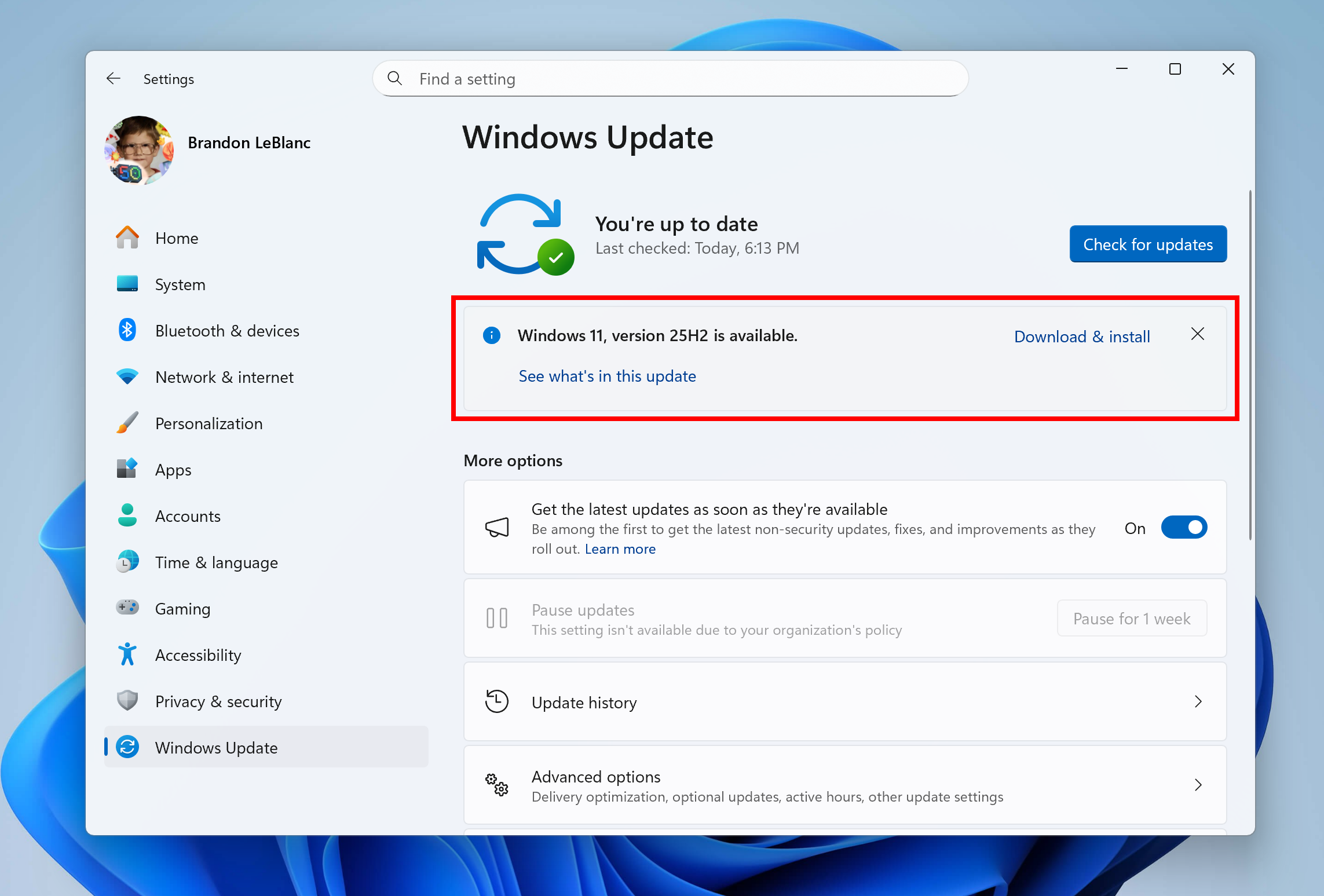
- Go to Settings > Windows Update and select Check for updates.
- If your device is ready, you'll see the option to Download and install Windows 11, version 25H2.
To confirm which version you're currently running before or after updating, press Windows key + R, type winver, and press Enter, or go to Settings > System > About and check the "Version" and "OS Build" fields. Full instructions are in Microsoft's official version-check support article. A device on 25H2 reports OS Build 26200.x; a 24H2 device reports 26100.x.
What's actually new in Windows 11 25H2
Because most of 25H2's code already exists on updated 24H2 machines, "new" mostly means "now turned on for everyone" or "no longer needs a policy to unlock." Based on Microsoft's own what's new documentation and its consumer-facing release notes, here's what changes:
Turned on for everyone (previously gated by enterprise policy)
- Improved Windows search — adds semantic indexing so results surface items related to your search terms, not just literal matches, while still respecting existing search policies.
- Click to Do — identifies text and images on screen so you can act on them directly (a Copilot+ PC feature).
- Agent in Settings — on-device AI assistance for finding and changing Windows settings and troubleshooting issues, also limited to Copilot+ PCs.
- AI actions in File Explorer — right-click an image or document for AI-powered actions like blurring a background, erasing objects, or summarizing a file via Copilot.
New management and connectivity features
- Policy-based removal of preinstalled Microsoft Store apps — IT admins on Enterprise and Education editions can now permanently remove inbox apps like Clipchamp, Media Player, or Teams via Intune or Group Policy, preventing them from reappearing.
- Wi-Fi 7 support for enterprise access points — consumer materials describe speeds up to 4x faster than Wi-Fi 6/6E; it requires 25H2 (or 24H2 with KB5065789 or later), Wi-Fi 7 hardware, and certified drivers and access points.
- QR code Wi-Fi sharing — scan a code to join a network or share credentials without typing a password.
- Windows Backup for Organizations — now generally available, restoring user settings and Microsoft Store apps when moving to a new or reimaged PC.
- Quick Machine Recovery — automatically searches the cloud for remediations when a device hits a critical error that blocks it from booting, reducing the need for IT to manually intervene on widespread outages.
- Sudo for Windows — a built-in command-line elevation tool, configurable from Settings.
- Hearing device support — direct pairing and audio streaming for Bluetooth LE Audio assistive hearing devices.
Smaller, everyday refinements
- Taskbar pinning policies apply without restarting explorer.exe, and admins can let users unpin specific apps without them reappearing.
- Energy Saver settings are now manageable by IT via Intune and Group Policy, alongside the existing Quick Settings toggle for extending battery life.
- File Explorer gains native 7-Zip and TAR archive support, faster large-archive extraction, a "New Folder" option in the left-pane context menu, restoring previously open tabs at sign-in, and Microsoft Entra ID people icons in the Activity column.
- Task Manager switches its memory-speed unit from MHz to MT/s, releases process handles faster, adds a "CPU Utility" column for anyone who prefers the older CPU-usage calculation, and picks up accessibility fixes for keyboard navigation, text scaling, and screen readers.
- Redesigned system prompts for camera, microphone, and location permissions dim the screen and center the dialog for visibility; Windows Hello and passkey sign-in flows were also redesigned.
- A new Settings > Privacy & security > Text and Image Generation page lists which apps have used on-device generative AI models and lets you control which ones are allowed to.
Features that remain exclusive to Copilot+ PCs
Several of the headline features associated with 25H2 aren't available on every PC that installs it. Click to Do, Recall (preview), semantic/improved search, and Agent in Settings all require a Copilot+ PC — Microsoft's class of Windows 11 machines built around a neural processing unit (NPU) capable of more than 40 trillion operations per second (TOPS). On a standard Windows 11 PC without an NPU meeting that bar, 25H2 installs normally, but these specific features simply won't appear. Recall in particular ships disabled by default and is removed entirely on managed (enterprise) devices unless an administrator turns it on.
What Microsoft removed in 25H2
Version 25H2 also sheds some long-deprecated components:
- PowerShell 2.0 is no longer included at all.
- Windows Management Instrumentation command-line (WMIC) is uninstalled during the update. It can technically be reinstalled through optional features or DISM, but Microsoft doesn't recommend doing so, since WMIC is slated for full removal in a future release.
| Aspect | Windows 11, version 24H2 | Windows 11, version 25H2 |
|---|---|---|
| Released | October 1, 2024 | September 30, 2025 |
| OS build | 26100.x | 26200.x |
| Underlying files | Same core OS as 25H2 | Same core OS as 24H2 |
| Recall, Click to Do, Agent in Settings, improved search | Present but dormant/policy-gated on many managed PCs | Enabled by default (Copilot+ PCs); temporary enterprise control lifted |
| Preinstalled Store app removal policy | Not available | Available (Enterprise/Education) |
| PowerShell 2.0 | Present | Removed |
| WMIC | Present | Uninstalled by the update |
| Support ends (Home/Pro) | October 13, 2026 | October 12, 2027 |
| Support ends (Enterprise/Education) | October 12, 2027 | October 10, 2028 |
How 25H2 fits Microsoft's support lifecycle
Windows 11 feature updates in the General Availability Channel follow a fixed servicing window measured from each version's release date, not from when an individual PC installs it. Per Microsoft's official Windows 11 release information page:
| Edition | End of updates (support) |
|---|---|
| Home, Pro, Pro Education, Pro for Workstations | October 12, 2027 |
| Enterprise, Education, IoT Enterprise, Enterprise multi-session | October 10, 2028 |
That works out to roughly 24 months of servicing for consumer and Pro editions, and 36 months for Enterprise and Education — the same pattern Microsoft has used since Windows 11 23H2. Once a device's version reaches its end-of-updates date, it stops receiving monthly security and quality updates entirely unless it moves to a newer version. Because 24H2's Home/Pro support ends October 13, 2026, PCs still on 24H2 are the ones facing the more time-pressured upgrade decision; 25H2, by contrast, has support running into late 2027 and 2028.
Current known issues and rollout status
Windows 11 25H2 is a mature, generally available release at this point, but Microsoft's Windows release health page continues to track a handful of issues tied to specific monthly cumulative updates, most already mitigated or resolved through out-of-band fixes as of late September 2026. It's the same page Microsoft uses to flag safeguard holds and rollout blocks, so it's worth a check before manually forcing an update if you hit an unexpected problem. For a rundown of what shipped in the most recent monthly cumulative update on top of 25H2, see our coverage of KB5124010 and the September 2026 preview update. Features destined for a future annual release continue to surface first through the Insider program, which we've also covered in our rundown of recent Windows 11 Insider builds.
Frequently asked questions
Is Windows 11 25H2 a completely new operating system?
No. It shares the same core system files as Windows 11 24H2. If your PC already has a recent 24H2 update installed, most of 25H2's code is already present but dormant; the update simply activates it.
Do I need to back up my PC before installing 25H2?
Because it installs as a single-restart enablement package rather than a full feature-update image, the risk profile is closer to a routine monthly update than a full in-place upgrade. It's still good practice to keep a current backup before any Windows update, and Windows Backup for Organizations or File History can help with that.
Why don't I see Recall or Click to Do after updating to 25H2?
Those features require a Copilot+ PC with a qualifying NPU. On other Windows 11 PCs, 25H2 installs normally, but NPU-dependent features simply aren't available.
How long will Windows 11 25H2 be supported?
Home, Pro, Pro Education, and Pro for Workstations editions are serviced until October 12, 2027. Enterprise, Education, IoT Enterprise, and Enterprise multi-session editions run through October 10, 2028.
Does 25H2 remove any features I rely on?
It removes PowerShell 2.0 entirely and uninstalls the WMIC command-line utility (which can be manually reinstalled, though Microsoft advises against it since it's being phased out).
What to do next
If you're on Windows 11, version 24H2 with a recent update installed, 25H2 will most likely reach your PC automatically through Windows Update's intelligent rollout with no action needed. If you'd rather not wait, check manually under Settings > Windows Update. If you're still on an older version and specifically need to get current before a support deadline, our step-by-step 24H2-to-25H2 upgrade guide covers the process in detail. Either way, once installed, run winver to confirm you're on OS Build 26200.x, and check Settings for the AI and File Explorer features noted above — several only appear on Copilot+ hardware.
Frequently asked questions
Is Windows 11 25H2 a completely new operating system?
No. It shares the same core system files as Windows 11 24H2. If your PC already has a recent 24H2 update installed, most of 25H2's code is already present but dormant; the update simply activates it.
Do I need to back up my PC before installing 25H2?
Because it installs as a single-restart enablement package rather than a full feature-update image, the risk profile is closer to a routine monthly update than a full in-place upgrade. It's still good practice to keep a current backup before any Windows update.
Why don't I see Recall or Click to Do after updating to 25H2?
Those features require a Copilot+ PC with a qualifying NPU. On other Windows 11 PCs, 25H2 installs normally, but NPU-dependent features simply aren't available.
How long will Windows 11 25H2 be supported?
Home, Pro, Pro Education, and Pro for Workstations editions are serviced until October 12, 2027. Enterprise, Education, IoT Enterprise, and Enterprise multi-session editions run through October 10, 2028.
Does 25H2 remove any features I rely on?
It removes PowerShell 2.0 entirely and uninstalls the WMIC command-line utility, which can be manually reinstalled although Microsoft advises against it since it's being phased out.
How do I check if I'm already on Windows 11 25H2?
Press Windows key + R, type winver, and press Enter, or go to Settings > System > About. A 25H2 device reports OS Build 26200.x; a 24H2 device reports 26100.x.
Sources
- What's new in Windows 11, version 25H2 for IT pros (Microsoft Learn)learn.microsoft.com
- Windows 11 2025 Update overview (Microsoft Support)support.microsoft.com
- KB5054156: Feature update to Windows 11, version 25H2 by using an enablement package (Microsoft Support)support.microsoft.com
- Windows 11 release information (Microsoft Learn)learn.microsoft.com
- Windows 11, version 25H2 known issues and notifications (Microsoft Learn)learn.microsoft.com
- Which version of Windows operating system am I running? (Microsoft Support)support.microsoft.com
Felix Moreau writes Pandromeda's software coverage and how-to guides. He covers Windows, macOS and Linux updates, the apps people rely on, emulators and developer tools, and turns official documentation into clear, numbered steps that work on the current version.