VS Code 1.142: Canvases, Move Chats, and New Model Picker
The October 14, 2026 stable release adds a shared visual workspace for working with Copilot agents, portable chats, and tighter enterprise agent controls.
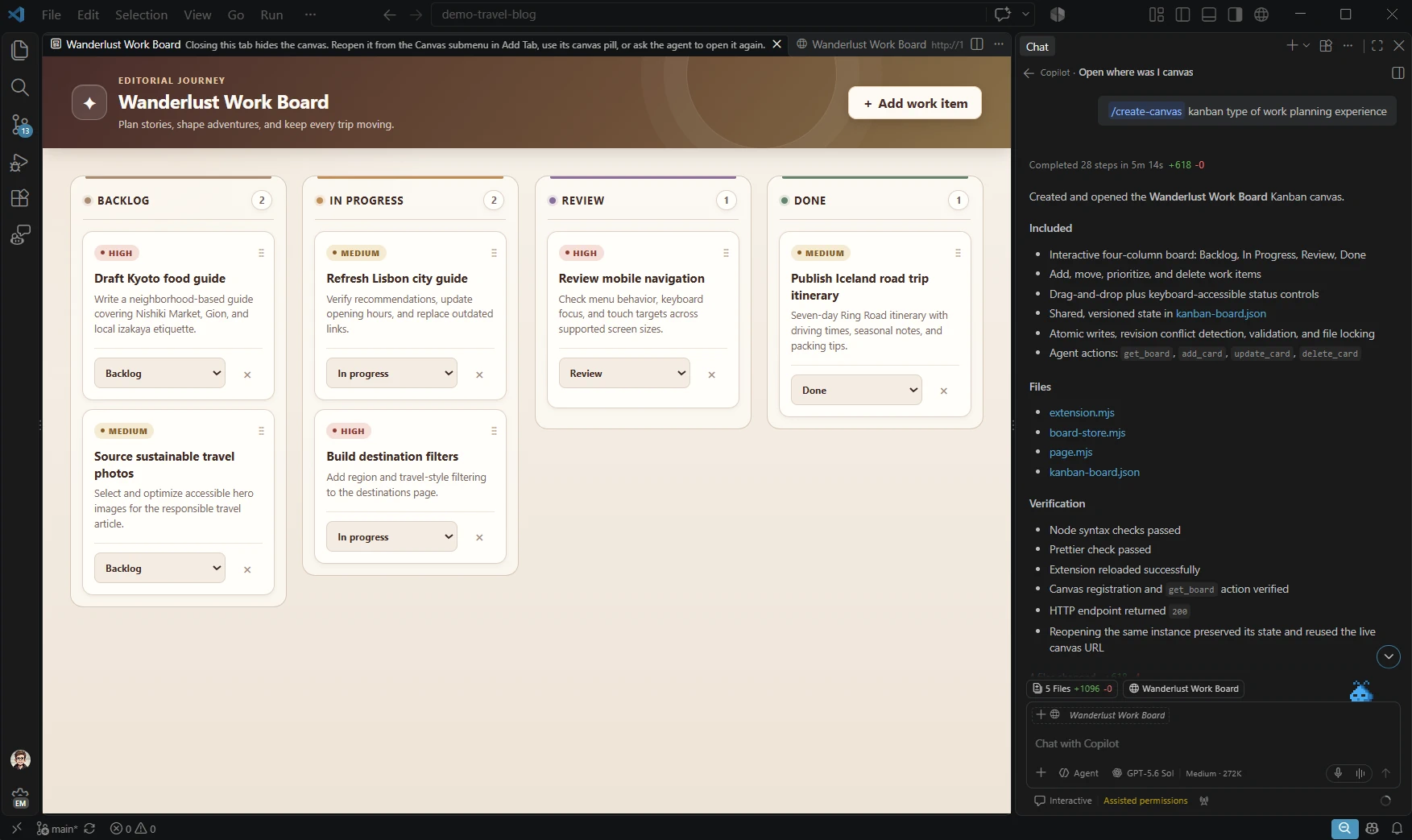
Visual Studio Code 1.142 shipped as a stable release on October 14, 2026, and its headline addition is Canvases (Preview), an interactive, kanban-style workspace that opens alongside Copilot Chat so a developer and an AI agent can track and reshape the same work item together in real time. The release also adds the ability to move an in-progress chat to another folder or a brand-new Git worktree without losing its history, a redesigned Copilot model picker that separates first-party Copilot models from bring-your-own-key (BYOK) models, a reworked Markdown editor with direct image pasting and in-place link renaming, and a set of new enterprise controls for agent sandboxing and permission-mode policy.
Key facts: VS Code 1.142
- Version: 1.142.0
- Released: October 14, 2026 (stable)
- Headline feature: Canvases (Preview) — a kanban-style visual workspace next to Copilot Chat
- Also new: Move chats to another folder or worktree, redesigned Copilot model picker, Markdown editor image paste and link rename
- For IT admins: New policy controls for agent sandboxing and Copilot permission mode
What shipped in VS Code 1.142
VS Code 1.142 is this month's stable build of Microsoft's editor, following the 1.141 release that introduced agent sandboxing and the 1.140 release that reworked the Copilot harness. The update continues Microsoft's push to make the editor itself a collaborative surface for agentic coding, rather than a window that simply hosts a chat sidebar. According to the official release notes, the changes are grouped into Agents, Chat, Markdown editor, Editor experience, Languages, Enterprise, and Contributions to extensions, plus one deprecated feature.
The version is available now through VS Code's built-in updater and as a fresh download from the project's site. There is no separate Insiders-only gate on the core features described here, though Canvases remains labeled Preview and sits behind a setting, which is typical for early-stage VS Code functionality that is still being refined based on usage.
Canvases (Preview): a shared visual workspace for you and an agent
Canvases are, in Microsoft's own description, "interactive interfaces to collaborate with an agent." Rather than reading an agent's plan as scrolling chat text, a Canvas opens in a panel beside Copilot Chat and renders the same artifact as an interactive, kanban-style board of cards. A developer can drag, edit, or reorder items on the board while an agent is actively working, and the agent can update the same board in response — both sides are editing one shared surface instead of one party describing changes for the other to re-type.
The feature is explicitly a preview. To try it, a developer needs to enable the chat.canvases.enabled setting, and it currently works with the Copilot harness running in local sessions. Microsoft has not published performance benchmarks or adoption numbers for the feature, and it's reasonable to expect the interaction model to keep changing before Canvases moves out of preview.
The clearest way to picture it is as a persistent, structured to-do board for an agent task: instead of an agent dumping a plan into chat and a developer approving it message by message, the plan becomes cards that either side can rearrange, mark done, or edit directly. That shared-state approach is the same philosophy behind other recent Copilot additions, including the model controls Microsoft has been rolling out across editors — see, for instance, the recent model-control updates shipped for GitHub Copilot in JetBrains IDEs.
Move chats: continue a conversation in a new folder or worktree
The second agent-focused addition in 1.142 is "move chats." Previously, an in-progress Copilot conversation was effectively tied to the folder and session it started in. With this release, a developer can move an existing chat to a different folder or spin it out into a brand-new Git worktree, and the agent "keeps the conversation history intact" when it picks the conversation back up in the new location.
This is aimed squarely at a common agentic-coding friction point: a developer starts a conversation to explore or fix something, realizes mid-task that the change really belongs on a separate branch or in an isolated worktree so it doesn't collide with other in-flight work, and previously had to restate context from scratch after switching. Per the release notes, move chats currently requires the Codex harness, or Codex running in Interactive mode, and applies to sessions that have exactly one chat and one local folder.
A redesigned model picker for Copilot and BYOK models
VS Code's Chat view also gets a visible redesign in 1.142: chat titles now display the name of the active harness (for example, Copilot or Codex), and the model picker itself has been reorganized into separate tabs for Copilot-provided models versus bring-your-own-key models from other providers. Hovering over a model in the new picker exposes direct controls for its thinking level and its context window size, so a developer can tune those settings without digging through a separate preferences screen.
The release notes also mention that BYOK responses are now stateful, which keeps continuity for externally keyed models across a conversation in a way the previous implementation didn't guarantee. Together, the harness-name labels and the split-tab picker make it easier to see, at a glance, which model and which execution path is actually driving a given chat — useful now that a single VS Code window may juggle Copilot's own models, several BYOK providers, and more than one agent harness at once.
Markdown editor improvements
Several quality-of-life changes land in the Markdown editor this release. Editing mode now places each source line on its own visual line (read-only/preview mode is unchanged), which makes line-based diffing and navigation more predictable. Beyond that layout tweak, the editor picks up four concrete additions:
- Paste images directly into a Markdown document, rather than having to save a file separately and insert a manual link.
- Rename file links in place using Rename Symbol (F2), which now updates matching file links throughout a document instead of requiring a manual find-and-replace.
- Outline view and breadcrumb support, so a long Markdown document's headings show up in VS Code's Outline panel and in the breadcrumb trail at the top of the editor, matching the navigation most developers already use in code files.
- A copy button on code blocks that appears on hover, for grabbing a snippet without manually selecting it first.
None of these are agent-related, but they're a reminder that 1.142 is not purely a Copilot release — documentation and README editing, a daily task for most repositories, gets real attention too.
Enterprise controls: agent sandboxing and permission-mode policy
For organizations managing fleets of VS Code installs, 1.142 tightens how Copilot agent sessions are governed. If an organization's policy sets a non-empty permissions object, or turns on sandbox.enabled, VS Code now requires full chat sessions to run through the Copilot harness in Agent Host rather than locally. Existing Local chats under that policy are migrated automatically, and the original Local session is only archived once the new Agent Host chat has actually opened, which is meant to avoid any window where history could be lost mid-migration.
Administrators who need more time before enforcing that move can set vscode.temporaryDefaultToLocalHarness to keep defaulting new chats to the Local harness during the transition. A separate new setting, permissions.disableAssistedPermissionsMode, lets an organization restrict Copilot's Assisted permission mode independently of whether Allow All is also restricted — giving IT teams a finer-grained lever than the previous all-or-nothing approach. Windows Group Policy handling also improves in this release, with policies now able to carry DWORD and QWORD numeric values, which several enterprise-managed settings require.
This continues directly from the sandboxing groundwork introduced in VS Code 1.141, and reflects Microsoft's ongoing effort to give administrators comparable guardrails for AI agents to what they've long had for extensions and network access.
Other notable changes: Python, stacked PRs, and a deprecation
A handful of smaller but practical updates round out the release:
- Python Environments extension fixes. Environment discovery, interpreter selection, and terminal activation all see bug fixes. For example, Python installations managed by
uvnow correctly appear under the Global category, and${workspaceFolder}now resolves properly when used insidepython.defaultInterpreterPath. - Stacked pull request support. The GitHub Pull Requests extension (version 0.170.0) now enables stacked PR support by default, and conflict-free pull requests that are checked out locally can be updated directly from the extension.
- A new editor setting.
editor.occurrencesHighlightFromAllProvidersmerges document highlights from every registered provider; by default, VS Code still shows highlights from only the highest-priority provider. - Deprecated: Windows sandboxing for Local harness. Sandboxed terminal command execution on Windows is no longer supported for Local harness sessions. Developers who need sandboxed execution on Windows should move that work to an Agent Host session instead.
| Area | What's new in 1.142 | Status |
|---|---|---|
| Agents | Canvases: kanban-style shared workspace beside Copilot Chat | Preview |
| Agents | Move chats to another folder or a new Git worktree, history preserved | Stable (Codex harness/Interactive mode) |
| Agents | Session-scoped Agents window layout via sessions.experimental.layoutScope | Experimental |
| Chat | Redesigned model picker with separate Copilot/BYOK tabs; chat titles show harness name | Stable |
| Markdown | Paste images, rename file links with F2, Outline/breadcrumb support, hover copy button | Stable |
| Editor | editor.occurrencesHighlightFromAllProviders setting | Stable |
| Languages | Python Environments: fixes for discovery, interpreter selection, terminal activation | Stable |
| Enterprise | Policy-managed migration to Copilot Agent Host; independent permission-mode controls | Stable (policy-gated) |
| Extensions | GitHub Pull Requests 0.170.0: stacked PR support enabled by default | Stable |
| Deprecated | Windows sandboxing for Local harness terminal commands | Removed |
How to update to VS Code 1.142
Most developers will see 1.142 arrive automatically: VS Code checks for updates on launch and prompts to install when a new stable build is available. To update manually, open the Command Palette and run "Check for Updates," or use Help > Check for Updates from the menu bar. Developers who prefer a clean install, or who are setting up a new machine, can grab the current stable build directly from the VS Code download page. Linux users on a package manager (apt, snap, or similar) will get 1.142 through their usual update channel once it syncs with Microsoft's repositories.
Two features in this release require an explicit opt-in rather than arriving turned on. Canvases needs chat.canvases.enabled set in your user or workspace settings before the panel becomes available next to Copilot Chat. The experimental Agents window layout scope needs sessions.experimental.layoutScope set, and VS Code must be reloaded after changing it for the new scope to take effect. Everything else described here, including move chats, the redesigned model picker, and the Markdown editor changes, is on by default once the update installs.
IT administrators rolling this out across a fleet should review the enterprise section above before deploying broadly: if your organization already enforces a permissions policy or sandbox.enabled, this update changes how existing Local chats behave the first time users open VS Code 1.142, migrating them to Agent Host automatically.
What's next
Canvases is explicitly a preview feature, so expect the interaction model, the set of supported harnesses, and the visual layout to keep evolving in upcoming releases rather than staying fixed as shipped today. The same is true of move chats, which is currently scoped to the Codex harness and single-chat, single-folder sessions — a narrower condition than many multi-chat workflows actually use. Microsoft has followed a steady monthly cadence with VS Code releases, with 1.140 introducing the Copilot harness rework, 1.141 adding agent sandboxing, and 1.142 now layering a shared visual workspace on top of that foundation; a 1.143 release addressing broader harness support for move chats, or further enterprise policy knobs around Canvases, would be a reasonable next step to watch for. Developers who rely on Copilot's agent features for daily work should read the enterprise policy notes carefully if they're on a managed machine, since the sandboxing requirement can change how an existing chat behaves the first time it's opened after updating.
Frequently asked questions
When was VS Code 1.142 released?
VS Code 1.142 was released as a stable build on October 14, 2026.
What is Canvases in VS Code 1.142?
Canvases (Preview) is an interactive, kanban-style workspace that opens beside Copilot Chat, letting a developer and an agent view and edit the same board of work items together. It requires enabling the chat.canvases.enabled setting and currently works with the Copilot harness in local sessions.
How do move chats work in VS Code 1.142?
Move chats lets a developer relocate an in-progress Copilot conversation to a different folder or a new Git worktree while keeping its history intact. It currently requires the Codex harness, or Codex in Interactive mode, for sessions with one chat and one local folder.
How do I update to VS Code 1.142?
VS Code checks for updates automatically and prompts you to install new stable builds. You can also run "Check for Updates" from the Command Palette, use Help > Check for Updates, or download the latest build directly from the VS Code website.
Does VS Code 1.142 change anything for enterprise-managed installs?
Yes. If an organization's policy sets a non-empty permissions object or enables sandbox.enabled, existing Local Copilot chats are automatically migrated to run through the Copilot harness in Agent Host, with the original chat archived only after the new one opens successfully.
What happened to Windows sandboxing for the Local harness?
It was deprecated in 1.142. Sandboxed terminal command execution on Windows is no longer supported for Local harness sessions; developers needing that protection should use an Agent Host session instead.
Sources
- Visual Studio Code 1.142 Release Notescode.visualstudio.com
- VS Code 1.142.0 Release on GitHubgithub.com
- GitHub Pull Requests Extension (Marketplace)marketplace.visualstudio.com
- Python Environments Extension (Marketplace)marketplace.visualstudio.com
Felix Moreau writes Pandromeda's software coverage and how-to guides. He covers Windows, macOS and Linux updates, the apps people rely on, emulators and developer tools, and turns official documentation into clear, numbered steps that work on the current version.