VS Code 1.146 Is Out: Inbox Mode and Copilot Fusion Comparisons
VS Code 1.146 adds an experimental session inbox, Copilot Fusion model comparisons, preview chat windows, and confirms the Local harness will be removed in February 2027.
Visual Studio Code 1.146 shipped as a stable release on November 11, 2026, and its agent-focused update is aimed squarely at people juggling several coding sessions at once: an experimental "Inbox mode" collects every session that needs a decision into one list, the Agents window's model-comparison tools now support Copilot Fusion and can be run by an agent on its own, chat can finally open in its own window, and extensions can be found, installed, and removed without leaving the Agents window. The release also makes official what Microsoft signaled in recent updates: the Local harness is deprecated and will be removed in February 2027.
VS Code 1.146 at a glance
- Released: November 11, 2026 (Stable)
- Inbox mode for sessions: experimental, off by default (
sessions.list.inboxEnabled) - Model comparison with Copilot Fusion: preview, off by default (
sessions.chat.compareAgents.tools.enabled) - Chat windows: preview, off by default in Stable (
sessions.chatWindows.enabled) - Extension management in the Agents window: experimental
- Local harness: deprecated, scheduled for removal in February 2027
What's new in VS Code 1.146
VS Code's last few releases, including version 1.144 and version 1.145, have steadily widened the Agents window from a single chat panel into something closer to a mission-control view for multiple coding agents running in parallel. Version 1.146 continues that trend rather than reversing it. Four of the headline items in this release are explicitly experimental or preview features, which means they ship behind settings that are off by default in Stable builds, and Microsoft is still gathering feedback before deciding whether and how they graduate. The fifth headline item isn't a new feature at all: it's a deprecation notice confirming that the Local harness, the original way VS Code ran agent sessions on your own machine, is being phased out in favor of the Copilot harness.
Inbox mode brings every session that needs you into one view
The feature most directly aimed at agent overload is Inbox mode for sessions. It's experimental and controlled by the sessions.list.inboxEnabled setting, which is off by default. Once enabled, you turn it on in the Agents window's sessions list by selecting Grouping, then Inbox Mode.
With Inbox mode on, sessions that need your attention are surfaced at the top of the list, ahead of the existing Working, Ready to merge, On hold, and Done groupings. According to the official release notes, you can dismiss, hold, or snooze a session from that inbox view, and dismissing a session does not archive it, so it stays retrievable rather than disappearing for good. The practical effect is that if you're running several agent sessions across different projects, whether they're actively working, waiting for a merge, or stalled on a question, you get a single triage list instead of having to click into each project's sessions panel separately.
Model comparisons add Copilot Fusion, and agents can run their own bake-offs
The Agents window's Compare Models feature also moved forward, under a new preview setting, sessions.chat.compareAgents.tools.enabled, which is off by default and requires Compare Models to already be available. Two changes stand out. First, you can now add a judge and a synthesizer to a comparison without first selecting a workspace, which lowers the setup cost for a quick side-by-side. Second, and more notably, you can select Copilot Fusion itself, along with its supported effort tiers, as one of the attempts being compared, or as the judge or synthesizer evaluating the other attempts.
Copilot Fusion is the multi-model routing and orchestration option in GitHub Copilot's model picker that reached general availability in October 2026, as covered when it launched alongside Copilot Fusion's GA in VS Code 1.144. Rather than running a single named model, Fusion routes a task to one or more underlying models using one of three patterns, according to GitHub's own changelog: a single model completing the task directly, a cascade where an efficient model drafts and a stronger model is escalated to only if needed, or a critique pattern where one model drafts, a second reviews, and the first revises. It's offered at three effort levels, Standard, High, and Max, and GitHub's own published figures state that the Max tier scored within about two points of Claude Code running Opus 5.5 Max on the Artificial Analysis Coding Agent Index, at roughly half the average API cost per task. Folding Fusion into VS Code's comparison tooling means you can now benchmark that routing behavior directly against single-model attempts inside the same Agents window workflow, rather than having to test it separately.
The other notable piece of this update is tool access: the release notes describe experimental tools that let an agent itself discover available models, launch a comparison, and read back the results, rather than a person having to configure and kick off every comparison by hand. Manual comparisons aren't going away; you can disable the experimental tools and keep running comparisons yourself.
Chat windows let conversations leave the sidebar
Chat windows move in the opposite direction from consolidation: instead of pulling more into one panel, this preview feature lets a chat session leave the sidebar entirely. With sessions.chatWindows.enabled turned on, enabled by default in Insiders builds but off by default in Stable, a chat can open in its own separate window, which you can then arrange alongside its own editors and terminals independently of your main VS Code window. Chats can also be moved between windows. If a window's layout gets tangled, the release notes point to a new command, Developer: Reset Chat Window Layout, to restore it.
For anyone running multiple agent sessions side by side, each with its own set of files and a terminal, this is the feature that lets you actually spread them across monitors instead of tabbing between chat threads stacked in a single sidebar.
Manage extensions without leaving the Agents window
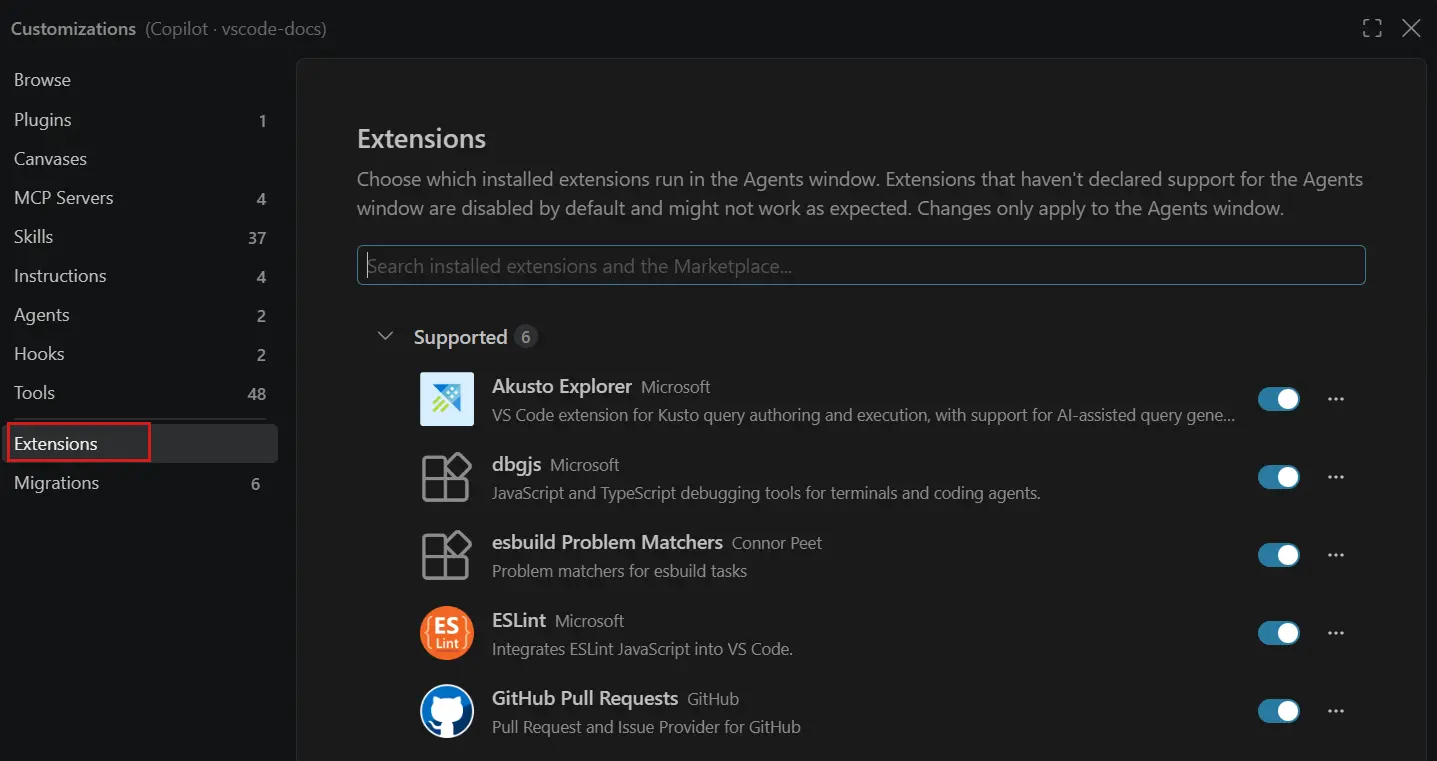
The fourth experimental feature addresses a smaller but recurring friction point: needing an extension mid-session but having to switch to a full editor window to go get it. VS Code 1.146 adds an Extensions section to Agent Customizations inside the Agents window, where you can search for, install, and uninstall extensions directly. Searches query the Marketplace the same way the Extensions view does, and if an extension doesn't support running inside the Agents window, the release notes say it's flagged with a warning rather than silently failing. The section can be opened with Shift+Cmd+X on macOS (Ctrl+Shift+X on Windows and Linux) or through the Extensions: Manage Extensions command.
The Local harness is being retired in February 2027
Alongside the four preview and experimental features, Microsoft used this release to formalize a deprecation that's been building for a few release cycles. The release notes state plainly that the Local harness is deprecated and will be removed in three months, which the notes pin to February 2027. For the next three months, the Local harness stays available but is, in Microsoft's words, functionally frozen: new agent-related features will be built for the Copilot harness, not the Local one. After that window closes, the Local harness is removed entirely, and so is the enterprise setting vscode.temporaryDefaultToLocalHarness, which organizations have been able to use to keep defaulting new sessions to the Local harness.
Microsoft has published a dedicated migration guide at code.visualstudio.com/docs/agents/run/move-to-copilot for teams that still have workflows, extensions, or enterprise policy pinned to the Local harness and need to move them over to the Copilot harness before removal.
Other changes worth knowing about
The five items above are the release's headline agent features, but a few smaller changes in 1.146 are worth a mention for anyone running multiple sessions day to day. Session list inline actions, another experimental feature behind the sessions.list.inlineActions setting, adds inline buttons to the sessions list for fixing a failing check or addressing a review comment, and runs that fix in the background on the session without you having to open it. It doesn't turn on Agent Merge or loosen any action's permissions on its own.
On the security side, VS Code 1.146 tightens permission prompts in the Copilot harness. Previously, a prompt could grant something as broad as "Allow in this Session" for web fetches, letting the model reach any URL for the rest of that session. The release notes say prompts are now more granular by default, adding allowances scoped to specific domains, commands, or directories instead of a blanket session-wide grant. Separately, under a new preview setting, chat.agentHost.mcpSkills.enabled, VS Code adds support for SEP-2640, which lets an MCP server hand the model skills automatically; the first time you connect to a server like that, VS Code asks you to approve bringing its skills into the model's context, and approved skills then show up on the Skills tab of the Agent Customizations editor.
VS Code 1.146 feature rundown
| Feature | Status | What it does |
|---|---|---|
| Inbox mode for sessions | Experimental | Groups sessions needing attention above Working, Ready to merge, On hold, and Done; sessions can be dismissed, held, or snoozed from one list across projects. |
| Model comparison improvements | Preview | Adds Copilot Fusion and its effort tiers to Compare Models as an attempt, judge, or synthesizer; lets an agent discover models and run comparisons itself. |
| Chat windows | Preview | Opens a chat session in its own window with its own editors and terminals, movable independently of the main VS Code window. |
| Extensions in the Agents window | Experimental | Finds, installs, and uninstalls Marketplace extensions from an Extensions section in Agent Customizations, without switching to an editor window. |
| Local harness | Deprecated | Frozen for new features now; removed along with the vscode.temporaryDefaultToLocalHarness setting in February 2027. Migrate to the Copilot harness. |
Why this release matters
None of these five changes is a brand-new product category for VS Code. Multi-session management, model comparison, detachable chat, and in-editor extension management have all existed in some form in earlier builds. What 1.146 does is push each of them a step further toward handling several autonomous agent sessions at once rather than one chat at a time, which has been the throughline of VS Code's agent-tooling work since the remote and cloud session previews in 1.145. It's also a reminder that this pace of change isn't unique to VS Code: competing editors and plugins, from Cursor to Copilot's own integrations in other IDEs, are iterating on the same problem of making multiple AI coding sessions manageable rather than overwhelming.
The Local harness deprecation is the item enterprise admins and anyone with custom agent tooling should pay closest attention to, since it comes with a hard date and a setting that will stop working outright rather than just losing feature updates.
How to get VS Code 1.146
VS Code updates automatically by default, so most users will be prompted to install 1.146 the next time they restart the editor, or it will already be applied. To install or update manually, download the latest Stable build directly from code.visualstudio.com. Because Inbox mode, the Copilot Fusion comparison tools, chat windows, and Agents-window extension management are all off by default in Stable, you'll need to turn on the relevant setting (sessions.list.inboxEnabled, sessions.chat.compareAgents.tools.enabled, or sessions.chatWindows.enabled) yourself before you'll see them; extension management in the Agents window is available by default via the Extensions: Manage Extensions command. Anyone still relying on the Local harness has until February 2027 before it's removed, and should start testing the Copilot harness migration guide in the meantime.
Frequently asked questions
What is Inbox mode in VS Code 1.146?
Inbox mode is an experimental setting (sessions.list.inboxEnabled) that groups coding-agent sessions needing your attention at the top of the Agents window's sessions list, above the Working, Ready to merge, On hold, and Done groups. You can dismiss, hold, or snooze a session from the inbox, and dismissing it doesn't archive it.
Is Copilot Fusion available in VS Code's model comparison tools?
Yes. With the preview setting sessions.chat.compareAgents.tools.enabled turned on, you can select Copilot Fusion and its effort tiers as an attempt, judge, or synthesizer in the Agents window's Compare Models feature, alongside new experimental tools that let an agent discover models and launch comparisons itself.
What is happening to the Local harness in VS Code?
The Local harness is deprecated as of VS Code 1.146 and will be removed in February 2027, along with the enterprise setting vscode.temporaryDefaultToLocalHarness. It remains available but functionally frozen until then; Microsoft recommends migrating to the Copilot harness.
Can I open a VS Code chat in its own window?
With the preview setting sessions.chatWindows.enabled turned on, chats can open in their own separate window with their own editors and terminals, and can be moved between windows. It's enabled by default in Insiders builds but off by default in Stable.
How do I manage extensions from the Agents window in VS Code 1.146?
Open the Extensions section of Agent Customizations with Shift+Cmd+X (Ctrl+Shift+X on Windows/Linux) or the Extensions: Manage Extensions command. You can search the Marketplace, install, and uninstall extensions without switching to an editor window; extensions that don't support the Agents window show a warning.
When was VS Code 1.146 released?
VS Code 1.146 was released as a stable build on November 11, 2026.
Sources
- Visual Studio Code 1.146 release notescode.visualstudio.com
- Move from the Local harness to the Copilot harnesscode.visualstudio.com
- GitHub Changelog: Route and orchestrate models with GitHub Copilot Fusiongithub.blog
- Download Visual Studio Codecode.visualstudio.com
- Visual Studio Code - Wikipediaen.wikipedia.org
Felix Moreau writes Pandromeda's software coverage and how-to guides. He covers Windows, macOS and Linux updates, the apps people rely on, emulators and developer tools, and turns official documentation into clear, numbered steps that work on the current version.