What Is Cursor? The AI Code Editor Explained
What Cursor actually is, its current pricing tiers, Tab and Agent explained, which AI models it supports, and how it compares to GitHub Copilot and Claude Code.
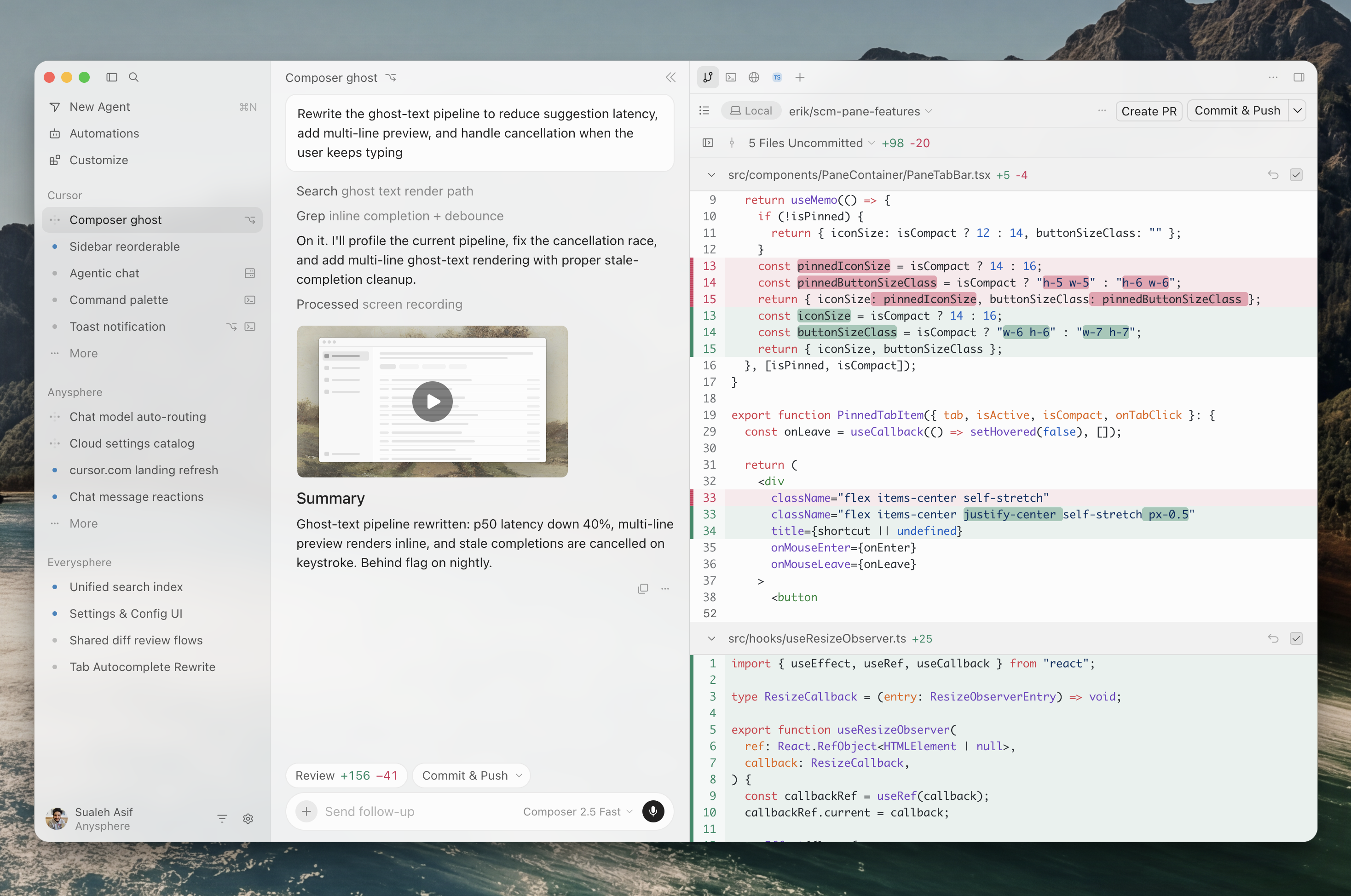
Cursor is an AI-powered code editor built by Anysphere that turns plain-language instructions into working code: you describe what you want in a chat panel, and an "Agent" reads your codebase, writes and edits files, runs terminal commands, and shows you a diff to review. It is built on a fork of Visual Studio Code, so existing VS Code settings, keybindings, and most extensions carry over, and its signature features are Tab (AI-powered autocomplete), Agent (the chat-driven coding assistant, formerly also called Composer in the editor), and Composer 2.5 (Cursor's own in-house AI model tuned for coding tasks). As of late 2026, Cursor is sold through The X Subscription, a single plan that bundles Cursor with Grok and X after Anysphere's 2026 acquisition by SpaceX — a change that reshaped its pricing structure and is the single most-searched-for thing about the product right now.
What is Cursor, exactly?
Cursor is a desktop code editor for macOS, Windows, and Linux, plus a command-line agent and a web/mobile dashboard for kicking off cloud-based coding tasks. Anysphere, the company behind it, describes Cursor as "your coding agent for building ambitious software": instead of only autocompleting one line at a time, it can plan a feature, search and read your repository, make coordinated edits across multiple files, run your test suite, and open a pull request, while you stay in the loop to approve or redirect it.
Under the hood, Cursor is a fork of VS Code. Cursor's own help documentation confirms you can import your existing VS Code settings, themes, keybindings, and extensions in one click, that Cursor ships with the same default keyboard shortcuts as VS Code, and that it draws on the Open VSX extension registry rather than the official VS Code Marketplace. That heritage is a big part of why Cursor was able to grow so quickly: developers get a familiar editor shell with an AI layer bolted on top, rather than having to learn a brand-new interface.
Founded in 2022 by a group of MIT students, Anysphere grew from a small startup into one of the fastest-scaling software companies of the 2020s before SpaceX announced a deal to acquire it in 2026. That acquisition is why Cursor's own pricing and model documentation now references "SpaceXSI," "The X Subscription," and Grok alongside the coding features developers came for — details covered in the pricing section below.
Tab, Agent, and Composer: Cursor's core features
Three features define how people actually use Cursor day to day.
Tab is Cursor's AI-powered autocomplete. Per Cursor's own documentation, Tab suggests code as you type based on your recent edits, the surrounding code, and any linter errors, with suggestions appearing as grayed-out "ghost text" ahead of your cursor. It isn't limited to single-line completions: Tab can rewrite multiple lines at once, add missing import statements, and predict edits in other files when a change in one place implies a change somewhere else — a small "portal" window pops up at the bottom of the editor when a cross-file jump is available. After you accept a suggestion, pressing Tab again jumps you to the next place Cursor predicts you'll want to edit, which Cursor calls "jump-in-file."
Agent is Cursor's assistant for complete, independent coding tasks — the feature most people mean when they talk about "AI coding agents." You open it with Cmd/Ctrl+I, describe a task, and it searches your codebase, edits files, runs terminal commands, and iterates, with no fixed limit on how many tool calls it can make in a single task, according to Cursor's agent documentation. Before Agent makes a significant change it saves a local "checkpoint," so you can preview or restore your files to an earlier point if it takes a wrong turn, without touching your actual Git history. For larger bodies of work — a full feature or a migration — Cursor supports "Projects," where a coordinator agent plans the work and delegates pieces of it to other agents, and "Plan Mode" (Shift+Tab), which has Cursor research your codebase, ask clarifying questions, and write a detailed implementation plan before it touches any code.
Composer today refers mainly to Composer 2.5, Cursor's own in-house agentic model, built and trained by Anysphere specifically for long, tool-heavy coding sessions inside the editor — file edits, terminal commands, and multi-step tasks — rather than general-purpose chat. It's the default model offered to new users and is designed to be fast and comparatively cheap to run at the same intelligence level as competing "fast" models.
- Maker: Anysphere, Inc. (a SpaceX company as of 2026)
- Platforms: macOS, Windows, Linux desktop app; CLI; cloud/mobile agent dashboard
- Built on: a fork of Visual Studio Code, using the Open VSX extension registry
- Signature features: Tab autocomplete, Agent, Plan Mode, Cloud Agents, Bugbot/Grok Bot code review
- Current pricing: Free, Plus ($8/mo), Premium ($30/mo), Super ($100/mo), Ultra ($200/mo), Teams (from $30/seat/mo), Enterprise (custom)
Which AI models does Cursor support?
Cursor isn't tied to one AI lab. According to Cursor's Models & Pricing documentation, you can pick from Cursor's own models as well as third-party frontier models from several providers:
- Cursor's own models: Grok 4.7, Grok 4.6, and Grok 4.5 (described in Cursor's docs as "jointly trained by Cursor and SpaceXAI"), plus Composer 2.5, Cursor's dedicated agentic coding model.
- Anthropic: the Claude family, including Claude Sonnet and Claude Opus models, selectable in Cursor as third-party models.
- OpenAI: GPT-5-series models, including coding-tuned "Codex" variants.
- Google: Gemini Pro and Flash models.
- Additional third-party options from providers such as Meta, Moonshot, Z.ai, and DeepSeek.
The split that matters for most developers: Cursor's own models (Grok and Composer 2.5) draw from the plan's included weekly usage pool on every paid tier, including the entry-level Plus plan. Third-party models — Claude, GPT, and Gemini among them — aren't included in that pool; they're available starting on the Premium plan and billed separately, at the provider's API list price, from a prepaid credit balance. There's also an "Auto" mode that picks a model for you, with Cost, Balance, and Intelligence routing options depending on your plan.
Cursor pricing: current plans and what they include
This is the part that changes most often, and the part worth double-checking against Cursor's own pricing page before you buy, since the structure shifted substantially in 2026. As of this writing, new Cursor customers sign up for The X Subscription, a single plan line shared with Grok and X:
| Plan | Price | Included coding usage | Third-party models (Claude, GPT, Gemini) |
|---|---|---|---|
| Free | $0 | Limited Agent and Chat requests | Not available |
| Plus | $8/mo | Base weekly pool, Cursor's own models only | Not available |
| Premium | $30/mo | 4x Plus usage | API list price, from prepaid credit |
| Super | $100/mo | 15x Plus usage | API list price, from prepaid credit |
| Ultra | $200/mo | 50x Plus usage | API list price, from prepaid credit |
| Teams | From $30/seat/mo | Matches the seat's individual tier | API list price + a small per-token routing fee |
| Enterprise | Custom | Pooled across the organization | API list price + routing fee |
A few details worth knowing before you pick a plan, per Cursor's own documentation:
- Every paid plan's usage pool refreshes weekly rather than monthly, and is shared across Cursor, Grok Chat, and related Grok apps on the same subscription.
- Only Premium and above include third-party models like Claude and GPT at all; Free and Plus are restricted to Cursor's own Grok and Composer models.
- Annual billing is available at a discount: $80/year for Plus, $300/year for Premium, $1,000/year for Super, and $2,000/year for Ultra.
- Cloud Agents, automated PR review ("Bugbot," now also called Grok Bot), and code hosting via Origin are gated behind Premium and above — they aren't available on Free or Plus.
Prices shown exclude tax, and third-party model usage is always billed separately from the base subscription price, so a heavy Claude or GPT user on Premium should expect a bill above the flat $30/month.
What happened to Hobby, Pro, and Business?
If you've seen older write-ups mention Cursor's "Hobby," "Pro," "Pro+," or Teams "Standard"/"Premium" plans, those names still exist — they're just no longer what new customers sign up for. According to Cursor's legacy plans documentation, anyone who subscribed before the 2026 switch to The X Subscription keeps their old plan, price, and two separate monthly usage pools (one for Cursor's own models, one for third-party models) unless they actively choose to switch:
| Legacy plan | Price | Closest current equivalent |
|---|---|---|
| Hobby | Free | Free |
| Pro | $20/mo | Premium ($30/mo) |
| Pro+ | $60/mo | Super ($100/mo) |
| Ultra | $200/mo | Ultra ($200/mo, unchanged) |
| Teams Standard | $40/user/mo | Teams, Premium seat ($30/user/mo) |
| Teams Premium | $120/user/mo | Teams, Super seat ($100/user/mo) |
Cursor's documentation is explicit that the new plans aren't simply price changes: each paid tier on The X Subscription includes a larger pool of coding usage than the legacy plan it replaces, usage resets weekly instead of monthly, and it adds Grok and X app benefits — but it also drops the included allowance for third-party models that Pro, Pro+, and legacy Teams used to bundle in. In other words, the old "Pro at $20/month" and the new "Premium at $30/month" are comparable, not identical, and switching is a one-way decision. If you're already a paying Cursor customer, there's no requirement to move.
Cloud Agents, the CLI, and Bugbot: Cursor beyond the editor window
Cursor's agent isn't confined to the desktop app. Cloud Agents run on Cursor's own infrastructure rather than your laptop, so you can kick off a task from the editor, the web, or a phone, close your computer, and come back later to review finished work; multiple Cloud Agents can run in parallel on different tasks. The Cursor CLI brings the same agent into a terminal, with interactive and non-interactive ("print") modes for scripts and CI pipelines, plus the ability to hand a running conversation off to a Cloud Agent mid-session. Bugbot (rebranded "Grok Bot" on the current plans) reviews pull requests on GitHub and can be configured as an automated teammate for a team's repositories, and Origin is Cursor's own code-hosting feature for teams that want everything — editor, agents, and repository — in one product.
How Cursor compares to GitHub Copilot and Claude Code
Cursor, GitHub Copilot, and Claude Code all compete for the same "AI pair programmer" budget line, but they take different shapes:
- Cursor vs. GitHub Copilot: Cursor is a full standalone editor with its own interface, Tab autocomplete, and agent system built in from the ground up. GitHub Copilot is primarily an extension that layers AI completions and chat onto an editor you already use (including inside VS Code itself), tightly integrated with GitHub's own ecosystem of repos, pull requests, and Actions.
- Cursor vs. Claude Code: Claude Code is Anthropic's terminal-first coding agent, built around Claude models specifically and designed to be scripted and composed into other tools and workflows. Cursor is editor-first with a graphical interface at its center (though it now ships its own CLI too), and it's model-agnostic by design — you can point it at Claude, GPT, Gemini, or Cursor's own Grok and Composer models from the same interface.
None of this makes one tool strictly "better": a developer who lives in the terminal and wants direct control over a single model family tends to prefer Claude Code, a GitHub-centric team already paying for Copilot often sticks with it for the integration, and people who want one editor that can autocomplete, chat, and run multi-file agent tasks with a choice of models gravitate to Cursor.
How to download and get started with Cursor
Cursor is downloadable directly from cursor.com for macOS 12 (Monterey) and later on Apple Silicon or Intel, Windows 10 and later, and Linux (via apt/yum repositories or a portable AppImage), and the CLI installs with a single curl or PowerShell command from the same site. The standard first run, per Cursor's own quickstart guide, is to open a project folder, ask the Agent to explain the codebase and point you to the main entry points, make one small, low-risk change together, and review the diff before trusting it with anything bigger. For multi-file features or migrations, switching into Plan Mode first — so Cursor researches the codebase and proposes an approach before writing any code — is the workflow Cursor itself recommends.
What's next for Cursor
Two things are worth watching if you're deciding whether to adopt Cursor or stick with what you have. First, pricing and plan names are clearly in flux following the 2026 SpaceX acquisition and the rollout of The X Subscription, so it's worth checking Cursor's pricing page directly rather than trusting a cached screenshot, including your own, a year from now. Second, the model lineup keeps moving: Cursor already mixes its own Grok and Composer models with third-party Claude, GPT, and Gemini releases, and new model versions tend to show up in Cursor within days of a provider announcing them, which is one of the clearer ways to judge whether the editor is staying current. For teams evaluating AI coding tools more broadly, including how agentic workflows fit alongside a traditional editor like VS Code, it's worth reading up on how AI coding agents work and on VS Code's own AI features for comparison before settling on one tool.
Frequently asked questions
What is Cursor used for?
Cursor is an AI-powered code editor used to write, edit, and refactor software with AI help. It combines an AI autocomplete feature called Tab with an "Agent" that can plan multi-file changes, run terminal commands, and open pull requests from a plain-language description of the task.
Is Cursor free to use?
Yes. Cursor has a Free plan with limited Agent and Chat usage. Paid plans start with Plus at $8/month for Cursor's own Grok and Composer models, and Premium at $30/month is the first tier that adds third-party models like Claude and GPT, Cloud Agents, and Bugbot code review, according to Cursor's pricing page.
What AI models does Cursor support?
Cursor supports its own models (Grok 4.7, Grok 4.6, Grok 4.5, and Composer 2.5) plus third-party models including Anthropic's Claude Sonnet and Opus, OpenAI's GPT-5-series and Codex models, Google's Gemini models, and additional options from providers like Meta, Moonshot, Z.ai, and DeepSeek.
Is Cursor built on VS Code?
Yes. Cursor is a fork of Visual Studio Code. Cursor's own documentation confirms it uses the same default keyboard shortcuts as VS Code, lets you import existing VS Code settings and extensions in one click, and draws on the Open VSX extension registry.
How does Cursor's pricing work now compared to the old Pro and Business plans?
New customers sign up for The X Subscription, with Free, Plus ($8/mo), Premium ($30/mo), Super ($100/mo), Ultra ($200/mo), Teams (from $30/seat/mo), and Enterprise tiers. The older Hobby, Pro ($20/mo), Pro+ ($60/mo), and Teams Standard/Premium plans still work for existing subscribers as "legacy" plans but are no longer offered to new sign-ups.
How is Cursor different from GitHub Copilot and Claude Code?
Cursor is a full standalone editor with its own interface, autocomplete, and agent built in, and it lets you choose from several AI model providers. GitHub Copilot is mainly an extension added to an editor you already use, integrated closely with GitHub. Claude Code is Anthropic's terminal-first coding agent built specifically around Claude models.
Sources
- Cursor — Pricingcursor.com
- Cursor Docs — Models & Pricingcursor.com
- Cursor Docs — Legacy Cursor Planscursor.com
- Cursor Docs — Agent Overviewcursor.com
- Cursor Help — Tab Completioncursor.com
- Anthropic — Claude Sonnetanthropic.com
Felix Moreau writes Pandromeda's software coverage and how-to guides. He covers Windows, macOS and Linux updates, the apps people rely on, emulators and developer tools, and turns official documentation into clear, numbered steps that work on the current version.