Visual Studio 2026 October Update Brings C++23 IntelliSense
Microsoft's 18.11 and 18.11.1 updates bring C++23 IntelliSense completion, a Windows SDK bump, and a rebuilt Copilot chat to Visual Studio 2026.
Visual Studio 2026's latest feature update, version 18.11, landed on October 13, 2026, followed a week later by the 18.11.1 servicing release on October 20 — and together they mark a real milestone for the IDE's C++ tooling: IntelliSense is now feature-complete for C++23, minus modules support, alongside a refreshed Copilot chat experience and a Windows SDK servicing bump. The updates arrive under the monthly-release model Microsoft introduced when Visual Studio 2026 shipped last November as the first major version bump since Visual Studio 2022, with an Insiders channel that replaced the old Preview track and Stable replacing what used to be called Current.
What actually shipped this week
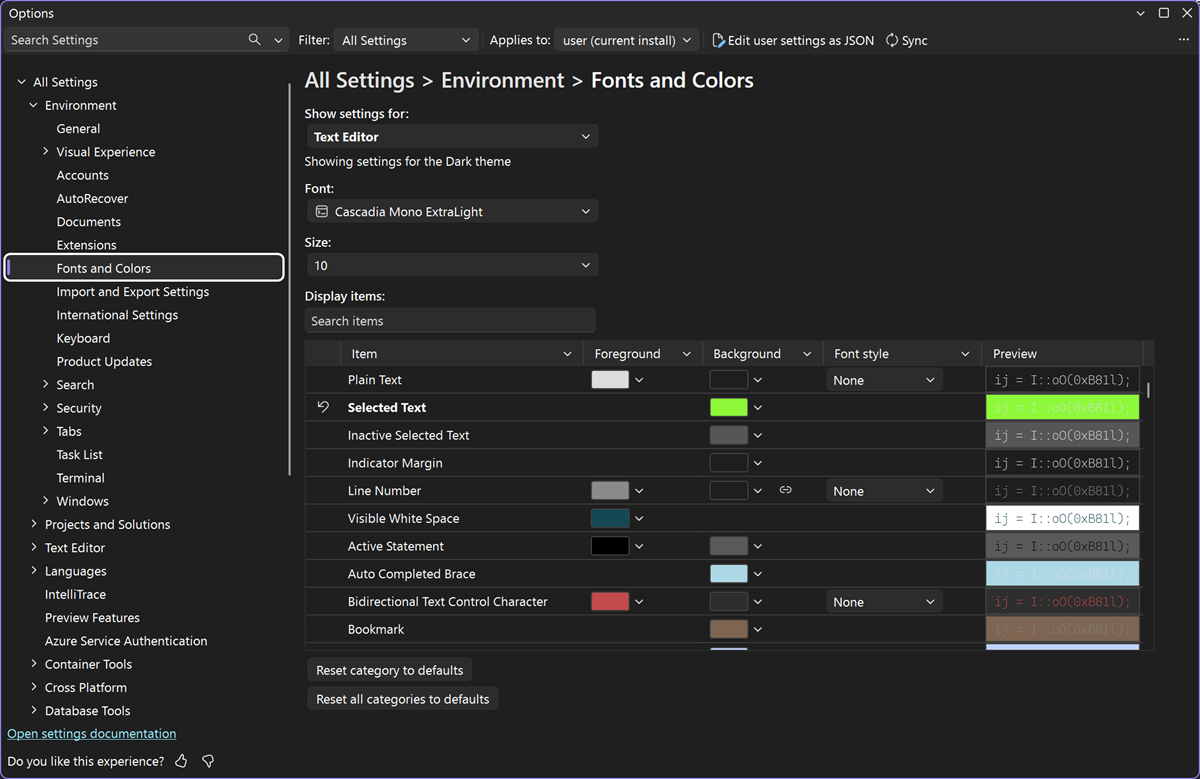
Microsoft ships Visual Studio 2026 on a monthly cadence now, and October brought two separate drops. The 18.11.0 "October Update" on October 13 is a feature release: it introduces a new Copilot chat experience built on the Copilot SDK — the same foundation used by the GitHub Copilot CLI and the standalone Copilot app — along with numbered document-tab shortcuts (Ctrl+Numpad 1 through 9), a Hot Exit option that preserves unsaved work across sessions, a redesigned Fonts and Colors settings page now backed by the Unified Settings/settings.json platform, a "stop build on first failure" option, and two Git additions: comparing a commit against your working tree, and bulk-resolving merge conflicts.
The 18.11.1 servicing release that followed a week later, on October 20, is smaller but notable for C++ developers specifically. Per Microsoft's official release notes, its top fixes include updating the installer to bundle the latest Windows SDK servicing release (10.0.26100.9457), a fix for a Docker Compose debugging regression tied to an overeager failover to WSL, and this line, quoted directly from the notes: "C++23 feature complete in IntelliSense minus modules support."
- Current version as of October 21, 2026: 18.11.1 (released October 20, 2026)
- Prior feature update: 18.11.0 "October Update" (October 13, 2026)
- GA launch: version 18.0, mid-November 2025 — the first major Visual Studio version since Visual Studio 2022
- Release channels: Insiders (replaces Preview) and Stable (replaces Current)
- Shipped alongside: full .NET 10 and C# 14 support, MSVC Build Tools 14.50
- Editions: Community (free), Professional, Enterprise
The C++23 IntelliSense milestone, explained
C++ developers have been watching two separate tracks inside Visual Studio 2026: the MSVC compiler's conformance to the C++23 standard, and the editor's IntelliSense engine actually understanding that syntax for autocomplete, error-squiggles, and navigation. The two don't move in lockstep. Microsoft's C++ team has been shipping C++23/26 compiler conformance work since the 14.50 Build Tools that launched with Visual Studio 2026 last November, and has continued adding conformance fixes release over release.
What 18.11.1 closes out is the IntelliSense side: the editor's understanding of C++23 syntax is now feature-complete, with the explicit exception of C++20/23 modules support, which remains separately tracked. In practice that means code using most C++23 features — the auto(x) decay-copy idiom, the relaxed constexpr rules, the new #warning directive, and similar additions — should now get accurate completions, error detection, and navigation in the editor itself, not just correct compilation.
The compiler side of that story is moving on its own schedule. On October 15, Microsoft's C++ team published a release candidate announcement for MSVC Build Tools version 14.52, stating plainly that "C++23 is ready for production use and available through the /std:c++23 compiler option" — replacing the older, now-deprecated /std:c++23preview flag. That build is currently only available through the Visual Studio 2026 Insiders channel as a release candidate; Microsoft's post says it's expected to go stable in November and ship with Visual Studio's 18.12 release on the Stable channel. So as of October 21, IntelliSense's understanding of C++23 syntax has caught up in Stable via 18.11.1, while the compiler's own production-ready C++23 conformance is still a few weeks out from Stable, sitting in Insiders as a release candidate.
Windows SDK update and other fixes in 18.11.1
The servicing release also rolls the installer forward to the latest Windows SDK build for the 10.0.26100 branch (specifically 10.0.26100.9457), which matters for teams that install the SDK alongside Visual Studio rather than separately through the standalone installer. The other headline fix addresses a debugging regression where pressing Ctrl+F5 on Docker Compose projects could fail over too aggressively to the WSL container runtime instead of the one actually configured for the project.
A new Copilot chat experience, and the AI thread running through 2026
The most visible part of 18.11.0 is a rebuilt Copilot chat interface, which Microsoft says is now built on the same Copilot SDK that powers the GitHub Copilot CLI and the standalone Copilot desktop app — rather than a Visual Studio–specific chat implementation. It's opt-in for now, behind Tools → Options → GitHub → Copilot → Copilot Chat, with a restart required to switch over.
Copilot itself is also more broadly accessible than it used to be: Microsoft's own Visual Studio download page lists a free GitHub Copilot tier bundled into every edition, including Community, with a monthly allowance of 2,000 code completions and 50 chat messages before a paid Copilot plan is needed — on top of agent mode, multi-file Copilot Edits, and access to recent AI models. That free allotment is what most individual developers and students will actually be using when they open the new 18.11 chat interface for the first time.
That's one entry in a longer pattern. Since Visual Studio 2026 launched, nearly every monthly update has added or deepened an AI feature: an Agent (Preview) built on the Copilot CLI's SDK and built-in .NET/Azure skills arrived in 18.8; thinking-effort controls (low/medium/high) for supported models, Git agent features for reviewing commits and working changes, and submodule and worktree support in Git tooling landed in 18.9; pull-request exploration through the Copilot agent and a preview of Bring-Your-Own-Key support — letting developers plug in Microsoft Foundry, OpenAI, Anthropic, or Ollama endpoints instead of the default Copilot backend — shipped in 18.10. Rather than a single splashy AI reveal, Microsoft has been shipping Copilot-adjacent features roughly monthly, consistent with the broader industry push toward agentic coding tools and fast-expanding AI model lineups across competing IDEs and extensions this year.
Visual Studio 2026 vs. Visual Studio 2022: what actually changed
Visual Studio 2026 is the first major version number bump since Visual Studio 2022 launched in late 2021 — but Microsoft has also changed how it ships updates. Visual Studio 2022 got periodic minor-version updates (17.x) over roughly four years. Visual Studio 2026 instead moves on an annual major-version cadence with monthly feature updates in between, and Microsoft has said Visual Studio 2022, 2019, and 2017 keep their existing support lifecycles unaffected.
| Area | Visual Studio 2022 | Visual Studio 2026 |
|---|---|---|
| Release model | Minor updates (17.x) over the product's lifetime | Annual major version + monthly feature updates (18.x) |
| Preview/beta channel | "Preview" channel | "Insiders" channel (replaces Preview) |
| Stable channel | "Current" channel | "Stable" channel (replaces Current) |
| C++ compiler toolset | MSVC v143 (up to 17.14) | MSVC Build Tools 14.50+, C++23/26 conformance work |
| .NET support at launch | .NET 6 | .NET 10 and C# 14, full support at GA |
| Container tooling | Docker only | Docker and Podman support in Container Tools |
| AI assistant depth | Copilot added via extension/updates over time | Copilot chat, agent mode, and Git-integrated review built in from GA, expanded nearly every month |
| Long-term servicing | Standard LTSC options per release | LTSC channel option expected November 2026, one year of security servicing |
Insiders replaces Preview — what that means for updates
One of the more procedural but consequential changes with Visual Studio 2026 is the channel naming and behavior. Microsoft's official announcement states plainly that "Insiders replaces the 'Preview' Channel previously available," with "Stable" similarly replacing the old "Current" channel. The practical effect: early-access features now surface through Insiders builds, validated features move into Stable on a monthly basis, and — per Microsoft — each November the IDE is expected to roll forward to the next annual version, with Visual Studio 2026 expected to update in place to Visual Studio 2027 next year. An LTSC (long-term servicing channel) option for staying on a fixed version with security-only updates is also planned, giving teams that don't want monthly feature churn a slower-moving alternative.
Visual Studio 2026 is not Visual Studio Code
It's worth separating the two products explicitly, since the names collide in search results constantly. Visual Studio 2026 is the full, Windows-first IDE discussed in this article — the one with solution/project files, the integrated debugger, the C++/.NET-heavy toolchain, and the Community/Professional/Enterprise edition tiers. Visual Studio Code is a separate, free, cross-platform lightweight code editor built on Electron, with its own independent, much more frequent release cycle; its recent updates, like the chat canvases and model picker changes in VS Code 1.142, are unrelated to anything covered here. Microsoft maintains both products in parallel and has no plans to merge them.
Editions, pricing, and who it's for
Visual Studio 2026 ships in the same three-tier structure as its predecessor: Community is free for individual developers, students, and open-source work; Professional and Enterprise are paid tiers aimed at small teams and larger organizations, respectively, each offered as a trial through Microsoft's own download page. All three install through the same Visual Studio Installer, where Stable and Insiders now appear as the two channel choices alongside the older edition picker. Container Tools' new Podman support is available across editions for developers who've moved off Docker — a shift some teams have already made for licensing reasons, similar to the trade-offs covered in Pandromeda's own comparison of Docker and Podman.
Why the Windows SDK bump matters right now
Bundling SDK build 10.0.26100.9457 into the Visual Studio installer saves C++ and Windows app developers a separate manual SDK install, and keeps the toolchain aligned with the current Windows 11 servicing branch. For teams tracking Windows platform changes more broadly — including the feature work Microsoft has rolled into recent Windows 11 26H2 updates — having the matching SDK ship through the IDE installer rather than as a separate download is a small but real convenience, especially for native Windows app and driver developers who need the SDK and the IDE in lockstep.
What's next
Microsoft's cadence suggests an 18.12 update is coming in November, and this time there's a specific, already-announced reason to watch for it: Microsoft has said MSVC Build Tools 14.52 — the release that makes the compiler itself production-ready for C++23 — is expected to go stable and ship with 18.12, a month after the 18.11.1 IntelliSense milestone covered here. November also lines up with the one-year anniversary of Visual Studio 2026's original launch and the window Microsoft has flagged for an LTSC channel option. On the C++ side, full conformance for C++23 modules support in IntelliSense remains the explicitly called-out gap after 18.11.1, so that's the next milestone worth watching for native developers after the compiler catches up. Teams currently on Visual Studio 2022 don't need to move immediately — Microsoft has reiterated that its support lifecycle is unaffected — but anyone already running Visual Studio 2026 should expect the Stable channel to pick up 18.11.1's fixes automatically, while Insiders users will likely see early builds of November's update before it reaches Stable. The fastest way to confirm what's installed is Help → About Microsoft Visual Studio inside the IDE, and the release notes page on Microsoft Learn is updated with every servicing build as it ships.
Developers evaluating whether to update now rather than wait can check Microsoft's official release notes page directly, since it's updated the same day as each servicing release and lists exact version numbers, build dates, and linked Developer Community bug tickets for anyone who wants to verify a specific fix before rolling it out to a team.
Frequently asked questions
What is Visual Studio 2026?
Visual Studio 2026 is Microsoft's full desktop IDE (version 18.0 at launch), the first major version since Visual Studio 2022. It shipped in November 2025 and now moves on an annual major-version cadence with monthly feature updates, most recently 18.11.0 on October 13, 2026 and the 18.11.1 servicing release on October 20, 2026.
What's new in the Visual Studio 2026 18.11 update?
The 18.11.0 October Update adds a new Copilot chat experience built on the Copilot SDK, numbered document-tab shortcuts, a Hot Exit option for unsaved work, a redesigned Fonts and Colors settings page, a stop-on-first-failure build option, and Git additions for comparing a commit to the working tree and bulk-resolving merge conflicts.
What does Visual Studio 2026 version 18.11.1 fix?
According to Microsoft's release notes, 18.11.1 (October 20, 2026) updates the installer to the latest Windows SDK servicing release (10.0.26100.9457), fixes a Docker Compose debugging failover issue, and makes IntelliSense feature-complete for C++23 except for modules support.
Is Visual Studio 2026 the same as Visual Studio Code?
No. Visual Studio 2026 is the full, Windows-first IDE with solution/project files and a paid Professional/Enterprise tier structure. Visual Studio Code is a separate, free, cross-platform lightweight editor with its own independent release cycle; Microsoft develops and updates both products separately.
What happened to the Visual Studio Preview channel?
Microsoft replaced it. Starting with Visual Studio 2026, the Insiders channel replaces the old Preview channel for early-access builds, and the Stable channel replaces what was previously called the Current channel.
Is Visual Studio 2026 free to download?
The Community edition is free for individual developers, students, and open-source work. Professional and Enterprise are paid tiers offered as free trials, and a free GitHub Copilot tier with monthly completion and chat allowances is bundled into every edition.
Sources
- Visual Studio 2026 release notes - Microsoft Learnlearn.microsoft.com
- Visual Studio download page - Microsoftvisualstudio.microsoft.com
- Visual Studio: built for the speed of modern development - DevBlogsdevblogs.microsoft.com
- MSVC Build Tools version 14.52 release candidate now available - DevBlogsdevblogs.microsoft.com
- C language updates in MSVC Build Tools v14.50 - DevBlogsdevblogs.microsoft.com
- Visual Studio - Wikipediaen.wikipedia.org
Felix Moreau writes Pandromeda's software coverage and how-to guides. He covers Windows, macOS and Linux updates, the apps people rely on, emulators and developer tools, and turns official documentation into clear, numbered steps that work on the current version.