What Is Android Find Hub? Google's Find My Device Rebrand, Explained
Google renamed Find My Device to Find Hub in 2025, then added UWB pinpointing, satellite sharing, and airline luggage tracking. Here's what changed and how it all works.
Find Hub is the name Google now uses for the app and network that used to be called Find My Device — the free, built-in Android system for locating a lost phone, tablet, watch, pair of earbuds, or Bluetooth tracker tag. The rebrand happened in 2025, and since then Google has layered on ultra-wideband (UWB) precision finding, satellite location sharing for when you have no signal, and a feature that lets you hand your checked luggage's location to an airline if a bag goes missing. If you've searched "Find Hub" wondering whether it's a new app, a new Google account setting, or just Find My Device with a fresh coat of paint, the short answer is: it's the same underlying service, renamed and considerably expanded.
The short version: Find Hub = the rebranded Find My Device. It still locates, rings, locks, and erases Android devices, and it still runs the crowdsourced offline-finding network for tracker tags. New since the rename: UWB "Find Nearby" pinpointing, satellite location sharing, and airline luggage-tag sharing. It requires Android 9 or later for the network and a screen lock for offline finding.
What is Find Hub?
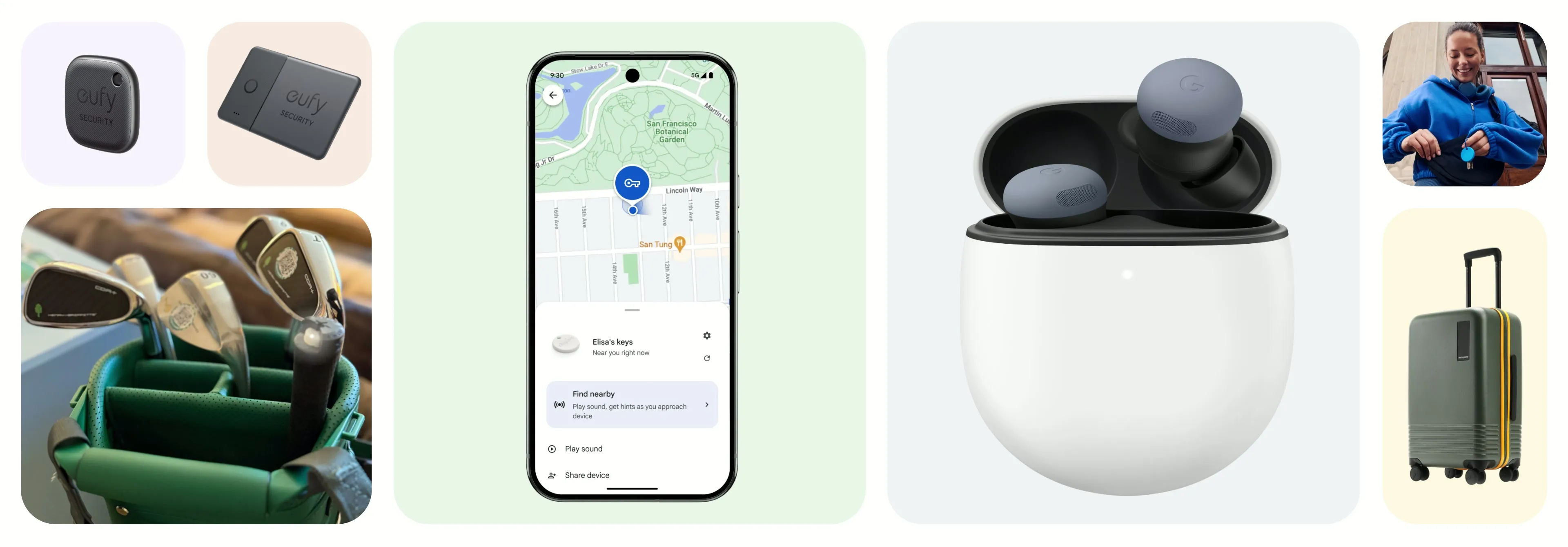
Find Hub is Google's umbrella name for locating things: your own Android phone or tablet, Wear OS watches, Android XR devices, compatible headphones and earbuds, and third-party Bluetooth tracker tags that carry the "Works with Android" badge. According to Google's own Find Hub product page, the service covers three broad jobs — finding a device on a map, ringing it to help you locate it nearby, and protecting it remotely by locking, securing, or erasing it if it's lost for good. It's built into Android, free to use, and tied to the Google Account already signed in on the device.
What happened to Find My Device?
Find My Device didn't disappear — it was renamed. Google's own "What is Find Hub" article states plainly that Find Hub "was previously called Find My Device," without giving a public reason for the switch. Separately, background on the service (via Wikipedia's entry on Find My Device) notes that Google announced the Find Hub rebrand in 2025 at its "The Android Show: I/O Edition" presentation, around the same time the service's crowdsourced offline network — first expanded in April 2024 — was picking up more third-party tracker-tag partners. So if an older review, forum post, or app listing still says "Find My Device," it's talking about the same product Find Hub is today; the app, the settings menu label, and the branding changed, not the underlying account or device data.
What can Find Hub actually find?
Per Google's official product page and support documentation, Find Hub can locate:
| Item type | What Find Hub can do with it |
|---|---|
| Android phones & tablets | Map location, ring at full volume, lock/secure, erase remotely |
| Wear OS watches & Android XR devices | Map location and ring, same as phones/tablets |
| Compatible earbuds/headphones | Locate individually or by case |
| Bluetooth tracker tags ("Works with Android") | Map location, UWB precision finding, offline network support |
| Checked luggage with a tracker tag | All of the above, plus airline link-sharing if a bag is lost |
Everything in that list shows up in the Find Hub app (available on Google Play) or at android.com/find on another signed-in device, and it also works with Android XR devices, the platform Pandromeda has covered separately as Google's mixed-reality push.
How UWB "Find Nearby" precision finding works
The headline feature Google added after the rebrand is ultra-wideband (UWB) precision finding, which Google's product page calls "Find nearby." Instead of just showing a dot on a map, UWB gives you a live distance-and-direction readout — point your phone around a room and it tells you how close you are and which way to go, similar in concept to how AirTag-style trackers work on other platforms. Google's own support documentation is specific about hardware requirements: both the phone and the tag need UWB radios. On the phone side, that currently means Pixel 8 Pro and later, Samsung Galaxy S21+ and Ultra models, and select Motorola Edge and Razr phones. Without UWB hardware on both ends, Find Hub falls back to Bluetooth proximity and the regular map view — still useful, just less precise at close range.
Satellite location sharing
Find Hub's Connect features also now include satellite sharing: the ability to share your live location over satellite when your phone has no cellular or Wi-Fi connection at all. Google's product page frames this as part of the same location-sharing tools that let you share with family or friends for an hour, the rest of the day, or until you manually turn it off — satellite sharing just extends that to places with no network coverage. Google notes availability varies by market and carrier, so it isn't guaranteed on every phone or in every country yet.
Lost luggage tracking with airlines
The other notable post-rebrand addition is luggage tracking. If you've attached a compatible tracker tag to a suitcase, Find Hub lets you generate a shareable link to that tag's location and hand it to airline staff so they can help locate the bag — you control when sharing starts and stops. Google's support pages add a practical detail: this requires an internet connection and a Google Account, availability depends on which airline, airport, and region you're in, and a shared link expires automatically either when the tag is reunited with you or after seven days, whichever comes first.
The Find Hub network: how offline finding works
Separate from any single device, Find Hub also runs a crowdsourced offline-finding network — the same underlying system Google first expanded in April 2024 under the Find My Device name. The idea: millions of opted-in Android phones anonymously relay Bluetooth signals from nearby lost items (your own devices or tracker tags) back to Google, encrypted, so you can see where something was last spotted even if it has no internet connection of its own. Google's official setup guide lays out the actual participation tiers, which matter because they trade coverage for battery and privacy:
| Offline network setting | What it does |
|---|---|
| Off | No encrypted location history stored; device doesn't join the network |
| Without network | Device doesn't join the network, but past online locations stay visible |
| With network, busy places only | Helps locate the device in crowded areas like airports (screen lock required) |
| With network, everywhere | Broadest coverage, busy and remote areas alike (screen lock required) |
Google requires Android 9 or later for network participation, and the device must have a screen lock set for offline finding to work at all. On select Pixel phones — the 8 series and later — the network can reportedly still locate a powered-off handset for several hours after it dies, as long as Bluetooth and Location were switched on when it shut down. That's worth remembering if your phone's battery has been acting up lately; it's a good moment to check your phone's battery health so a dying battery doesn't cut your finding window shorter than it needs to be.
How to set up Find Hub
Google's official checklist for getting Find Hub ready, in order:
- Confirm your Google Account and recovery email are current under Passwords, passkeys and accounts.
- Turn on Location in Settings.
- Go to Settings > Security > Find Hub and turn on "allow this device to be located" (on Android 5.0 and earlier, this lives in the separate Google Settings app).
- In Find Hub settings, choose "Find your offline devices" and set a PIN, pattern, or password — offline finding won't work without a screen lock.
- Make sure the device isn't hidden in Google Play's device library; hidden devices don't show up in Find Hub.
- Test it by signing in at android.com/find on another device.
- Install the Find Hub app from Google Play for the best experience.
- Set up 2-Step Verification backup codes (or keep a physical security key) so you can still sign in and lock or erase a lost device later.
Accessories like earbuds and tracker tags typically get added automatically through a Fast Pair pop-up when you first connect them, or manually later under Connected devices. None of this is especially exotic as device setup goes — it's roughly the same category of "turn on a toggle, grant a permission" process as any other Android settings chore.
Accessories and the "Works with Android" badge
Find Hub isn't limited to Google's own hardware. Partner accessories — tracker tags, earbuds, headphones, tablets, watches, and even smart luggage from third-party manufacturers — can plug into the network if they carry Google's "Works with Android" badge, which signals they've been certified to show up correctly in the Find Hub app and participate in the offline network. Google's product page lists this as the thing to look for when buying a non-Google tracker tag if you want it to work with Find Hub rather than only with its own manufacturer's app.
Security, encryption, and acceptable use
Google says location data moving through the Find Hub network is encrypted using the device's own PIN, pattern, or password — meaning only someone who can unlock the device (or the account owner, via the app) can decrypt where it's been. Separately, Bluetooth-enabled Android phones can surface "unknown tracker" alerts if an unfamiliar tag appears to be travelling with you, which is Google's answer to the stalking risk inherent in any crowdsourced tracker network.
That risk is also addressed directly in Google's Find Hub acceptable use policy, which spells out what the network is explicitly not for: tracking a person or property that isn't yours, trying to determine whether someone is at a location without their knowledge and consent, or placing a tag on someone's belongings to gather information about them without consent. Google's policy page states that using Find Hub to track or stalk someone without consent may be a crime, notes that compatible trackers can reveal a redacted version of the owner's account email to someone who finds an unknown tag near them, and warns that tampering with a tracker's speaker or other safety features is strictly prohibited and can get an account disabled. Law enforcement can also request identifying information tied to misuse reports.
What next
If you already used Find My Device, there's nothing to migrate — your devices, your account, and your settings carry over under the Find Hub name automatically. The only action worth taking now is checking whether your phone and any tracker tags you own actually support UWB precision finding, since that's the one feature with real hardware gatekeeping. Beyond that, it's worth opening Settings > Security > Find Hub at least once to confirm offline finding and a screen lock are both turned on, since neither is forced on by default and both are what make a lost, offline device findable at all. For other Android basics worth getting right while you're in the settings menu, Pandromeda's explainer on why RCS messaging sometimes doesn't work covers another commonly misunderstood Android feature in the same spirit.
Frequently asked questions
What is Find Hub?
Find Hub is Google's built-in Android system for locating, ringing, locking, and erasing lost phones, tablets, watches, earbuds, and Bluetooth tracker tags. It's free, tied to your Google Account, and available as an app or at android.com/find.
What happened to Find My Device?
Find My Device was renamed Find Hub. Google announced the rebrand in 2025, and the underlying account data, settings, and devices carried over automatically — nothing needs to be migrated.
Does Find Hub work without an internet connection?
Yes, through the Find Hub network: opted-in Android phones relay encrypted Bluetooth signals from nearby lost items, so you can see a last-known location even if the item itself has no connection. It requires Android 9 or later and a screen lock on the lost device.
Which phones support UWB precision finding in Find Hub?
Google lists Pixel 8 Pro and later, Samsung Galaxy S21+ and Ultra models, and select Motorola Edge and Razr phones as supporting the ultra-wideband hardware needed for UWB 'Find nearby' pinpointing. The tracker tag also needs UWB support.
How does Find Hub's luggage tracking work?
If a tracker tag is attached to your luggage, you can generate a shareable link to its location and give it to airline staff to help find a lost bag. It requires an internet connection and a Google Account, and the link expires after the bag is found or after seven days.
Is Find Hub location data encrypted?
Google says location data on the Find Hub network is encrypted using the device's own PIN, pattern, or password, so only the account owner can decrypt where a device has been.
Sources
- Google: Learn about Find Hubandroid.com
- Google: What is Find Hub and how to use itandroid.com
- Google Support: Be ready to find a lost Android devicesupport.google.com
- Google Support: Find Hub acceptable use policysupport.google.com
- Wikipedia: Find My Deviceen.wikipedia.org
Nadia Osei covers mobile and consumer gadgets for Pandromeda: smartphones, tablets, smartwatches, earbuds and smart-home devices. She tracks launches, software updates and pricing across Apple, Google, Samsung and the rest, and builds comparisons from the manufacturers' published specifications.