eGPU Explained: Thunderbolt 5 vs OCuLink vs USB4 Compared
Thunderbolt 5, OCuLink and USB4 all let you plug a desktop graphics card into a laptop, mini PC or handheld — but they differ sharply on speed, power and which devices even support them.
An external GPU (eGPU) lets you plug a full desktop graphics card into a thin laptop, a mini PC, or a handheld gaming PC, turning a machine with weak built-in graphics into something that can run modern games or GPU-heavy creative work at a desk. The connection you use to do that — Thunderbolt 5, OCuLink, or USB4 — decides how much of the card's performance you actually get to keep, and which devices you can even plug it into.
The short version: Thunderbolt 5 is the safest, most widely compatible choice for laptops — it carries data, video, and up to 240W of charging power over one cable, and most eGPU enclosures support it. OCuLink is a more direct PCIe connection that loses less performance to the cable, but only a small number of handhelds and mini PCs have an OCuLink port to begin with. USB4 sits in between: it's standard on most 2025–2026 laptops and handhelds and supports PCIe tunneling for eGPUs, but typically gives up more bandwidth than Thunderbolt 5 or OCuLink.
What Is an eGPU, and Why Would You Want One?
An eGPU is a desktop graphics card housed in its own enclosure with its own power supply, connected to a laptop, mini PC, or handheld over an external cable instead of a motherboard's PCIe slot. The appeal is simple: a lightweight ultrabook or a handheld like the ROG Xbox Ally can travel light day to day, then plug into real desktop-class graphics at a desk for gaming, 3D rendering, or AI workloads that need a card with real VRAM.
The tradeoff is that no external connection moves data as fast as a graphics card sitting directly in a PCIe x16 slot, so an eGPU will always lose some performance compared to the same card installed inside a desktop. How much you lose depends almost entirely on which of the three connection types you're using.
Three groups of buyers tend to end up looking at eGPUs. The first is laptop owners who want one machine for travel and work, then desktop-class graphics at home without buying and maintaining a second PC. The second is owners of thin mini PCs — the kind built around a laptop-class chip in a small box with no room for a full-size graphics card — who want to add real gaming or GPU-compute performance after the fact. The third, and fastest-growing, is handheld gaming PC owners: devices like the ROG Xbox Ally or Lenovo Legion Go 2 ship with laptop-class integrated graphics by design, and an eGPU is the only way to push them past that ceiling when docked at a desk.
Thunderbolt 5: The Most Compatible Option
Thunderbolt 5 is Intel's current connector standard, built on USB4 Version 2.0, DisplayPort 2.1, and PCI Express Gen 4. In its standard mode it runs at 80 Gbps of bidirectional bandwidth, and it can shift into an asymmetric "Bandwidth Boost" mode that pushes up to 120 Gbps in one direction when a connected display needs the extra throughput. For an eGPU specifically, Thunderbolt 5 exposes PCIe Gen4 x4 bandwidth to the external card — up to roughly 64 Gbps of raw PCIe throughput — and it can deliver as much as 240W of power over the same cable, enough to charge a laptop without a separate power brick.
Because Thunderbolt 5 is backward-compatible with Thunderbolt 4, Thunderbolt 3, and USB4, it's the connection most eGPU enclosure makers build for first, and the one most likely to already be on a Windows laptop, a MacBook, or a mini PC you already own.
OCuLink: The Fastest, Least Compatible Option
OCuLink is a direct PCIe cable connection rather than a tunneled protocol like Thunderbolt or USB4 — the host exposes a native PCIe link (typically PCIe 4.0 x4, around 64 Gbps of raw bandwidth) straight through the cable, with no tunneling overhead to translate the signal into USB packets first. That makes it the connection of choice for handheld gaming PCs and compact mini PCs that need an eGPU to hit the highest percentage of a card's native performance.
The catch is availability: OCuLink ports are far rarer than Thunderbolt or USB4 ports. A short list of handhelds and mini PCs ship with one, and most mainstream laptops don't have an OCuLink port at all, so buying an OCuLink eGPU dock only makes sense if the device you already own has that port.
USB4: The Common Middle Ground
USB4 Version 2.0, published by the USB Implementers Forum, doubles the maximum aggregate bandwidth of the original USB4 spec to up to 80 Gbps over existing USB Type-C cabling, using a new PAM3 signaling scheme. It's built on the Thunderbolt protocol architecture that Intel contributed to the USB-IF, and critically for eGPUs, USB4 supports PCIe tunneling — the same basic mechanism Thunderbolt uses to carry a graphics card's PCIe traffic over the cable.
USB4 is now standard on most Windows laptops and gaming handhelds released in 2025 and 2026, including several that don't have Thunderbolt branding at all, which makes it the most common on-ramp to an eGPU even though it typically can't match Thunderbolt 5's combination of bandwidth, display support, and power delivery.
Thunderbolt 5 vs OCuLink vs USB4: Spec Comparison
| Connection | Bandwidth | PCIe for eGPU | Power delivery | Where you'll find it |
|---|---|---|---|---|
| Thunderbolt 5 | 80 Gbps (up to 120 Gbps boost) | Up to ~64 Gbps (PCIe 4.0 x4) | Up to 240W | Many 2024–2026 Windows laptops, MacBooks with Intel chips, some mini PCs |
| OCuLink | ~64 Gbps (native PCIe 4.0 x4) | Up to ~64 Gbps, least overhead | No standard power delivery; needs its own PSU | A handful of handhelds (via dock) and mini PCs |
| USB4 (v2.0) | Up to 80 Gbps | Varies by implementation, PCIe tunneling | Varies, typically lower than Thunderbolt 5 | Most 2025–2026 Windows laptops and handhelds |
Real eGPU Enclosures You Can Buy Right Now
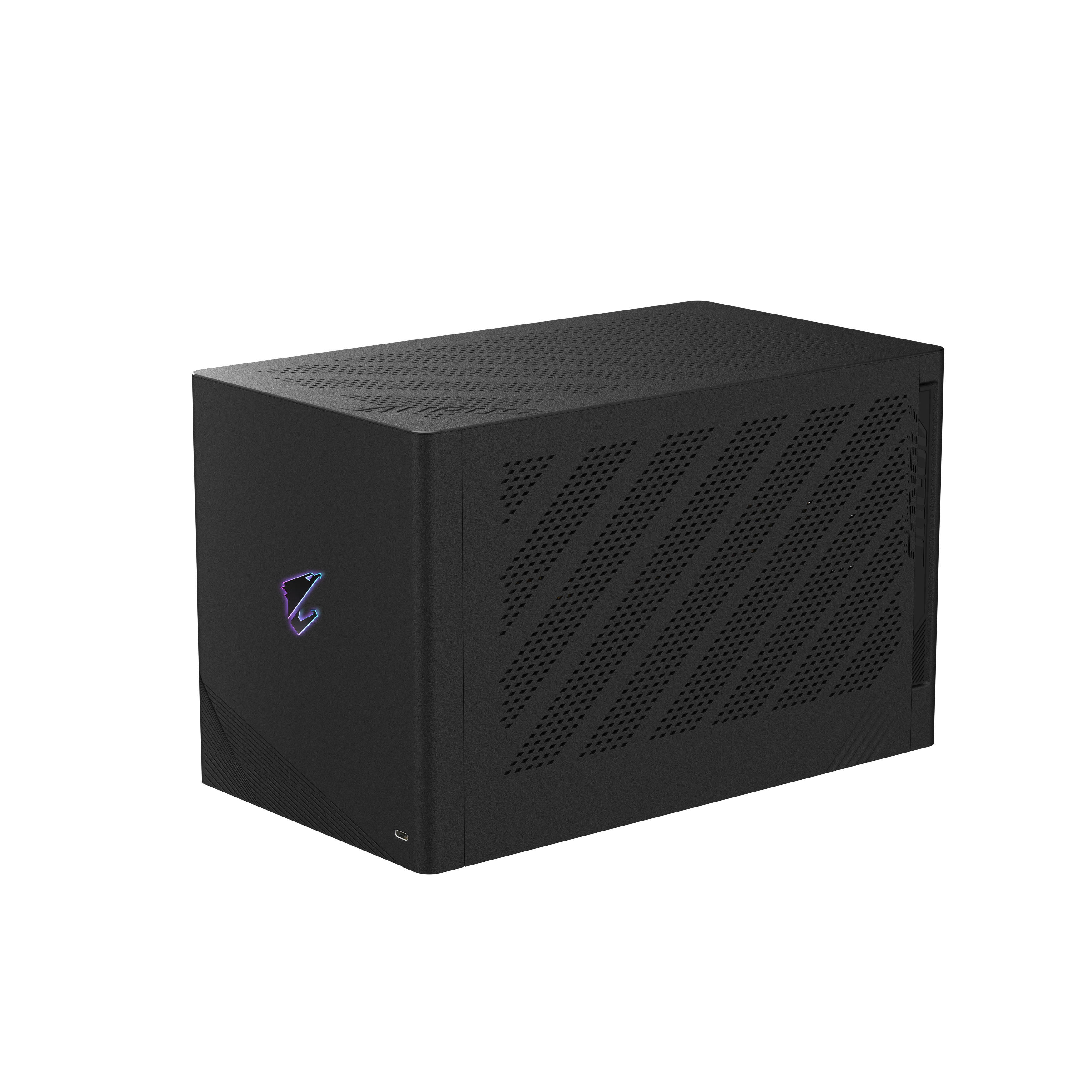
On the Thunderbolt 5 side, GIGABYTE's AORUS RTX 5090 AI BOX is a fully built eGPU enclosure with a liquid-cooled GeForce RTX 5090 already installed inside. According to GIGABYTE's own product page, it connects over two Thunderbolt 5 Type-C ports (one "To PC," one "To Peripheral"), supports USB4 Version 2.0 and Power Delivery 3.0, adds its own Ethernet, DisplayPort 2.1, and HDMI 2.1 outputs, and runs off an internal 850W power supply. GIGABYTE lists Windows 11 version 25H2 or later as the requirement and advises checking Thunderbolt 5/USB4 compatibility with your specific laptop maker before buying. The Thunderbolt consortium's own certification listing for the box confirms the same core specs.
On the OCuLink side, Minisforum's DEG-series docks are the enclosures most often paired with OCuLink-equipped handhelds like the ROG Xbox Ally X20 and compact mini PCs: an open-frame dock that takes a standard ATX or SFX power supply and a desktop graphics card, connected over a native OCuLink PCIe link rather than a tunneled protocol. Because these docks have no built-in PSU or GPU, buyers supply both themselves, which keeps the dock cheap but adds setup work compared to a sealed box like the AORUS AI BOX.
Compatibility Pitfalls: OS, dGPU Switching and Power
eGPU support is not universal, even among devices with the right port. On macOS, Apple's own support documentation says eGPUs only work with Intel-based Macs running Thunderbolt 3 and macOS High Sierra 10.13.4 or later — current Apple Silicon Macs are not listed as supported, which rules out eGPUs on every M-series MacBook. On Windows, USB4 and Thunderbolt 5 both need to be enabled in the laptop's firmware before an eGPU enclosure is recognized, and Windows treats the external card as a second graphics adapter rather than a replacement for the laptop's built-in GPU — Microsoft's own guidance describes assigning individual demanding apps to the eGPU through Windows' graphics settings rather than expecting every app to switch automatically.
Power is the other recurring snag. Enclosures with a built-in power supply, like the AORUS AI BOX's 850W unit, are simpler to set up but limit you to whatever GPU the box ships with or was designed around. Open-frame OCuLink docks that take your own ATX or SFX PSU are more flexible about which card you install, but you're responsible for sizing that power supply correctly for the card, and for routing its cables inside a dock that wasn't built around one specific GPU.
Cable quality matters more with an eGPU than with almost any other USB-C or Thunderbolt accessory. Thunderbolt 5 and USB4's top bandwidth figures assume a certified active cable rated for the full speed; a cheap or overly long USB-C cable can silently negotiate down to a lower USB 3.2 or even USB 2.0 fallback mode, which will make an expensive graphics card perform far below what its spec sheet promises. The enclosure maker's own documentation usually names which certified cable it was tested with, and that's worth following rather than substituting a cable you already have in a drawer.
Which Should You Buy?
If your laptop or mini PC already has Thunderbolt 5 (or Thunderbolt 4/3) and you want a plug-and-play setup, a sealed Thunderbolt enclosure like the AORUS RTX 5090 AI BOX is the simplest path, and the one most likely to keep working if you switch laptops later. If you own a gaming handheld or mini PC with a dedicated OCuLink port, an OCuLink dock gets you closer to the card's native performance for less money, as long as you're comfortable supplying your own PSU and GPU. If your device only has USB4 and no Thunderbolt branding, you can still run an eGPU through PCIe tunneling, but check the enclosure maker's compatibility list first — USB4 eGPU support varies more by implementation than either Thunderbolt 5 or OCuLink.
What an eGPU Setup Actually Costs
A sealed, GPU-included enclosure is the more expensive but more predictable option: GIGABYTE's AORUS RTX 5090 AI BOX bundles a full RTX 5090 with the enclosure, so the price covers both pieces at once rather than being a bare dock you fill yourself. An open-frame OCuLink dock flips that math — the dock itself is comparatively inexpensive, but you're buying a desktop graphics card and, in most cases, an ATX or SFX power supply separately, which is where most of the total cost ends up regardless of which connection standard you choose.
Either way, it's worth comparing the all-in cost of an eGPU setup against simply building or buying a small desktop PC with the same graphics card installed internally. An eGPU earns its premium specifically from portability and from not needing a second full PC — if neither of those matters for your situation, a traditional desktop with the card seated in a PCIe x16 slot will outperform any external connection for less money.
What to Do Next
Before buying anything, check two things on your own device: which of Thunderbolt 5, OCuLink, or USB4 it actually has (not just "USB-C," which doesn't guarantee any of the three), and whether its maker publishes an eGPU compatibility list. From there, match the enclosure to the port you have rather than the fastest spec on paper — an OCuLink dock is useless without an OCuLink port, and a Thunderbolt 5 enclosure will still work over Thunderbolt 4 or 3, just at lower bandwidth.
Frequently asked questions
What is an eGPU used for?
An eGPU (external GPU) lets you plug a full desktop graphics card into a laptop, mini PC, or handheld gaming PC over an external connection, giving a device with weak built-in graphics access to desktop-class gaming or creative performance at a desk.
Do I need Thunderbolt for an eGPU?
No. Thunderbolt 5 is the most widely supported connection for eGPU enclosures, but USB4 also supports PCIe tunneling for eGPUs, and some handhelds and mini PCs use a direct OCuLink PCIe connection instead.
Can a MacBook use an eGPU?
Only Intel-based Macs with a Thunderbolt 3 port running macOS High Sierra 10.13.4 or later, according to Apple's own support documentation. Current Apple Silicon (M-series) MacBooks are not listed as supporting eGPUs.
Is OCuLink faster than Thunderbolt 5?
OCuLink is a more direct PCIe connection with less protocol overhead, so it can preserve more of a card's native performance than a tunneled connection. But OCuLink ports are far rarer than Thunderbolt or USB4, so most buyers are limited by whether their device has one at all.
Will an eGPU work with my gaming handheld?
It depends on the ports your handheld has. Handhelds with a dedicated OCuLink port can use an OCuLink dock for the best performance; handhelds with only USB4 or Thunderbolt can still use an eGPU enclosure built for those standards, typically at somewhat lower bandwidth.
How much power does an eGPU enclosure need?
It depends on the graphics card. Sealed enclosures like GIGABYTE's AORUS RTX 5090 AI BOX include their own power supply (850W in that case) sized for the bundled GPU; open-frame OCuLink docks have no built-in PSU, so the buyer supplies and sizes an ATX or SFX power supply for whatever card they install.
Sources
- GIGABYTE: AORUS RTX 5090 AI BOX product pagegigabyte.com
- Thunderbolt Technology: Certified eGFX productsthunderbolttechnology.net
- USB Implementers Forum: USB4usb.org
- Apple Support: Use an external graphics processor with your Macsupport.apple.com
- Microsoft Learn: Assign a GPU to run demanding apps in Windowslearn.microsoft.com
Mara Lindqvist edits the hardware desk. She covers graphics cards, processors, memory and storage, the foundries and chip designers behind them, and what the numbers on a spec sheet mean for people choosing a PC. Specifications in her stories come from manufacturer spec pages and datasheets.