What Is Thunderbolt 5? Speed, Cables and Charging Explained
Thunderbolt 5 doubles Thunderbolt 4's bandwidth, adds a 120Gbps Boost mode, charges laptops at up to 240W over one cable, and runs on the USB4 Version 2.0 standard it's built on.
Thunderbolt 5 in brief:
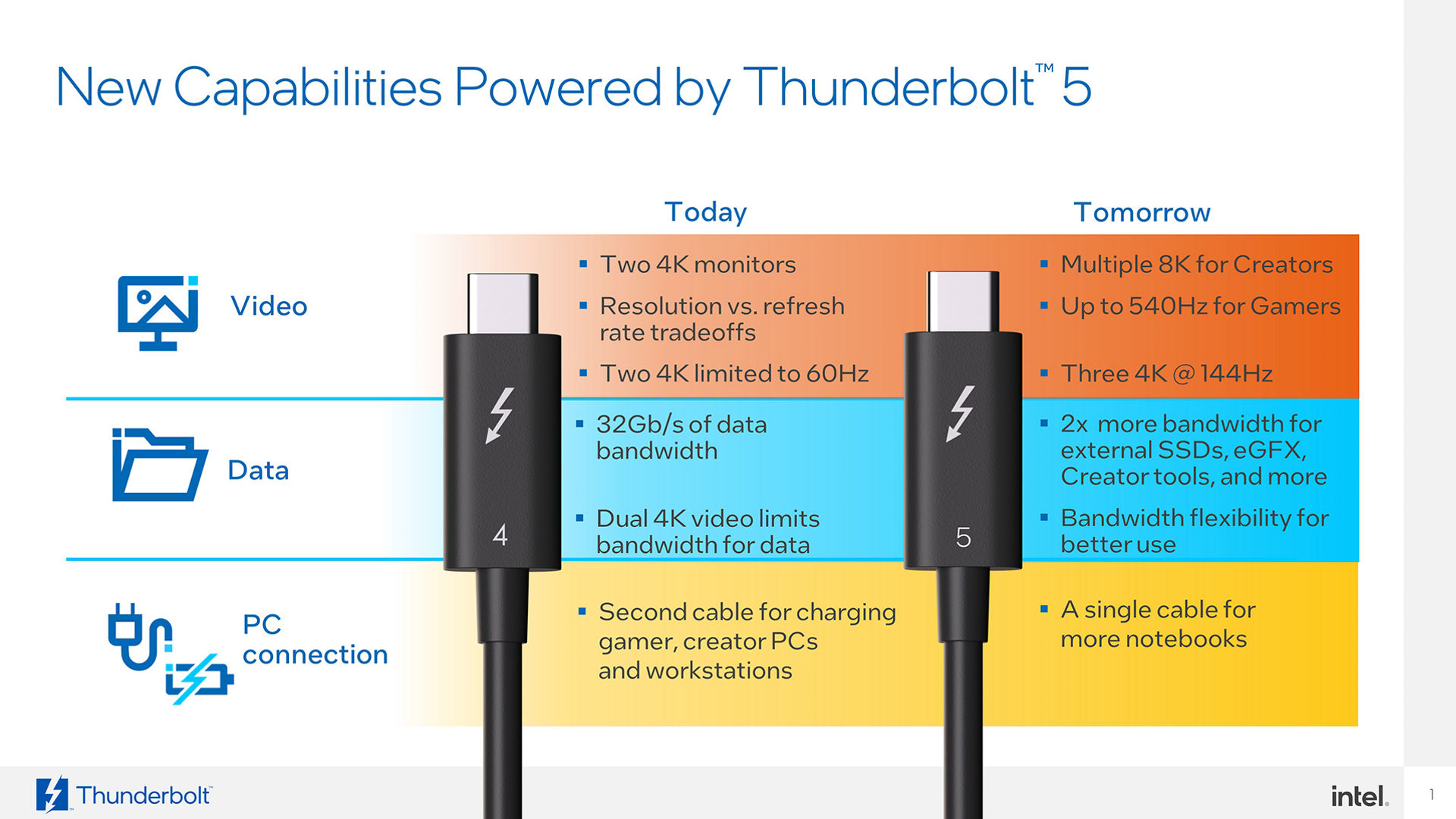
- 80 Gbps of bidirectional bandwidth as standard — double Thunderbolt 4
- Bandwidth Boost can push one direction to 120 Gbps (and the other down to 40 Gbps) for demanding displays
- 64 Gbps of PCIe Gen 4 throughput for external SSDs and eGFX — double Thunderbolt 4
- Up to 240W of USB-PD charging over a single cable; at least 140W is required on one PC port
- Built on and compliant with the USB-IF's USB4 Version 2.0 specification and DisplayPort 2.1
- Universal passive cables up to 2 meters carry the full 80/120 Gbps signal
What is Thunderbolt 5?
Thunderbolt 5 is Intel's newest connectivity standard for the USB-C port, and it roughly doubles what Thunderbolt 4 could do. Where Thunderbolt 4 topped out at 40 Gbps of bidirectional bandwidth, Thunderbolt 5 delivers 80 Gbps as standard, with an optional Bandwidth Boost mode that pushes up to 120 Gbps in one direction for driving high-resolution, high-refresh-rate monitors. It also doubles PCIe throughput to 64 Gbps, supports up to 240W of charging over a single cable, and remains a single USB-C connector that is meant to replace the separate charger, dock, and display cables many laptops still ship with.
Intel introduced Thunderbolt 5 in September 2023, and the first products built around its discrete controller, code-named Barlow Ridge, began shipping in late 2024. By 2026, Thunderbolt 5 has moved from announcement to an actual shelf of hardware: docks, external SSDs, cables, and a growing number of laptops and desktops now carry the Thunderbolt 5 logo, according to Intel's own newsroom announcement and the product listings on Intel's Thunderbolt technology site.
The short version: Thunderbolt 5 matters now because it is the first USB-C standard that can comfortably carry multiple high-end monitors, fast external storage, and laptop charging all on one cable, without most users ever thinking about lane allocation or which port on their laptop is "the fast one."
Thunderbolt 5 vs. Thunderbolt 4 vs. USB4: the numbers
Thunderbolt 5 is built on top of the USB-IF's USB4 Version 2.0 specification, so the two share the same underlying bandwidth ceiling. The difference is that Thunderbolt 5 turns several of USB4's optional capabilities into requirements, and adds Intel's own certification and testing program on top. Here's how the three compare on paper, based on Intel's Thunderbolt 5 technology brief and the USB-IF's USB4 Version 2.0 announcement:
| Spec | Thunderbolt 5 | Thunderbolt 4 | USB4 Version 2.0 |
|---|---|---|---|
| Standard bandwidth | 80 Gbps bidirectional | 40 Gbps bidirectional | Up to 80 Gbps (optional for vendors) |
| Boost / asymmetric mode | Up to 120 Gbps one way, 40 Gbps return (required) | Not supported | Up to 120 Gbps one way, 40 Gbps return (optional) |
| PCIe data throughput | 64 Gbps (PCIe Gen 4) | 32 Gbps (PCIe Gen 3) | Varies by implementation |
| Required PC charging | Up to 140W required; up to 240W available | Up to 100W required; up to 140W available | Not mandated by the spec |
| Display support (PC requirement) | Dual 6K | Dual 4K | Depends on implementation |
| Signaling | PAM-3 | NRZ | PAM-3 (new in v2.0) |
| Certification | Mandatory Intel certification for hosts, devices, and cables | Mandatory Intel certification | Self-certification allowed |
The practical effect is that a port or cable labeled "USB4 Version 2.0" is not guaranteed to hit 80 Gbps, support 240W charging, or drive dual 6K displays — those are all optional in the USB4 spec. A port labeled Thunderbolt 5 is guaranteed to, because Intel requires it and tests for it before the logo can be used.
Bandwidth Boost: how the 120 Gbps mode works
By default, a Thunderbolt 5 connection splits its bandwidth evenly: up to 80 Gbps available for data moving out of the PC, and up to 80 Gbps for data coming in, at the same time. That is already double Thunderbolt 4's 40 Gbps in each direction.
Bandwidth Boost is a separate, optional mode that rebalances that link when a system needs more bandwidth for video than for data. According to Intel's technology brief, Boost mode dedicates up to 120 Gbps to outbound (transmit) traffic — typically video heading to external monitors — while dropping the inbound (receive) side to 40 Gbps. Intel says this gives up to three times more video bandwidth than Thunderbolt 4, and up to 50% more than DisplayPort 2.1's UHBR20 mode on its own. The feature is based on the asymmetric transmission mode defined in the USB4 Version 2.0 specification, rather than being a Thunderbolt-only invention.
In practice, Bandwidth Boost is what lets a single Thunderbolt 5 port or dock drive multiple high-resolution, high-refresh-rate monitors — Intel's own materials cite configurations with multiple 8K displays or very high refresh rates for gaming — without starving the link of bandwidth for everything else plugged into the same dock. When a system doesn't need that much display bandwidth, the link simply stays in its evenly split 80/80 Gbps state.
Cable requirements: passive vs. active, and length limits
Thunderbolt 5's higher speeds ride on the same PAM-3 signaling technology that underpins USB4 Version 2.0. Intel's technology brief states that this lets Thunderbolt 5 reach 80/120 Gbps "over the same Thunderbolt passive cables, connectors, and PC boards that previously supported up to 40 Gbps" — in other words, the physical cable technology didn't need to be reinvented, just driven harder.
Intel's own spec comparison lists "universal cables up to 2 meters in length" as carrying the full 120 Gbps on Thunderbolt 5, versus 40 Gbps for the equivalent Thunderbolt 4 cable length. At Thunderbolt 5's original unveiling, Intel also described the new speeds running over "today's printed circuit boards, connectors, and passive cables up to 1 meter," so exact passive-cable length limits have been described slightly differently across Intel's own materials at different points — buyers should check the rating printed on a specific cable rather than assume a universal number.
The USB-IF's own announcement for USB4 Version 2.0 describes the underlying physical layer as working "over existing 40Gbps USB Type-C passive cables and newly defined 80Gbps USB Type-C active cables," with the 120 Gbps asymmetric configuration reserved for driving very-high-performance displays. Active cables use embedded electronics to maintain signal integrity over longer runs, which is typically how longer Thunderbolt and USB4 cables are built once you move past the passive-cable length ceiling. All Thunderbolt 5 cables are also required to support up to 240W of charging, per Intel's own characteristics table, regardless of their data length rating.
Up to 240W charging over one cable
Thunderbolt 5 raises both ends of the charging equation compared with Thunderbolt 4. Intel's technology brief specifies that every Thunderbolt 5 PC is required to provide at least 140W on one port (up from 100W required for Thunderbolt 4), and that Thunderbolt 5 ports can optionally be built to deliver up to 240W. That 240W ceiling comes from USB Power Delivery 3.1's Extended Power Range (EPR), which Thunderbolt 5 supports but does not mandate on every device — Intel's brief is explicit that Thunderbolt 5 "supports (but does not require) Extended Power Range (EPR) support, delivering up to 240 watts of power."
At the other end, Intel requires a minimum of 15W of power be available for accessories plugged into a Thunderbolt 5 port — the same floor as Thunderbolt 4 — so small peripherals that draw power from the port keep working even on a system that doesn't implement the higher charging tiers. In practice, that means a single Thunderbolt 5 cable can be enough to charge even power-hungry workstation-class laptops, while still leaving headroom in the same connection for data and display traffic — something that used to require a separate charging brick and cable alongside a dock.
Doubled PCIe throughput for storage and eGFX
Thunderbolt 5 is built on PCI Express Gen 4, and Intel specifies 64 Gbps of PCIe data throughput — double Thunderbolt 4's 32 Gbps. That bandwidth is what external NVMe SSD enclosures, eGFX (external graphics) boxes, and high-end capture devices tunnel through, since Thunderbolt and USB4 carry PCIe traffic as one of several protocols multiplexed over the same USB-C connection, alongside DisplayPort and USB 3 data.
Intel's own materials describe this as enabling "storage-intensive applications" and "high PCI-demanding data devices such as eGFX and capture devices" to move data roughly twice as fast as they could over Thunderbolt 4. The same doubling applies to Thunderbolt Networking — Intel's PC-to-PC data transfer feature over a Thunderbolt cable — which moves from 32 Gbps on Thunderbolt 4 to 64 Gbps on Thunderbolt 5, useful for fast file transfers and machine-to-machine backups without a network switch in between.
How Thunderbolt 5 relates to USB4 Version 2.0
It helps to think of USB4 Version 2.0 as the open standard, published by the USB Implementers Forum, and Thunderbolt 5 as Intel's certified, guaranteed-feature-set implementation of it. The USB-IF's USB4 page notes that USB4 itself is based on the Thunderbolt protocol specification originally contributed by Intel, so the relationship runs in both directions: Intel's Thunderbolt 3 architecture became the technical foundation for USB4, and USB4 Version 2.0 in turn became the foundation Thunderbolt 5 builds on.
The USB-IF published the USB4 Version 2.0 specification in October 2022, describing it as enabling "USB 80Gbps performance over the USB Type-C cable and connector," built on the new PAM-3 physical layer, and aligned with DisplayPort Revision 2.1 and PCI Express Revision 4 — the same three building blocks Intel cites for Thunderbolt 5. The key difference, as the comparison table above shows, is that USB4 Version 2.0 leaves most of that performance optional for manufacturers, while Thunderbolt 5 certification requires it. That's why a laptop can legitimately advertise "USB4 Version 2.0" without supporting the 240W charging tier, the 120 Gbps boost mode, or dual 6K displays — while a Thunderbolt 5 logo is Intel's guarantee that it does. For more background on how USB and Thunderbolt protocols evolved into today's single USB-C connector, Wikipedia's Thunderbolt (interface) entry has a useful timeline.
Which devices support Thunderbolt 5 in 2026
Three years after Intel's original announcement, Thunderbolt 5 hardware has moved well past first-generation novelty. Intel's own Thunderbolt product listings now include Thunderbolt 5 docking stations from several dock makers, Thunderbolt 5 external NVMe SSDs, Thunderbolt 5-rated cables in multiple lengths, and at least one eGFX enclosure, alongside a growing number of laptops and desktop motherboards built around Intel's Barlow Ridge controller. Monitor makers have also started shipping Thunderbolt 5 displays that can daisy-chain additional accessories off a single cable, taking advantage of Bandwidth Boost for higher refresh rates.
Not every USB-C port on a 2026 laptop is a Thunderbolt 5 port, though, and not every high-bandwidth USB-C laptop is Thunderbolt-certified at all — some systems ship with native USB4 Version 2.0 support without going through Intel's Thunderbolt certification process, which means their 80 Gbps ceiling is real but the 240W charging tier, dual-6K requirement, and Bandwidth Boost mode are not guaranteed the way they are on a certified Thunderbolt 5 port. Shoppers evaluating a new laptop, dock, or monitor should check for the Thunderbolt 5 logo specifically, rather than assuming any fast USB-C port behaves the same way.
Pandromeda has covered several recent devices with high-bandwidth USB-C connectivity, including the Surface RTX Spark Dev Box and the Surface Laptop Ultra; neither has been confirmed by Microsoft to use Thunderbolt 5 specifically, so treat them as related reading on fast USB-C hardware rather than confirmed Thunderbolt 5 devices. The same caution applies broadly in 2026: with USB4 Version 2.0, Thunderbolt 5, and manufacturer-specific USB-C implementations all sharing the same port shape, the only way to know what a given port actually supports is to check the manufacturer's own spec sheet for the Thunderbolt 5 logo or an explicit 80/120 Gbps and 240W rating.
What next
Thunderbolt 5 is no longer a future standard — it's shipping hardware with real docks, drives, and displays behind it, and it solves a genuine problem: one USB-C cable that can reliably carry high-resolution video, fast external storage, networking, and laptop charging at the same time. The numbers worth remembering are 80 Gbps standard, up to 120 Gbps in Bandwidth Boost, 64 Gbps of PCIe throughput, and up to 240W of charging, all running on the same USB4 Version 2.0 foundation that the USB-IF publishes and Intel certifies against.
For background on two of the standards Thunderbolt 5 builds on, see Pandromeda's explainers on DisplayPort 2.1's UHBR bandwidth tiers and on how GDDR7 encoding improves on GDDR6, another example of a connectivity standard getting a generational bandwidth jump. Buyers shopping for a new dock, cable, or monitor in 2026 should look specifically for the Thunderbolt 5 logo and certification rather than assuming any fast USB-C port behaves the same way — the spec sheet, not the connector shape, is what determines whether a cable delivers 40 Gbps, 80 Gbps, or the full 120 Gbps Boost mode.
Frequently asked questions
What is Thunderbolt 5?
Thunderbolt 5 is Intel's latest USB-C connectivity standard. It delivers 80 Gbps of bidirectional bandwidth as standard, with an optional Bandwidth Boost mode that reaches up to 120 Gbps in one direction, plus up to 240W of charging and 64 Gbps of PCIe throughput over a single cable.
Is Thunderbolt 5 the same as USB4?
No, but they're closely related. Thunderbolt 5 is built on the USB-IF's USB4 Version 2.0 specification and requires the same PAM-3 signaling and 80/120 Gbps bandwidth modes. The difference is that USB4 Version 2.0 leaves most of that performance optional for manufacturers, while Intel's Thunderbolt 5 certification makes it mandatory, along with the 240W charging tier and dual-6K display support.
Do I need a special cable for Thunderbolt 5?
Yes, cables must be rated for Thunderbolt 5 to guarantee full performance. Intel says the new speeds run over the same passive cable, connector, and PC board technology that supported Thunderbolt 4, with universal cables up to 2 meters carrying the full signal; longer runs typically require active cables. A Thunderbolt 4 or basic USB-C cable plugged into a Thunderbolt 5 port will cap bandwidth well below 80 Gbps.
How much power can Thunderbolt 5 deliver for charging?
Every Thunderbolt 5 PC is required to provide at least 140W of charging on one port, up from 100W on Thunderbolt 4, and ports can optionally be built to deliver up to 240W using USB Power Delivery 3.1's Extended Power Range. Thunderbolt 5 ports also guarantee a minimum of 15W for small accessories.
What is Bandwidth Boost?
Bandwidth Boost is an optional Thunderbolt 5 mode, based on USB4 Version 2.0's asymmetric transmission mode, that rebalances the link to dedicate up to 120 Gbps to outbound video traffic while dropping the return direction to 40 Gbps. It's meant for driving multiple high-resolution or high-refresh-rate displays, and the link reverts to an even 80/80 Gbps split when that extra video bandwidth isn't needed.
Is Thunderbolt 5 backward compatible?
Yes. Intel says Thunderbolt 5 is fully compatible with previous versions of Thunderbolt and USB, including Thunderbolt 4, Thunderbolt 3, and standard USB-C devices, though connected at the lower speed and feature set those older standards support.
Sources
- Intel Newsroom: Intel Introduces Thunderbolt 5 Connectivity Standardintel.com
- Intel: Thunderbolt 5 Technology Brief (PDF)intel.com
- USB-IF: USB4 Version 2.0 Specification Announcement (PDF)usb.org
- USB Implementers Forum: USB4 Specification Overviewusb.org
- Wikipedia: Thunderbolt (interface)en.wikipedia.org
Mara Lindqvist edits the hardware desk. She covers graphics cards, processors, memory and storage, the foundries and chip designers behind them, and what the numbers on a spec sheet mean for people choosing a PC. Specifications in her stories come from manufacturer spec pages and datasheets.