AIO Liquid Cooling: The Complete 2026 Buyer's Guide
A practical, spec-sheet-checked guide to AIO liquid CPU coolers: how they work, which radiator size fits your case and CPU, and whether one is worth it over air cooling in 2026.
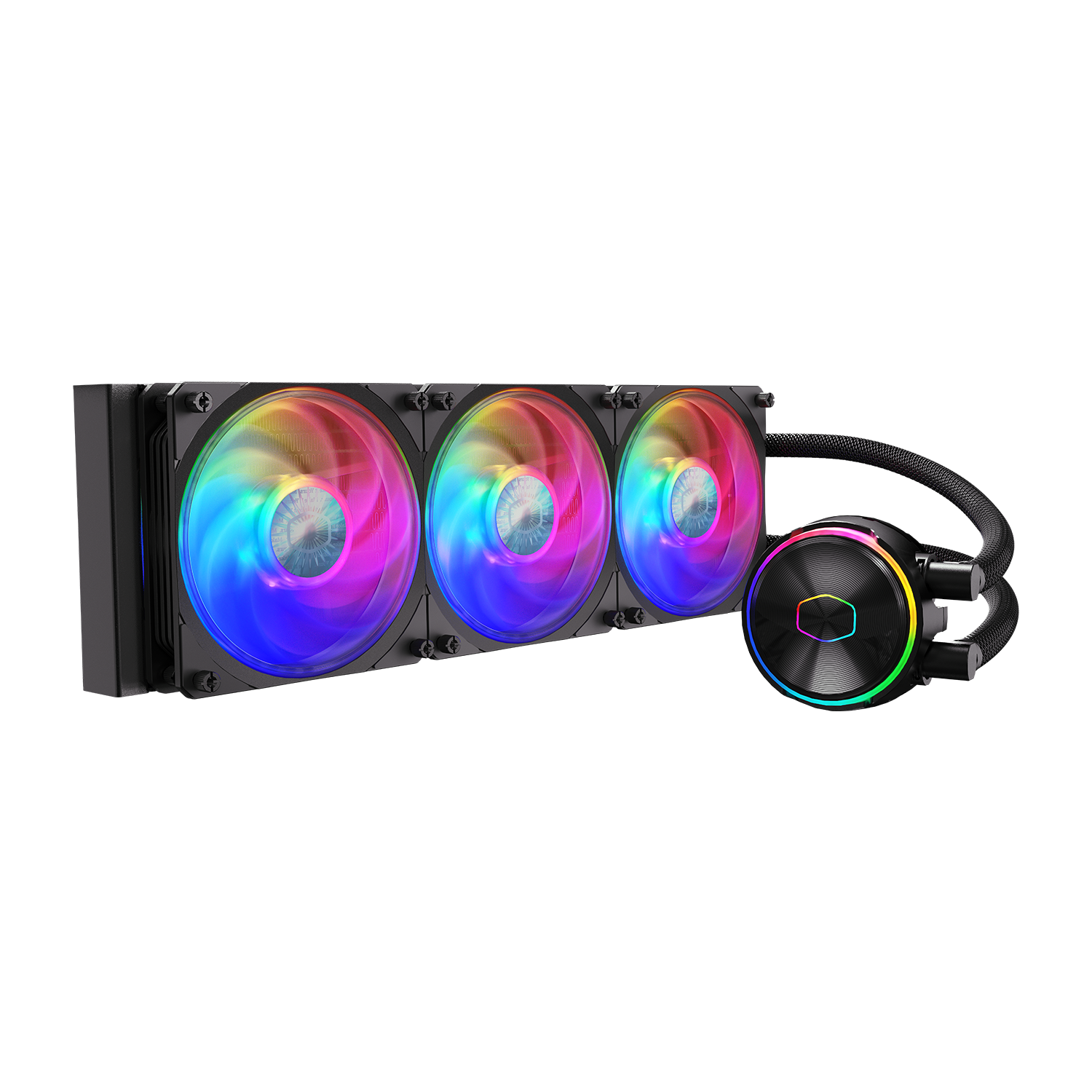
An all-in-one (AIO) liquid CPU cooler is worth buying when you want quieter, more consistent cooling for a mid-range-or-hotter CPU without the mess of a custom loop — a 240mm unit suits most mainstream builds, a 280mm or 360mm unit suits high-TDP chips or small/dense cases, and a good tower air cooler remains the safer, lower-maintenance default for budget and compact builds. Below is how AIOs work, where the three common radiator sizes fit, and what manufacturer spec and support pages actually say about lifespan, pump whine, and warranty — so you can decide without guessing.
- An AIO is a sealed, pre-filled closed loop: a pump/cold-plate unit on the CPU, tubing, a radiator, and fans. You never refill it.
- 240mm, 280mm and 360mm radiators are the common sizes; bigger generally means more surface area for the fans to reject heat, but case clearance and fan noise matter more than raw size for most people.
- Cooler Master's published spec sheet for its 360mm MasterLiquid PL360 Flux lists a radiator fan noise ceiling of 32 dBA and a fan life expectancy above 160,000 hours; ASUS's ROG Ryujin III 360 spec page lists a pump speed range of 800–3600 RPM and a 6-year warranty.
- Corsair and NZXT both back their current AIO lines with multi-year warranties (commonly 5–6 years), which is the closest thing to an official lifespan figure most buyers will get.
- For most 2026 builds, a quality air cooler is still the pragmatic choice; an AIO earns its keep on hot CPUs, compact cases needing top/front radiator mounting, or when you specifically want to move heat away from the CPU socket area.
What an AIO liquid cooler actually is
An all-in-one liquid cooler is a closed-loop CPU cooling system that arrives pre-assembled and pre-filled with coolant from the factory. Unlike a custom ("open") loop, you don't fill it, bleed air from it, or choose your own tubing and fittings — it's sealed at the factory and installed as a single kit. Wikipedia's overview of computer cooling describes this category as combining a pre-filled radiator, fans, and a water block with an integrated pump into one simplified unit, trading a small amount of cooling headroom for dramatically easier installation compared with a custom loop.
That sealed design is the core appeal: you get most of the thermal benefit of liquid cooling — water moves heat more efficiently than air and lets you relocate the radiator away from the CPU socket — without the build complexity, leak risk, or maintenance schedule of a DIY loop.
How an AIO cooler works: pump, cold plate, radiator, fans
Every AIO has the same four components working together:
- Cold plate / pump assembly: A metal block (almost always copper) sits directly on the CPU, with the pump built into or bolted to the same assembly on nearly every modern AIO. The pump circulates coolant through the cold plate, where it absorbs heat from the CPU via thermal paste contact, then pushes the now-warmed coolant out through the tubing.
- Tubing: Pre-filled, sealed tubes (often sleeved rubber or a low-permeation composite) carry coolant between the pump/cold-plate unit and the radiator. ASUS's spec page for the ROG Ryujin III 360, for example, lists "sleeved rubber tube" at 400mm length for that model.
- Radiator: A thin, finned aluminum heat exchanger that the warmed coolant flows through. Fans push or pull air through the radiator's fins, transferring the heat into the surrounding air, which case fans then exhaust. This is the same convection principle Wikipedia describes for any heatsink: heat moves into the radiator, then out via airflow, until the loop reaches thermal equilibrium with the case environment.
- Fans: Typically two or three 120mm or 140mm fans mounted to the radiator, matched to its length. Fan speed (and therefore noise and cooling capacity) is usually PWM-controlled from the motherboard.
Coolant then returns to the pump and cold plate, and the cycle repeats continuously while the system is powered — there's no reservoir to check or refill on a sealed AIO, which is the main practical difference from a custom loop.
AIO vs. air cooling: the real tradeoffs
Neither option is simply "better" — they trade off differently depending on your case, CPU, and tolerance for maintenance.
- Cooling headroom on hot CPUs: A large-radiator AIO (280mm or 360mm) generally has more thermal capacity to handle sustained high power draw than a single-tower air cooler, because the radiator's surface area for heat rejection is larger and the heat source is moved away from the socket. A large dual-tower air cooler can close much of that gap on many chips, but AIOs tend to have an edge at the top end of CPU power consumption.
- Noise character: Air coolers have one noise source (the fan(s) on the tower); AIOs add a pump as a second noise source. A good air cooler is often the quieter overall package at idle and light load, partly because there's no pump to contribute whine (see below).
- Case clearance and compatibility: Tall air coolers can clash with tall RAM heatsinks or case side panels; AIOs need a case with enough radiator mounting space (top or front) and the right fan-mount pattern, but leave RAM slots and the socket area completely clear.
- Failure mode: An air cooler's worst-case failure is a dead fan — annoying but low-risk. An AIO's worst-case failure is a pump dying (silent thermal shutdown risk) or, rarely, a leak. Modern AIOs are sealed and tested at the factory, but it's a real difference in risk profile, however small.
- Maintenance: Air coolers need only occasional dust cleaning. AIOs are also effectively "set and forget" in normal use — you don't refill or bleed them — but they are not serviceable if the pump fails; the whole unit is typically replaced under warranty rather than repaired.
- Looks and RGB: AIOs with LCD screens or ARGB pump caps (increasingly common on premium models) offer a visual customization angle that air coolers generally can't match.
If you're also weighing where your money is best spent on a new build, it's worth cross-checking your CPU choice against how the current flagship CPU options compare before deciding how much cooling headroom you actually need.
Radiator sizes: 240mm vs 280mm vs 360mm
Radiator size is usually described by the combined length of the fan mounts it supports — a "360" radiator takes three 120mm fans, a "280" takes two 140mm fans, and a "240" takes two 120mm fans. Manufacturer spec sheets show how this plays out in real dimensions: Cooler Master's spec page for the MasterLiquid PL360 Flux lists its 360mm radiator at 394 x 119.6 x 27.2mm, while the same line's 240mm radiator measures 277 x 119.6 x 27.2mm — roughly proportional to the extra fan mount, with radiator thickness held constant.
| Radiator size | Typical fan count | Best fit | CPU TDP guidance |
|---|---|---|---|
| 240mm | 2 x 120mm | Compact/mATX cases, mainstream builds, front or top mount where 360mm won't fit | Mainstream desktop CPUs; adequate for most non-overclocked chips |
| 280mm | 2 x 140mm | Mid-tower cases with 140mm top/front mounts; a middle ground on surface area and fan noise | Mainstream to upper-mid-range CPUs, including moderately power-hungry chips |
| 360mm | 3 x 120mm | Larger towers, high-airflow cases, enthusiast and workstation builds | High-TDP or overclocked CPUs, and anyone prioritizing lower fan speeds for a given thermal load |
As a rule of thumb: check your case's radiator clearance first (including RAM height if top-mounting, and front-panel thickness if front-mounting), then size up to the largest radiator your case and budget support if your CPU runs hot or you want lower fan speeds for the same cooling result. Going bigger doesn't hurt thermals, but it does cost more and demands more case space — there's rarely a reason to undersize deliberately if a larger radiator fits.
Pump specs, fan noise, and what "quiet" really means
Pump speed and fan speed are usually independently controlled, and both affect noise. Official spec sheets give a sense of the ranges involved: ASUS's ROG Ryujin III 360 ARGB variant lists its 8th-generation Asetek-based pump running from 800 to 3600 RPM (±10%), while its fans are specified from 450–2000 RPM with a listed noise figure of 29.7 dB(A) at full fan speed. Cooler Master's MasterLiquid PL360 Flux spec sheet lists a pump noise ceiling of 15 dBA and a fan noise ceiling of 32 dBA, with fans rated 0–2300 RPM.
In practice, most of the audible noise from a well-set-up AIO at idle or light load comes from fans, not the pump — manufacturers generally tune pump curves to stay low unless the loop is under heavy thermal load. The exception is "pump whine": a high-pitched electrical or cavitation noise some AIO pumps produce, particularly at certain RPM points, which is a known and discussed issue across the category rather than something confined to one brand. If you're especially noise-sensitive, look for models whose motherboard software lets you set a fixed, moderate pump curve rather than letting it spike dynamically, and avoid running the pump at its lowest rated speed, which is sometimes where whine is most noticeable.
Lifespan, maintenance, and warranty: what manufacturers actually say
AIOs are sealed units with no user-serviceable maintenance — you don't top off coolant or bleed air from a properly sealed, modern AIO. The practical lifespan question is really "how long before the pump wears out or the coolant degrades," and manufacturers address this mainly through warranty length and component-level reliability figures rather than a blanket "lifespan" number.
- Warranty as the best public signal: ASUS's spec page for the ROG Ryujin III 360 lists a 6-year warranty. NZXT's support documentation for its current Kraken pump line lists a comparable multi-year warranty window, and Corsair's own guidance on its support site discusses expected AIO service life in a similar multi-year range, with warranty terms varying by specific product line (its newer iCUE LINK coolers carry longer terms than some older, discontinued lines).
- Component-level reliability figures: Where manufacturers do publish hard numbers, they tend to be MTTF (mean time to failure) ratings on individual parts rather than a whole-unit lifespan. Cooler Master's spec sheet for the MasterLiquid PL360 Flux lists a pump MTTF above 210,000 hours and a fan life expectancy above 160,000 hours — figures that correspond to many years of continuous runtime under rated conditions, though MTTF is a statistical fleet average, not a guarantee for any individual unit.
- What actually degrades: The pump bearing and the coolant/anti-corrosion additive package are the parts most likely to limit real-world life. A pump that develops whine, a noticeable RPM drop, or rising idle temperatures over time is the practical signal something is wearing out — at that point, replacement under warranty (rather than DIY repair) is the normal path, since sealed AIOs generally aren't designed to be opened and refilled by the end user.
- No scheduled maintenance beyond dust control: Keep the radiator fins and fan intakes free of dust buildup, same as you would for an air cooler's heatsink — that's effectively the entire maintenance routine for a sealed AIO.
Is an AIO worth it for a typical builder in 2026?
For most mainstream builds — a mid-range CPU, a standard mid-tower case, no extreme overclocking — a well-reviewed tower air cooler remains the simpler, lower-risk, and often similarly effective choice, and it's the option we'd default to if you're not sure you need more. An AIO becomes the better call when one or more of these apply:
- Your CPU runs at the high end of current desktop power draw and you want more thermal headroom without louder fan noise.
- Your case has generous radiator mounting (top or front) but limited clearance for a tall air-cooler tower, especially next to tall RAM heatsinks.
- You want the radiator positioned away from the socket to improve airflow around VRMs and RAM, or you want the aesthetic of an LCD/ARGB pump cap.
- You're comfortable with "sealed unit, replace under warranty if it fails" as your maintenance plan, rather than wanting a fully serviceable cooler.
Compared with a custom open loop, an AIO gives up some of the ultimate thermal ceiling and the ability to cool a GPU in the same loop, but it removes nearly all the build complexity, leak risk during assembly, and ongoing maintenance (refilling, bleeding, coolant replacement) that a custom loop demands. For anyone who isn't already building loops as a hobby, an AIO is the far more sensible way to get most of liquid cooling's benefit. If you're assembling a full parts list and want a sense of where the rest of your budget should go, Pandromeda's roundup of current GPU pricing and the latest Steam Hardware Survey breakdown are both useful context for what a "typical" build looks like heading into 2026.
What to check before you buy
Before buying an AIO, confirm three things directly against your case and CPU: (1) your case's radiator clearance for the size you want, including RAM height for top mounts; (2) your CPU's rated power draw against the cooler maker's own compatibility or TDP guidance for that specific model, since this varies by cooler and isn't universal; and (3) the warranty length and region-specific terms on the manufacturer's own product or support page, since these differ by product line and have changed over time even within the same brand. Manufacturer spec and support pages — not third-party reviews — are the most reliable source for all three.
Frequently asked questions
What size AIO radiator do I need — 240mm, 280mm, or 360mm?
Start with what your case supports: a 240mm radiator takes two 120mm fans, a 280mm takes two 140mm fans, and a 360mm takes three 120mm fans. If your case fits a 360mm and your CPU runs hot or you want quieter fan speeds, go bigger; if you're in a compact case or on a mainstream CPU, 240mm is usually sufficient.
Is an AIO liquid cooler better than a good air cooler?
Not universally. Large-radiator AIOs tend to have more thermal headroom for high-power CPUs, but a quality air cooler is often quieter, has no pump-whine risk, and needs essentially zero maintenance. For mainstream builds, a good air cooler is frequently the more pragmatic choice.
What is pump whine and can I avoid it?
Pump whine is a high-pitched noise some AIO pumps produce, especially at certain RPM points, caused by the pump motor or minor cavitation. It isn't limited to one brand. Setting a fixed, moderate pump speed in motherboard software rather than letting it idle at its lowest rated RPM can sometimes reduce it.
How long do AIO coolers actually last?
Manufacturers don't usually publish a single lifespan figure. The closest official signals are warranty length — commonly five to six years on current lines from brands like ASUS and NZXT — and component MTTF ratings, such as Cooler Master's published pump MTTF above 210,000 hours for its MasterLiquid PL360 Flux.
Do AIO coolers need maintenance like a custom loop does?
No. A sealed AIO is pre-filled and never needs refilling or air-bleeding. The only real maintenance is keeping the radiator fins and fan intakes free of dust, the same as with an air cooler.
Is a custom open loop worth it instead of an AIO?
Only if you want to cool a GPU in the same loop, want the highest possible thermal ceiling, or enjoy loop-building as a hobby. For everyone else, an AIO delivers most of liquid cooling's benefit without the leak risk, build complexity, or ongoing coolant maintenance a custom loop requires.
Sources
- ASUS ROG Ryujin III 360 — official spec pagerog.asus.com
- Cooler Master MasterLiquid PL360 Flux — official spec pagecoolermaster.com
- Cooler Master MasterLiquid PL240 Flux — official spec pagecoolermaster.com
- Corsair — How long do Corsair AIOs last (support guidance)corsair.com
- NZXT Kraken — Features & Compatibility support articlesupport.nzxt.com
- Wikipedia — Computer coolingen.wikipedia.org
Mara Lindqvist edits the hardware desk. She covers graphics cards, processors, memory and storage, the foundries and chip designers behind them, and what the numbers on a spec sheet mean for people choosing a PC. Specifications in her stories come from manufacturer spec pages and datasheets.