What Is ChatGPT's Intelligent UI? GPT-6 Interactive Answers Explained
ChatGPT can now answer with calculators, diagrams, comparison tables and mini tools instead of plain text. Here is what OpenAI's Intelligent UI does, who has it, and how to dial it back.
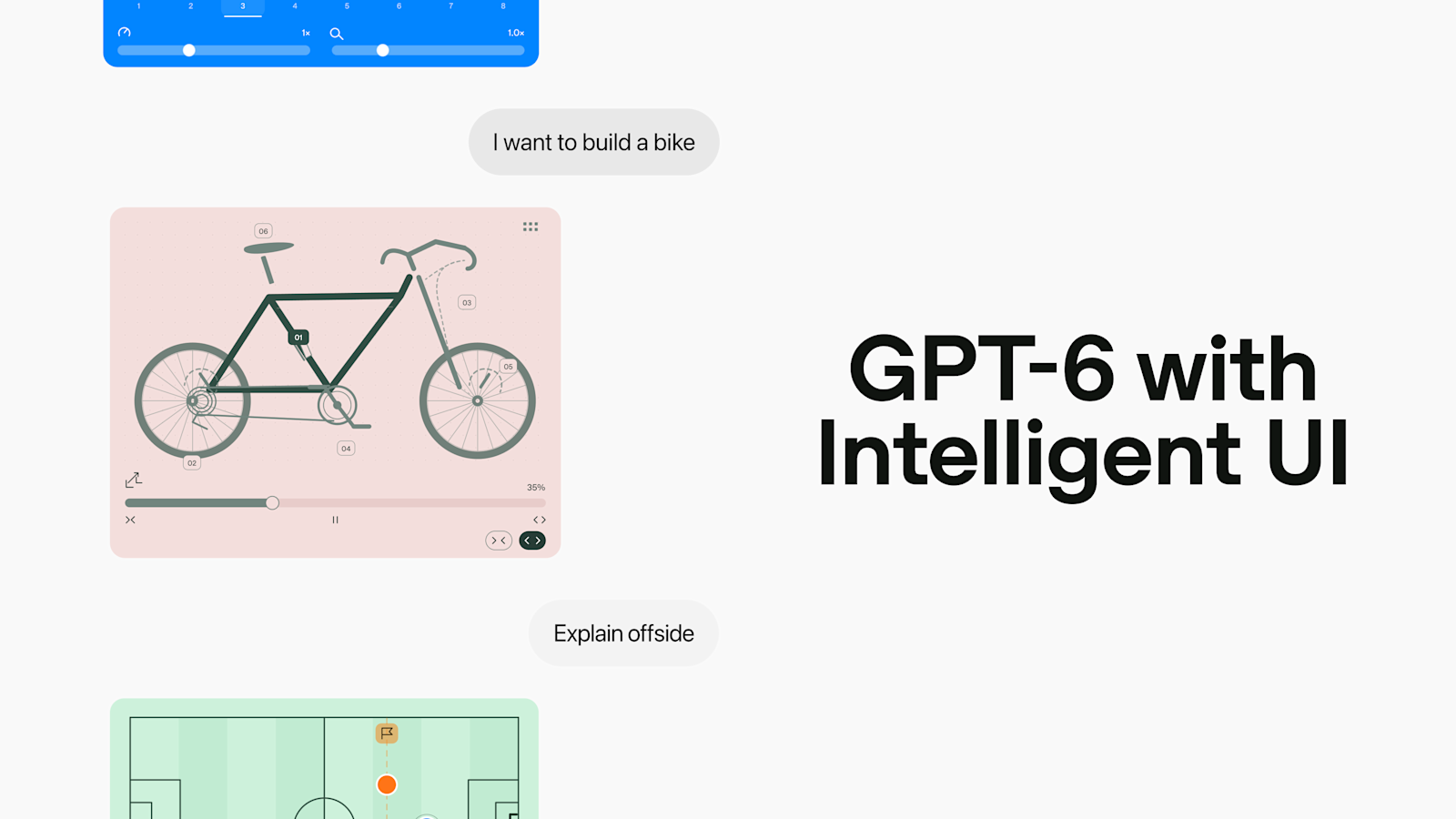
Intelligent UI is a new feature in ChatGPT that lets the chatbot answer with more than plain paragraphs. When OpenAI's GPT-6 models judge that a question is better served by something interactive — a calculator, a comparison table, a diagram, a small on-the-spot tool, even a short game — they can generate that interface directly inside the chat, instead of (or alongside) a text response. OpenAI announced the feature on October 7, 2026, rolling it out first to paying ChatGPT plans on GPT-6 Sol, with Free and Go users getting it the next day on GPT-6 Luna.
Intelligent UI at a glance
- What it is: ChatGPT responses that can include buttons, sliders, calculators, tables, diagrams and small interactive tools, generated by the model itself.
- Announced: October 7, 2026, alongside GPT-6's expansion into standard ChatGPT.
- Who has it first: Plus, Pro, Business and Enterprise, via GPT-6 Sol (from October 7).
- Who gets it next: Free and Go, via GPT-6 Luna (from October 8).
- Where it doesn't appear: The ChatGPT Work tab, Voice, and the Pro reasoning setting (which still runs on GPT-6 Astra).
- Can you turn it off: Not with a single switch. OpenAI's help center says setting Personalization > Layout and Visuals to "Simple" reduces visual and interactive elements, though some may still appear.
What Intelligent UI Actually Does
In OpenAI's own description, Intelligent UI "lets ChatGPT shape each answer with the right layout, visuals, and interactivity" for what a person is trying to understand or do. Rather than forcing every answer into the same scrolling-text format, GPT-6 now decides, on a question-by-question basis, how much of the reply should be plain text and how much should be a generated interface component. A simple factual question can still come back as a normal paragraph. A question that's naturally visual or hands-on — planning a trip, comparing two products, building something step by step — can come back with a diagram, a table, or a small working tool instead.
OpenAI frames this as a continuation of a trend that started with reasoning models: once ChatGPT could handle harder problems, the next gap was presentation. A correct answer buried in a wall of text is still harder to use than one you can see and manipulate. Intelligent UI is OpenAI's attempt to close that gap by letting the model choose its own output format, the same way it already chooses its own wording.
How It Works: A Component Library and a Compiler
According to OpenAI, the feature is built on two pieces of underlying infrastructure. First, a library of "native, streamable components" — the buttons, sliders, charts, forms and similar building blocks the model can draw on when it decides an interface would help. Second, a compiler that processes the interface as the model generates it, so the layout appears progressively on screen rather than popping in all at once after the model finishes "thinking." OpenAI says this combination works on both web and mobile, and spans GPT-6's full range of reasoning levels, from Instant up to Extra High.
Some generated components keep their state if you refresh the page in the middle of a conversation — a checklist you've partly ticked off, for instance, will still be partly ticked off after a reload. That state isn't carried over between separate chat threads, though; each new conversation starts fresh.
Because the compiler renders the interface as the model writes it, you generally see a component take shape piece by piece rather than waiting for a finished block to appear all at once, the same way streaming text appears word by word today. OpenAI hasn't published a technical paper detailing exactly how the component library is trained or constrained, so specifics beyond what's described above — such as the total number of available component types — aren't publicly documented.
Examples: Calculators, Diagrams, Trackers and Mini Games
OpenAI's own announcement walks through several concrete cases rather than describing the feature only in the abstract. Depending on the prompt, ChatGPT can generate:
- A savings calculator you can adjust with sliders to see how contributions grow over time.
- A bill splitter for a group dinner, so the math updates as you change the inputs.
- A step-by-step diagram for a hands-on project — OpenAI's own example shows a labeled bicycle build, with interactive callouts on each part.
- An explainer diagram for a rules question, such as a soccer pitch with markers illustrating an offside call.
- A short, playable game generated inside the conversation itself.
- A quantities table that scales automatically, such as ingredient amounts for a meal that adjusts as you change the guest count.
The common thread is that these aren't static illustrations. They're functional: sliders actually move, tables actually recalculate, and tools respond to further input in the same conversation, without a separate app or plugin.
The Rollout: Sol for Paid Plans, Luna for Free
Intelligent UI arrived as part of a broader move of GPT-6 into standard ChatGPT. Sol and Luna themselves weren't brand new on October 7 — according to multiple outlets that covered OpenAI's earlier announcement, both models had already been introduced in late September for ChatGPT Work, Codex and the API, with Sol pitched at more demanding coding and agent tasks and Luna aimed at faster, high-volume work. What changed on October 7 was that the same two models, paired with Intelligent UI, became the models behind the ordinary Chat tab that most ChatGPT users actually open. In the consumer app, access depends on which GPT-6 variant a plan runs on, and the two tiers didn't go live on the same day.
| Plan | Underlying model | Intelligent UI starts |
|---|---|---|
| Plus | GPT-6 Sol | October 7, 2026 |
| Pro | GPT-6 Sol | October 7, 2026 |
| Business | GPT-6 Sol | October 7, 2026 |
| Enterprise | GPT-6 Sol | October 7, 2026 (subject to workspace admin settings) |
| Free | GPT-6 Luna | October 8, 2026 |
| Go | GPT-6 Luna | October 8, 2026 |
OpenAI's blog post itself doesn't print calendar dates — it uses "today" for the Sol rollout and "tomorrow" for Luna, language consistent with an October 7 publish date and an October 8 follow-on, which matches how the rollout has been reported elsewhere. For more on how Sol compares with GPT-6's higher-end Astra model, see Pandromeda's breakdown of GPT-6 Sol vs. Astra pricing and access, and for how Luna stacks up against a rival low-cost model, see our comparison of Claude Haiku 4.5 and GPT-6 Luna.
Where Intelligent UI Doesn't Show Up
The feature isn't universal across every corner of ChatGPT. Per OpenAI's help center, Intelligent UI is available in the Chat tab but not in the Work tab, and it isn't available in Voice conversations at all. There's also a wrinkle inside Chat itself: if you select the Pro reasoning option on a plan that supports it, that query runs on GPT-6 Astra rather than Sol or Luna, and Astra does not support Intelligent UI. In other words, picking the highest reasoning effort can mean trading away the interactive answers. If you've connected plugins such as Gmail, Health or Finance to ChatGPT, OpenAI says those continue to function normally alongside the feature.
Can You Turn Intelligent UI Off?
Not entirely, at least not according to OpenAI's own documentation. There is no single toggle that disables generated interfaces outright. What OpenAI's help center does offer is a setting under Personalization > Layout and Visuals on the web, where choosing Simple "reduces visual and interactive elements," though the article is explicit that some may still appear. Beyond that, OpenAI suggests steering the model through Custom Instructions — for example, asking it to default to concise, text-only answers — or simply requesting a plain-text response within a single conversation. The exact layout ChatGPT returns can still vary even with those preferences set.
This is worth flagging because secondary coverage of the launch has been inconsistent on this exact point, with some write-ups implying visuals can be switched off completely. Based on OpenAI's own help article, that's not quite accurate: Simple mode dials the feature back, it doesn't guarantee a return to plain text every time.
How It's Different From Canvas and ChatGPT's Apps
OpenAI has shipped interactive surfaces inside ChatGPT before, so it's worth separating Intelligent UI from what came earlier. Canvas, which OpenAI's help center still documents as a distinct feature, opens a separate editing pane next to the chat for long-form writing or code that needs repeated revisions — you can highlight a section, ask for inline edits, and step back through version history. It's meant for one sustained document or script, and it typically opens automatically once a response runs long or when you ask for it by name.
Intelligent UI works differently. It doesn't open a separate pane; the interactive element appears directly inside the conversation flow, generated fresh for that specific answer. It's aimed at short, self-contained interactions — a calculator, a diagram, a quick tool — rather than a single document you edit over an extended session. The two features can coexist: a long piece of writing might still prompt Canvas, while a one-off "help me split this bill" question is the kind of case Intelligent UI targets. OpenAI's announcement doesn't frame Intelligent UI as a replacement for Canvas or for ChatGPT's connected apps and plugins, and both continue to operate alongside it.
Why OpenAI Is Doing This
OpenAI's stated reasoning ties back to the same shift that produced reasoning models in the first place: as the underlying model gets better at hard problems, the bottleneck moves from "can it get the answer right" to "can it present the answer usefully." A correct savings projection is more useful as an adjustable calculator than as three paragraphs of numbers; a correct bike-assembly explanation is more useful as a labeled diagram than as a numbered list. By giving GPT-6 a component library and a renderer to draw from, OpenAI is betting that letting the model pick its own output format — the way it already picks its own words — makes ChatGPT more useful across the huge range of things people actually ask it to do, from the more than 1.2 billion people OpenAI says use ChatGPT weekly.
It also puts ChatGPT in more direct competition with how rival chatbots present answers. Google introduced a comparable concept, Generative Interface, alongside Gemini 3 the prior year, and OpenAI's framing of Intelligent UI — letting the model choose between text, visuals and interactive elements per answer — closely mirrors that approach, suggesting generated, answer-specific interfaces are becoming a contested feature among the major chat assistants rather than a one-off experiment.
What's Next
The immediate rollout finishes once Free and Go users receive GPT-6 Luna, closing the gap between paid and unpaid tiers that opened on October 7. Beyond that, OpenAI has said there's "still work ahead to improve the model's design judgment and expand what it can create," language that suggests both the range of components and the model's sense of when to use them are expected to keep changing rather than being locked in at launch. Worth watching: whether OpenAI eventually extends Intelligent UI into the Work tab and Voice, whether the Pro reasoning tier (still running on GPT-6 Astra) gains support for it, and whether a more complete opt-out arrives in response to user requests for a plain toggle — a request that has already surfaced in OpenAI's community forums since launch. For context on the model generation this feature rides on, see Pandromeda's explainer on what GPT-6 Astra is and what it does.
Frequently asked questions
What is ChatGPT's Intelligent UI?
Intelligent UI is a ChatGPT feature, announced by OpenAI on October 7, 2026, that lets GPT-6 generate interactive interface elements inside a response, such as calculators, diagrams, comparison tables and small tools, instead of only plain text, whenever the model judges that format would help.
Which ChatGPT plans get Intelligent UI first?
Plus, Pro, Business and Enterprise got it first, on October 7, 2026, running on GPT-6 Sol. Free and Go users got it the next day, October 8, 2026, running on GPT-6 Luna.
Can you turn off ChatGPT's Intelligent UI?
Not with a single on/off switch. OpenAI's help center says going to Personalization, then Layout and Visuals, and choosing Simple on the web reduces visual and interactive elements, though some may still appear. You can also set a text-only preference in Custom Instructions.
How is Intelligent UI different from Canvas?
Canvas opens a separate editing pane for long-form writing or code you revise over time. Intelligent UI doesn't open a separate pane; it generates a self-contained interactive element, like a calculator or diagram, directly inside the normal chat flow for a single answer.
Does Intelligent UI work in ChatGPT Voice or the Work tab?
No. According to OpenAI's help center, Intelligent UI is available in the Chat tab but not in the Work tab, and it is not available in Voice conversations. It also doesn't apply when a response uses the Pro reasoning option, which runs on GPT-6 Astra.
What are examples of Intelligent UI in action?
OpenAI's own examples include an adjustable savings calculator, a bill splitter, a labeled step-by-step diagram for building a bicycle, an explainer diagram for a soccer offside call, a short playable game, and a quantities table that recalculates as you change inputs.
Sources
- OpenAI: GPT-6 with Intelligent UIopenai.com
- OpenAI Help Center: Intelligent UI in ChatGPThelp.openai.com
- OpenAI Help Center: What is the canvas feature in ChatGPT and how do I use it?help.openai.com
- OpenAI: ChatGPT plans and pricingopenai.com
Theo Park runs the AI desk at Pandromeda. He follows model launches from the frontier labs and the open-weight community, tracks the assistants and developer tools built on them, and explains what each release changes on pricing, capability and safety. His reporting leans on primary sources: model cards, technical reports, API documentation and the companies' own announcements.