VS Code 1.144: Cloud Sessions, Copilot Fusion and a New Marketplace
Visual Studio Code's October 2026 stable release adds cloud sessions, Copilot Fusion model routing, experimental Computer Use, and a new way to discover chat customizations.
Visual Studio Code 1.144 is out now as a free update to the Stable channel, and it's a bigger release than its version-number bump suggests. The October 2026 build adds cloud-hosted sessions that keep working after you close your laptop, a model-routing system called Copilot Fusion that can split one coding task across several AI models, an experimental mode that lets agents operate your desktop apps directly, and a new in-editor marketplace for finding chat customizations. If you use VS Code's AI agent features day to day, this is one of the more consequential updates of the year.
VS Code 1.144 at a glance
- Released: October 28, 2026, to the Stable channel
- Headline features: Session continuity (cloud sessions), Copilot Fusion model routing, Computer Use (experimental), Assisted permissions (now GA), customization marketplace (preview)
- How to get it: VS Code auto-updates by default, or run Help > Check for Updates
- Follows: VS Code 1.143, which made the Copilot harness the default chat experience
Session continuity: agent sessions that don't need your laptop online
The headline feature in 1.144 is what Microsoft calls session continuity. Previously, an agent session tied to the Copilot harness generally needed your machine to stay on and connected. With 1.144, VS Code adds cloud sessions that run on GitHub's infrastructure, so a long-running agent task keeps going even after you close the lid. You can pick a session back up from VS Code itself, from GitHub.com, or from GitHub Mobile.
To manage where sessions actually run, 1.144 introduces a Remote Environments dialog. It brings GitHub Environments, Dev Tunnels, WSL instances, and SSH hosts into a single list with status indicators and connect/disconnect controls, instead of scattering them across separate menus.
The release also adds Cloud Automations in preview: automations that trigger on a schedule or in response to a repository event (a new issue, a failed check, a merged pull request), created directly from the Agents window rather than hand-written as workflow files. And underpinning all of this is Agent Host Protocol (AHP) version 1.0 — the open, JSON-RPC-based protocol VS Code already used internally to talk to agents, now published as a stable 1.0 spec with official client libraries for Rust, TypeScript, Kotlin, Go, Swift and .NET. Because AHP separates the session layer from any specific agent implementation, other editors or tools can in principle implement either side of it.
Why does a published protocol version matter to someone who just wants their chat history to survive a reboot? Because AHP 1.0 is what makes session continuity portable rather than a one-off feature bolted onto VS Code specifically. Since the protocol separates "how a session's state is represented and synchronized" from "how a given agent actually reasons or calls tools," any client that implements AHP — in principle, another editor, a CI dashboard, or a mobile app — can show and resume the same session a developer started in VS Code. The official client libraries Microsoft published alongside 1.0 (covering Rust, TypeScript, Kotlin, Go, Swift, and .NET) exist specifically so that other tool builders, not just Microsoft, can plug into that layer.
Copilot Fusion: one request, multiple models
The second major addition is Copilot Fusion, which is now generally available (with its higher tiers restricted to certain plans). Instead of picking a single model for a chat request, Copilot Fusion selects a model, a reasoning-effort level, and an execution pattern on your behalf — and it can run more than one model on the same task, for example having one model draft an answer while a second reviews or critiques it before you see the result.
Copilot Fusion offers three effort levels — Standard, High, and Max — with High and Max gated to specific Copilot plans. Billing follows the standard per-model token rates for whichever models Fusion actually invokes, and Microsoft is running a 30% discount on paid plans through November 30, 2026, presumably to encourage people to try it while it's new.
Alongside Fusion, 1.144 also extends side-by-side model comparisons — letting you see how two models handle the same prompt — to more project types than the feature supported before. Taken together, Fusion and the expanded comparisons point at the same underlying shift: VS Code is increasingly treating "which model" as a setting the tool manages on your behalf by default, with manual single-model selection becoming the opt-out rather than the default path.
Computer Use: letting agents operate your desktop (experimental)
An experimental feature called Computer Use lets an agent running in a Copilot harness session see and control desktop applications on macOS or Windows — not just files inside VS Code, but other windows and programs on the machine. The agent can ask for permission before turning this on, or you can toggle it yourself with the /computer on and /computer off chat commands. Being experimental and desktop-automation-adjacent, this is one to test cautiously rather than enable by default, especially on a machine with sensitive data or credentials in other open applications.
Assisted permissions moves from preview to generally available
Assisted permissions — a feature that uses a model to judge the risk of each tool call an agent wants to make, and auto-approves the ones it scores as low-risk while still asking you to confirm anything riskier or ambiguous — graduates from preview to general availability in this release. It's turned on from the permissions picker, requires folder isolation to be enabled, and an organization can still restrict or disable it through policy. 1.144 also adds working set review (experimental): a way to see every file an agent has touched during a session in one place and keep or undo each change individually, plus Copilot Memory, automatic worktree cleanup, and the ability to run extensions directly inside the Agents window.
A new way to discover chat customizations
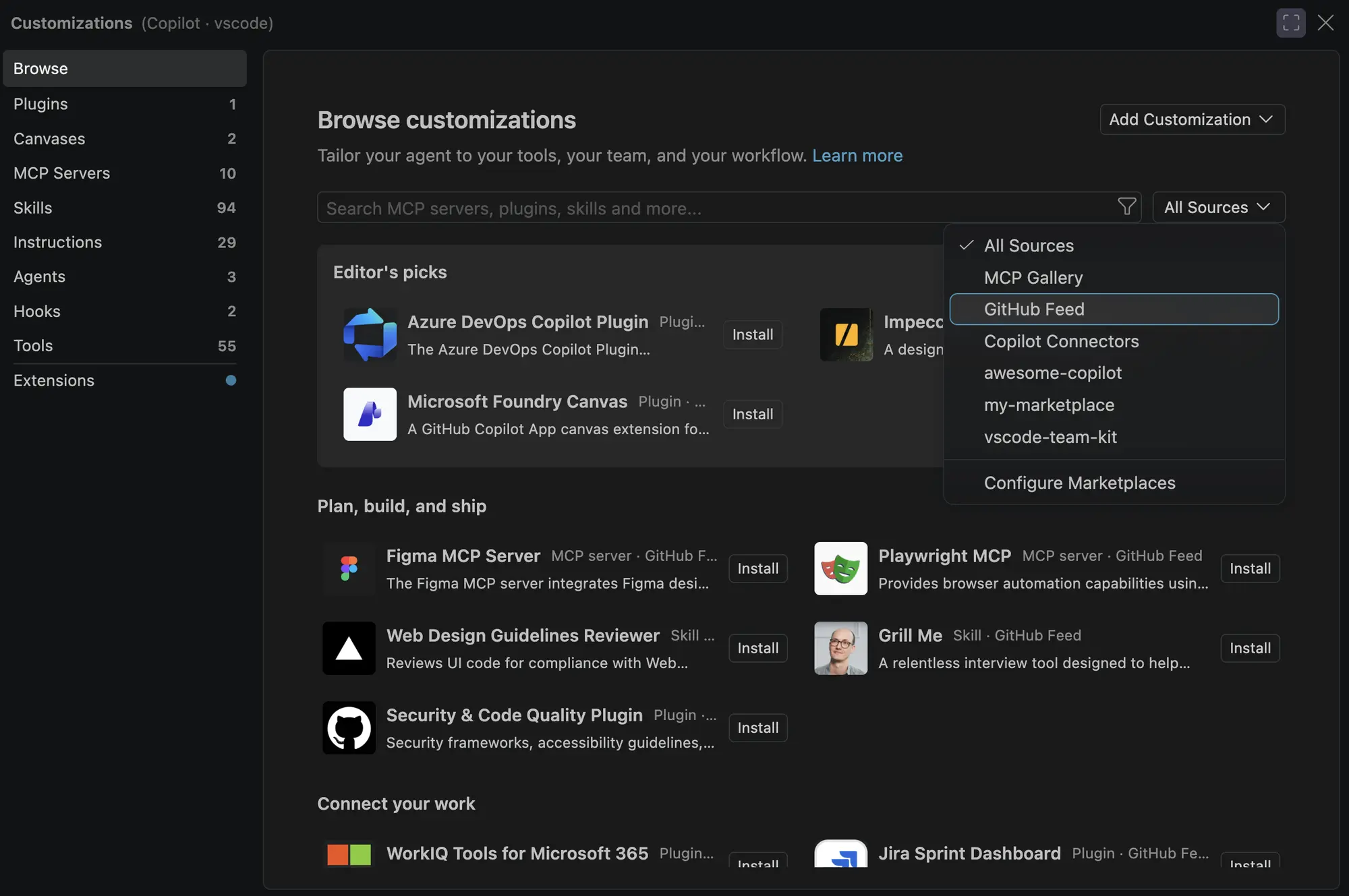
1.144 adds a Browse experience (preview) that works like a small marketplace for chat customizations — combining a GitHub Feed of community content with plugins from whatever marketplaces you've configured, organized into sections like Editor's Picks and filterable by source or type. You can open it from the Customizations view or by running the Chat: Open Customizations command. Note that the GitHub Feed portion needs a supported harness and isn't available in fully local sessions.
The same update area adds Copilot connectors in preview — a way to connect services like Slack and Notion directly into an agent session so it can pull in context from them — richer in-editor editing of custom agent files, shareable links to a customization so a teammate can install it in one click, and slash commands that can trigger plugins, MCP servers, and skills.
Smaller but useful changes
Several lower-profile changes round out the release:
- Session management: you can now move an existing chat into a different session (preview), nested sessions get their own per-session workspaces, nested sessions work inside quick chats, and session groups support custom icons and colors.
- Chat: an experimental voice mode supports full conversations that retain session context, and voice approvals for tool calls are now localized into 25 languages.
- Editor experience: the issue reporter was redesigned into a single-page form that supports file attachments, opens in its own window, and covers more repositories than before.
- Terminal (Windows): dialog boxes spawned by a command you run in the integrated terminal now open in front of the VS Code window instead of behind it.
- Enterprise: restricted permission modes are now shown as disabled rather than hidden entirely, administrators can push organization-managed defaults for new sessions, and loading managed settings now shows inline progress.
- Extension authoring: OIDC Trusted Publishing lets developers publish an extension straight from a GitHub Actions workflow without storing a personal access token as a secret, closing off a common source of leaked long-lived credentials in publishing pipelines.
None of these smaller items are headline features on their own, but they're a reasonable snapshot of where Microsoft is spending incremental effort release over release: session and permission plumbing for teams, and quality-of-life fixes for everyday editing and the terminal.
| Feature | Status in 1.144 | What it does |
|---|---|---|
| Session continuity / cloud sessions | New | Keeps agent sessions running on GitHub's infrastructure when your machine is offline |
| Copilot Fusion | Generally available | Routes a request across one or more models, with Standard/High/Max effort levels |
| Computer Use | Experimental | Lets an agent see and operate desktop apps on macOS/Windows |
| Assisted permissions | Generally available | Auto-approves low-risk tool calls after an automated risk check |
| Working set review | Experimental | Review, keep, or undo every file an agent changed in a session |
| Customization marketplace / Browse | Preview | Discover and install chat customizations, skills, and plugins |
| Copilot connectors (Slack, Notion, etc.) | Preview | Lets an agent session pull context from connected services |
How to get VS Code 1.144
VS Code checks for and installs Stable updates automatically on its default schedule; to force a check, open the Command Palette and run Help: Check for Updates, or look under the Help menu. Users on the Insiders channel will have already seen most of these features land incrementally over the preceding weeks, since Insiders builds ship nightly ahead of each monthly Stable release.
Should you turn on the experimental features now?
Assisted permissions and Copilot Fusion are generally available, so there's little downside to trying them if you already use VS Code's agent features — Fusion in particular is worth testing on a task you'd normally hand to a single model, to see whether the extra model calls (and extra token cost) are worth the quality gain. Computer Use and working set review are explicitly experimental and, in Computer Use's case, grant an agent fairly broad control over your desktop; it's worth testing in a low-stakes environment before relying on it for anything that touches sensitive windows or credentials elsewhere on your machine.
Teams working under an enterprise policy should check with whoever administers their VS Code rollout before flipping on Computer Use or assisted permissions broadly — both are the kind of feature an organization may reasonably want to restrict by policy rather than leave to individual developer preference, and 1.144's enterprise section specifically calls out that administrators can now push managed defaults for new sessions and that restricted permission modes are visible (shown as disabled) instead of disappearing from the UI, which should make it easier to tell when a feature is unavailable because of policy rather than a bug.
What's next
Microsoft typically ships one Stable VS Code release per month, so a 1.145 release note cycle should follow in roughly four weeks, likely moving some of 1.144's previews and experiments — Computer Use, working set review, and the customization marketplace among them — further toward general availability. For now, the official VS Code 1.144 release notes are the authoritative source for exact setting names and rollout status of each feature.
For more on how VS Code's AI agent stack got here, see Pandromeda's coverage of VS Code 1.143, which made the Copilot harness the default, and VS Code 1.142's canvases and model picker update. Readers tracking the broader AI-coding-assistant market may also want Pandromeda's look at GitHub Copilot's own Fusion rollout and Code Review Max.
Frequently asked questions
When was VS Code 1.144 released?
Microsoft released Visual Studio Code 1.144 to the Stable channel on October 28, 2026.
What is Copilot Fusion in VS Code 1.144?
Copilot Fusion is a model-routing feature, now generally available, that picks a model, reasoning effort, and execution pattern per request and can run more than one model on the same task, such as having one model draft and another review the result.
What is session continuity in VS Code 1.144?
Session continuity lets agent sessions run on GitHub's cloud infrastructure instead of needing your local machine to stay on, so you can pick up a session from VS Code, GitHub.com, or GitHub Mobile.
Is Computer Use safe to turn on in VS Code 1.144?
Computer Use is explicitly experimental and lets an agent control desktop apps on macOS or Windows beyond VS Code itself, so Microsoft and Pandromeda both recommend testing it in a low-stakes environment before relying on it around sensitive data or credentials.
How do I update to VS Code 1.144?
VS Code installs Stable updates automatically by default; to check immediately, run Help: Check for Updates from the Command Palette or the Help menu.
Is Assisted permissions generally available in VS Code 1.144?
Yes. Assisted permissions, which auto-approves low-risk agent tool calls after an automated risk check, moved from preview to generally available in this release.
Sources
- Visual Studio Code: October 2026 (version 1.144) release notescode.visualstudio.com
- VS Code: Introducing the Agent Host for persistent, portable agent sessionscode.visualstudio.com
- VS Code docs: Agent Host architecture and Agent Host Protocolcode.visualstudio.com
- Visual Studio Code download pagecode.visualstudio.com
Felix Moreau writes Pandromeda's software coverage and how-to guides. He covers Windows, macOS and Linux updates, the apps people rely on, emulators and developer tools, and turns official documentation into clear, numbered steps that work on the current version.