visionOS 27 Is Out: New Features for Apple Vision Pro
Apple's Vision Pro headset gains Siri AI, spatial scenes made from panoramas, a new Thórsmörk Environment and faster Wi-Fi in visionOS 27, part of Apple's September 2026 software wave.
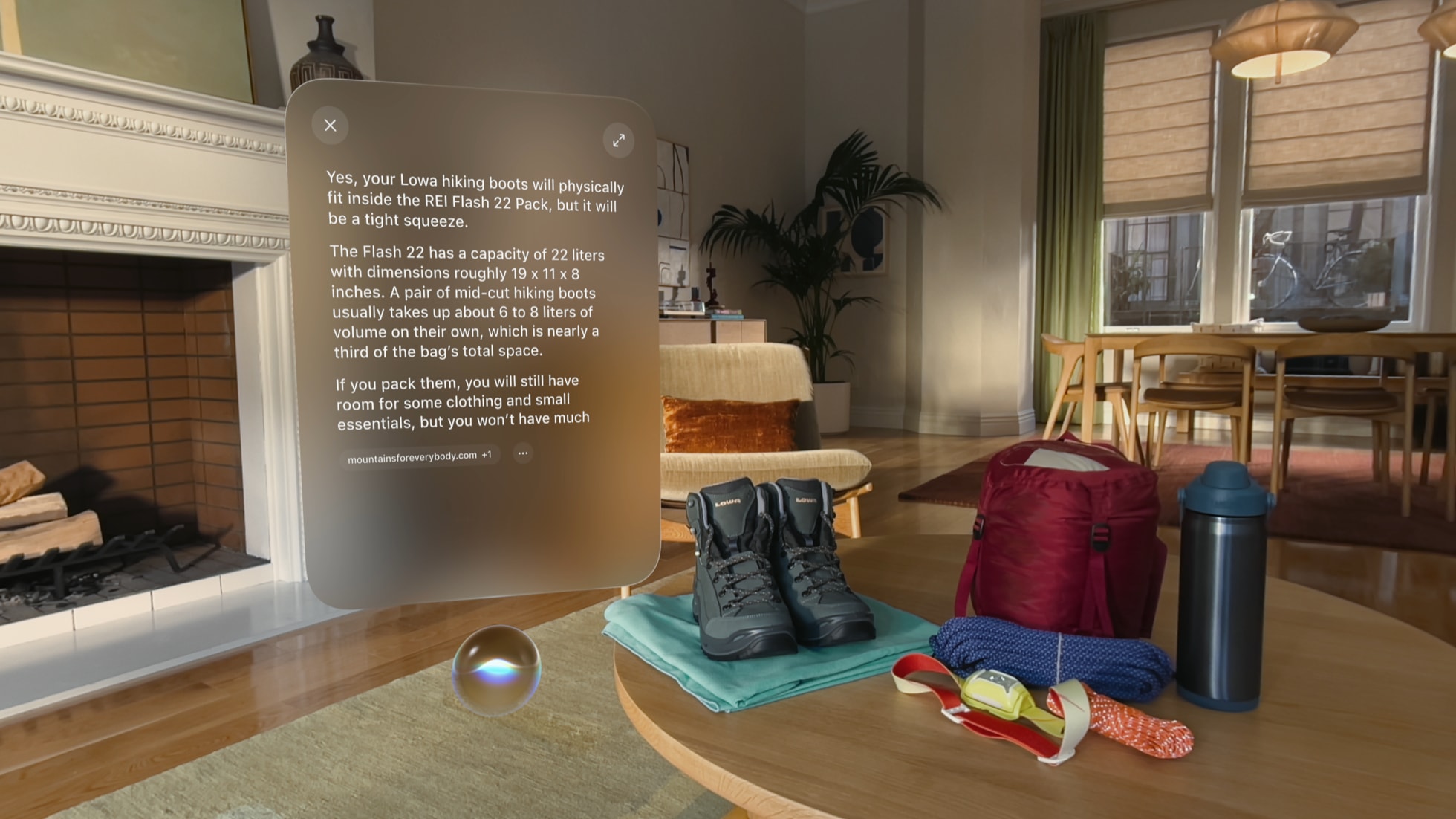
visionOS 27 is out now as a free update for every Apple Vision Pro, released on September 14, 2026 alongside iOS 27, iPadOS 27, macOS 27 Golden Gate and watchOS 27 in Apple's September software wave. The headline changes are Siri AI with onscreen and personal-context awareness, a Visual Intelligence mode that lets you ask questions about whatever you're looking at, a new tool that turns ordinary panoramic photos into spatial scenes you can use as an Environment, a dynamic Thórsmörk aurora Environment, refined Liquid Glass materials throughout the interface, and a Wi-Fi connection that Apple says is up to three times faster after the headset powers on. You can install it today from Settings > General > Software Update on Vision Pro.
visionOS 27 at a glance
- Release date: September 14, 2026
- Compatible hardware: Apple Vision Pro (both the original and the 2025 refresh with the M5 chip)
- Price: Free software update
- Headline features: Siri AI, Visual Intelligence, spatial scenes from panoramas, Thórsmörk Environment, Liquid Glass refinements, faster Wi‑Fi
- Siri AI language support at launch: English, with French, Japanese, Korean, Portuguese and Spanish arriving in October 2026
- How to update: Settings > General > Software Update on the headset
When visionOS 27 was released
Apple confirmed visionOS 27 as available on September 14, 2026, the same day iOS 27 and iPadOS 27 arrived for iPhone and iPad, in a release Apple's newsroom framed as "major updates for Apple's software platforms." watchOS 27 followed for Apple Watch and macOS 27 Golden Gate rolled out for Mac in the same announcement. Apple had previewed visionOS 27 at WWDC earlier in the year and shipped it to developers and public beta testers over the summer before the public release. Because it's a point-oh release, Vision Pro owners should expect Apple to follow up with smaller visionOS 27.x updates over the following months that patch bugs and, per Apple's own release notes, extend Siri AI's language support beyond the initial English-only beta.
Which Vision Pro models get visionOS 27
visionOS 27 supports every Apple Vision Pro sold to date, including the original model launched in 2024 and the 2025 refresh built around Apple's M5 chip. Apple's newsroom notes that the full set of Apple Intelligence features, including Siri AI and Visual Intelligence, is available on Vision Pro in this release. Unlike some iPhone and Mac features that are gated to the newest chip generation, Apple has not restricted visionOS 27's core Apple Intelligence functions to the M5 refresh alone, since both Vision Pro versions run on Apple silicon capable enough for on-device processing. There is no separate visionOS 27 hardware requirement beyond owning a Vision Pro headset that can already run visionOS, and Apple has not announced a new Vision Pro model alongside this software release, unlike the iPhone and Apple Watch lines, which got new hardware in the same September window.
Siri AI and Apple Intelligence come to Vision Pro
The centerpiece of visionOS 27 is Siri AI, the more capable version of Siri that Apple has been rolling into its platforms this cycle. On Vision Pro, Siri AI can draw on personal context, understand what's on screen, and act across and between apps rather than handling one isolated request at a time. Paired with that is Visual Intelligence, which Apple describes as letting people "search, ask questions, and take action simply by looking at their surroundings." In practice that means looking at an object or a passthrough scene through the headset and asking Siri about it, without switching apps or typing a query.
Apple is rolling Siri AI out in English first, with French, Japanese, Korean, Portuguese and Spanish support following in October 2026, according to Apple's own release coverage. That staggered rollout mirrors how Apple has phased Siri AI and Apple Intelligence features across iPhone and Mac this year, and it's worth checking Settings if a language you need hasn't appeared yet after updating.
Liquid Glass refinements across the interface
visionOS 27 continues Apple's Liquid Glass design language, the translucent, light-reactive material system Apple introduced across its platforms in the prior release cycle. Apple's newsroom describes this update's changes as bringing "an even more focused and approachable experience," which in visionOS 27 shows up as adjustments to how glass panels, window chrome and system controls render and respond to the light and depth of a person's actual surroundings inside the headset. Vision Pro is arguably where Liquid Glass makes the most physical sense of any Apple platform, since the whole interface is already rendered as floating panels over a passthrough camera feed, and Apple's tuning here is aimed at making those panels feel less like flat 2D windows and more like objects that belong in the room.
Spatial scenes, panoramas and the new Thórsmörk Environment
visionOS 27 adds a feature that turns an ordinary panoramic photo, the kind most people already have sitting in their camera roll from an iPhone, into what Apple calls a spatial scene: a version of that panorama rendered with rich depth that can be set as a personal Environment inside Vision Pro. That means a panorama shot on a phone years before Vision Pro existed can become an immersive backdrop without needing to have been captured with spatial or 3D camera hardware in the first place.
Apple also added a new built-in Environment called Thórsmörk, modeled on the Icelandic nature reserve of the same name, featuring a dynamic aurora that shifts overhead. It joins Vision Pro's existing library of Environments like Mount Hood and Joshua Tree as one of the ambient, fully immersive backdrops people can dial in with the Digital Crown. Environments are one of the features that made Vision Pro distinct from a conventional VR headset at launch, letting a person keep working or watching video while gradually replacing their real surroundings with a calming, rendered scene, and Thórsmörk is Apple's first new addition to that library in this release cycle.
Immersive Safari and entertainment on Vision Pro
The update also extends immersive, spatial browsing in Safari, letting supported websites present content in immersive environments rather than a flat browser window, building on the spatial web features Apple has been layering into visionOS since launch. Combined with the spatial-scenes tool and the new Environment, visionOS 27's entertainment-facing changes lean toward making passive, ambient content, photos, panoramas and web experiences feel native to the headset rather than requiring dedicated spatial video or 3D capture equipment to enjoy.
Faster Wi-Fi and everyday performance
Apple says Vision Pro running visionOS 27 connects to Wi-Fi up to three times faster after the headset powers on, cutting down the wait between putting the headset on and being able to actually use apps that need a network connection. It's a background improvement rather than a headline feature, but it addresses one of the more common everyday friction points Vision Pro owners have reported: the device previously could take a noticeable moment to reconnect after being asleep or freshly powered on, which matters more on a headset than on a phone or laptop because Vision Pro can't do much of anything useful, including streaming video, using SharePlay or browsing the web, until it's back on the network.
What's new for developers in visionOS 27
Alongside the consumer release, Apple shipped a substantial set of developer-facing tools with visionOS 27, most of them built around RealityKit and Reality Composer Pro. The table below summarizes the main additions Apple documents for developers building spatial apps and games.
| Area | What's new in visionOS 27 |
|---|---|
| RealityKit | Physical-space lighting (virtual objects cast light on real surfaces), a projective textures API, real-time cloth simulation, a reverb mesh API for spatial audio, and support for 3D Gaussian splats |
| Reality Composer Pro 3 | Deeper Xcode integration, generative asset-creation tools, and live preview of edits directly on Vision Pro |
| Object tracking | Higher-frame-rate tracking, extended Create ML training, a metric-space pose API for measurement and navigation use cases, and cross-platform support with iOS without retraining |
| Spatial accessories | Support for third-party controllers and accessories with IR LEDs, IMUs, buttons and haptics, tracked at up to 90Hz, plus Unity support for accessories such as PlayStation VR2 Sense controllers |
| Foveated Streaming | A new framework for streaming high-quality spatial content from PCs, workstations or cloud servers, rendering detail only where the user is looking, with OpenXR and NVIDIA CloudXR integration |
| Apple Immersive Video | Camera presentation commands for live production, real-time Vision Pro preview from Mac during a shoot, and wide-aspect-ratio portal support |
Full technical detail on each of these is in Apple's visionOS 27 release notes and its what's new in visionOS page for developers, both aimed at engineering teams rather than end users but useful context for why some third-party Vision Pro apps will look and feel noticeably different once they adopt the new RealityKit capabilities.
How to update to visionOS 27
Updating a Vision Pro to visionOS 27 works the same way it has for every prior visionOS release. With the headset on, open Settings, go to General, then Software Update; if visionOS 27 is available for the device, tap Download and Install (or Install Now if it has already downloaded) and enter the passcode when prompted. Apple's own guidance notes the headset needs enough battery charge or to be connected to power before starting, and that it will try to free up space automatically, by clearing recoverable app data rather than personal files, if storage is tight. Progress during the install is shown through EyeSight on the front of the headset. To avoid doing this manually every time, Settings > General > Software Update > Automatic Updates can be switched on so Vision Pro installs future visionOS updates on its own whenever it's charging, locked and connected to Wi-Fi. Apple's support page on updating visionOS covers the full manual and automatic update process along with troubleshooting steps if an install fails partway through.
How visionOS 27 fits into Apple's September 2026 releases
visionOS 27 is one piece of a coordinated software release across Apple's lineup, all built around the same version number and Apple Intelligence engine. iOS 27 brought Siri AI, Visual Intelligence and a set of camera and messaging changes to iPhone, covered in detail in Pandromeda's iOS 27 release guide. macOS 27 Golden Gate brought the same Siri AI engine, along with its own Liquid Glass and Safari changes, to Mac, which Pandromeda has broken down in its macOS 27 Golden Gate coverage. visionOS 27 is the version of that same wave built specifically for a headset: instead of a Camera app or a menu bar, its distinguishing features are things that only make sense in a spatial, passthrough environment, like turning panoramas into Environments, an aurora-lit 3D backdrop, and a Siri that can reason about whatever the wearer is physically looking at.
What's next for visionOS
The most immediate thing to watch is Siri AI's language rollout: Apple has said French, Japanese, Korean, Portuguese and Spanish support is coming in October 2026, so Vision Pro owners outside English-speaking markets should expect a point update rather than getting the full feature on day one. Beyond that, Apple's developer-facing additions in visionOS 27, particularly Foveated Streaming and the expanded spatial-accessory support, point toward third-party Vision Pro apps and games that lean more heavily on external accessories and cloud-streamed content over the next few months, as studios adopt the new frameworks. Apple typically follows a .0 visionOS release with several .x updates through the fall and winter that fix bugs and round out features that shipped in a limited state, and Vision Pro owners with automatic updates enabled will get those without having to do anything.
Frequently asked questions
When did visionOS 27 come out?
Apple released visionOS 27 on September 14, 2026, the same day as iOS 27, iPadOS 27 and macOS 27 Golden Gate, as part of Apple's coordinated September software update wave.
Which Vision Pro models support visionOS 27?
Every Apple Vision Pro can run visionOS 27, including the original 2024 model and the 2025 refresh built around Apple's M5 chip. Apple has not gated the update's Apple Intelligence features to a specific Vision Pro version.
Is visionOS 27 a free update?
Yes. Like every visionOS release, visionOS 27 is a free software update for existing Apple Vision Pro owners, installed through Settings > General > Software Update on the headset.
What is Siri AI on Vision Pro?
Siri AI is Apple's more capable version of Siri introduced across its platforms this cycle. On Vision Pro it uses personal context and onscreen awareness, and pairs with Visual Intelligence so people can ask questions about whatever they're looking at through the headset.
Does visionOS 27 support languages other than English?
Siri AI on visionOS 27 launches in English only. Apple has said French, Japanese, Korean, Portuguese and Spanish support is coming in October 2026.
How do I update my Apple Vision Pro to visionOS 27?
With the headset powered on and charging or charged, go to Settings, then General, then Software Update, and tap Download and Install. Automatic Updates can also be turned on in the same menu so future visionOS updates install without any manual steps.
Sources
- Apple Newsroom: Major updates for Apple's software platforms are now availableapple.com
- Apple Developer: visionOS 27 Release Notesdeveloper.apple.com
- Apple Developer: What's New in visionOSdeveloper.apple.com
- Apple Support: Update visionOS on your Apple Vision Prosupport.apple.com
- Apple: visionOSapple.com
Felix Moreau writes Pandromeda's software coverage and how-to guides. He covers Windows, macOS and Linux updates, the apps people rely on, emulators and developer tools, and turns official documentation into clear, numbered steps that work on the current version.