Gemini 4 Neon Arrives in GitHub Copilot: What It Is and Who Can Use It
GitHub quietly flipped on Google's newest coding model for Copilot users on November 18 — before Google has even published its own announcement.
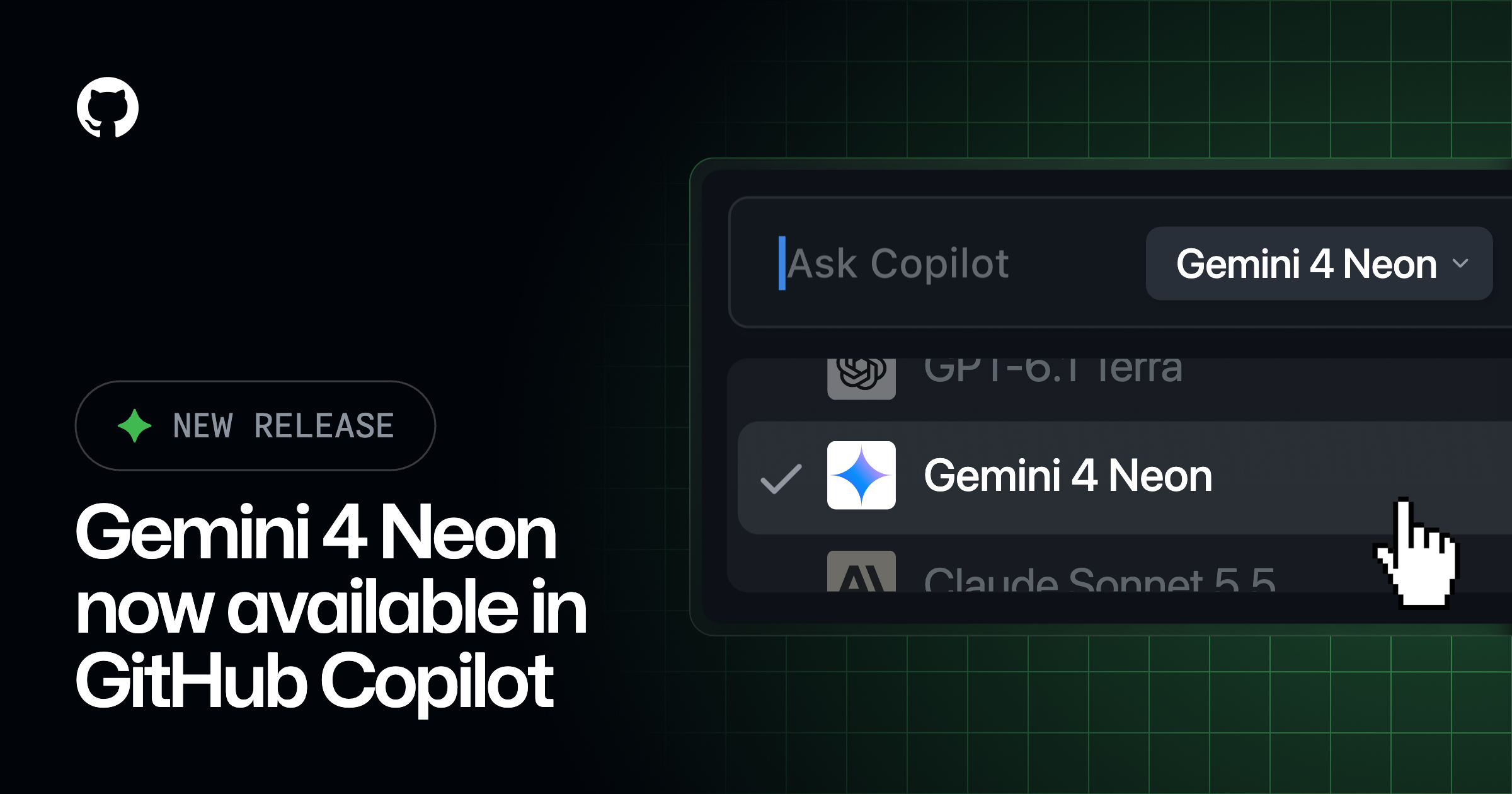
Gemini 4 Neon, a new AI model from Google, is now generally available inside GitHub Copilot as of November 18, 2026. It's enabled across Visual Studio Code, Visual Studio, the Copilot CLI, the Copilot coding agent, the Copilot app, GitHub.com, GitHub Mobile, JetBrains IDEs, Xcode, and Eclipse for anyone on Copilot Pro+, Business, or Enterprise — you just need to pick it from the model picker.
The short version:
- Gemini 4 Neon went GA in GitHub Copilot on November 18, 2026, per GitHub's official changelog.
- It's built for agentic coding, multistep tool use, and knowledge work.
- Google says it matches Gemini 4 Carbon's quality at a lower token cost and with fewer unrequested code changes — a vendor claim, not an independently verified benchmark.
- It's available on Copilot Pro+, Business, and Enterprise plans across nearly every Copilot surface.
- Billing is usage-based at provider list pricing; Google has not published a dedicated public announcement for Neon the way it did for Gemini 4 Argon.
What is Gemini 4 Neon?
Gemini 4 Neon is the newest entry in Google's Gemini 4 model family to show up inside GitHub Copilot, joining Gemini 4 Argon, Gemini 4 Carbon, and Gemini 4 Hydrogen on Copilot's supported-models list. According to GitHub's changelog, Neon is "designed for agentic coding, multistep tool use, and knowledge work" — the same broad category GitHub uses to describe other frontier coding models it has added to Copilot this year.
What makes Neon notable is less about raw specs — GitHub hasn't published a context-window size or benchmark scores for it — and more about where it sits in Google's lineup. GitHub's own Copilot documentation lists Gemini 4 Neon as a separate, generally available model alongside Argon, Carbon, and Hydrogen, which confirms it's a real, shipped model rather than a rumor. That's worth noting because, as of this writing, Google has not put out its own blog post introducing Gemini 4 Neon the way it did for Gemini 4 Argon on September 30. The clearest public references to "Neon" before GitHub's changelog were leaks: a reference to the model name was spotted inside the Gemini web app's own code in mid-November, which is a common way new Google AI models surface before an official launch.
In short: GitHub has confirmed Neon is live and usable today. Google's own marketing for it hasn't caught up yet.
What Google says about how it performs
GitHub's changelog entry attributes a specific set of performance claims to Google, not to GitHub's own testing:
- Quality "close to" Gemini 4 Carbon, but at a lower token cost per task.
- Faster response times than Carbon.
- Fewer unrequested changes on coding tasks — meaning it's less likely to rewrite code you didn't ask it to touch.
- Less likely to make unsupported claims about code, tools, or test results.
None of these are independently verified benchmark numbers; they're vendor claims relayed by GitHub. No third-party benchmark results for Gemini 4 Neon were available at publication time, so treat "close to Carbon, cheaper" as a positioning statement rather than a confirmed figure.
Where you can use Gemini 4 Neon
Per GitHub's changelog, Neon is rolling out across nearly every surface Copilot supports:
| Surface | Status |
|---|---|
| Visual Studio Code | Available in model picker |
| Visual Studio | Available in model picker |
| Copilot CLI | Available |
| Copilot coding agent | Available |
| Copilot app / github.com | Available |
| GitHub Mobile (iOS & Android) | Available |
| JetBrains IDEs | Available |
| Xcode | Available |
| Eclipse | Available |
GitHub notes the rollout is gradual, so it may take a little time to show up in your own model picker even if your plan supports it.
Which Copilot plans include it
Gemini 4 Neon is available on Copilot Pro+, Max, Business, and Enterprise. It is not listed for the free Copilot tier or the base Copilot Pro plan. If you're on one of the included plans and don't see it yet, it's likely still rolling out to your account rather than disabled.
That plan split matches the pattern GitHub has followed with most of its other recent frontier-model additions this year: new, more expensive or more capable models tend to land first on the higher Pro+/Max/Business/Enterprise tiers, while the free and base Pro plans keep access to a smaller, often older set of models. If you're deciding whether an upgrade is worth it just to get early access to models like Neon, it's worth checking GitHub's plan comparison page directly, since the exact model list attached to each tier has changed more than once over the past few months as GitHub has added new providers.
For Business and Enterprise customers, administrators control whether new models like Neon are available to their organization through the model policy settings in Copilot. GitHub's default behavior is to automatically turn on new models for an organization unless an admin has either turned off the global "enable new models by default" setting or explicitly disabled that specific model. If your team isn't seeing Neon, that model policy is the first place to check.
How pricing works
Neon is billed under Copilot's usage-based billing at "provider list pricing," according to GitHub's changelog, which points users to GitHub's own models-and-pricing documentation for the specifics. GitHub's Copilot docs list Neon as generally available alongside Argon, Carbon, and Hydrogen, but don't break out a per-model price list in the page's visible content. In practice, this means your cost depends on your Copilot plan's included usage and how many tokens a given request against Neon consumes — the same framework GitHub uses for every other third-party model in Copilot, including the OpenAI, Anthropic, and xAI models already on the list.
GitHub's documentation also flags a separate cost lever worth knowing about: picking a larger context window or a higher reasoning level for a request consumes more tokens, and therefore more of your plan's included AI credits, regardless of which model you're using. GitHub's general advice is to stick with the default context and reasoning settings unless a task genuinely needs more — advice that applies to Neon the same way it applies to every other model on the list.
For context on how that compares with a model that does have published pricing: Gemini 4 Argon carries an introductory rate of $2 per million input tokens and $10 per million output tokens, rising to $4 and $20 after the introductory window, with cached input tokens priced 95% lower than standard input. Neon has no equivalent published rate card yet, which is one more sign that Google hasn't finished rolling out Neon's public-facing materials even though the model itself is already live inside Copilot.
How Neon fits next to Argon, Carbon, and Hydrogen
GitHub's supported-models reference lists four separate Gemini 4 variants as generally available providers inside Copilot: Argon, Carbon, Hydrogen, and now Neon. Google has given each of the other three a distinct public identity — Argon as Google's September 30 frontier flagship built for long-running software engineering and cybersecurity work, with an extended 1M-token output ceiling and introductory pricing of $2 per million input tokens and $10 per million output tokens before the rate rises. Neon, by contrast, has shipped into Copilot without that kind of dedicated rollout messaging from Google, which is why this article leans on GitHub's own changelog and model-reference page as the primary confirmation rather than a Google press release.
If you've already been using Gemini 4 Argon in Copilot for heavier, long-horizon tasks, Neon is positioned as the leaner, cheaper option for everyday agentic coding and tool-use work — at least per Google's own characterization, relayed secondhand through GitHub.
Why Copilot keeps adding more models
Neon is the latest addition to what has become a very long list inside Copilot's model picker. GitHub's own supported-models reference now shows more than two dozen GA models across five providers: OpenAI (including GPT-5.3-Codex, GPT-6, GPT-6.1, and GPT-6.2 variants), Anthropic (the Claude Fable, Haiku, Opus, and Sonnet lines), Google (Gemini 3.8 Flash and the Gemini 4 Argon/Carbon/Hydrogen/Neon set), Microsoft (the MAI-Code family), Moonshot AI's Kimi K3, and xAI's Grok 4.5 through 4.7. GitHub's pitch for offering this many options is that different models suit different jobs — a quick inline completion doesn't need the same model as a long-running autonomous coding agent — and it lets developers and administrators choose based on cost, speed, or task fit rather than being locked into a single vendor.
That also means a developer opening Copilot today faces a genuinely confusing model picker. Google alone now has four Gemini 4 variants listed as GA Copilot options, each with a different intended use case and, in Argon's case, published pricing that the others don't have. Neon's pitch, as relayed by GitHub, is specifically about being the cheaper, faster option for the kind of everyday agentic work most developers do most of the time — as opposed to Argon, which Google built and priced for long-running, high-stakes engineering and cybersecurity tasks.
What we don't know yet
Several details remain unconfirmed as of publication. GitHub's changelog and model documentation don't list a context-window size for Neon, a parameter count, or any third-party benchmark score. There's also no confirmed release note from Google itself explaining the model's training, intended audience, or how "Neon" fits into the naming scheme alongside Argon, Carbon, and Hydrogen — whether it's meant as a lighter sibling, a regional variant, or something else entirely is not something GitHub's changelog addresses. Until Google publishes its own material, the performance claims in this article should be read as Google's marketing position, carried secondhand through GitHub, rather than as verified facts.
How to try Gemini 4 Neon right now
- Confirm your Copilot plan is Pro+, Max, Business, or Enterprise.
- Open Copilot Chat in VS Code, Visual Studio, a JetBrains IDE, Xcode, Eclipse, the Copilot app, github.com, or GitHub Mobile.
- Open the model picker and look for "Gemini 4 Neon." If it isn't there yet, the gradual rollout likely hasn't reached your account.
- Business/Enterprise users: ask your Copilot administrator to check the model policy settings if Neon doesn't appear after a few days.
What to watch next
Two things are worth tracking. First, whether Google follows up with its own dedicated Gemini 4 Neon announcement — the kind of post it gave Argon — which would likely bring confirmed specs and benchmark numbers. Second, how GitHub's gradual rollout plays out across the different Copilot surfaces; features like this sometimes land in VS Code and the web app well before JetBrains or mobile catch up. This article will be a reasonable reference point until Google publishes something more concrete about Neon on its own blog.
For comparisons with other models already available in Copilot, see our coverage of which frontier models Copilot already supports and the Microsoft Ignite 2026 Copilot and Entra Agent ID announcements.
Frequently asked questions
What is Gemini 4 Neon?
Gemini 4 Neon is a Google AI model that became generally available in GitHub Copilot on November 18, 2026. GitHub describes it as built for agentic coding, multistep tool use, and knowledge work.
Which GitHub Copilot plans include Gemini 4 Neon?
Copilot Pro+, Max, Business, and Enterprise. It is not available on the free Copilot tier or the base Copilot Pro plan.
Is Gemini 4 Neon better than Gemini 4 Carbon?
Google's claim, relayed by GitHub, is that Neon matches Carbon's quality at a lower token cost, responds faster, and makes fewer unrequested code changes. These are vendor claims, not independently verified benchmarks, since no third-party benchmark results for Neon were available at publication.
How much does Gemini 4 Neon cost in Copilot?
It's billed under Copilot's usage-based billing at provider list pricing, the same framework GitHub uses for other third-party models in Copilot. GitHub's pricing documentation covers the specifics; no flat per-token rate for Neon was published in the surfaces checked for this article.
Where can I use Gemini 4 Neon?
Visual Studio Code, Visual Studio, Copilot CLI, the Copilot coding agent, the Copilot app, github.com, GitHub Mobile, JetBrains IDEs, Xcode, and Eclipse — selectable from the model picker on each surface, with a gradual rollout.
What's the difference between Gemini 4 Neon and Gemini 4 Argon?
Argon is Google's flagship Gemini 4 model, announced September 30, 2026, built for long-running software engineering, enterprise knowledge work, and cybersecurity defense, with a 1M-token output ceiling and published introductory pricing. Neon, per GitHub's characterization of Google's claims, is positioned as a cheaper, faster option for everyday agentic coding rather than Argon's long-horizon, high-stakes tasks.
Sources
Felix Moreau writes Pandromeda's software coverage and how-to guides. He covers Windows, macOS and Linux updates, the apps people rely on, emulators and developer tools, and turns official documentation into clear, numbered steps that work on the current version.