What Is a Zero-Click Exploit? How It Works and How to Protect Yourself
No link, no tap, no download needed. Here is how zero-click exploits like Pegasus and FORCEDENTRY work, and how Apple's Lockdown Mode helps.
A zero-click exploit is malicious code that compromises a phone or computer without the owner clicking a link, opening an attachment, or taking any action at all — the attack succeeds just by reaching the device, often through a messaging app, a phone call, or even a missed call. That makes zero-click exploits far more dangerous than phishing or typical malware, because there is no obvious scam to spot and nothing for the victim to avoid doing wrong.
- A zero-click exploit needs no tap, click, download, or reply from the victim.
- It typically targets a flaw in how an app silently processes incoming data, such as an image or a file preview inside a messaging app.
- Real-world examples include NSO Group's Pegasus spyware and the FORCEDENTRY and BLASTPASS iMessage exploits documented in official CVE records.
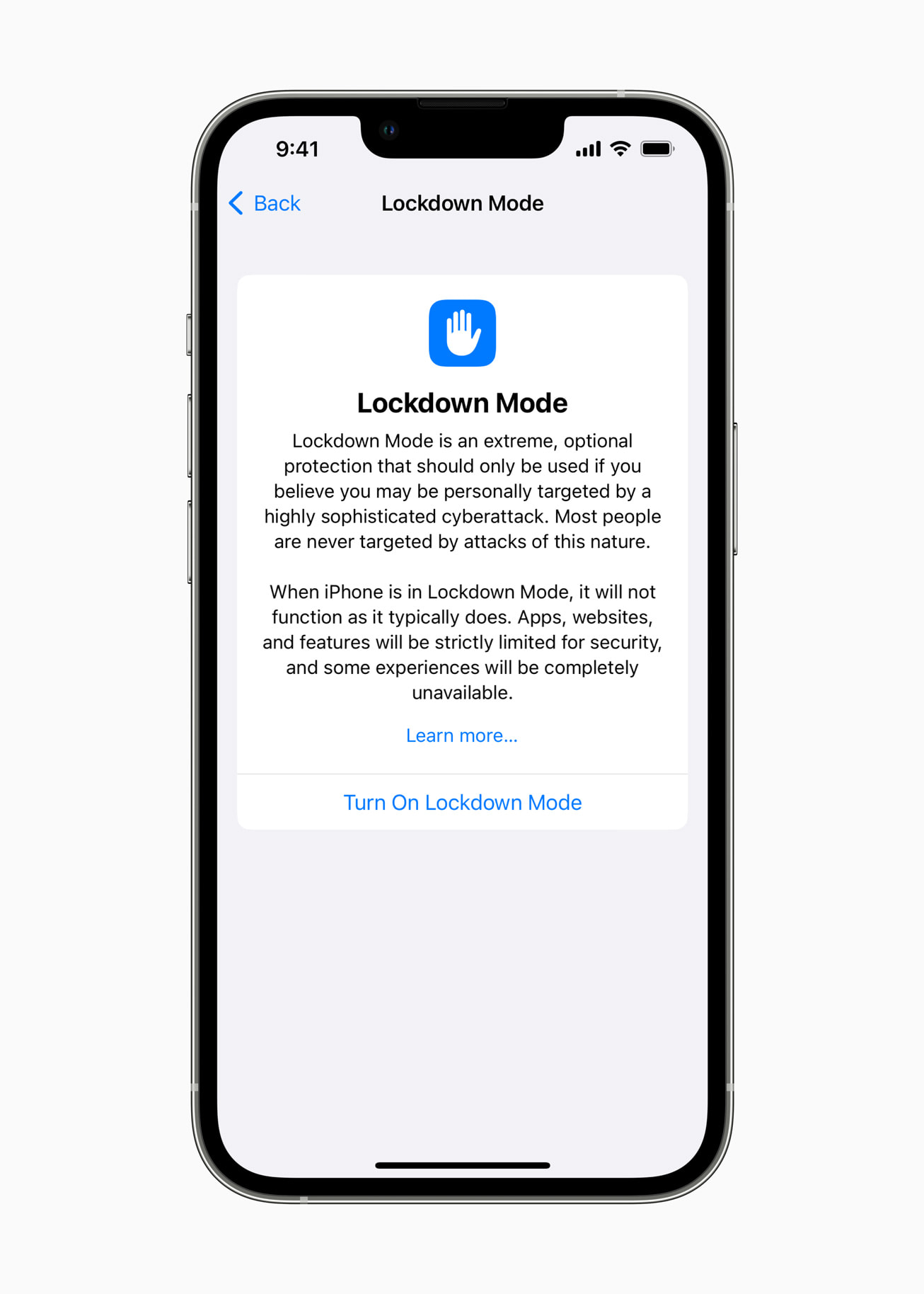
- Apple's Lockdown Mode, released for iOS 16 and later, is built specifically to narrow the paths these exploits use.
- Zero-click attacks are rare and expensive to develop, and historically have been used in targeted spyware campaigns rather than mass attacks.
What is a zero-click exploit?
A zero-click exploit is a piece of attack code that takes advantage of a software flaw to run on a device automatically, without the person using that device doing anything to trigger it. The "zero" refers to the number of user interactions required: zero taps, zero clicks, zero downloads, zero approvals. The device is compromised purely because it received and processed a piece of data — an image, a message, a network packet, or even a call — that was crafted to exploit a bug in how the receiving app parses that data.
This is different from a zero-day vulnerability, a term that describes a flaw unknown to the vendor at the time it is being exploited. A zero-click exploit can target a zero-day flaw, but it can also target a bug that has already been reported and is simply unpatched on a given device. The two terms describe different things: zero-day is about who knows about the flaw, while zero-click is about how much the victim has to do for the attack to work. You can read more in Pandromeda's explainer on zero-day vulnerabilities.
How a zero-click exploit differs from phishing and normal malware
Most malware still depends on some action from the victim. Phishing relies on a person clicking a fraudulent link or entering credentials on a fake page. Many malware infections require opening an attachment, installing a fake app, or approving a permission prompt. Those attacks can be blunted by training people to recognize suspicious messages, hover over links, or avoid unknown attachments.
A zero-click exploit removes that entire layer of defense. There is no suspicious link to hover over and no attachment to second-guess, because the malicious data is processed automatically by the receiving app — for example, by the code that generates a link preview, decodes an image thumbnail, or renders an incoming file format. If that background code has an exploitable bug, the attacker can run their own code on the device the moment the message, call, or file arrives, sometimes before a notification even appears. Awareness training, which works reasonably well against phishing and ransomware delivered through malicious attachments, offers essentially no protection against a true zero-click chain.
How zero-click attacks actually work
Zero-click exploits almost always chain together more than one software flaw. A typical chain looks like this:
- An attacker sends a specially crafted piece of data — commonly an image, a PDF, a GIF, or another file format — through a channel the target device processes automatically, such as iMessage, WhatsApp, or a messaging protocol that generates previews without opening the conversation.
- A parsing or rendering bug in that app (or in a lower-level library the app calls, like an image codec) is triggered the instant the data is processed, corrupting memory in a way the attacker controls.
- That memory corruption is used to run the attacker's own code, often escaping any sandbox that is supposed to contain the app.
- A second exploit, or an existing weakness in the operating system, is used to escalate privileges so the malicious code can install spyware with deep access to the device — contacts, messages, microphone, camera, and location.
- The exploit is frequently designed to leave minimal forensic trace, sometimes deleting itself or the incoming message after installation.
Because this requires finding and chaining multiple working vulnerabilities in widely used software, these exploit chains are expensive and technically difficult to build. That is a major reason they have historically shown up in targeted surveillance campaigns rather than broad consumer-facing attacks.
Real documented examples of zero-click exploits
Zero-click exploits are not a theoretical concept — several have been documented through official vulnerability records and independent research.
FORCEDENTRY (CVE-2021-30860). According to the National Vulnerability Database record for CVE-2021-30860, an integer overflow in Apple's handling of a maliciously crafted PDF could lead to arbitrary code execution, and Apple said it was aware of a report that the issue "may have been actively exploited." The fix shipped in iOS 14.8, iPadOS 14.8, macOS Big Sur 11.6, watchOS 7.6.2, and a Catalina security update. This exploit, delivered through iMessage without any interaction from the recipient, was used to install NSO Group's Pegasus spyware on the phones of activists and journalists, as documented by researchers and summarized in the Wikipedia article on Pegasus (spyware).
BLASTPASS (CVE-2023-41064). The NVD record for CVE-2023-41064 describes a buffer overflow addressed with improved memory handling, fixed in iOS 16.6.1, iPadOS 16.6.1, and related macOS updates, where "processing a maliciously crafted image may lead to arbitrary code execution," and Apple again said it was aware of a report of active exploitation. This flaw was paired with a second vulnerability and delivered through iMessage attachments with no click required, in an exploit chain publicly named BLASTPASS.
Pegasus and NSO Group. Pegasus is commercial spyware built by the Israeli company NSO Group. Early versions relied on tricking a target into clicking a malicious link, but by around 2019 the spyware shifted toward zero-click delivery, including a 2019 method that WhatsApp disclosed could install the spyware through a voice call the target never answered. Once installed, Pegasus can read messages, track location, activate the microphone and camera, and harvest data from apps, according to the Wikipedia summary of public research and legal findings, including a 2024 U.S. court ruling that found NSO liable for hacking roughly 1,400 WhatsApp users.
These cases share a pattern: a popular messaging app's automatic data handling is the entry point, a memory-corruption bug is the mechanism, and a small number of high-value targets — journalists, activists, dissidents, and government officials — are the victims, rather than the general public.
| Attack type | User action required | Typical delivery | Primary defense |
|---|---|---|---|
| Zero-click exploit | None | Message, call, or file the device processes automatically | Keeping software updated; Lockdown Mode or similar restricted modes |
| Phishing | Clicking a link or entering credentials | Email, text, or fake login page | Verifying senders; passkeys; multi-factor authentication |
| Typical malware | Opening a file, installing an app, or granting a permission | Email attachment, fake app, infected download | Avoiding unknown downloads; app store vetting; antivirus |
Who is actually targeted by zero-click exploits
Because building a working zero-click chain is costly and requires fresh vulnerabilities, documented cases have overwhelmingly involved high-value, narrowly targeted individuals: journalists, human rights defenders, lawyers, political dissidents, diplomats, and government officials, according to the cases described in public research on Pegasus. Apple itself frames the risk this way on its own support pages, describing the attacks that its Lockdown Mode is designed to resist as "extremely rare and highly sophisticated," aimed at a small number of people "who may be personally targeted because of who they are or what they do," rather than the general public.
That framing matters for how seriously an average reader should treat the risk. Most people are exceedingly unlikely to be individually targeted by a zero-click spyware chain. The much larger everyday risk for most people remains phishing, credential theft, and conventional malware. Still, because zero-click exploits leave few warning signs, and because the same underlying parsing bugs can sometimes be reused more broadly once discovered, understanding how they work and what mitigations exist is useful even for people who are not likely targets.
How to protect your phone against zero-click exploits
There is no single setting that makes zero-click exploits impossible, since they exploit flaws that are, by definition, not yet fixed. But several concrete steps meaningfully shrink the attack surface:
- Install operating system and app updates promptly. Both FORCEDENTRY and BLASTPASS were fixed once Apple shipped a security update; devices running older, unpatched software remain exposed to exploits that have already been publicized and reused.
- Turn on Lockdown Mode if you are a plausible target. Apple's official Lockdown Mode support page describes it as "an optional, extreme protection" for the small number of people who may face "highly targeted mercenary spyware." Turning it on blocks most message attachment types and link previews, blocks most FaceTime calls from numbers you haven't contacted before, restricts complex web technologies in Safari, requires the device to be unlocked before it will connect to an accessory or computer, stops it from auto-joining insecure Wi-Fi networks, disables 2G and 3G connections, and prevents new mobile device management profiles from being installed. It is available on iOS 16 and iPadOS 16 or later, watchOS 10 or later, and macOS Ventura or later, with fuller protections on iOS/iPadOS 17 and macOS Sonoma and newer.
- Restart your device regularly. Because some zero-click spyware does not achieve persistence across a reboot, security researchers have noted that periodic restarts can disrupt certain infections, even though this is not a guaranteed fix.
- Limit who can reach you automatically. Restricting FaceTime and Messages to known contacts, as Lockdown Mode does, reduces the number of channels an attacker could use to deliver a malicious file without your involvement.
- Treat threat notifications seriously. Apple and other vendors send direct notifications to accounts believed to be targeted by state-sponsored or mercenary spyware. Anyone who receives one should assume it is credible and seek specialist help, including from digital-security organizations that assist journalists and activists.
- Use strong account security elsewhere. Zero-click exploits target the device itself, but attackers often pair device compromise with account takeover. Using unique passwords and, where available, passkeys instead of passwords closes off a related avenue of attack even if it does not stop a zero-click chain directly.
How researchers and agencies track these threats
Once a zero-click vulnerability is discovered and fixed, it is formally cataloged with a CVE identifier and a technical description in the National Vulnerability Database, as with CVE-2021-30860 and CVE-2023-41064 above. In the United States, the Cybersecurity and Infrastructure Security Agency maintains the Known Exploited Vulnerabilities catalog, which it describes as "the authoritative source of vulnerabilities that have been exploited in the wild," and which organizations are advised to use "as an input to their vulnerability management prioritization framework." Vulnerabilities that have actually been used in real attacks, including some tied to zero-click spyware chains, can appear in that catalog alongside a recommended remediation deadline, giving IT teams and software vendors a shared, official reference point for how urgently a given flaw needs to be patched.
Common questions about zero-click exploits
A few points come up repeatedly when people search for this topic, and they are worth stating plainly here before the full FAQ: a zero-click exploit does not require you to click, open, or download anything, it is not something routine antivirus software reliably catches before infection, and the best general-purpose defenses are fast software updates and, for people at elevated risk, a restricted mode like Lockdown Mode rather than any single app or habit.
What to do next
Zero-click exploits are rare, expensive to build, and have so far been documented almost exclusively in targeted spyware campaigns against journalists, activists, and officials rather than the general public. That said, the defense against them is simple to state even if it is not glamorous: keep your phone's operating system updated as soon as fixes are available, consider Lockdown Mode if your role or public profile makes you a plausible target, and pair good device hygiene with strong account security such as passkeys. For most people, the bigger day-to-day risk remains phishing and credential theft rather than a nation-state-grade exploit chain — but the two defenses, update promptly and verify before you trust, reinforce each other either way.
Frequently asked questions
What is a zero-click exploit?
A zero-click exploit is attack code that compromises a device without the owner clicking a link, opening a file, or taking any action. The device is infected simply by receiving data, such as a message or call, that triggers a flaw in how an app automatically processes it.
How does a zero-click exploit differ from phishing?
Phishing requires the victim to click a malicious link or enter credentials on a fake page. A zero-click exploit requires nothing from the victim at all, which means awareness training that helps against phishing offers no protection against it.
Can antivirus software stop a zero-click exploit?
Routine antivirus software is not a reliable defense, because zero-click exploits target unpatched flaws in trusted apps before a fix exists. The strongest defenses are installing security updates quickly and, for likely targets, using a restricted mode such as Apple's Lockdown Mode.
Is Lockdown Mode available on every iPhone?
Lockdown Mode requires iOS 16 or later, with fuller protections on iOS 17 and newer, according to Apple's support page. It is also available on iPadOS 16+, watchOS 10+, and macOS Ventura and later.
What is Pegasus spyware?
Pegasus is commercial spyware developed by the Israeli company NSO Group. It was originally delivered through phishing links but shifted toward zero-click delivery methods, including exploits sent through iMessage and WhatsApp, according to public research summarized on Wikipedia.
How would I know if I've been targeted by a zero-click exploit?
Zero-click exploits are designed to leave minimal trace, so there is often no visible warning sign. Some device makers send direct threat notifications to accounts believed to be targeted by sophisticated spyware; anyone who receives one should treat it as credible and seek specialist help.
Sources
- Apple Support: About Lockdown Modesupport.apple.com
- CISA: Known Exploited Vulnerabilities Catalogcisa.gov
- NVD: CVE-2021-30860 (FORCEDENTRY)nvd.nist.gov
- NVD: CVE-2023-41064 (BLASTPASS)nvd.nist.gov
- Wikipedia: Pegasus (spyware)en.wikipedia.org
Sana Qureshi runs the security and privacy desk. She reports on actively exploited vulnerabilities, vendor patches and data breaches, and covers the password managers, VPNs and authentication tools readers use to protect themselves. Her alerts cite vendor advisories, CISA and the CVE record directly.