What Is an AirTag? How It Works, Price and Setup
Apple's AirTag clips to keys, bags and luggage and leans on the Find My network to help you locate them. Here's how it works, what it costs, and how private it really is.
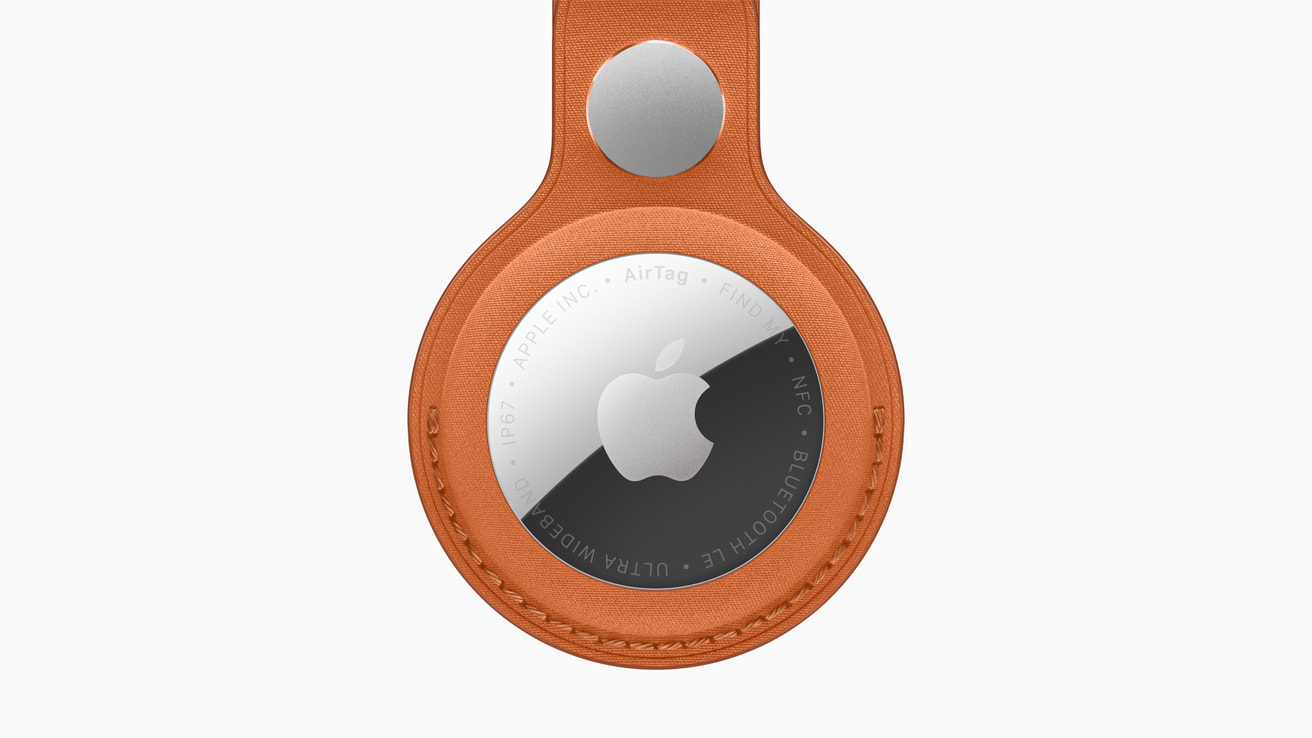
An AirTag is a small, coin-sized tracker made by Apple that you attach to everyday items — keys, a backpack, a wallet, luggage — so you can find them using the Find My app. It does not have GPS or its own cellular connection. Instead, it broadcasts a secure Bluetooth signal that nearby iPhones, iPads and Macs detect anonymously and relay to you through Apple's Find My network, so you can see the item's last known location on a map, play a sound to find it nearby, or use Precision Finding for exact distance and direction.
- Price: $29 for one, $99 for a 4-pack (apple.com, U.S. pricing)
- Tracking method: Apple's Find My network (Bluetooth, crowdsourced), not GPS
- Precision Finding: requires iPhone 15 or later (except 16e/17e) or iPhone Air, or Apple Watch Series 9/Ultra 2 or later
- Battery: user-replaceable CR2032 coin cell, rated for more than a year by Apple
- Water/dust resistance: IP67
- Second generation released: January 26, 2026
How does an AirTag work?
Each AirTag continuously emits a Bluetooth signal. When another Apple device running Find My — an iPhone, iPad or Mac belonging to any user, not just you — passes within Bluetooth range, it detects that signal, encrypts the AirTag's approximate location, and sends it anonymously to Apple's servers. Apple says the network draws on more than a billion iPhone, iPad and Mac devices worldwide. Only you, signed in with your own Apple Account, can decrypt and view that location in the Find My app.
Inside the Find My app's Items tab, your AirTag shows up on a map with its last reported position. From there you can play a sound on the AirTag to help find it nearby, mark it as lost so anyone who finds it can be shown a message with your contact details via an NFC tap, or get notified when it's found again. None of this requires the AirTag itself to have a SIM card, Wi-Fi, or GPS chip — the heavy lifting is done entirely by the crowdsourced network of other people's devices.
The Find My network, explained
The Find My network is the infrastructure that makes an AirTag useful away from home. According to Apple, location reports generated by other users' devices are end-to-end encrypted, and Apple says it does not know the location of an AirTag or the identity of the device that helped find it — the data is only readable by the owner's own devices. The network also covers a growing list of third-party accessories built with Apple's Find My specification, not just AirTags.
If an AirTag is separated from its owner, Apple's Lost Mode lets the owner mark it lost directly in Find My. Anyone who finds the item can hold an NFC-capable iPhone or Android phone near the AirTag to see a web page with the item's identifying details and, if the owner has shared it, a way to contact them, without revealing the owner's phone number.
Precision Finding and the U1/UWB chip
The original AirTag introduced Precision Finding using Apple's U1 Ultra Wideband (UWB) chip, which gives distance and direction readings — not just an approximate Bluetooth signal — when both the AirTag and your iPhone support UWB. Apple's second-generation AirTag, released in January 2026, uses a newer, Apple-designed second-generation Ultra Wideband chip (the same family of chip used in the iPhone 17 lineup, iPhone Air, Apple Watch Series 11 and Apple Watch Ultra 3). Apple says this extends Precision Finding range by up to 1.5 times versus the first-generation AirTag, and pairs it with an upgraded Bluetooth chip for longer range outside of Precision Finding, plus a built-in speaker that Apple says is 50% louder than before, audible from roughly twice as far away.
Precision Finding on iPhone requires an iPhone Air or iPhone 15 or later, excluding the iPhone 16e and iPhone 17e, according to Apple's AirTag product page, and availability can vary by region where Ultra Wideband is restricted. With the second-generation AirTag, Precision Finding also works directly from an Apple Watch for the first time — Apple lists support for Apple Watch Series 9 or later and Apple Watch Ultra 2 or later, running watchOS 26.2.1. Without a UWB-capable device, you still get Bluetooth-based directions ("nearby") and the ability to play a sound, just without the on-screen arrow-and-distance display.
AirTag price: how much does it cost?
An AirTag costs $29 for a single unit or $99 for a 4-pack, directly from Apple's online store, which also offers free personalized engraving (initials, an emoji, or both) at checkout. That price held steady from the original 2021 AirTag through the second-generation model introduced in January 2026 — Apple's own announcement states the new AirTag keeps the same U.S. pricing as its predecessor. AirTag does not come with a way to attach it to anything out of the box; Apple sells separate accessories such as a FineWoven Key Ring (listed at $35 on Apple's store) in several colors, and third parties make loops, wallet sleeves and luggage tags.
| Item | Price (U.S.) |
|---|---|
| AirTag — single | $29 |
| AirTag — 4-pack | $99 |
| FineWoven Key Ring accessory | $35 |
| Engraving (initials/emoji) | Free |
How to set up an AirTag
Setting up an AirTag is designed to take seconds. Apple's support instructions outline the process:
- Make sure Bluetooth and Location Services are turned on, Find My is enabled for your Apple Account, and you're signed in to iCloud.
- Pull the plastic tab to activate the battery, then hold the AirTag near your iPhone or iPad.
- A setup card appears on screen — tap Connect.
- Choose a name for the item from Apple's suggested categories (Keys, Backpack, Bag, and so on) or create a custom name with an emoji.
- Confirm the AirTag is linked to your Apple Account, then tap Done.
You can also add an AirTag manually from the Find My app by opening the Items tab, tapping Add, and choosing AirTag. A first-generation AirTag needs iOS or iPadOS 14.5 or later; Apple's second-generation AirTag requires iOS or iPadOS 26.2.1 or later. Each Apple Account can track up to 32 items total in Find My, counting AirTags, shared items and compatible accessories (AirPods and AirPods Pro count for more than one slot each toward that limit).
AirTag battery life and replacement
AirTag runs on a single user-replaceable CR2032 coin-cell battery, the same compact, widely available battery type used in many watches and small electronics. Apple states the battery lasts more than a year under typical use, based on Apple's own testing with preproduction units, and notes that actual results vary with how often the AirTag is pinged, played a sound, or tracked via Precision Finding. The Find My app shows a battery-status indicator for each AirTag so you know when it's getting low, and replacing the battery just means popping off the back cover and swapping in a new CR2032 — no tools or Apple Store visit required.
AirTag for Android: what works and what doesn't
AirTag is built around Apple's ecosystem, so an Android phone cannot set one up, view its live location, rename it, enable Lost Mode details, or use Precision Finding — those functions all require Find My and an Apple Account on iPhone or iPad. What Android can do is detect an AirTag that may be traveling with someone without their knowledge. Apple and Google built a shared cross-platform standard so that both iPhone and Android users get alerted about unknown Bluetooth trackers moving with them over time. On Android, this unwanted-tracking detection is built into Android 6.0 and later; on older versions, or for a manual on-demand scan, Apple publishes a free Tracker Detect app on the Google Play Store that lets an Android user search for nearby AirTags and other Find My network accessories. Any phone with NFC — the same short-range wireless tech behind tap-to-pay on iPhone and Android — can also tap a found AirTag to see identifying information and, if the owner marked it lost, a way to help return it.
If you're comparing ecosystems, Google runs a similar crowdsourced system on the Android side; see our explainer on how Android's Find Hub network works for how that compares to Apple's approach.
Privacy and anti-stalking protections
Because an AirTag can be slipped into a bag or car without the owner knowing, Apple has built several protections around unwanted tracking directly into iOS, Android, and the AirTag hardware itself. Per Apple's support documentation: if an unknown AirTag or Find My accessory appears to be traveling with you over time, your iPhone or iPad (running iOS/iPadOS 14.5 or later, with Bluetooth, Location Services and tracking notifications turned on) can alert you with a notification. From that alert you can play a sound to locate the item, use Find Nearby/Precision Finding to walk to it, view instructions to disable it, and review past alerts under Items Detected With You in the Find My app. Apple's second-generation AirTag adds what Apple's January 2026 announcement calls "industry-first protections against unwanted tracking," including cross-platform alerts and Bluetooth identifiers that change frequently, making a tag harder to fingerprint and track across time.
An AirTag that has been away from its owner for a period of time and is then moved will also play a sound to alert whoever is carrying it. If you ever find an unfamiliar AirTag and believe it's being used to track you without consent, Apple's guidance is to prioritize your safety, tap the notification or hold your phone near the AirTag to see its details, follow the on-screen "Instructions to Disable" to remove the battery, and contact law enforcement if you feel at risk — police can request identifying information from Apple about a reported AirTag. Apple also states plainly that it designed AirTag and Find My to discourage stalking, and that using AirTag to track another person without consent is not an intended use of the product.
What's new in the second-generation AirTag
Apple introduced the second-generation AirTag on January 26, 2026, nearly five years after the original. According to Apple's official announcement, the upgrades are: a new second-generation Ultra Wideband chip for up to 1.5x greater Precision Finding range; an upgraded Bluetooth chip for extended range outside Precision Finding; a speaker that's 50% louder, audible from roughly twice as far; Precision Finding support on compatible Apple Watch models for the first time; a new Share Item Location feature that lets owners temporarily share a lost item's location with partner airlines (Apple cites partnerships with more than 50 airlines, with sharing that ends automatically after the item is found, is manually stopped, or after seven days); and the cross-platform unwanted-tracking protections described above. The physical design, CR2032 battery, and IP67 rating are unchanged from the original, and the new AirTag works with existing AirTag accessories. Apple also notes sustainability details for the new model, including an enclosure made of 85% recycled plastic and 100% recycled magnets.
Bottom line
An AirTag is a simple, inexpensive way to keep tabs on things you'd otherwise lose track of — keys, a suitcase, a bag — by leaning on Apple's enormous, crowdsourced Find My network rather than GPS or cellular hardware of its own. It works best inside Apple's ecosystem: setup, live tracking and Precision Finding all require an iPhone or iPad, and Android support is limited to detecting a tag that might be tracking you without consent. At $29 (or $99 for four), with a user-replaceable battery Apple rates at over a year and real anti-stalking protections built into iOS and Android alike, it remains a straightforward accessory rather than a connected gadget you have to think much about day to day. If you're setting one up for the first time, pulling the battery tab and holding it near an iPhone is genuinely most of the process — the rest is naming it and deciding what it's going to help you stop losing.
Frequently asked questions
What is an AirTag used for?
An AirTag is a small Bluetooth tracker you attach to items like keys, a bag, a wallet or luggage so you can locate them in the Find My app using Apple's crowdsourced Find My network and, on supported devices, Precision Finding.
How much does an AirTag cost?
An AirTag costs $29 for a single unit or $99 for a 4-pack directly from Apple, which also offers free personalized engraving at checkout. That U.S. pricing has stayed the same from the original AirTag through the second-generation model.
Does AirTag work with Android?
You cannot set up, view the live location of, or use Precision Finding with an AirTag on Android, since those features require an iPhone or iPad signed into Find My. Android phones can, however, get alerted to an unknown AirTag traveling with them, and can use Apple's free Tracker Detect app to scan for nearby AirTags.
How long does an AirTag battery last?
AirTag uses a single user-replaceable CR2032 coin-cell battery that Apple says lasts more than a year under typical use, based on Apple's own testing. You can check battery status in the Find My app and swap the battery yourself by removing the back cover.
Can someone use an AirTag to track me without my knowledge?
Apple has built unwanted-tracking protections into iOS and Android through a shared cross-platform standard: your phone can alert you if an unfamiliar AirTag or Find My accessory appears to be traveling with you over time, and the AirTag will also play a sound after being separated from its owner for a period and then moved.
What's new in the second-generation AirTag?
Apple's second-generation AirTag, released January 26, 2026, adds a new second-generation Ultra Wideband chip for up to 1.5x greater Precision Finding range, a speaker that's 50% louder, Precision Finding support on compatible Apple Watch models, a Share Item Location feature for airline luggage tracking, and added unwanted-tracking protections, while keeping the same price, CR2032 battery and IP67 rating as the original.
Sources
- Apple: AirTag (official product page)apple.com
- Apple Newsroom: Apple introduces new AirTag with expanded range and improved findabilityapple.com
- Apple Support: How to add an AirTag to Find Mysupport.apple.com
- Apple Support: Detect unwanted trackers with iPhonesupport.apple.com
- Apple Store: Buy AirTagapple.com
- Wikipedia: AirTagen.wikipedia.org
Nadia Osei covers mobile and consumer gadgets for Pandromeda: smartphones, tablets, smartwatches, earbuds and smart-home devices. She tracks launches, software updates and pricing across Apple, Google, Samsung and the rest, and builds comparisons from the manufacturers' published specifications.