DLSS 4.5 Ray Reconstruction Explained: GPUs, Setup, and Games
Nvidia's second-generation Ray Reconstruction model reaches every GeForce RTX GPU since 2018. Here's what changed, which 27 games support the override, and how to enable it.
DLSS 4.5 Ray Reconstruction is Nvidia's current AI denoising model for ray-traced and path-traced games, and it works on every RTX GPU Nvidia has shipped since 2018 — not just the newest RTX 50 series. Nvidia announced it at Computex 2026 and began rolling it out through the Nvidia App that August, and by late October it covers more than 1,000 RTX games and apps overall, with 27 titles supporting the manual DLSS override that lets you force the new model on.
- What it is: a "2nd generation transformer model" that replaces hand-tuned denoisers in ray-traced scenes
- Announced: May 31, 2026, at Computex; rolled out via the Nvidia App starting that August
- GPU support: all GeForce RTX cards — RTX 20, 30, 40, and 50 series alike
- Games with override support: 27 at the time of Nvidia's announcement, inside a library of 1,000+ RTX-enabled titles overall
- Not the same as DLSS 5: DLSS 5 is a separate, newer neural-rendering model still rolling out
What is DLSS 4.5 Ray Reconstruction?
Ray Reconstruction is the part of Nvidia's DLSS suite that cleans up ray-traced and path-traced lighting. When a game casts rays for reflections, shadows, or global illumination, it can't afford to sample every pixel, so it leaves gaps that a denoiser has to fill in. Older engines used hand-tuned denoising algorithms built for each game. Nvidia's version replaces that with an AI network, trained on Nvidia's own supercomputers, that fills in the missing pixels and produces an image closer to a fully ray-traced "ground truth" render.
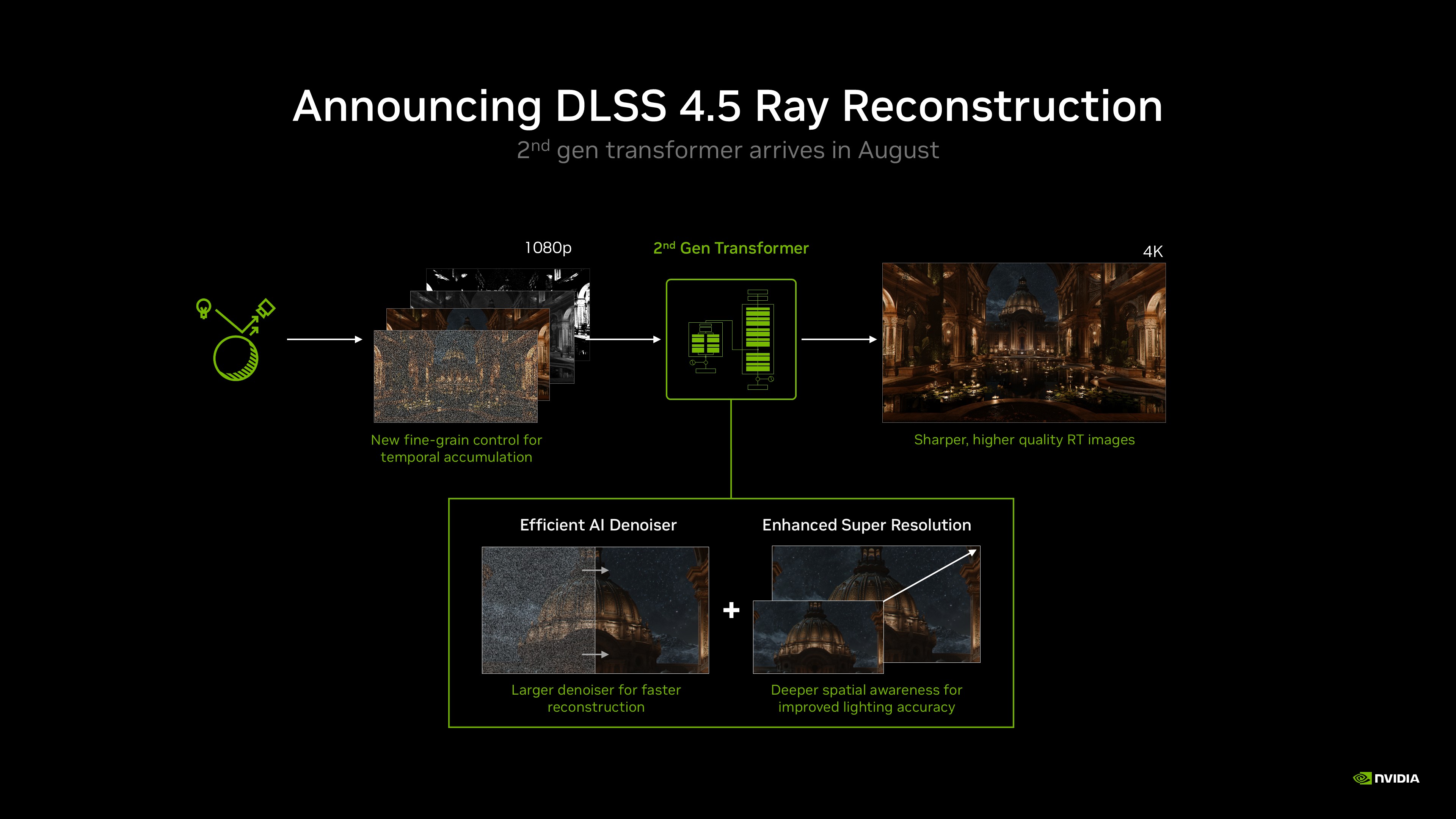
DLSS 4.5 is the second major revision of this model. According to Nvidia, it combines denoising and upscaling (Super Resolution) into one network, and it was trained on a larger dataset than the original Ray Reconstruction model that shipped with earlier DLSS versions. Nvidia says the new model has 35% more compute capability and 20% more parameters than its predecessor, while targeting similar performance.
A quick history of Ray Reconstruction
Ray Reconstruction isn't a new idea from Nvidia — it's a feature with a specific origin point. Nvidia first announced it alongside DLSS 3.5 at Gamescom in August 2023, timed to the reveal of Half-Life 2 RTX, and it shipped that September in Cyberpunk 2077 and the Chaos Vantage renderer before rolling into Cyberpunk 2077: Phantom Liberty later that month. At launch, Nvidia said the original model was trained on roughly five times as much data as the base DLSS 3 suite, and — just like today's version — it ran on every RTX GPU rather than being locked to the newest cards, because Frame Generation was the feature Nvidia reserved for RTX 40-series hardware at the time.
In other words, the pattern hasn't changed in two years: Nvidia keeps adding frame-rate features that need the newest Tensor Cores, while continuously retraining the Ray Reconstruction and Super Resolution models and pushing the improved versions out to every RTX generation that came before. DLSS 4.5's Ray Reconstruction is the third major revision of that same 2023 feature, not a separate technology with a confusingly similar name — see Wikipedia's version-by-version rundown of DLSS if you want the full release history in one place.
What's actually new in this version
Nvidia lists four concrete changes between this model and the Ray Reconstruction model that shipped before it:
- A more efficient denoiser — more compute capability and parameters packed into a model that Nvidia says runs at roughly the same speed as before.
- Deeper spatial awareness in Super Resolution — the model makes more use of each engine's pixel-sampling and motion data, which Nvidia links to steadier lighting and clearer motion.
- A larger training dataset — Nvidia says this helps the model pick the right source data more accurately across different game engines.
- Developer-side controls — studios get finer control over how much the model accumulates data over time, which affects how quickly it reacts to fast motion versus how stable the image looks when the camera is still.
In practical terms, Nvidia's own before/after examples point to less ghosting around fine particles (shown in Indiana Jones and the Great Circle), steadier lighting response in fast-moving scenes (PRAGMATA), and reduced static-like noise in dark areas (Alan Wake 2).
Which GPUs support it
This is the detail that separates Ray Reconstruction from most other features Nvidia has shipped under the "DLSS 4.5" and "DLSS 5" names. Multi Frame Generation and 3D-Guided Neural Rendering are locked to the RTX 50 series, and plain Frame Generation needs at least an RTX 40 card. Ray Reconstruction, by contrast, is one of only two DLSS technologies (along with Super Resolution and the older DLAA) that Nvidia's own DLSS technology page lists as supported on every RTX generation, going back to the 2018 RTX 20 series:
| DLSS feature | RTX 50 | RTX 40 | RTX 30 | RTX 20 |
|---|---|---|---|---|
| 3D-Guided Neural Rendering (DLSS 5) | Yes | No | No | No |
| Dynamic Multi Frame Generation | Yes | No | No | No |
| Frame Generation | Yes | Yes | No | No |
| Ray Reconstruction | Yes | Yes | Yes | Yes |
| Super Resolution | Yes | Yes | Yes | Yes |
| DLAA | Yes | Yes | Yes | Yes |
So if you own an RTX 2060 or an RTX 3070 just as much as an RTX 5090, this specific upgrade is available to you — you're just not eligible for the frame-generation features Nvidia reserves for newer silicon. That's a meaningful distinction if you're trying to decide whether a DLSS headline actually applies to your card: a story about "DLSS 5" usually means RTX 50 only, while a story specifically about Ray Reconstruction or Super Resolution applies much more broadly. Nvidia doesn't publish a performance cost specifically for Ray Reconstruction on each GPU tier, so the practical way to judge the impact on your own system is to watch the frame counter after enabling the override, rather than relying on a single published number.
Supported games and apps
Nvidia counts more than 1,000 RTX-enabled games and apps in total across all DLSS features, but the DLSS override that forces this specific Ray Reconstruction model on currently lists 27 supported titles, including Alan Wake 2, Cyberpunk 2077, Half-Life 2 RTX, Hogwarts Legacy, Indiana Jones and the Great Circle, Star Wars Outlaws, Resident Evil Requiem, Crimson Desert, Call of Duty: Black Ops 7, DOOM: The Dark Ages, Portal with RTX, and NARAKA: BLADEPOINT, among others. Nvidia maintains the full, current list on its own site rather than in any fixed document, so check there before assuming a specific game is covered.
Titles that use ray tracing but aren't on that override list still benefit from whichever Ray Reconstruction version the developer built in at launch — you just can't force the newer model on manually until Nvidia (or the developer) adds override support. That's an important nuance: Ray Reconstruction support and DLSS 4.5 Ray Reconstruction override support are two different lists. A game can ship with an older Ray Reconstruction model built in and simply never get updated to let you swap in the newer one yourself, which is why Nvidia's override list is shorter than its overall DLSS-game count.
Nvidia also folded this model into Blender's Cycles renderer (covered below) and into standalone rendering tools like Chaos Vantage, which has supported Ray Reconstruction since the DLSS 3.5 era — a sign that the technology's audience extends well past game night.
How to turn on DLSS 4.5 Ray Reconstruction
Nvidia's own driver documentation describes DLSS overrides as a Nvidia App setting rather than something buried in each game's own menu. The general path:
- Update the Nvidia App and install the current Game Ready or Studio driver.
- Open the Nvidia App and go to the Graphics tab, then select the specific game (or the global profile).
- Under Driver Settings, find the DLSS Override – Model Presets section and switch Ray Reconstruction to a preset other than "App default" — Nvidia's guidance maps "Recommended" to specific internal presets depending on which DLSS mode (Performance, Balanced, Quality, Ultra Performance) the game is already running.
- Launch the game with DLSS and ray tracing enabled, open the Nvidia overlay (Alt+Z), and check the Statistics panel to confirm which Ray Reconstruction model is actually active.
A few things worth knowing before you go looking for the toggle: it only works in games that already ship with DLSS support in the first place — the override can swap which Ray Reconstruction or Super Resolution model a game uses, but it can't add DLSS to a game that never had it. Nvidia's own driver documentation also notes that preset overrides aren't available on Linux. If the override menu looks greyed out or missing entirely, make sure both the Nvidia App and your GPU driver are fully up to date first, since the feature has rolled out gradually across app versions rather than in one single update.
It's also worth checking the in-game graphics settings menu on top of the Nvidia App override. Several of the 27 supported titles expose their own Ray Reconstruction toggle directly in their DLSS or ray-tracing settings, which can be simpler than hunting through driver-level overrides if you just want the feature on for that one game.
DLSS 4.5 vs. DLSS 5: what's the difference
It's easy to confuse the two, since Nvidia ships updates to both under overlapping names. On Nvidia's own technology page, DLSS 5 is listed as the newer release, built around what Nvidia calls "3D-Guided Neural Rendering" — and that feature is exclusive to RTX 50-series GPUs. DLSS 4.5 is the generation before it, and it's the one that introduced Dynamic Multi Frame Generation along with this second-generation Ray Reconstruction and Super Resolution model.
In other words: Ray Reconstruction itself isn't new to DLSS 5, and DLSS 5 doesn't replace the Ray Reconstruction model covered in this piece. If you want the full picture of what DLSS 5 adds on top of this, see our DLSS 5 explainer. And if you only play through Nvidia's cloud service, the override options work differently there — we covered the GeForce NOW-specific DLSS 4.5 controls separately.
Blender and other non-gaming uses
Ray Reconstruction isn't limited to games. Nvidia says it's being added to Blender's Cycles renderer as a new denoiser option, targeting the Blender 5.3 release this fall. The goal there is faster, cleaner interactive previews while working in the viewport — it sits alongside Blender's existing OptiX AI denoiser rather than replacing the render engine itself, and it isn't a promise that final renders will complete faster.
What to do next
If you own any GeForce RTX card, this is one of the rare DLSS upgrades that doesn't care which generation you bought. Update your Nvidia App and driver, check whether your current game is on Nvidia's override list, and try switching the Ray Reconstruction preset if you play anything with heavy ray tracing or path tracing. If you're shopping for a new card instead and want help deciding between generations, our 2026 graphics card buying guide covers what's actually worth paying for right now. For the newest neural-rendering features that are still RTX 50-exclusive, the DLSS 5 explainer linked above is the next thing to read.
Frequently asked questions
What is DLSS 4.5 Ray Reconstruction?
It's Nvidia's AI denoising model for ray-traced and path-traced games. It replaces hand-tuned denoisers with a neural network that fills in missing pixels, producing cleaner lighting and less noise in ray-traced scenes.
Which GPUs support DLSS 4.5 Ray Reconstruction?
All GeForce RTX GPUs, from the RTX 20 series through RTX 50, according to Nvidia's own DLSS technology page. That's different from features like Frame Generation or 3D-Guided Neural Rendering, which need RTX 40 or RTX 50 hardware.
Is DLSS 4.5 Ray Reconstruction the same as DLSS 5?
No. DLSS 5 is a newer, separate release built around 3D-Guided Neural Rendering, exclusive to RTX 50-series GPUs. DLSS 4.5 Ray Reconstruction is the generation before it and remains available on every RTX card.
How do I turn on DLSS 4.5 Ray Reconstruction?
Update the Nvidia App and your GPU driver, open the Graphics tab for your game, and under Driver Settings switch the DLSS Override - Model Presets option for Ray Reconstruction away from the app default, per Nvidia's driver documentation.
Which games support DLSS 4.5 Ray Reconstruction?
Nvidia lists 27 games with manual override support as of its announcement, including Cyberpunk 2077, Alan Wake 2, Hogwarts Legacy, Half-Life 2 RTX, and Indiana Jones and the Great Circle, within a broader library of 1,000+ RTX-enabled titles.
Does DLSS 4.5 Ray Reconstruction work outside of games?
Yes. Nvidia is adding it to Blender's Cycles renderer as a denoiser option in Blender 5.3, and it is also supported in standalone rendering tools like Chaos Vantage.
Sources
Mara Lindqvist edits the hardware desk. She covers graphics cards, processors, memory and storage, the foundries and chip designers behind them, and what the numbers on a spec sheet mean for people choosing a PC. Specifications in her stories come from manufacturer spec pages and datasheets.