Microsoft Copilot Autopilot Explained: Price and How It Works
Microsoft overhauled Copilot with Home, Code and Autopilot on September 25, 2026, and moved long-running agent work to usage-based billing.
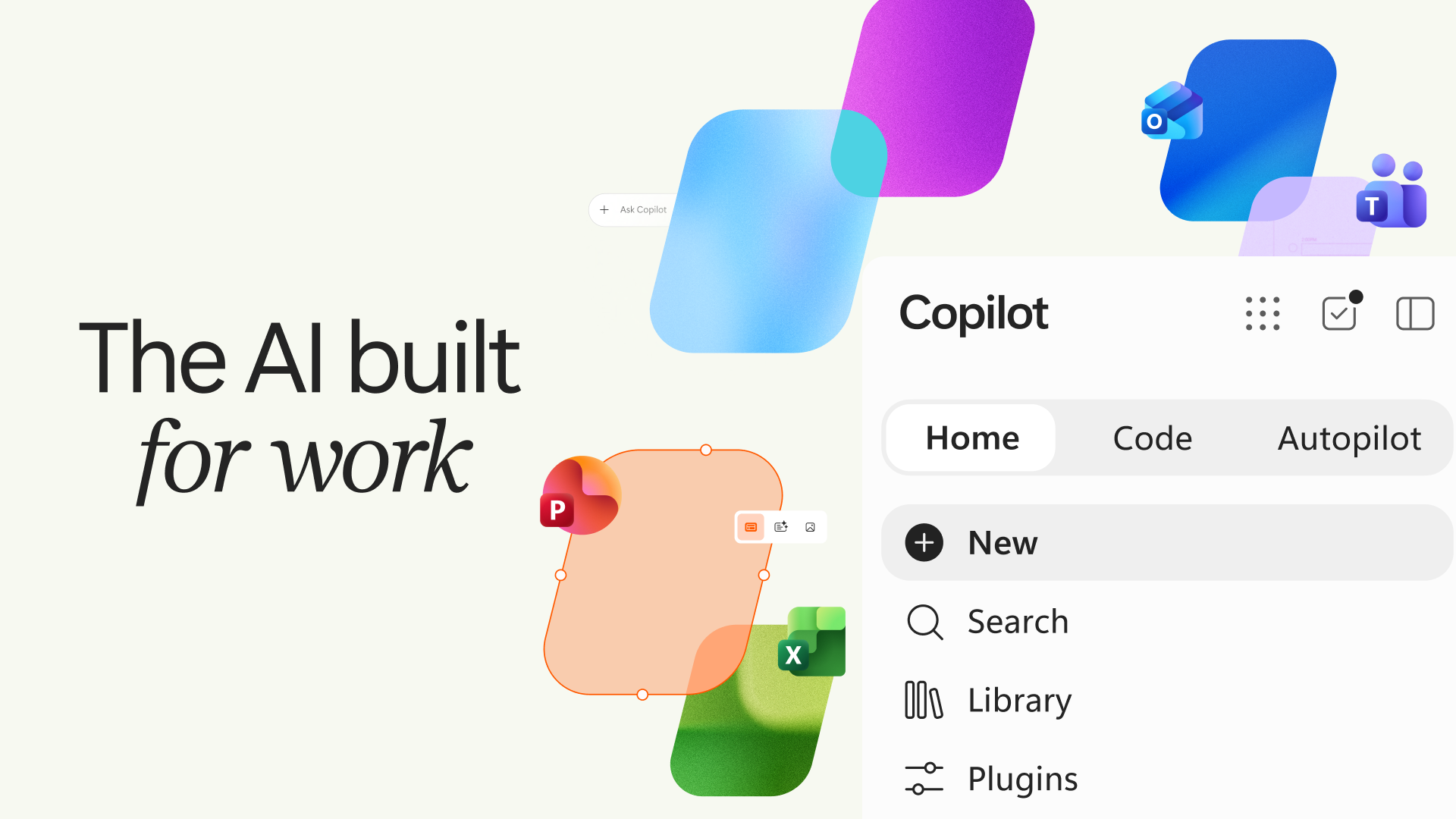
Microsoft overhauled Copilot on September 25, 2026, replacing the old Chat-and-Cowork split with three new tabs: Home, Code and Autopilot. Home merges everyday chat and multi-step Cowork tasks into one starting point, Code lets people without programming skills build small apps and automations by describing them in plain language, and Autopilot is a persistent, proactive agent that keeps working on an assigned goal even when nobody is actively using it. Alongside the redesign, Microsoft is moving the heavier, long-running agent work — Cowork, Code and Autopilot — onto usage-based billing through a new metered unit called the Copilot Credit, separate from the fixed-cost Copilot subscription that still covers chat, Word, Excel, PowerPoint, Outlook and Teams.
Key facts:
- Announced September 25, 2026 by Microsoft (blog post by Jared Spataro, CMO of AI at Work)
- Home and Code begin rolling out to Frontier early-access users within weeks of the announcement
- Autopilot expands to private preview by the end of September 2026
- Code is powered by the same underlying technology as GitHub Copilot and runs in a sandboxed environment inside a tenant
- Cowork, Code, Autopilot and frontier models (Astra, Fable) move to usage-based billing via Copilot Credits
- Pay-as-you-go Copilot Credits are priced at $0.01 per credit, billed monthly in arrears
What Microsoft actually changed in Copilot
Microsoft's September 25 announcement reframes the Copilot app around three tabs instead of the previous Chat/Cowork split. The company describes the goal as connecting the tools people already use — Word, Excel, PowerPoint, Outlook and Teams — with next-generation capabilities for building, customizing and scaling AI across an organization. The change applies to the standalone Microsoft 365 Copilot app and its Chat and Cowork modes, not to the separate GitHub Copilot developer product, which Microsoft continues to ship and price independently for professional developers writing code inside an IDE.
It's worth being precise about naming here, because the two products get confused constantly. GitHub Copilot is a coding assistant built into editors like Visual Studio Code and aimed at software engineers. Microsoft 365 Copilot — the subject of this piece — is the general-purpose AI assistant layered across Word, Excel, PowerPoint, Outlook, Teams and the standalone Copilot app, aimed at every employee in an organization, not just developers. The new Code tab inside Microsoft 365 Copilot borrows GitHub Copilot's underlying model technology, but it is a separate, no-code-oriented feature living inside the broader Copilot app.
Home: Chat and Cowork merged into one hub
Home becomes the new landing point inside Copilot. It brings Chat (single-turn question-and-answer assistance) and Cowork (multi-step, longer-running task execution) into the same interface, so a user can start a quick question and escalate it into a longer delegated task without switching apps. Home also surfaces recent activity and suggestions for what Copilot can help with next, and it folds in "Office in Copilot," giving the app direct, real-time collaborative access to Word, Excel and PowerPoint documents that colleagues can also be editing.
Before this change, Chat and Cowork were presented as two separate modes a user had to pick between before starting a task, which meant guessing upfront how much work a request would need. Collapsing them into Home removes that fork: a request simply starts as a conversation and Copilot escalates it into a longer-running Cowork task automatically if the work requires multiple steps, document edits or research across several sources. Microsoft's own Copilot Cowork documentation describes this as the mode built for delegated, multi-step work rather than single-turn answers.
Code: a natural-language app builder for non-developers
Code is aimed at employees who don't write software. It lets someone describe a widget, dashboard, automation or small internal app in plain language, and Copilot generates and runs it in a sandboxed environment inside the organization's own Microsoft 365 tenant. Microsoft says Code is powered by the same underlying technology as GitHub Copilot, extending coding-assistant capability to non-technical staff rather than professional developers. If you're curious how that underlying coding assistant differs from the consumer-facing Copilot app, see our explainer on how AI is being built directly into Word, Excel and PowerPoint.
Autopilot: a persistent, proactive agent
Autopilot is the most structurally new piece. It is an agent assigned a name, a role and a goal by its owner, and it is designed to keep working inside Microsoft 365 even when no one is actively prompting it — following up on open items, watching channels and conversations, and resuming multi-day projects on its own. Autopilot is cloud-hosted with its own Entra-managed identity, memory and workspace, and it integrates into Teams, Outlook and other Microsoft 365 apps so it can act where people already collaborate. It reaches private preview by the end of September 2026, after the Home and Code rollout to Frontier testers.
Fabric IQ, the plugin registry and other moving pieces
The same announcement bundles several supporting changes: Fabric IQ — Microsoft's grounding layer for giving Copilot organizational context — becomes generally available for Chat and Cowork immediately; a plugin registry for connecting third-party tools becomes generally available across surfaces in the coming weeks; Dynamics 365 and Power Platform integrations move to public preview the following month; and an "@Copilot" mention capability in Teams enters private preview by the end of the month. None of these replace Home, Code or Autopilot — they're the infrastructure Microsoft is laying underneath them.
Fabric IQ matters more than it sounds, because it's what lets Home, Code and Autopilot reason over an organization's actual data — files, emails, chats and business records — rather than just the open conversation. Microsoft frames it as the connective layer that turns Copilot from a generic assistant into one grounded in a specific company's own content, which is also part of why heavier Fabric IQ-backed queries draw from the new usage-based credit pool rather than the flat subscription.
The usage-based billing shift, explained
Microsoft is splitting Copilot costs into two buckets. The fixed-cost Microsoft 365 Copilot subscription (the User Subscription License) continues to cover Chat, the Office apps, Outlook and Teams at a flat per-seat price. Everything that runs as longer, autonomous agent work — Cowork, Code, and Autopilot, plus access to frontier models such as Astra and Fable — now draws on a separate metered currency called the Copilot Credit. The rationale Microsoft gives is that agentic work varies enormously in cost depending on which model it calls, how much organizational data it retrieves, how many tools it invokes and how long it runs, so a flat subscription price doesn't match the underlying compute cost the way per-seat chat access does.
Pay-as-you-go Copilot Credits are priced at $0.01 each and billed monthly in arrears, with no upfront commitment required, according to Microsoft's official Copilot Credits licensing guidance. Organizations that want predictable costs can prepay through a tiered Pre-Purchase Plan, which discounts larger annual credit commitments, with discounts scaling from roughly 5% at the smallest tier up to 20% at the largest. Credits are provisioned and managed centrally: pay-as-you-go access is turned on in the Power Platform admin center, prepaid plans are provisioned through Azure, and day-to-day spend policies, usage thresholds and consumption dashboards live under Copilot Cost management in the Microsoft 365 admin center.
| Capability | Billing model | What drives cost |
|---|---|---|
| Chat (in Home) | Fixed Copilot subscription (USL) | Per-seat license, included in subscription |
| Office apps, Outlook, Teams | Fixed Copilot subscription (USL) | Per-seat license, included in subscription |
| Cowork (in Home) | Usage-based (Copilot Credits) | Model used, context retrieved, tools called, runtime |
| Code | Usage-based (Copilot Credits) | App complexity to build; connector/user volume to host |
| Autopilot | Usage-based (Copilot Credits) | Persistent runtime, memory, tool calls over time |
| Frontier models (Astra, Fable) | Usage-based (Copilot Credits) | Per-query model and reasoning cost |
What a Copilot Credit actually costs
Beyond the flat $0.01-per-credit pay-as-you-go rate, Microsoft's own licensing guidance breaks consumption down by feature. Building an app in Code can run roughly 250 to 1,350-plus credits depending on complexity, while hosting and running that app afterward costs an estimated 10 to 5,000 credits per month depending on user volume and how many connectors it uses. Work IQ API tool and action calls are billed at roughly 0.1 Copilot Credit per call, with query consumption varying based on how much grounding, retrieval and reasoning a request needs. Dynamics 365 agent usage draws from the same pooled, tenant-level credit balance. Admins who want to avoid surprise bills can set spend policies and usage thresholds directly in the Microsoft 365 admin center's Copilot Cost management section.
Why Microsoft is making this change now
The redesign reflects a broader shift across the AI assistant market: moving from single-turn chatbots toward agents that act over longer stretches of time with less supervision. That shift strains flat, per-seat pricing, because a five-second chat answer and a multi-hour autonomous research task cost Microsoft wildly different amounts of compute to deliver. Usage-based billing lets Microsoft keep a predictable subscription price for everyday chat and document work while charging closer to actual cost for the agentic workloads that vary the most. It also puts Copilot in closer competitive alignment with how rival AI products are increasingly priced — our comparison of how Claude, Grok and ChatGPT stack up as assistants covers how other vendors handle the same trade-off between flat subscriptions and metered usage.
Rollout and availability timeline
Home and Code are rolling out first to Frontier, Microsoft's early-access program for Microsoft 365 Copilot customers, in the weeks following the September 25 announcement. Autopilot is moving into private preview on a separate, slightly later track by the end of September 2026. Microsoft has not published a general-availability date for any of the three features as of this writing; Frontier and private-preview participants will see them first, with broader availability expected to follow in subsequent months based on feedback. Separately, Microsoft 365 Copilot Business plans are set to gain default usage-based billing for additional eligible AI experiences starting October 19, 2026, continuing the same cost-model shift for a wider set of customers.
Frontier access itself isn't universal: Microsoft gates it behind an active Microsoft 365 Copilot license, and an organization's admin has to opt the tenant into the program before any individual user can see early features like Home and Code. That means most Microsoft 365 Copilot subscribers won't see the new tabs on day one even if their employer already pays for Copilot — the features need to be switched on at the tenant level first, then surfaced to users as Microsoft expands the rollout.
What it means if you use Copilot today
If your organization only uses Chat and the Office app integrations, nothing changes about how you're billed — that stays under the flat per-seat subscription. The change matters most to IT admins and power users who lean on Cowork for multi-step tasks, anyone who plans to use Code to build internal tools, and any team that adopts Autopilot once it leaves private preview, since all three now draw from a separate, metered credit pool that needs active cost monitoring. It's a similar pattern to how Microsoft has folded assistant features into familiar apps elsewhere — see our look at how AI assistants are showing up inside everyday Office apps for the broader trend of AI moving into tools people already use daily, and how that compares with AI assistants on phones from Apple, Google and OpenAI.
Terms to know before you dig in
Microsoft's announcement introduced or repurposed several terms that are easy to mix up, so here's a quick reference. Home is the new combined landing tab inside the Copilot app, replacing the old split screen between Chat and Cowork. Cowork is the multi-step, longer-running task mode that now lives inside Home rather than as its own separate tab. Code is the natural-language app-building tab, distinct from the standalone GitHub Copilot product even though it borrows its underlying technology. Autopilot is the persistent, always-on agent — Microsoft has previously referred to earlier versions of this concept internally as "Scout" before settling on the Autopilot name for this launch. Fabric IQ is the grounding layer that connects Copilot to an organization's actual data. And a Copilot Credit is the new metered unit — priced at $0.01 pay-as-you-go — that Cowork, Code, Autopilot and frontier-model usage now consume instead of drawing on the flat per-seat subscription.
What's next
Watch for three things over the next few months: whether Home and Code graduate from Frontier to general availability, whether Autopilot's private preview expands beyond its initial cohort, and whether the October 19, 2026 default usage-based billing change for Microsoft 365 Copilot Business plans draws pushback from IT buyers used to flat per-seat pricing. Microsoft's own Copilot Cost management admin tools will be the place to track actual credit consumption once any of these features are turned on inside a tenant.
Frequently asked questions
What is Microsoft Copilot Autopilot?
Autopilot is a persistent agent inside Microsoft 365 Copilot that is given a name, a role and a goal by its owner, then keeps working on that goal even when nobody is actively using it. It runs in the cloud with its own Entra-managed identity, memory and workspace, and it can act inside Teams, Outlook and other Microsoft 365 apps.
What is the new Home tab in Copilot?
Home is the new starting point inside the Copilot app. It merges the old Chat mode (quick question-and-answer) and Cowork mode (longer, multi-step delegated tasks) into one interface, and it integrates Office in Copilot for direct, real-time work in Word, Excel and PowerPoint.
What does the Code tab in Copilot do?
Code lets people without programming experience build small apps, dashboards and automations by describing what they want in plain language. It is powered by the same underlying technology as GitHub Copilot and runs the resulting app in a sandboxed environment inside the organization's own Microsoft 365 tenant.
How much does a Copilot Credit cost?
Pay-as-you-go Copilot Credits are priced at $0.01 each and billed monthly in arrears, according to Microsoft's official Copilot Credits licensing guidance. Organizations can also prepay through a tiered Pre-Purchase Plan for volume discounts.
When is Microsoft Copilot Autopilot available?
Autopilot moved into private preview by the end of September 2026, after Microsoft's September 25, 2026 announcement. Home and Code are rolling out separately to Frontier, Microsoft's early-access program, in the weeks following the same announcement.
Is Microsoft Copilot the same as GitHub Copilot?
No. Microsoft 365 Copilot is the general-purpose AI assistant built into Word, Excel, PowerPoint, Outlook, Teams and the standalone Copilot app. GitHub Copilot is a separate coding assistant aimed at software developers working in code editors. The new Code tab inside Microsoft 365 Copilot uses GitHub Copilot's underlying technology but is a distinct, no-code-oriented feature.
Sources
- Microsoft: Introducing the new Copilot with Home, Code and Autopilotblogs.microsoft.com
- Microsoft: Copilot Credits licensing guidancemicrosoft.com
- Microsoft Learn: Get started with Copilot Coworklearn.microsoft.com
- Microsoft: Frontier for business usersmicrosoft.com
- Microsoft News: Introducing the new Copilot (EMEA)news.microsoft.com
Theo Park runs the AI desk at Pandromeda. He follows model launches from the frontier labs and the open-weight community, tracks the assistants and developer tools built on them, and explains what each release changes on pricing, capability and safety. His reporting leans on primary sources: model cards, technical reports, API documentation and the companies' own announcements.