What Is a JWT? How JSON Web Tokens Work
JSON Web Tokens power login sessions and API auth across the web. Here's what's inside one, how signing works, and the security mistakes to avoid.
A JWT (JSON Web Token, pronounced "jot") is a compact, URL-safe string that packages a set of claims about a user or app into a signed JSON object, so a server can verify who sent it and that nothing in it was altered, without looking anything up in a database. Defined by IETF RFC 7519, it's the token format behind most modern "stateless" login sessions and API authorization headers — the string you'll see after Authorization: Bearer in a browser's network tab.
- Full name: JSON Web Token, RFC 7519 (IETF standard)
- Format: three base64url parts joined by dots —
header.payload.signature - Common algorithms: HS256 (shared secret), RS256, ES256 (public/private key)
- Used for: login sessions, single sign-on, API authorization (
Authorization: Bearer <token>) - Not encrypted by default: anyone can read a signed JWT's contents — only the signature is protected
What is a JWT, exactly?
A JWT is a way to represent a set of "claims" — small facts like a user ID, an expiration time, or a role — as a signed JSON object that's compact enough to fit in an HTTP header or a URL query parameter. That's the actual design goal stated in the spec: RFC 7519 describes JWT as "a compact claims representation format intended for space constrained environments such as HTTP Authorization headers and URI query parameters."
The key property that makes JWTs useful is that they're self-contained. A traditional login session hands the browser a random, meaningless ID and makes the server look up who that ID belongs to on every request. A JWT instead carries the user's identity and permissions inside the token itself, cryptographically signed so the server can trust it without a database round trip. That's why JWTs are sometimes called "stateless" tokens.
JWT isn't a new encryption scheme — it's a packaging format built on two related standards: JSON Web Signature (JWS), for signed tokens, and JSON Web Encryption (JWE), for encrypted ones. The vast majority of JWTs you'll encounter day to day — in login flows, in API requests, in OAuth 2.0 access and ID tokens — are signed JWS tokens, not encrypted JWE ones. That matters for the security section below: signed does not mean secret.
The three parts: header, payload, signature
Every JWT is three base64url-encoded strings separated by periods, in this order:
| Part | What it contains | Example (decoded) |
|---|---|---|
| Header | Token type and the signing algorithm used | {"alg":"HS256","typ":"JWT"} |
| Payload | The claims — the actual data being asserted | {"sub":"1234567890","name":"Jane Doe","iat":1730000000} |
| Signature | A cryptographic signature over the encoded header and payload | HMACSHA256(base64url(header) + "." + base64url(payload), secret) |
Put together, a real JWT looks like a long string such as eyJhbGciOiJIUzI1NiJ9.eyJzdWIiOiIxMjM0NTY3ODkwIn0.dQw4w9WgXcQ... — three chunks of base64url text joined by dots. The jwt.io introduction, maintained by Auth0/Okta as the open reference for the JWT spec, breaks this down the same way: a header describing the algorithm, a payload of claims, and a signature computed over the first two parts.
Base64url encoding is not encryption — it's just a text-safe encoding, the same family as regular base64 but swapped so the output is safe to put in a URL or an HTTP header without extra escaping. Anyone can decode a JWT's header and payload with nothing more than a text editor and a base64 decoder. What they can't do (without the signing key) is produce a new token with a valid signature, which is the entire security guarantee a JWT provides.
How JWT signing works: HMAC vs RSA vs ECDSA
The alg field in a JWT's header tells the receiver which algorithm was used to produce the signature, and that signature is what lets a server trust the token without storing session state. There are two broad families:
- Symmetric (HMAC) — e.g., HS256: the same secret key both signs and verifies the token. Fast and simple, but every service that needs to verify a token must hold the same secret, which means every one of them could also forge tokens.
- Asymmetric (public/private key) — e.g., RS256 (RSA) or ES256 (ECDSA): a private key signs the token, and a public key — which can be shared freely, even published — verifies it. Only the issuer can mint valid tokens, but any API that has the public key can check them. This is the pattern behind most "verify locally, no callback to the login server" API architectures.
| Algorithm | Key type | Typical use |
|---|---|---|
| HS256 (HMAC-SHA256) | Single shared secret | Simple setups where the signer and verifier are the same service |
| RS256 (RSA-SHA256) | RSA private/public key pair | Identity providers issuing tokens that many separate APIs must verify |
| ES256 (ECDSA P-256) | Elliptic-curve private/public key pair | Same use case as RS256, with smaller keys and signatures |
Per jwt.io's own documentation, JWTs "can be signed using a secret (with the HMAC algorithm) or a public/private key pair using RSA or ECDSA." Auth0's JWT documentation adds that with public/private key signing, the signature also proves the holder of the private key actually created the token — useful when the issuer and the verifier are different organizations entirely, like an identity provider and a third-party API.
Common JWT claims: iss, sub, exp, aud and more
The payload is just a JSON object, so in principle it can hold anything. But RFC 7519 registers a small set of standard claim names so different systems can interoperate. None of them are mandatory, but these are the ones you'll see constantly:
| Claim | Name | What it means |
|---|---|---|
iss | Issuer | Who created and signed the token |
sub | Subject | Who the token is about — typically a user ID |
aud | Audience | Who the token is intended for; a recipient not listed here should reject it |
exp | Expiration time | The token must not be accepted after this time |
nbf | Not before | The token must not be accepted before this time |
iat | Issued at | When the token was created, useful for judging its age |
jti | JWT ID | A unique identifier for the token, useful for preventing replay |
Beyond those registered claims, applications add their own "private" claims — a role, a tenant ID, a permission scope — as long as both the issuer and consumer agree on what they mean. RFC 7519 also defines "public" claims, which are either registered with IANA or namespaced to avoid collisions, but in practice most apps just add whatever custom fields they need.
What JWTs are actually used for
Two use cases cover almost every JWT you'll run into:
- Authorization / authentication. After a user logs in, the server issues a JWT. The client then sends that token with every subsequent request — usually in an
Authorization: Bearer <token>header — so the server can confirm identity and access rights on each call. This is the backbone of most single sign-on (SSO) setups and OpenID Connect ID tokens, and it's exactly why JWTs show up constantly alongside OAuth 2.0, where the access token an authorization server hands back is very often a JWT. - Information exchange between parties. Because a JWT is signed, the receiving party can confirm who sent it and that the content wasn't tampered with in transit — useful any time one service needs to assert something to another without them sharing a database.
In an API context, a JWT lets each backend service verify a caller's identity on its own, by checking the signature against a known public key (or shared secret), rather than calling a central session store for every request to every endpoint. That's the appeal for microservices and distributed systems: verification is local and doesn't need a network round trip.
JWT vs. session cookies: what's actually different
The classic alternative to a JWT is an opaque session identifier — a random string stored in a cookie that means nothing on its own. The server keeps a session table (often in memory or in something like Redis) mapping that ID to the actual user data. Here's the practical contrast:
| Opaque session cookie | JWT | |
|---|---|---|
| Contents | Random ID, meaningless by itself | Readable JSON claims (base64url, not encrypted) |
| Server state | Server must store and look up the session | Self-contained; no lookup needed to verify |
| Revocation | Instant — delete the row and the session is dead | Hard — a valid, unexpired JWT stays valid until it expires unless you add a blocklist |
| Scaling across services | Every service needs access to the same session store | Any service with the public key/secret can verify independently |
| Typical transport | Cookie, often httpOnly | Authorization header (or cookie) |
That revocation row is the single biggest practical trade-off. A session cookie can be killed the instant you delete its server-side record. A JWT, by design, needs no server-side record — which is also exactly why you can't simply "delete" one; it remains cryptographically valid until its exp claim passes, unless the system also maintains some kind of denylist or short-lived refresh-token pattern, which reintroduces some of the server state JWTs were meant to avoid.
Why people search "JWT decode" — and how debuggers like jwt.io work
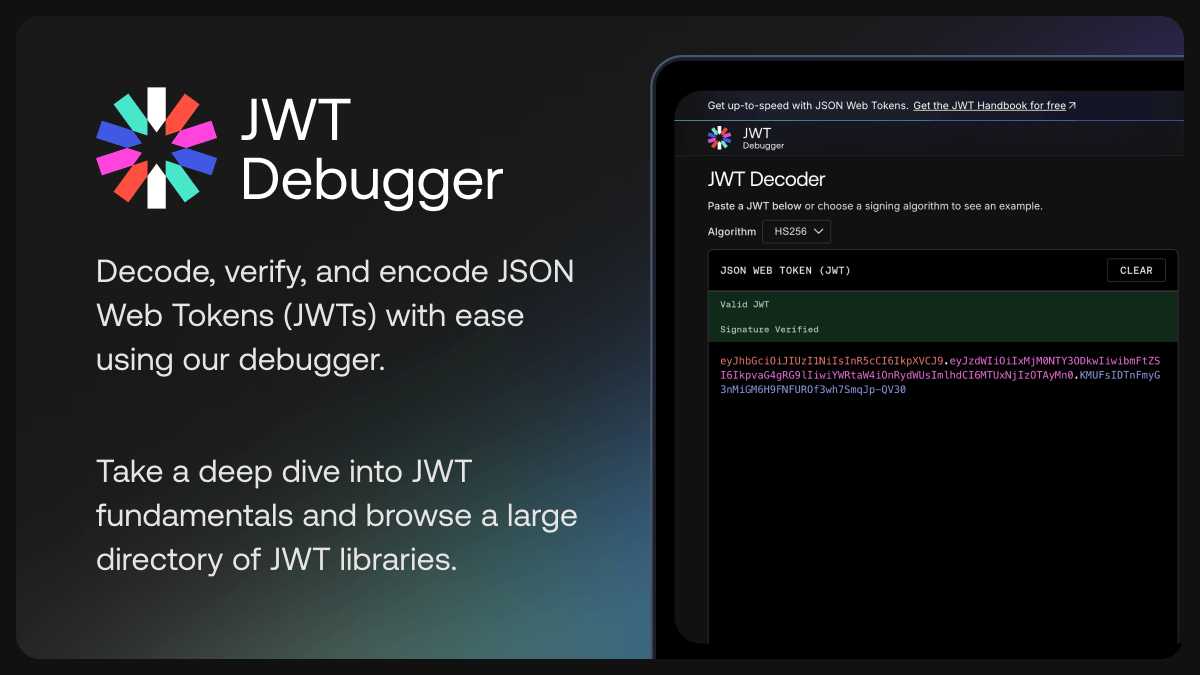
Because the header and payload are just base64url-encoded JSON rather than encrypted, "decoding" a JWT is trivial and developers do it constantly while debugging — to check what claims an identity provider actually issued, confirm an exp timestamp, or see which algorithm signed a token a third-party library produced. That's the demand behind tools like the jwt.io debugger, the open-source reference decoder that Auth0/Okta maintains: paste a token in, and it decodes the header and payload instantly in the browser, and can verify the signature if you supply the matching secret or public key.
It's worth being precise about what "decode" means here versus "verify": decoding just reads the base64url text back into JSON — no key required, and no security check happens. Verifying checks the signature against a key and confirms the token hasn't been altered and was issued by whoever holds that key. A token can decode perfectly cleanly and still fail verification (or have expired), which is exactly why production code must never treat "it decoded" as "it's valid."
JWT security pitfalls to avoid
JWTs are a format, not a security guarantee on their own — most real-world JWT vulnerabilities come from how they're stored or validated, not from the token format itself.
- Storing tokens in localStorage. Auth0's own token storage guidance calls in-memory storage (ideally inside a Web Worker) the most secure option for browser apps, and treats localStorage as a fallback — because any cross-site scripting (XSS) vulnerability on the page, including one introduced by a third-party script, can read every token sitting in localStorage. An httpOnly cookie that JavaScript can't read at all removes that specific exposure, though it trades in a need to guard against CSRF with flags like
SameSiteandSecure. - Not restricting or validating the
algheader server-side. Because the header names its own algorithm, a server that blindly trusts whateveralga token claims is exploitable. RFC 8725, the JWT Best Current Practices spec, documents the classic "algorithm confusion" attack: an attacker setsalgtononehoping a careless library skips signature checking entirely, or switches an RS256 token to HS256 and uses the issuer's known-public RSA public key as the HMAC secret. The fix, per RFC 8725, is that verifying code must let the caller specify an explicit allow-list of acceptable algorithms and reject anything else — never infer the algorithm from the token itself. - Treating a valid signature as proof the data should be trusted for anything. A signature proves the token wasn't altered and came from the holder of the signing key — it says nothing about whether the claims inside are still appropriate to act on. RFC 8725 also recommends checking the
audclaim explicitly and rejecting any token that doesn't name the current service as an intended recipient. - Ignoring expiry, or setting it too generously. A JWT with a long-lived
expand no revocation mechanism stays valid for its entire lifetime even if the user's access should have been cut off. Short-lived access tokens paired with a separate, more tightly controlled refresh-token flow are the standard mitigation. - Putting sensitive data in the payload. Since a signed JWT's payload is readable by anyone who intercepts it, it's not the place for passwords, secrets, or anything you wouldn't put in a URL. If data genuinely needs to be hidden, that calls for JWE (encrypted JWTs), not JWS (signed ones).
What to do next
If you're implementing JWT-based auth rather than just reading about it: use a well-maintained library for your language rather than hand-rolling signature verification, explicitly configure which algorithm(s) it should accept, keep access tokens short-lived, and decide deliberately — not by default — where tokens live on the client. If you're debugging an existing token, the jwt.io debugger is the standard way to decode one and sanity-check its claims before chasing the bug elsewhere. And if your token issuance actually runs through an OAuth 2.0 authorization server, it's worth understanding that layer too — see Pandromeda's explainer on how OAuth 2.0 works for the flow that typically produces the token in the first place.
Frequently asked questions
What does JWT stand for?
JWT stands for JSON Web Token, a standard defined in IETF RFC 7519. It's pronounced "jot." A JWT is a compact, signed string used to represent a set of claims — such as a user's identity and permissions — in a format that's safe to pass in an HTTP header or URL.
Is a JWT encrypted?
Not by default. The vast majority of JWTs in use are signed (JWS), not encrypted (JWE). Their header and payload are base64url-encoded, not encrypted, so anyone can decode and read them with a tool like the jwt.io debugger. Only the signature is protected — it proves the token wasn't altered and came from whoever holds the signing key.
Can a JWT be revoked before it expires?
Not easily, and that's one of the main trade-offs versus a server-side session. A JWT is self-contained and valid until its exp claim passes; killing it early requires extra infrastructure, like a token denylist or very short-lived access tokens paired with a revocable refresh token.
Is it safe to store a JWT in localStorage?
Auth0's own token storage guidance treats localStorage as a fallback, not the recommended option, because any cross-site scripting (XSS) vulnerability on the page can read tokens stored there. It recommends in-memory storage, ideally inside a Web Worker, as the most secure option for browser apps, with httpOnly cookies as another way to keep tokens out of reach of page JavaScript.
What's the difference between a JWT and an API key?
An API key is typically an opaque, long-lived credential the server looks up in a database to identify an app or account. A JWT is self-describing — it carries its own claims and expiration and can be verified locally via its signature — and is more commonly used for per-user, time-limited authorization than for static app-level API access.
What does "JWT decode" actually do, and is it the same as verifying a token?
Decoding a JWT just reverses its base64url encoding to show the readable JSON header and payload — no key or signature check is involved, which is why tools like the jwt.io debugger can decode any token instantly. Verifying is a separate step that checks the signature against a key to confirm the token is authentic and unaltered; a token can decode cleanly and still fail verification or be expired.
Sources
- RFC 7519 — JSON Web Token (JWT)datatracker.ietf.org
- RFC 8725 — JSON Web Token Best Current Practicesdatatracker.ietf.org
- Introduction to JSON Web Tokens — jwt.iojwt.io
- JWT Debugger — jwt.iojwt.io
- JSON Web Tokens — Auth0 Docsauth0.com
- Token Storage Guidance — Auth0 Docsauth0.com
Felix Moreau writes Pandromeda's software coverage and how-to guides. He covers Windows, macOS and Linux updates, the apps people rely on, emulators and developer tools, and turns official documentation into clear, numbered steps that work on the current version.