What Is OAuth 2.0 and How Does It Work?
OAuth 2.0 lets apps access your data without your password. Here's how the authorization code flow, access and refresh tokens, and PKCE actually work.
OAuth 2.0 is an authorization framework, not a login system: it lets you grant one application limited access to your data on another service—your contacts, your files, your repositories—without ever handing over your password. Every time you click “Sign in with Google” or let a new app read your GitHub repos, OAuth 2.0 is the protocol doing the handshake behind the scenes, usually alongside a companion identity layer called OpenID Connect that actually confirms who you are.
- What it is: An open authorization framework defined in IETF RFC 6749, maintained by the IETF OAuth Working Group.
- What it does: Lets a third-party app get limited, scoped access to a resource (an API, an account) without seeing the user’s password.
- What it is not: An authentication protocol on its own—that job belongs to OpenID Connect (OIDC), which is built on top of OAuth 2.0.
- Core credentials: Access tokens (short-lived, used to call APIs) and refresh tokens (longer-lived, used to get new access tokens).
- Key security upgrade: PKCE (RFC 7636), now effectively mandatory for mobile apps, single-page apps, and recommended for all clients under current best practice.
What is OAuth 2.0?
OAuth 2.0 is an open standard for delegated authorization. According to the IETF's defining specification, RFC 6749, it is a framework that enables a third-party application to obtain limited access to an HTTP service, either on behalf of a resource owner (typically a person) or on its own behalf, without that application ever handling the owner's credentials directly—instead, the application receives a separate, scoped credential called an access token.
The spec defines four roles that show up in every OAuth exchange:
- Resource owner — the person who owns the data (you).
- Client — the application requesting access (the app asking to read your Google Calendar).
- Authorization server — the server that authenticates you and issues tokens (accounts.google.com, github.com/login/oauth).
- Resource server — the API that actually holds the protected data and checks the token (the Google Calendar API, the GitHub API).
OAuth 2.0 superseded OAuth 1.0 in 2012 and has since become the default authorization layer for virtually every major API: Google, Microsoft, GitHub, Slack, and thousands of smaller platforms all implement it, per the IETF specification and the vendors' own developer documentation linked throughout this piece.
Authentication vs. authorization — and where OIDC fits in
This is the single most common point of confusion, and it's baked into the protocol's own name. Authorization is about permission: does this app get to access that resource, and with what scope? Authentication is about identity: who is this person, actually?
OAuth 2.0, strictly speaking, only solves the authorization problem. The OpenID Foundation is explicit about this: OAuth 2.0 is "a framework for building authorization protocols," and OpenID Connect (OIDC) is "an interoperable authentication protocol based on the OAuth 2.0 framework of specifications." OIDC reuses OAuth's exact message flows but adds one critical extra: an ID token, a signed JSON Web Token that contains a verified identifier for the user (the `sub` claim) plus details about how and when they authenticated.
In practice, nearly every consumer-facing "Sign in with…" button is running OIDC on top of OAuth 2.0 simultaneously: the OAuth layer issues an access token so the app can (optionally) call an API on your behalf, while the OIDC layer issues the ID token that proves who you are. Developers who only need identity and no ongoing API access are, technically, using OIDC; developers who need an app to read your files or post on your behalf are using OAuth's authorization machinery, ID token or not.
How the authorization code flow works
The authorization code grant is the flow underpinning almost every "Sign in with…" button and most server-side integrations. RFC 6749 lays it out in five steps:
- The client redirects the user's browser to the authorization server's authorization endpoint, passing its client ID, the requested scope(s), a
statevalue (for CSRF protection), and a registeredredirect_uri. - The authorization server authenticates the resource owner (the login screen you actually see) and asks them to approve or deny the requested access.
- If approved, the authorization server redirects the browser back to the client's
redirect_uriwith a short-lived, single-use authorization code attached. - The client's backend sends that code to the authorization server's token endpoint—over a direct, TLS-protected server-to-server call, not through the browser—along with its own client credentials.
- The authorization server validates the code and the redirect URI, then returns an access token and, often, a refresh token.
GitHub's own implementation is a clean real-world example of this exact sequence: a client sends the user to github.com/login/oauth/authorize with a client_id, scope, and state; GitHub redirects back with a temporary code (which expires after 10 minutes); the app's server exchanges that code, plus its client_secret, for an access token at github.com/login/oauth/access_token, per GitHub's OAuth Apps documentation. Google's implementation follows the same shape for web server apps, as described in Google's OAuth 2.0 documentation, which also covers variants for installed apps, browser-based JavaScript apps, and devices with limited input like smart TVs.
| Step | What happens | Where it travels |
|---|---|---|
| 1. Authorization request | Client redirects user to the authorization server with client_id, scope, state, redirect_uri | User's browser |
| 2. User consent | User logs in and approves (or denies) the requested scopes | Authorization server's own page |
| 3. Authorization code issued | Server redirects back to redirect_uri with a short-lived, one-time code | User's browser |
| 4. Code exchange | Client's backend swaps the code (+ client secret or PKCE verifier) for tokens | Direct server-to-server TLS call |
| 5. Token issued | Authorization server returns an access token and, often, a refresh token | Direct server-to-server TLS call |
Access tokens vs. refresh tokens
RFC 6749 draws a sharp line between the two, and mixing them up is a common source of bugs and security mistakes:
- Access token — the actual credential sent with every API request (typically as an
Authorization: Bearer <token>header). It represents a specific scope and a short lifetime, and the spec treats it as something the client should generally not need to inspect—just present. Access tokens get sent to resource servers (the API). - Refresh token — a longer-lived credential used only to obtain a new access token once the current one expires, without forcing the user to log in again. Refresh tokens go exclusively to the authorization server, never to a resource server, and the authorization server is free to not issue one at all.
Platform specifics vary. Google notes that refresh tokens are meant for secure, long-term storage and can stop working after revocation, six months of inactivity, or when a per-account token limit is hit, per Google's OAuth 2.0 docs. GitHub's optional expiring-token mode issues access tokens that last eight hours alongside a refresh token to mint the next pair, according to GitHub's documentation. The upshot for developers: short-lived access tokens limit the damage if one leaks, while refresh tokens (which must be stored much more carefully) are what keep users from re-authenticating constantly.
Where ordinary people encounter OAuth every day
Most people never see the word "OAuth," but they trigger the flow constantly:
- "Sign in with Google / Microsoft / Apple / GitHub" buttons on third-party websites and apps—OAuth plus OIDC handling both the login and (often) a grant of limited profile access.
- Connecting apps to a calendar or cloud drive—e.g., giving a scheduling tool read access to your Google Calendar without giving it your Google password.
- Linking accounts between services—Spotify-to-Discord, a CI tool authorizing against your GitHub org, a design tool importing from Dropbox.
- Smart TVs and consoles—the "go to this URL and enter this code" screens you see when signing a streaming app into a device with no keyboard use OAuth's device authorization grant.
In each case, the consent screen listing exactly what the app can see or do ("This app will be able to: view your email address, manage your calendar events") is OAuth's scope system made visible—arguably the most consumer-facing part of a protocol most users never name.
Common security pitfalls
OAuth 2.0's flexibility is also where implementations go wrong. The specification and its follow-on security guidance flag several recurring issues:
- Loose redirect URI validation. RFC 6749 requires authorization servers to validate the
redirect_uriagainst a registered value using exact string comparison, and explicitly warns that without strict registration, the authorization endpoint "can be used as an open redirector." A server that accepts wildcard or partial-match redirect URIs risks sending authorization codes or tokens to an attacker-controlled endpoint. GitHub's own documentation flags this directly, warning that wildcard callback matching "can be a security risk" and recommending exact-match URLs. - Authorization code interception on public clients. Mobile and single-page apps can't keep a client secret truly confidential (it ships inside the app binary or browser bundle), so a malicious app registering the same custom URL scheme could intercept an authorization code in transit.
- Skipping PKCE. This is exactly the problem RFC 7636's PKCE extension (Proof Key for Code Exchange) fixes. The client generates a random
code_verifier, sends a hashedcode_challengewith the initial authorization request, and must present the original verifier when exchanging the code for a token. A stolen code is useless to an attacker without the matching verifier. The RFC requires clients capable of SHA-256 to use theS256challenge method rather than the weakerplainmethod. PKCE is now layered onto flows that didn't originally require it—GitHub's authorization endpoint, for instance, accepts optionalcode_challengeandcode_challenge_methodparameters on top of its standard authorization code flow. - Missing or ignored
stateparameter. Thestatevalue is there to bind the authorization request to the callback and prevent cross-site request forgery. GitHub's docs explicitly instruct developers to check that the returnedstatematches what they sent and to abort the flow if it doesn't. - Reused or long-lived authorization codes. RFC 6749 says a client must not use an authorization code more than once, and recommends a maximum code lifetime of 10 minutes; if a code is replayed, the authorization server is supposed to reject the request and revoke any tokens already issued from it.
- Treating the implicit grant or password grant as current best practice. Both are listed as legacy flows on oauth.net; current IETF security guidance (RFC 9700) recommends against the implicit grant and favors the authorization code flow with PKCE across client types, including browser-based apps.
Readers who want the general vocabulary around vulnerability tracking and severity scoring—useful context when an OAuth implementation flaw gets assigned a public identifier—can see our explainer on how CVE IDs and CVSS scores work.
The other OAuth grant types, briefly
The authorization code flow isn't the only one. oauth.net's developer reference lists several grant types for different client scenarios:
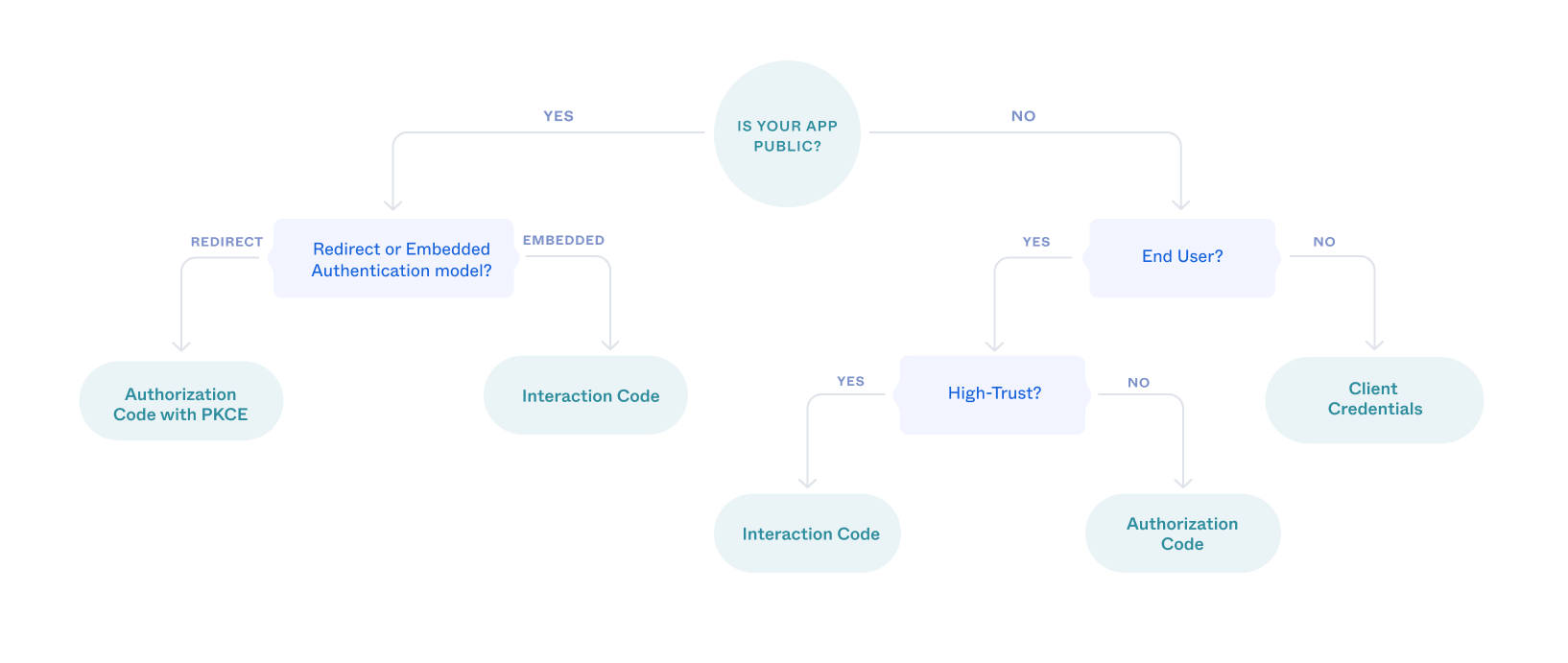
- Client Credentials — machine-to-machine access with no end user involved (a backend service calling another backend service).
- Device Code — for input-constrained devices like smart TVs and consoles, where the user approves access on a second device.
- Refresh Token — not an initial grant but the mechanism for minting new access tokens without re-prompting the user.
- Implicit and Resource Owner Password Credentials — both marked "legacy" by oauth.net; current guidance steers new implementations away from both in favor of authorization code plus PKCE.
Picking the right grant type is largely a function of whether the client can keep a secret (a confidential server-side client) or can't (a public client like a mobile app or SPA), and whether a human is present to approve access at all.
If you're integrating OAuth as a developer
A minimal, spec-aligned checklist for a server-side web app implementing "Sign in with X":
- Register your app with the provider to get a client ID (and secret, for confidential clients) and register your exact redirect URI(s).
- Generate a random, unguessable
statevalue per request and store it server-side or in a signed cookie; verify it on callback. - Use PKCE even for confidential clients where the provider supports it—it's cheap insurance.
- Request the narrowest scopes your app actually needs; broader scopes are a bigger liability if a token leaks.
- Store refresh tokens encrypted at rest, never in client-side storage accessible to JavaScript.
- Treat the access token as opaque where possible, and always validate tokens and signatures server-side rather than trusting client-supplied claims.
Teams evaluating full identity platforms on top of these primitives—rather than hand-rolling OAuth and OIDC—typically weigh vendor developer docs like Okta's OAuth and OpenID Connect overview or Auth0's authorization code flow documentation against building directly on a single platform's native OAuth implementation, such as the one covered in our look at recent changes to GitHub's developer tooling.
What's next for OAuth
The core of OAuth 2.0 hasn't changed since RFC 6749 in 2012, but the guidance around how to use it safely keeps tightening. The IETF's OAuth Security Best Current Practice (RFC 9700) now pushes public and confidential clients alike toward the authorization code flow with PKCE and away from the implicit and password grants. An in-progress "OAuth 2.1" effort aims to consolidate that accumulated best practice—PKCE by default, no implicit grant, stricter redirect matching—into a single, cleaner specification rather than a base RFC plus a growing stack of extensions. For most developers, the practical trajectory is the same either way: fewer legacy flows, PKCE everywhere, and tighter redirect URI enforcement as the default rather than the exception.
Frequently asked questions
What is OAuth 2.0 in simple terms?
OAuth 2.0 is an open standard that lets you grant one app limited access to your data on another service (like Google or GitHub) without giving that app your password. It issues a scoped access token instead of sharing credentials, as defined in IETF RFC 6749.
Is OAuth 2.0 authentication or authorization?
OAuth 2.0 is an authorization protocol — it governs what an app can access. Authentication (confirming who you are) is handled by OpenID Connect (OIDC), an identity layer built on top of OAuth 2.0 that adds a signed ID token.
What is the difference between an access token and a refresh token?
An access token is a short-lived credential sent with every API request to prove you're authorized. A refresh token is a longer-lived credential used only to request a new access token when the old one expires, and it is sent only to the authorization server, never to the resource server/API.
What is PKCE and why does OAuth 2.0 need it?
PKCE (Proof Key for Code Exchange, RFC 7636) protects the authorization code flow on mobile apps, single-page apps, and other clients that can't keep a secret truly confidential. The client generates a random code_verifier and sends a hashed code_challenge up front, then must present the original verifier to redeem the code — so an intercepted code alone is useless to an attacker.
Why is redirect URI validation important in OAuth 2.0?
If an authorization server doesn't strictly validate the redirect_uri against a pre-registered value, its authorization endpoint can be abused as an open redirector, letting an attacker redirect authorization codes or tokens to a malicious site. RFC 6749 requires exact-match registration and comparison for this reason.
What is the authorization code flow?
It's OAuth 2.0's most common flow: the client sends the user to the authorization server, the user logs in and approves access, the server redirects back with a one-time authorization code, and the client's backend exchanges that code (over a direct server-to-server call) for an access token and, often, a refresh token.
Sources
- IETF RFC 6749: The OAuth 2.0 Authorization Frameworkrfc-editor.org
- IETF RFC 7636: Proof Key for Code Exchange (PKCE)rfc-editor.org
- oauth.net: OAuth 2.0 overview and grant typesoauth.net
- OpenID Foundation: OpenID Connect overviewopenid.net
- Google for Developers: Using OAuth 2.0 to Access Google APIsdevelopers.google.com
- GitHub Docs: Authorizing OAuth Appsdocs.github.com
Felix Moreau writes Pandromeda's software coverage and how-to guides. He covers Windows, macOS and Linux updates, the apps people rely on, emulators and developer tools, and turns official documentation into clear, numbered steps that work on the current version.