GitHub's AI Scan and Agentic Autofix Are Now Generally Available
Two code-scanning features reached general availability on the same day — one finds vulnerabilities CodeQL can't, the other opens draft pull requests to fix alerts that already exist.
GitHub made two code-scanning features generally available on October 15, 2026: AI Scan for pull requests, an AI-based scanner that catches vulnerabilities in languages CodeQL doesn't cover, and agentic autofix for code scanning alerts, which graduated from public preview to GA and now drives a full explore-fix-verify loop that ends in a draft pull request. Neither feature needs a Copilot license to use, both draw on a new "Code Security AI Credits" billing pool, and both are aimed at the same problem: code scanning alerts that pile up faster than security teams can triage them.
Here's what actually changed, who can turn each feature on, and how the billing works.
The short version:
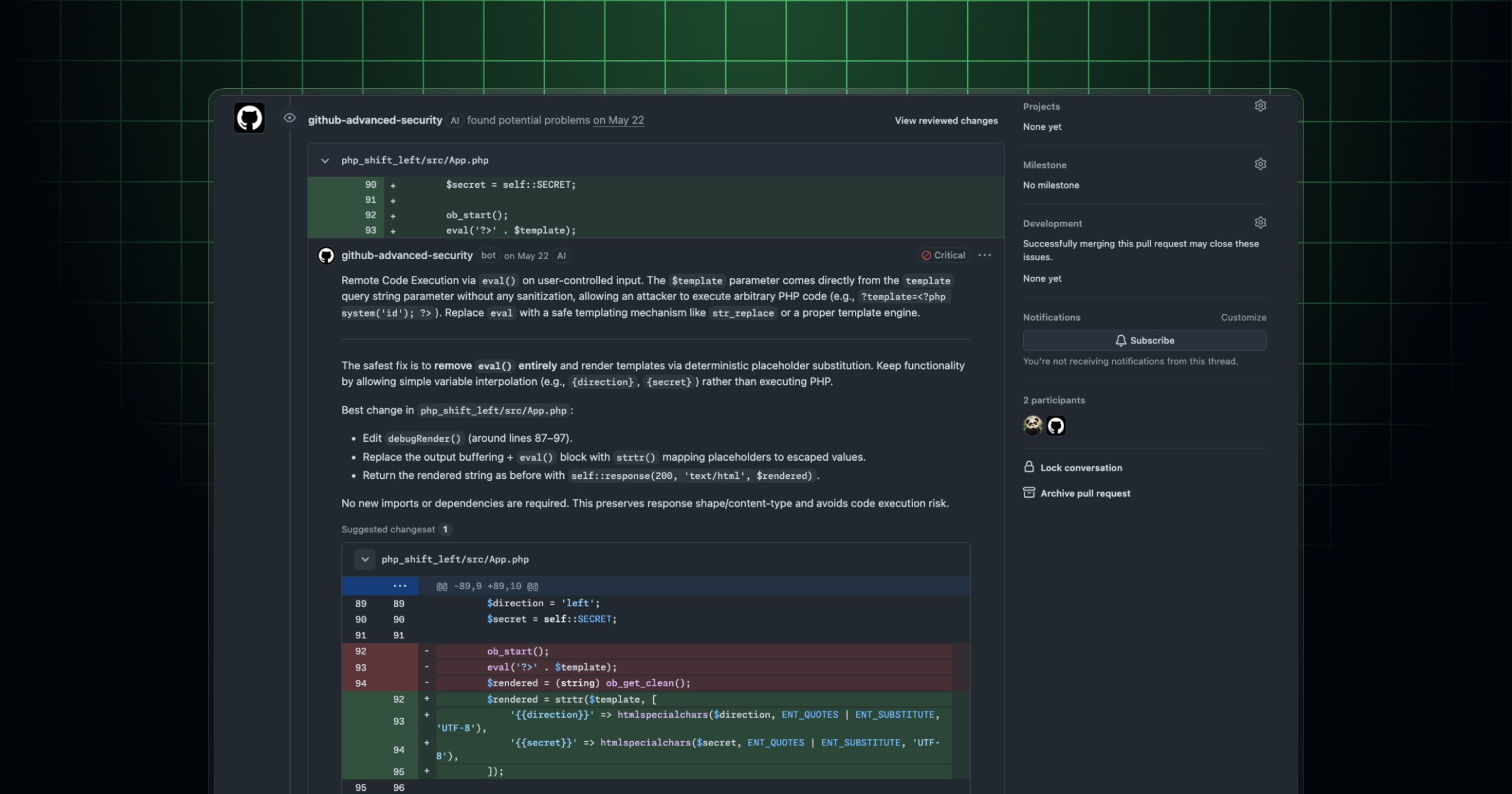
- AI Scan for pull requests is a new scanner that runs automatically on PRs, covering PHP, Shell/Bash, Terraform (HCL), Dockerfiles, JSP, and Blazor — languages CodeQL doesn't analyze. Findings show up with an "AI" badge on the Conversation and Files changed tabs and are advisory only; they cannot block a merge.
- Agentic autofix for code scanning alerts is now GA after a public preview that started in July 2026. Assigning an alert to Copilot launches an agent that explores the codebase, writes a fix, re-runs CodeQL to confirm the alert actually closes, and opens a draft pull request.
- Both features are billed through Code Security AI Credits; agentic autofix also consumes GitHub Actions minutes and needs a Copilot billing method on file.
- Neither requires an individual Copilot license, but private and internal repositories need GitHub Code Security or GitHub Advanced Security, and agentic autofix is Enterprise Cloud only.
What GitHub actually shipped on October 15
Both announcements landed on GitHub's changelog on the same day: AI Scan for pull requests reaching general availability, and agentic autofix for code scanning alerts moving from public preview to GA. They're separate features that plug into the same code scanning pipeline, and GitHub is positioning them as complementary: one finds more things, the other fixes what's already been found — including the new AI Scan findings. Code scanning, GitHub's umbrella term for static analysis on commits and pull requests, has run on CodeQL for years. CodeQL is precise but it only supports a fixed list of languages. AI Scan is GitHub's answer to that coverage gap, while agentic autofix is GitHub's answer to the fact that finding a vulnerability and actually fixing it correctly are two different, equally time-consuming jobs.
What AI Scan for pull requests does
AI Scan is an AI-based vulnerability scanner that runs on pull requests, in addition to CodeQL, not instead of it. According to GitHub's AI-powered security detections documentation, it specifically targets languages and frameworks CodeQL doesn't currently analyze: PHP, Shell/Bash, Terraform configuration (HCL), Dockerfiles, JSP for Java, and Blazor for C#, with GitHub noting that coverage "may change as the feature evolves." Each finding comes with an explanation of the underlying security risk and, where available, a suggested fix generated by Copilot Autofix. It's meant to read like a second reviewer flagging something worth a look, not a hard gate.
Where AI Scan findings show up — and why they can't block a merge
AI Scan results appear directly on the pull request, on both the Conversation tab and the Files changed tab, sitting alongside CodeQL alerts but carrying a distinct "AI" label so reviewers can tell the two apart at a glance. GitHub's documentation is explicit that these findings are advisory: they don't fail the code scanning check and can't block a merge through branch protection or repository rulesets, and AI Scan results don't appear as standing alerts in the security backlog the way CodeQL findings do — they live on the PR. There are a couple of scope limits worth knowing. AI Scan does not run on pull requests opened from forks, and it does not run on pull requests opened by Dependabot. It also runs independently of CodeQL's own state — a pending or failing CodeQL run on the same PR won't hold AI Scan back.
Who gets AI Scan, and what it costs to enable
AI Scan turns on per the repository's "AI Scan on pull requests" setting, which only takes effect once code scanning itself is already enabled. No GitHub Copilot license is required to use it. Availability otherwise comes down to repository visibility and ownership, per GitHub's documentation:
| Repository type | AI Scan availability |
|---|---|
| Organization-owned, public | Available, no active-committer license needed |
| Organization-owned, private or internal | Requires GitHub Code Security or GitHub Advanced Security |
| Personal account, public repo | Available |
| Personal account, private repo | Not available |
| Enterprise Managed User namespaces | Not available |
Enterprises control the feature top-down: the default enterprise policy for AI Scan is "Not allowed," so an enterprise owner has to explicitly allow it before org owners or security managers can switch it on for eligible repositories, which then inherit the organization's setting. A repository admin in an org that has AI Scan on can opt out locally, but can't opt in if the org-level switch is off.
What agentic autofix for code scanning alerts does
Agentic autofix is a different kind of feature — it doesn't find new vulnerabilities, it closes alerts that already exist. GitHub's autofix for code scanning documentation describes assigning an alert to Copilot as asking it to "investigate and fix one or more alerts for you, end to end." Once assigned, an agent session explores the codebase beyond just the flagged file, generates a fix, and then — this is the key difference from a simple code-suggestion tool — re-runs CodeQL using the code scanning query suite to validate that the alert is actually resolved before anything reaches a human. GitHub is careful to call this validation "best-effort," not a guarantee. The agent then opens a draft pull request containing the fix, a summary of why it closes the alert, and the validation steps it took. Reviewers can ask for further changes by commenting on the pull request or through the Agents tab, and GitHub still expects every fix to be reviewed and tested before merging — autofix proposes, it doesn't merge itself.
From preview to GA: what changed since July 2026
Agentic autofix isn't brand new — GitHub put it into public preview on July 10, 2026. The October 15 changelog post marks its move to general availability on GitHub Enterprise Cloud. The clearest visible change for day-to-day users: when agentic autofix is enabled, the old one-click Generate Fix button on an individual alert is replaced by an Assign to Copilot button, reflecting the shift from a single-shot code suggestion to a full agent session that explores, fixes, and validates before a PR ever appears.
GitHub also built in batching for teams working through a backlog: up to 25 alerts can be selected from the security alerts list and assigned together, landing as fixes in one pull request instead of 25 separate ones. For teams that want to drive this from automation rather than the UI, the same assignment can be triggered through the REST API for updating a code scanning alert, by setting its assignees field to ["copilot-swe-agent[bot]"].
One limitation carries over from preview: only alerts on a repository's default branch can be assigned to Copilot. Alerts detected solely on pull requests or other branches can't be handed to the agent, and it can't confirm fixes for alerts from custom CodeQL queries, the security-extended query suite, or third-party scanning tools, since those don't run through the standard CodeQL validation pass.
Who gets agentic autofix
Agentic autofix has a narrower eligibility bar than AI Scan. It's restricted to GitHub Enterprise Cloud (including data residency configurations), and it requires GitHub Code Security or GitHub Advanced Security. Turning it on is a two-step chain of approvals: an enterprise owner or security manager must allow the "Agentic autofix" policy at the enterprise level, and then an organization owner or security manager enables it for their organization — eligible repositories inherit that setting by default, with repository admins able to opt out. On personal-account public repositories, a repository admin can switch it on directly. It is not available to repositories owned by Enterprise Managed Users. Like AI Scan, agentic autofix doesn't require an individual Copilot license to use. It does, however, require a Copilot billing method to be on file for the paying account, since usage draws against Copilot-linked AI credit allowances before falling back to metered billing.
How the billing actually works
Both features meter usage through the same mechanism: a Code Security AI Credits SKU, visible in the "AI usage" section of enterprise billing and licensing under the "Advanced Security" product, where admins can set SKU-level budgets. Per GitHub's billing documentation, if the paying account has included AI credits from a Copilot entitlement, eligible usage draws from that allowance first; once it's exhausted, usage is metered. Accounts with no included credits go straight to metered billing. If a hard budget is in place and the allowance runs out, scanning or autofix activity simply stops until the budget is raised or the next billing cycle starts. Agentic autofix adds one more cost on top: each agent session also consumes GitHub Actions minutes, since the fix-and-validate loop runs through Actions infrastructure. Classic Copilot Autofix — the older, single-suggestion feature on individual alerts — is billed separately and doesn't draw from these AI credits. Billing is attributed to whichever account pays for the repository: organization-owned repos bill to the organization (or its parent enterprise), and public personal-account repos bill to that individual account unless the owner already has a Copilot license through an org or enterprise.
AI Scan vs. agentic autofix, side by side
| AI Scan for pull requests | Agentic autofix for code scanning alerts | |
|---|---|---|
| What it does | Finds vulnerabilities in languages/frameworks CodeQL doesn't cover | Fixes existing code scanning alerts and validates the fix |
| Runs on | Pull requests (not forks, not Dependabot PRs) | Alerts on the default branch |
| Output | Advisory findings with an "AI" badge, inline on the PR | A draft pull request with a fix summary and validation steps |
| Can block a merge? | No — advisory only | No — opens a draft PR for review |
| Copilot license required? | No | No (but a Copilot billing method is required) |
| Platform requirement | GitHub.com (public free; private/internal needs Code Security/Advanced Security) | GitHub Enterprise Cloud with Code Security/Advanced Security |
| Billed as | Code Security AI Credits | Code Security AI Credits + GitHub Actions minutes |
| How to enable | Turn on code scanning, then the "AI Scan on pull requests" setting | Enterprise policy, then org/repo-level toggle in Code Security settings |
How to turn each feature on
For AI Scan, the prerequisite is simply having code scanning enabled on the repository, then flipping the repository's (or, for orgs, the organization-level) "AI Scan on pull requests" setting under Code Security configuration. Enterprise admins need to confirm the enterprise-wide AI Scan policy is set to allow it first, since the default is off. For agentic autofix, the path runs through three layers of approval rather than one: enable the "Agentic autofix" policy in Advanced Security policies at the enterprise level, enable the equivalent setting in the organization's Code Security settings, and make sure a Copilot billing method is attached to the paying account. After that, any admin or developer with access can assign individual alerts, or up to 25 at once, to Copilot from the security alerts list — or trigger it programmatically through the REST API.
Why this matters for security and DevOps teams
The practical effect of shipping both features in GA on the same day is that GitHub is trying to close the loop on code scanning end to end: catch more issues (including in languages CodeQL has never reached, like Terraform and Dockerfiles), and then clear the resulting backlog without every fix requiring a human to write the patch from scratch. Teams already running GitHub's Copilot tooling across their IDEs will find the billing model familiar, since it reuses the same AI credit pool that other Copilot-adjacent features draw from. And for organizations still mapping out where agent-driven coding tools fit against more deterministic reviewers, these two features sit at opposite ends of the same spectrum as the broader agentic coding tooling GitHub has been shipping this year — one is a cautious, advisory layer bolted onto an existing workflow, the other hands an agent real autonomy to open a PR, bounded by a validation step that reruns the original scanner. Security teams dealing with mandated patch windows — the kind covered in our recent report on a CISA KEV deadline — will likely see agentic autofix's batch assignment as the more immediately useful of the two, since it's aimed squarely at clearing a backlog of already-confirmed alerts rather than finding new ones.
What next
Both features are live now for eligible accounts, but neither is universally on by default — enterprise and organization admins have to walk through the policy chain described above before developers see either one. Teams on GitHub Enterprise Cloud with existing GitHub Advanced Security or Code Security subscriptions are best positioned to pilot agentic autofix first, since it's the more capable but more gated of the two; teams working heavily in PHP, Shell, Terraform, Dockerfiles, JSP, or Blazor have the clearest immediate reason to turn on AI Scan, since that's exactly the coverage gap it's built to close. GitHub has said coverage for AI Scan may expand over time, so it's worth checking the documentation periodically rather than assuming the current language list is final.
Frequently asked questions
Does AI Scan for pull requests require a GitHub Copilot license?
No. GitHub's documentation states that a Copilot license is not required to use AI Scan. Usage instead draws from the Code Security AI Credits billing pool.
Can AI Scan or agentic autofix findings block a pull request from merging?
No. AI Scan findings are advisory — they don't fail the code scanning check and can't block a merge through branch protection or rulesets. Agentic autofix opens a draft pull request for human review rather than merging anything itself.
What languages does AI Scan cover that CodeQL doesn't?
GitHub lists PHP, Shell/Bash, Terraform configuration (HCL), Dockerfiles, JSP for Java, and Blazor for C#, noting that coverage may expand as the feature evolves.
Is agentic autofix available outside GitHub Enterprise Cloud?
No. As documented by GitHub, agentic autofix for code scanning alerts requires GitHub Enterprise Cloud (including data residency configurations) along with GitHub Code Security or GitHub Advanced Security.
How many alerts can agentic autofix handle at once?
Up to 25 code scanning alerts can be selected from the security alerts list and assigned to Copilot together, producing fixes bundled into a single pull request.
How is usage billed?
Both features draw from a Code Security AI Credits SKU, visible in enterprise billing under the Advanced Security product. Agentic autofix additionally consumes GitHub Actions minutes, and requires a Copilot billing method on the paying account.
Sources
- GitHub Changelog: AI Scan for pull requests generally availablegithub.blog
- GitHub Changelog: Agentic autofix for code scanning alerts general availabilitygithub.blog
- GitHub Docs: AI-powered security detectionsdocs.github.com
- GitHub Docs: Autofix for code scanningdocs.github.com
- GitHub Docs: How AI feature usage is billed (Advanced Security)docs.github.com
Felix Moreau writes Pandromeda's software coverage and how-to guides. He covers Windows, macOS and Linux updates, the apps people rely on, emulators and developer tools, and turns official documentation into clear, numbered steps that work on the current version.