What Is Material 3 Expressive? Android's New Look Explained
What is Material 3 Expressive? We explain Google's springier, more colorful Android design language, from its Pixel debut to what's changing in Android 17.

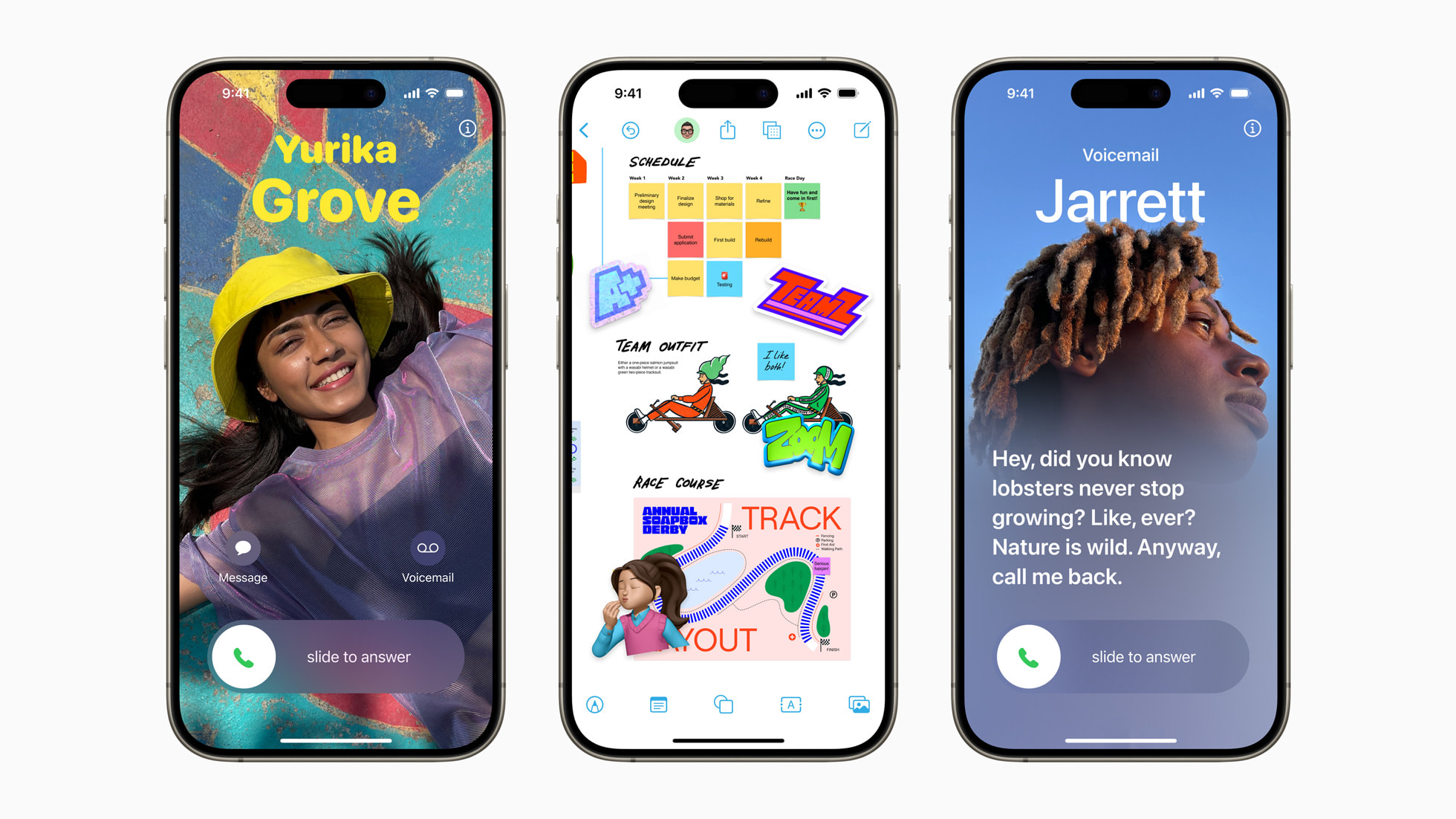
Material 3 Expressive is Google's bolder, more colorful redesign of Android's visual language — springier animations, brighter and more varied colors, new "expressive" shapes like a floating pill-shaped toolbar, and layouts built to draw the eye to the action that matters most. Google says it's the most-researched update to its design system ever, built from 46 studies and more than 18,000 participants over three years. It started rolling out on Pixel phones with Android 16 in 2025, and with Android 17 now out, the look is reaching more devices, more system surfaces and more of Google's own apps.
- What it is: Google's newest Material Design update — bolder color, springier motion, and new shapes across Android
- Research basis: 46 studies, 18,000+ participants, three years of testing, per Google's own research
- Debut: Pixel 10 series and Android 16 QPR1, September 2025
- Now: Expanding further with Android 17 and later Pixel Feature Drops in 2026
- Where you'll notice it: Lock screen, Quick Settings, notification shade, volume and power menus, and redesigned Google apps
What is Material 3 Expressive?
Material 3 Expressive, sometimes shortened to M3 Expressive or M3E, is an evolution of Material Design, the design system Google uses to style Android, Chrome OS, Wear OS and its own apps like Gmail, Search and Maps. Google introduced it publicly in May 2025 at The Android Show: I/O Edition, describing it as "the latest evolution of Material Design," built to make products "more engaging, easy to use, and desirable." The package bundles new UI components, a motion-physics system, updated type styles, a wider color palette and a new shape library.
Where the previous Material You update (introduced with Android 12) focused on personalization — pulling colors from a user's wallpaper into the system theme — Material 3 Expressive keeps that dynamic color engine but pushes it further, adding more vivid accent colors, bouncier spring-based animations, and shapes that morph as you interact with them. Google frames it less as a visual refresh and more as a usability project: brighter, bigger, more differentiated UI elements that are genuinely faster to find and tap, backed by its own research.
The research behind the redesign
Google has been unusually open about the evidence it used to justify the new look. According to the company's own writeup on design.google, the Material Design team ran 46 separate studies, tested hundreds of design variations, and gathered input from more than 18,000 participants worldwide over roughly three years of work.
The methods included eye-tracking sessions across ten real apps (comparing Material 3 Expressive layouts against the previous Material 3 style, shown in random order), usability tests that timed how long it took people to find and tap key actions, and surveys measuring emotional response. Some of the headline findings Google reports:
- People found key tappable elements, like a prominent email Send button, up to four times faster in eye-tracking tests.
- Expressive layouts were preferred across every age group tested, rising to 87% preference among 18-to-24-year-olds.
- Users 45 and older performed just as well as younger participants when it came to spotting and using key actions — the bolder design didn't just appeal to younger users, it measurably helped older ones too.
- Expressive interfaces scored higher on being perceived as energetic, modern and creative, with perceived "modernity" up 34% in testing.
Google's own report is also candid about where the approach failed: a playlist redesign that replaced a song list with large album art, and an email layout that removed text labels from action icons, both tested worse for usability than the originals. That's a useful detail for understanding why Material 3 Expressive isn't simply "make everything bigger and brighter" — Google says the goal is to use color, shape, size, motion and containment specifically to draw attention to the actions that matter, not to decorate for its own sake.
Where it started: Pixel and Android 16
Material 3 Expressive debuted first-party on the Pixel 10 series when those phones launched, and then rolled out more broadly as part of Android 16 QPR1 — the first quarterly platform release for Android 16 — alongside the September 2025 Pixel Feature Drop. Google's own Pixel Drop announcement describes it as "coming to Pixel 6 and newer devices," with the rollout beginning that September and continuing over the following weeks depending on device and carrier.
That update brought a redesigned Quick Settings panel, animated "Live effects" for the lock screen (wallpaper-based animations like moving shapes or weather), and springier haptics when dismissing notifications or dragging the volume slider. It was Android's broadest system-level redesign since Material You arrived with Android 12, and it set the template other Android OEMs and Google's own apps have been adopting since.
What's changing: color, shape, motion and size
Google names five building blocks of the expressive language: color, shape, size, motion and containment. In practice, that translates to several concrete changes you can see and feel:
- Color: A broader, bolder accent palette layered on top of Android's existing Material You dynamic color (theming the UI from your wallpaper), with more contrast between surfaces.
- Shape: A new shape library — including rounder, "squircle" and pill-style containers — some of which morph between states, like a circular button that stretches into a pill when pressed.
- Motion: A spring-physics animation system replacing older, more linear easing curves, so elements settle into place with a bouncier, more natural feel rather than snapping to a stop.
- Size: Bigger, more differentiated touch targets for primary actions — Google's research specifically tested larger "Send"-style buttons and found they were both faster to locate and faster to tap.
- Containment: Clearer visual grouping, using shape and color to separate related controls from the rest of a screen rather than relying on text labels alone.
Typography also shifted toward variable font axes, letting type weight and width adjust more fluidly instead of jumping between a fixed set of styles.
New components: the floating toolbar and more
Alongside the visual language, Material 3 Expressive shipped a new set of UI components for developers to build with. Google's research specifically called out testing on individual components including progress indicators, button sizing and a floating, pill-shaped toolbar — a contextual action bar that hovers above content (for example, over a list or a photo) rather than being pinned to the top or bottom edge of the screen. Other additions in the expanded component set include split buttons and button groups that bundle related actions together with shared, morphing shapes.
These components are documented for developers through Material Design's own site, which hosts the current Material 3 specification, component guidance and design tooling that Android and web developers use to build expressive interfaces consistently.
Material 3 Expressive and Android 17
Android 17 arrived as a stable release on June 16, 2026, and Google's official "Android 17 is here" post is focused mainly on platform-level changes — multitasking features like App Bubbles and a desktop-style interactive Picture-in-Picture, an AppFunctions API for on-device AI agents, memory and performance limits, and privacy changes like a system-level contact picker. It doesn't itself announce new Material 3 Expressive visuals; the design language's continued rollout has instead been happening through the quarterly platform releases and Pixel Feature Drops that follow the main Android 17 launch, the same pattern Android 16 QPR1 set a year earlier.
Multiple outlets that track Android betas, including 9to5Google and Android Central, have reported that Android 17 QPR1 — tested through the first half of 2026 and tied to the September 2026 Pixel Drop — expands translucent, blurred backgrounds across more of the system UI: the volume panel, power menu, app folders, home-screen context menus and the widget picker, tinted by the device's dynamic color theme. Those specifics haven't appeared in a Google blog post we could verify directly, so treat them as reported rather than officially confirmed, though they're consistent with the gradual, surface-by-surface rollout Google has followed since Android 16 QPR1 first brought blur to the notification shade and Quick Settings.
For the platform-level side of Android 17 — including how the beta program and QPR releases for Pixel have unfolded — Pandromeda's Android 17 QPR3 beta coverage has release dates and device details.
What you'll actually see: icons, blur and Quick Settings
For most people, Material 3 Expressive shows up less as a single new screen and more as a set of small, cumulative changes across the system:
- Icons and app layouts: Google's own apps — Gmail, Photos, Maps and others — have been restyled with the new shape language, larger primary buttons and updated navigation bars as they adopt the component set.
- Quick Settings: The toggle panel got a visual overhaul, including a springier pull-down animation, resizable tile groupings, and (per Android 17 QPR1 beta coverage) a dedicated edit icon for rearranging tiles.
- Blur effects: Translucent, frosted backgrounds first appeared behind the notification shade and Quick Settings with Android 16 QPR1, and have been reported expanding to the volume panel, power menu and other system surfaces in Android 17 QPR1.
- Lock screen: Live effects bring subtle wallpaper-based animation, and clock and shortcut styling lean on the new shape and type system.
- Haptics and motion: Spring-based animations make gestures like dismissing a notification or adjusting volume feel bouncier and more responsive than the older, more rigid Material You transitions.
Related system changes have been landing in the same window — Pandromeda covered the October Android update's scam-call blocks and Find Hub alerts, part of the broader cadence of monthly and quarterly updates Material 3 Expressive is riding alongside.
Material 3 Expressive vs. the previous Material You look
| Area | Material You (Android 12–15) | Material 3 Expressive (Android 16+) |
|---|---|---|
| Color | Dynamic color from wallpaper, muted tonal palette | Dynamic color plus bolder, higher-contrast accent colors |
| Shape | Rounded rectangles, limited shape variety | Expanded shape library with morphing, pill and squircle shapes |
| Motion | Linear/eased transitions | Spring-physics motion system, bouncier feedback |
| Components | Standard buttons, fixed toolbars | New components including floating toolbars, split buttons, button groups |
| Typography | Fixed type scale | Variable font axes for flexible weight and width |
| Research basis | Limited public research disclosure | 46 studies, 18,000+ participants publicly documented |
Which devices and apps have it
Material 3 Expressive first shipped on the Pixel 10 series and then reached Pixel 6 and newer phones through Android 16 QPR1 in September 2025, per Google's Pixel Drop post. Android 17, released in June 2026, builds on that base and is rolling out to more Pixel devices and, over the following months, to phones from partner manufacturers — Google's Android 17 announcement lists Honor, iQOO, Lenovo, OnePlus, OPPO, Realme, Sharp, vivo and Xiaomi as having tested compatible builds in beta. As with most Android design updates, non-Pixel timing depends on each manufacturer's own skin and update schedule, so the expressive look can arrive months later — or with its own manufacturer-specific variations — on phones from other brands.
Beyond phones, Google has also brought the design language to round-screen Wear OS devices, documented in Android's Wear OS design guidance, which adapts the same color, shape and motion principles to circular watch faces and components.
Developer and designer resources
For anyone building apps rather than just using them, Google publishes the full specification, component library and design tooling for Material 3 Expressive at m3.material.io, including Figma design kits and implementation guidance for Jetpack Compose. On the engineering side, the motion-physics system, new components and expressive theming are available through updated Material 3 library releases for Compose, which Google has continued to roll into stable Jetpack Compose builds since the design language's 2025 debut.
Material 3 Expressive isn't the only recent Android feature Google has rolled out gradually across system surfaces and app updates — Pandromeda's explainer on Circle to Search covers another example of that same staged approach.
What's next
Google has treated Material 3 Expressive as a staged rollout rather than a single release: Android 16 QPR1 introduced it on Pixel, Android 16's later quarterly releases and the Android 17 cycle have continued extending it to more system surfaces, and outside reporting suggests the translucency and blur effects will keep spreading across system UI through further Android 17 quarterly platform releases and Pixel Feature Drops in late 2026. Expect the pattern to continue: Google testing changes in Android beta channels first, shipping them to Pixel through quarterly releases and Feature Drops, and other manufacturers following on their own schedules as they update their Android skins to match. For the latest on how Android 17's own rollout is progressing on specific devices, see Pandromeda's ongoing coverage of Android 17 beta and QPR releases.
Frequently asked questions
What is Material 3 Expressive in simple terms?
It's Google's newest version of Material Design, the visual language behind Android and Google's apps. It adds bolder, higher-contrast colors, springier spring-physics animations, and new shapes like morphing buttons and a floating pill-shaped toolbar, all aimed at making key actions faster to spot and tap.
When did Material 3 Expressive launch?
Google unveiled it in May 2025 at The Android Show: I/O Edition. It debuted on the Pixel 10 series and then rolled out to Pixel 6 and newer phones through Android 16 QPR1 and the September 2025 Pixel Feature Drop.
Is Material 3 Expressive only for Pixel phones?
No. Google designed it as part of core Android and Material Design, so other manufacturers can adopt it too. Pixel got it first, and Google's Android 17 announcement lists partner brands including Honor, iQOO, Lenovo, OnePlus, OPPO, Realme, Sharp, vivo and Xiaomi as having tested compatible beta builds, though each brand sets its own rollout timing.
What research backs the redesign?
Google says it ran 46 separate studies with more than 18,000 participants over roughly three years, using eye-tracking, usability testing and surveys. It reports that people found key actions up to four times faster in the new design, with high preference across age groups.
What does Android 17 add to Material 3 Expressive?
Android 17's main June 2026 release focused on multitasking, AI and privacy features rather than new visuals. However, Google's Android 17 QPR1 update, tied to the September 2026 Pixel Drop, has been reported by multiple outlets to expand blurred, translucent backgrounds to more system surfaces like the volume panel and power menu, building on blur effects Android 16 QPR1 introduced for Quick Settings and notifications.
Can I turn off Material 3 Expressive on my phone?
There's no single official toggle to revert the whole system to the old look, since it's built into the Android and Pixel UI rather than offered as an optional theme. Some individual elements, like dynamic color theming, remain adjustable in system settings.
Sources
- Google Design: Better, Easier, Emotional UX (Material 3 Expressive research)design.google
- Android Developers Blog: The Android Show, I/O Editionandroid-developers.googleblog.com
- Google Blog: Material 3 Expressive updates in the latest Pixel Dropblog.google
- Android Developers Blog: Android 17 is hereandroid-developers.googleblog.com
- Material Design: m3.material.iom3.material.io
- Android Developers: Material 3 Expressive design language (Wear OS)developer.android.com
Nadia Osei covers mobile and consumer gadgets for Pandromeda: smartphones, tablets, smartwatches, earbuds and smart-home devices. She tracks launches, software updates and pricing across Apple, Google, Samsung and the rest, and builds comparisons from the manufacturers' published specifications.