Gemini Personal Intelligence on Android Auto: What It Does Now
Google has started rolling out Gemini's Personal Intelligence feature to Android Auto, giving drivers tailored answers drawn from their own Gmail, Calendar, Photos and Maps data.
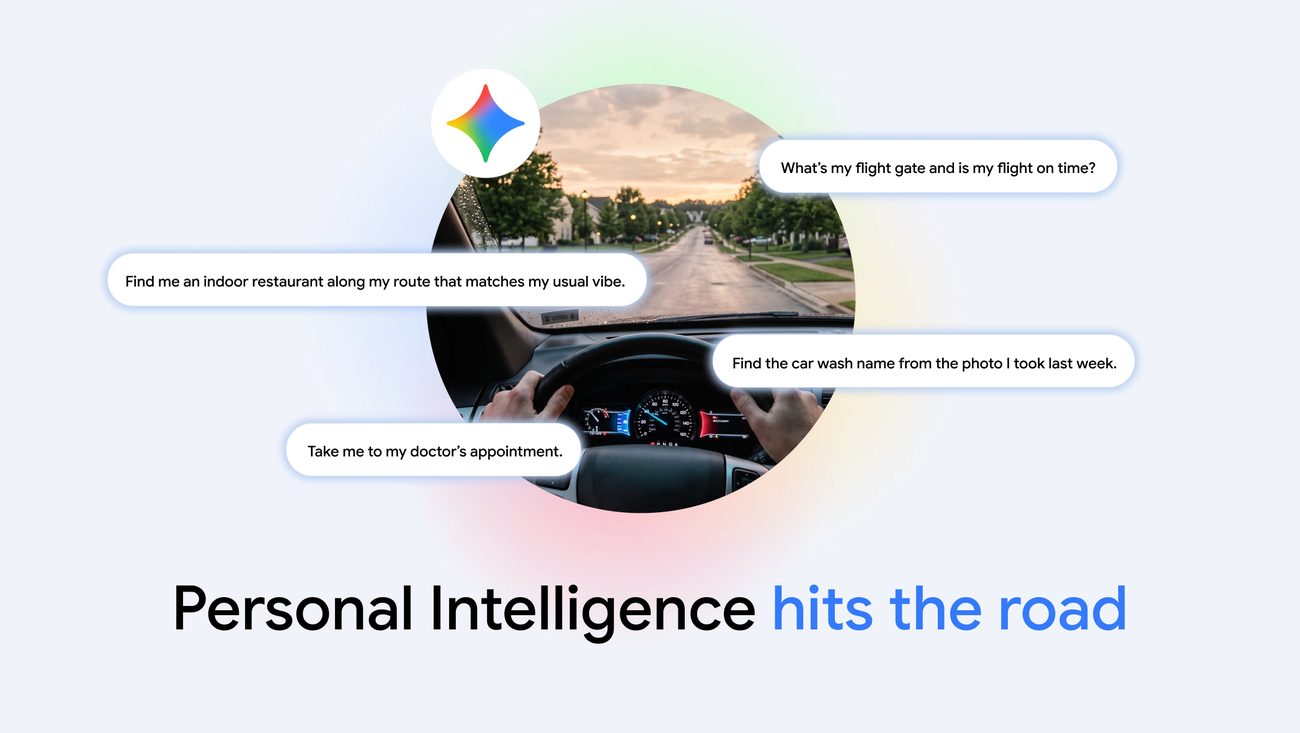
Gemini's "Personal Intelligence" feature started rolling out to Android Auto on October 20, 2026, and is coming to cars with Google built-in "in the coming months." Once you turn it on, Gemini can pull from your own Gmail, Google Calendar, Google Photos, Maps and Search history — with your permission — to answer questions it couldn't answer before, like finding a restaurant along your route that fits your usual dietary habits, or navigating to a place you only saw in a photo.
Quick facts
- What's new: Gemini's Personal Intelligence connects your Google apps to give tailored, context-aware answers while driving.
- Rollout: Started October 20, 2026 on Android Auto; cars with Google built-in get it "in the coming months," per Google.
- Activation: Say "Hey Google," tap the mic, or use your steering-wheel voice button.
- Who's excluded for now: Workspace business/education/enterprise accounts, users under 18, and people in the EEA, Switzerland, the UK and Nigeria.
- Turn it off: Anytime, in Gemini settings.
What Is Gemini's Personal Intelligence?
Personal Intelligence is a setting inside the Gemini app that lets the assistant connect to the Google apps you already use — Gmail and the rest of Workspace, Google Calendar, Google Photos, Google Maps, YouTube and Search — so it can answer questions that require pulling together more than one piece of information about your life. Google describes two strengths: retrieving a specific detail, such as a flight confirmation buried in an email, and reasoning across several sources at once, such as cross-referencing your calendar and a saved Maps place to figure out where you're actually headed.
Google's own examples give a sense of what that looks like behind the wheel. You can ask Gemini for your flight's gate number and whether it's on time, and get both answered in one response pulled from your inbox. You can ask it to find an indoor restaurant along your route that matches "your usual vibe" — Google's example is a vegetarian driver getting a shortlist that actually fits their diet, rather than a generic list of nearby restaurants. You can tell it to take you to a doctor's appointment without knowing the address yourself, because it's already in your calendar. You can ask it to navigate to the car wash from "that photo you took last week," or to the coffee shop you were talking about with a friend the day before.
None of this works until you opt in. Google apps aren't connected to Gemini automatically — Personal Intelligence has to be switched on in Gemini settings, and Google says it can be turned off again at any time.
How Personal Intelligence Works in the Car
Once Personal Intelligence is enabled in the Gemini app on your phone, Google says it carries over into the car automatically — there's no separate toggle to find inside Android Auto itself. The practical effect, according to Google's announcement, is that the same assistant that answers personal questions on your phone can now do the same thing projected onto your car's display, without you touching your phone while driving.
Gemini on Android Auto is activated the same way the built-in version of the assistant always has been: say "Hey Google" followed by your request, tap the microphone icon on the Android Auto home screen, or press your car's steering-wheel voice button, according to Google's Android Auto product page. Saying "Hey Google, let's talk" starts Gemini Live, an extended back-and-forth conversation mode that Google's own page notes is still arriving on Android Auto "in a future update" in some markets, so it may not be live on every device yet.
Because the personalization comes from your Google account rather than the car, Google's announcement is explicit that in cars with Google built-in, you only get fully personalized answers while your phone is connected and with you in the car. Ask the same question without your phone nearby, and Gemini still handles navigation, music, calls and general knowledge questions — it just can't draw on your personal Gmail, Photos or Calendar data to tailor the answer.
Texting and Hands-Free Replies
Alongside Personal Intelligence, Google has been describing a broader set of messaging upgrades for Gemini behind the wheel. In a companion post about Gemini tips for cars with Google built-in, Google says you can ask Gemini to "summarize your new text messages so you can respond with context and confidence," then dictate a reply out loud — its example is telling Gemini to "reply to Jane that I'm on my way and add my ETA" — and revise that draft without starting over, such as adding "also ask her if I should pick up dessert" before it sends.
Android Auto's own product page lists a related but separate capability: AI-generated summaries of long group chats, plus single-tap suggested replies, under its "what's new" messaging features, alongside the ability to send texts by voice, including emoji. Google doesn't spell out, on either page, whether every reply is read back to you for confirmation before it sends — treat that as a detail to check against your own car's behavior rather than an assumption.
Gemini vs. the Old Google Assistant on Android Auto
Gemini is replacing Google Assistant as the default voice assistant in cars with Google built-in, and is now the assistant most Android Auto users will reach for by default as the rollout continues. Here's how Google describes the jump in capability between the two, based on its own announcements:
| Capability | Google Assistant (previous) | Gemini on Android Auto / Google built-in |
|---|---|---|
| Personal context | Limited to basic account info | Can draw on Gmail, Calendar, Photos, Maps and Search with Personal Intelligence turned on |
| Route suggestions | Generic nearby search | Can filter by personal habits, e.g. dietary preferences, along your route |
| Text messages | Read messages aloud, send by voice | Can summarize new texts and draft context-aware replies you can revise by voice |
| Conversation style | Single-turn commands | Gemini Live supports extended, back-and-forth conversation (rolling out) |
| Navigation memory | Saved places only | Can navigate to places recalled from a photo or a past conversation |
| Vehicle questions (Google built-in only) | Not supported | Can answer questions from the manufacturer's owner's manual |
Rollout Timeline and Countries
Google's timeline, straight from its announcement, has two separate tracks. On Android Auto, Personal Intelligence began rolling out on October 20, 2026. For cars with Google built-in, Google says the feature is coming "in the coming months," which is vaguer and suggests a staggered release by car brand and model rather than a single flip-of-a-switch date.
Availability is global for Gemini itself on both platforms, but Personal Intelligence specifically carries real restrictions. A footnote on Google's announcement limits it to eligible personal Google accounts — not Workspace business, enterprise or education accounts — belonging to users 18 and older, and explicitly excludes the European Economic Area, Switzerland, the United Kingdom and Nigeria for now. Google's separate post on cars with Google built-in adds that its own initial rollout there starts in English in the United States, with more languages and countries following "over the coming months" and "in the near future" — language vague enough that Google isn't committing to a firm date beyond that.
If you already turned Personal Intelligence on inside the Gemini app on your phone, Google says you don't need to do anything extra to get it in the car — it's meant to carry over automatically once your car's software catches up.
Compatible Phones, Cars and Android Versions
Gemini's car features ride on top of Android Auto's existing compatibility rules, which Google lists on its Android Auto page: a wired connection needs Android 9.0 (Pie) or later, while a wireless connection needs Android 11.0 or later and a phone that supports wireless Android Auto. Phones running Android 10 or newer no longer need to install a separate Android Auto app at all — the functionality is built into the phone's settings. Google also still recommends a high-quality USB cable for wired setups.
On the car side, Google says Android Auto now works with more than 500 car models, with more being added, and that wireless Android Auto is limited to specific vehicles or to aftermarket stereos from JVC, Kenwood or Pioneer — Google directs drivers to its own vehicle and stereo compatibility list to check a specific model. For cars with Google built-in, Google's tips post says the Gemini upgrade can arrive both in new cars and in existing ones through a software update, and that you need to be signed into your Google Account in the car to see the upgrade prompt on the dashboard.
Neither Google post names which specific phone models get Personal Intelligence first, beyond the account-level restrictions above, so if your car shows an Android Auto connection problem rather than a missing feature, that's worth ruling out separately — our guide to fixing Android Auto when it won't connect walks through the cable, Bluetooth and permission checks that cause most of those issues.
Privacy: What You're Sharing, and How to Turn It Off
Because Personal Intelligence works by letting Gemini read across several of your Google apps at once, Google has built the feature as opt-in rather than on-by-default. Its announcement states plainly that none of your apps are connected until you turn Personal Intelligence on, and that you can turn it off again at any time from inside Gemini's settings. Google also maintains a dedicated support page on Personal Intelligence's privacy controls that covers what data each connected app shares and how to disconnect individual apps rather than the whole feature.
The age and region restrictions matter here too: because Personal Intelligence is excluded in the EEA, Switzerland, the UK and Nigeria for now, and is limited to personal accounts for users 18 and older, anyone outside those bounds will see Gemini continue to work in the car exactly as before — helpful with navigation, music and general questions — just without the personalized layer on top.
Cars With Google Built-In: What's Different
"Cars with Google built-in" is Google's term for vehicles where Android, Google Maps and the Google Assistant (now transitioning to Gemini) run natively in the car's own infotainment system, rather than being projected from a phone the way Android Auto is. Google's tips post for this category describes Gemini there going further than a voice assistant: it can surface EV-specific information like battery level, estimated battery on arrival, and nearby chargers, answer questions pulled from the vehicle's owner's manual (availability and detail there vary by brand and model, Google says), and respond to requests like turning on the heat or defroster.
Google also says future updates will extend Gemini's reach inside these cars to apps like Gmail, Calendar and Google Home, though it hasn't given a date for that. For now, the clearest distinction between the two platforms is the one covered above: cars with Google built-in need your phone connected in the car to unlock the personalized side of Gemini, since the car's own system doesn't hold your Google account data on its own.
This Gemini rollout follows close behind other recent changes to Android's driving and update cadence — Google's monthly platform updates, including October's update adding scam call blocks and Find Hub alerts, have been landing on a similar monthly rhythm, and Android's beta channel has kept moving in parallel as Google tests the next stable release.
What Next
If you already use Android Auto, check whether Personal Intelligence is turned on inside the Gemini app on your phone — Google says there's no separate switch for the car. If you don't see it yet, account eligibility (age, personal vs. Workspace account, region) is the first thing to check against Google's own restrictions above, followed by making sure your phone and Android Auto software are current. Drivers with a car that has Google built-in should watch for an upgrade prompt on the dashboard the next time they're signed in, since Google says that rollout is arriving in stages over the coming months rather than all at once.
Google has said more languages, more countries and deeper app access — Gmail, Calendar, Google Home — are coming to Gemini in cars, but hasn't attached dates to any of that beyond "the coming months." Expect Google to keep expanding Personal Intelligence's reach the same way it's expanded Gemini elsewhere on Android, in incremental updates rather than one single release.
Frequently asked questions
What is Gemini's Personal Intelligence on Android Auto?
It's a Gemini feature that, with your permission, connects to your Gmail, Google Calendar, Google Photos, Maps and Search so Gemini can give tailored answers while you drive, such as finding a restaurant along your route that matches your usual diet, according to Google's October 20, 2026 announcement.
How do I turn on Gemini in Android Auto?
Say "Hey Google," tap the microphone icon on the Android Auto home screen, or press your steering wheel's voice button, per Google's Android Auto page. Personal Intelligence itself has to be enabled separately in Gemini's settings on your phone.
Does Gemini work the same way in cars with Google built-in?
Mostly, but Google says personalized answers in cars with Google built-in require your phone to be connected in the car, since the car's own system doesn't store your Google account data.
Can Gemini read and reply to my text messages hands-free?
Google says you can ask Gemini to summarize new texts and dictate a reply, including revising the draft by voice before it sends, according to Google's tips post for cars with Google built-in.
Where is Personal Intelligence available?
Gemini itself is available globally on Android Auto and cars with Google built-in, but Personal Intelligence is limited to personal Google accounts for users 18 and older, and currently excludes the EEA, Switzerland, the UK and Nigeria, per Google's announcement.
What Android version do I need for Android Auto?
Google's Android Auto page lists Android 9.0 or later for a wired connection and Android 11.0 or later for wireless, plus a supported phone and, for wireless connections, a compatible car or aftermarket stereo.
Sources
- Google Blog: Get hands-free personalized help on the road with Geminiblog.google
- Google Blog: Gemini tips for cars with Google built-inblog.google
- Google: Android Auto overview and compatibilityandroid.com
- Google Blog: Android Auto and in-car updatesblog.google
- Google Support: Gemini Personal Intelligence privacy controlssupport.google.com
Nadia Osei covers mobile and consumer gadgets for Pandromeda: smartphones, tablets, smartwatches, earbuds and smart-home devices. She tracks launches, software updates and pricing across Apple, Google, Samsung and the rest, and builds comparisons from the manufacturers' published specifications.