AIO vs Air Cooler: Which CPU Cooling Should You Buy?
AIO or air: a practical guide to picking the right CPU cooler for your case, chip and noise tolerance, including when a high-TDP chip needs a big radiator.
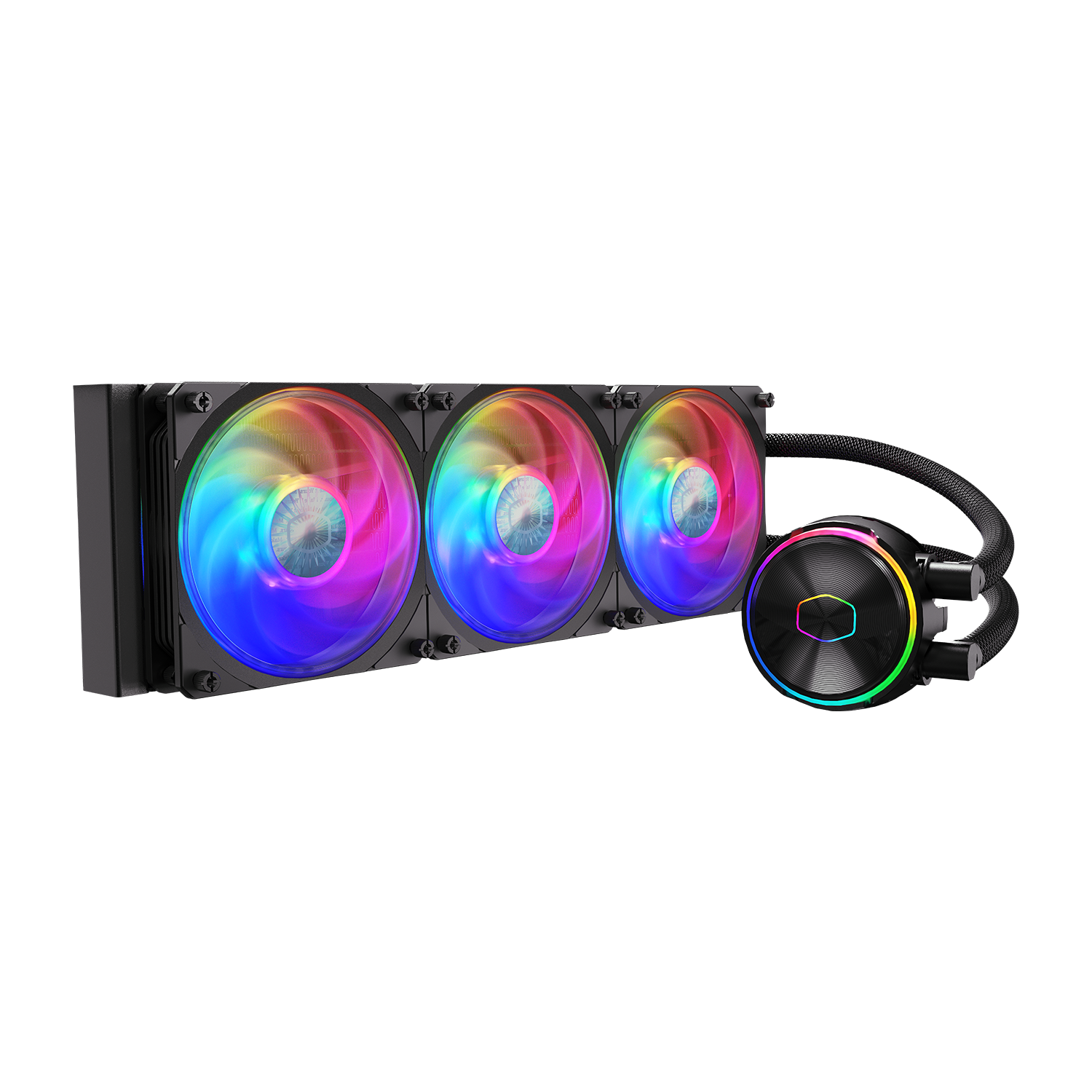
If you're trying to decide between an AIO liquid cooler and an air cooler for a new build, the short answer is this: a good 240–360mm AIO is the safer pick for hot-running, high-core-count or heavily overclocked chips in a case with room for a radiator, while a quality dual-tower air cooler is often the better everyday choice for quiet, low-maintenance builds, small cases, or anyone who doesn't want to think about pump longevity down the road. Both can keep a modern CPU well within its thermal limits — the real differences are noise character, case fit, maintenance, and what happens years from now when a part wears out.
Quick take
- Pick an AIO (240–360mm) if you're running a high-TDP chip (think Ryzen X3D-class or high-end desktop parts), overclocking, or building in a case where front/top radiator mounts are easy — and you're comfortable that a pump is a moving part with a finite lifespan.
- Pick an air cooler if you want the simplest, lowest-maintenance option with zero leak risk, you're building something compact or budget-focused, or your CPU's stock power draw is modest.
- Noise isn't automatically won by either side — a premium air tower at low fan speed can be quieter than a cheap AIO's pump whine, and vice versa for a well-tuned AIO versus a maxed-out air cooler under heavy load.
How air coolers actually move heat
A tower air cooler is a passive heat-moving machine with one active part: the fan. Heat pipes — sealed copper tubes containing a small amount of water — run from a base plate (which sits on the CPU, usually with a thin layer of thermal paste in between) up into a stack of thin aluminum fins. Inside each pipe, the water at the hot end evaporates, the vapor travels to the cooler end, condenses back into liquid, and releases its heat into the fins. A wick structure inside the pipe then carries the condensed water back to the hot end through capillary action, and the cycle repeats continuously. According to Wikipedia's technical overview of heat pipes, this evaporation-condensation cycle lets a pipe move heat far more efficiently than solid copper of the same size, because vaporizing water absorbs roughly 540 times more energy than simply warming the same amount of water by one degree. The fins then rely on a fan pushing air through them to actually carry that heat away into the room.
Because there's no pump and no liquid loop to seal, a heatsink like Cooler Master's Hyper 212 Halo Black is mechanically about as simple as CPU cooling gets: four heat pipes, a 120mm fan, and a base plate. Cooler Master's own spec sheet lists that fan at a maximum of 27 dBA and the whole unit's warranty at two years — numbers that are typical of mid-range air towers in this class. Bigger dual-tower air coolers (two fin stacks instead of one, often with two 120–140mm fans) push more surface area and airflow through the same basic mechanism, which is how premium air coolers close much of the thermal gap with liquid cooling.
How AIO liquid coolers work
An all-in-one liquid cooler replaces the heat pipes and fin stack with a sealed loop: a water block with an integrated pump sits on the CPU, tubing carries heated coolant to a radiator (effectively a much larger, remotely located fin stack), and radiator fans push air through it before the cooled liquid returns to the pump. The advantage, as Wikipedia's overview of computer cooling methods puts it, is that liquid "allows the transfer of more heat from the parts being cooled than air," largely thanks to water's higher specific heat and thermal conductivity. Moving the radiator away from the socket also means you can use far more fin surface area and multiple fans (240mm, 280mm, or 360mm radiators are common) than any air tower could physically fit over a CPU socket.
That capacity comes from an actual mechanical pump, which is the one component an air cooler doesn't have. Cooler Master's MasterLiquid PL360 Flux, a 360mm AIO, rates its pump noise at a maximum of 15 dBA with a mean time to failure above 210,000 hours, and backs the unit with a five-year warranty. NZXT's Kraken Elite 360 RGB, also a 360mm unit, carries a six-year warranty and uses a fluid-dynamic-bearing fan design rated for a 60,000-hour lifespan on the radiator fans specifically. Those long MTTF and warranty figures are reassuring, but they also underline the honest trade-off: an AIO has a wear part that an air cooler simply doesn't, and when a pump does eventually fail, cooling can drop off quickly rather than degrading gradually the way a dusty air cooler does.
Thermal performance: which actually cools better
For the vast majority of CPUs on the market today, a good air cooler and a 240mm+ AIO will both hold temperatures within safe limits under normal use — the difference shows up at the margins: sustained all-core workloads, small cases with restricted airflow, and chips that run hot by design. Thermal design power (TDP), the figure manufacturers publish to describe a chip's sustained heat output under normal operation, is the starting point for sizing a cooler, though Wikipedia's entry on the topic notes that TDP figures aren't directly comparable between brands because companies don't disclose the exact case and ambient temperatures behind their numbers — which is why the common advice is to oversize your cooler rather than match it exactly to the rated figure.
In practice, radiator size matters more than "liquid vs air" as a label. A 120mm single-fan AIO can actually underperform a large dual-tower air cooler, while a 360mm triple-fan radiator has more total fin area and airflow potential than almost any air cooler can match, simply because it isn't constrained by the space directly above the socket. That's the real reason enthusiasts reach for AIOs on hot-running chips: not that liquid is inherently superior, but that a radiator lets you brute-force more surface area into the case than a heatsink ever could.
Noise: the tradeoff people actually notice day to day
Noise is where the "AIO vs air" debate gets more nuanced than most buying guides admit. A cooler's total noise is really two sources added together — fan noise and, for AIOs, pump noise — and both scale with how hard the cooler is working. Fan noise in particular rises steeply with speed; a general engineering rule cited in Wikipedia's article on mechanical fans is that noise rises roughly with the fifth power of fan speed, so halving a fan's speed can cut its noise by around 15 dB — which is why idle and light-load noise is so much lower than full-tilt noise on almost any cooler.
On spec sheets, the numbers land close together: Cooler Master's Hyper 212 Halo Black air cooler is rated at 27 dBA maximum, Cooler Master's own PL360 Flux AIO combines a 15 dBA pump with fans rated up to 32 dBA, and NZXT's Kraken Elite 360 RGB fan is rated at 30 dBA. None of these figures are directly comparable across brands or test conditions, but they illustrate the point: a well-engineered AIO's fans aren't necessarily louder than a well-engineered air cooler's, and the pump itself — the part unique to liquid cooling — is rated quieter than the fans on every spec sheet above. The noise complaints people associate with cheap AIOs usually trace back to pump whine or coil-like buzzing on budget pumps, not to liquid cooling as a concept; a tight pump design like the ones above is built specifically to avoid that.
Maintenance, longevity, and pump failure
Air coolers are about as close to "install and forget" as PC hardware gets. There's no fluid to lose, no pump to wear out, and no fittings that can loosen. The only maintenance item is dust: fins clog over months and years, and your cooler needs an occasional blow-out with compressed air to keep airflow — and thermals — where they started.
AIOs ask for a little more trust. The pump is a moving, sealed mechanical part, and manufacturer MTTF ratings — like the 210,000+ hours Cooler Master quotes for the PL360 Flux's pump, or the 60,000-hour fan lifespan NZXT quotes for the Kraken Elite 360's radiator fans — are statistical averages, not guarantees for any individual unit. When a pump does fail, it tends to fail more abruptly than a dusty air cooler degrading: temperatures can spike quickly rather than creeping up over months. That's exactly what the warranty terms are there to cover, and it's worth noting both brands back their AIOs for years (five years from Cooler Master, six from NZXT) — a sign manufacturers are confident in the mechanism, even if it's inherently more complex than a solid lump of aluminum and copper. If you want the cooling capacity of a big radiator with the lowest possible long-term risk, buying from a brand with a long warranty and a track record is the practical mitigation, not avoiding AIOs altogether.
Case fit and build considerations
This is where the decision often gets made for you before thermals even enter the conversation. A 360mm radiator needs roughly 390–400mm of mounting length plus fan clearance — Cooler Master lists the PL360 Flux radiator at 394 x 119.6 x 27.2mm and NZXT lists the Kraken Elite 360's radiator at 401 x 120 x 27mm — which rules it out of smaller cases entirely and can mean compromises on front-panel airflow or top-mounted fans in mid-towers. A tall dual-tower air cooler, by contrast, needs case height clearance (often 160–170mm) but no radiator real estate, which makes it the simpler fit in cramped or airflow-constrained cases, including many small-form-factor builds.
Tube routing matters too: AIO pump tubes have a bend radius limit, so orientation relative to the radiator mount affects both looks and, in rare cases, pump longevity if tubes are kinked. Air coolers have no such constraint, though very tall towers can conflict with RAM heat spreaders or case side panels — worth checking clearance specs before buying either type.
| Your situation | Recommended cooler | Why |
|---|---|---|
| Quiet, low-maintenance daily-use PC | Air cooler (dual-tower) | No pump, no leak risk, fins degrade gradually with dust rather than failing abruptly |
| Small-form-factor / compact case | Air cooler or 120–240mm AIO | Limited radiator mounting space; a tall air tower or small AIO usually fits better than a 360mm radiator |
| High-TDP chip (X3D-class, HEDT, overclocked) | 240–360mm AIO | More total fin area than any air tower can fit over the socket; headroom for sustained all-core load |
| Budget build, modest CPU power draw | Air cooler | Lower cost, simpler install, no pump to eventually replace |
| Want a clean look / no visible radiator or fans up top | Air cooler | Single tower + fan is visually and mechanically simpler than a loop and radiator |
| Already overclocking or pushing power limits | 360mm AIO | Overclocking raises sustained heat output beyond stock TDP, and a bigger radiator gives more margin |
High-TDP chips: why big radiators show up in gaming builds
The reason AIOs dominate build lists for chips in the Ryzen X3D-class and high-end desktop tier isn't marketing — it's that these parts are designed to run near their power ceiling under sustained load, and a 360mm radiator simply has more fin area and airflow potential than a heatsink constrained to the footprint above a CPU socket. The same logic applies if you're the kind of builder who reads up on how overclocking actually works before touching voltage settings: pushing a chip past its stock behavior raises sustained heat output, and that's exactly the scenario where the extra thermal headroom of a large radiator earns its keep. A premium dual-tower air cooler can still handle many of these chips at stock settings — reviewers routinely show they're closer to AIOs than people expect — but the ceiling for sustained, maximum-load thermal capacity still belongs to the biggest radiators.
If you're not planning to overclock and your chip's stock TDP is moderate, you're very likely overthinking it by assuming you need a 360mm AIO. The chip's rated power draw, not its marketing tier, is what should drive the cooler-size decision.
Budget and value
Air coolers generally win on price-per-degree at the budget and mid-range tiers: a solid dual-tower air cooler can match or beat a cheap 120–240mm AIO for less money, with no pump to eventually fail. AIOs earn their price premium at the top end, where a 360mm radiator's cooling ceiling and — for many buyers — the aesthetics of a clean pump block and optional LCD display (like the one on NZXT's Kraken Elite line) are part of what you're paying for. If your budget is tight, it's usually better spent on a better air cooler than on a small, entry-level AIO that doesn't clearly outperform it.
What to check before you buy
Once you know which type fits your situation, run through this before checking out:
- Clearance, not just case size. Check your case's maximum air-cooler height and maximum radiator length/thickness — both are usually listed in the case manufacturer's spec sheet.
- Socket compatibility. Confirm the cooler's mounting kit covers your CPU socket (for example, AM5 or the current Intel desktop socket) — manufacturer product pages list supported sockets directly.
- RAM and case clearance for air coolers. Tall heat-spreader RAM can conflict with low-mounted air cooler fans; check clearance specs if you're using tall memory modules.
- Radiator mount location for AIOs. Top-mounted radiators often work better for lower idle temps; front-mounted can starve the GPU of fresh intake air in some case layouts.
- Warranty length as a longevity signal. Longer AIO warranties (five to six years on the units referenced in this guide) are a reasonable proxy for how confident a manufacturer is in their pump's durability.
- Don't oversize for the sake of it. If your chip's stock TDP is modest and you're not overclocking, a mid-range air cooler is very likely all you need — save the money or put it toward a case with better stock airflow instead.
Either path — a good air cooler or a well-built AIO — will keep a modern CPU safely within its thermal limits when sized correctly for the chip and case. The decision comes down less to which technology is "better" and more to how much radiator space your case has, how much heat your specific CPU actually produces under sustained load, and how much you value never having to think about a pump again.
Frequently asked questions
Is an AIO liquid cooler better than an air cooler?
Not inherently — a 360mm AIO has more total fin area than any air tower can fit over a CPU socket, so it has a higher thermal ceiling for sustained, high-load workloads. But a quality dual-tower air cooler handles the vast majority of CPUs at stock settings, with no pump to eventually wear out.
Do AIO coolers leak or fail more than air coolers?
Leaks are rare on sealed, factory-built AIOs, but the pump is a moving mechanical part that air coolers simply don't have. Manufacturers rate pump reliability in the hundreds of thousands of hours (Cooler Master rates its MasterLiquid PL360 Flux pump above 210,000 hours MTTF) and back AIOs with multi-year warranties, but when a pump does fail it tends to fail more abruptly than a dusty air cooler gradually losing efficiency.
What cooler do I need for a high-TDP chip like a Ryzen X3D-class CPU?
A 240mm or 360mm AIO is the safer choice for chips that run near their power ceiling under sustained load, or if you plan to overclock, because a large radiator has more total cooling capacity than a heatsink constrained to the space above the socket. A premium dual-tower air cooler can still work at stock settings, but it has less thermal headroom.
Is a 240mm AIO enough, or do I need a 360mm radiator?
It depends on your chip's power draw and your case's fan layout. A 240mm radiator is noticeably smaller than a 360mm one, so for high-TDP or overclocked chips, a 360mm radiator gives more margin. For moderate-TDP chips at stock settings, a 240mm AIO or a good air cooler is usually sufficient.
Are air coolers quieter than AIOs?
Not automatically. On manufacturer spec sheets, a premium air cooler's fan noise and an AIO's combined pump-plus-fan noise land in a similar range — Cooler Master rates its Hyper 212 Halo Black air cooler at 27 dBA max and its PL360 Flux AIO at a 15 dBA pump plus fans up to 32 dBA. Noise depends more on specific fan and pump quality than on the air-vs-liquid category.
How long do CPU coolers typically last?
Air coolers have no wear parts beyond the fan bearing and typically last as long as the fan does, with periodic dust cleaning. AIO pumps carry manufacturer MTTF ratings in the hundreds of thousands of hours and warranties of five to six years from brands like Cooler Master and NZXT, though individual units can vary.
Sources
- Cooler Master — MasterLiquid PL360 Flux product pagecoolermaster.com
- Cooler Master — Hyper 212 Halo Black product pagecoolermaster.com
- NZXT — Kraken Elite 360 RGB product pagenzxt.com
- Wikipedia — Heat pipeen.wikipedia.org
- Wikipedia — Computer coolingen.wikipedia.org
- Wikipedia — Thermal design poweren.wikipedia.org
Mara Lindqvist edits the hardware desk. She covers graphics cards, processors, memory and storage, the foundries and chip designers behind them, and what the numbers on a spec sheet mean for people choosing a PC. Specifications in her stories come from manufacturer spec pages and datasheets.