12V-2x6 vs 12VHPWR: What ATX 3.1 Actually Changed
ATX 3.1 renamed and re-engineered the GPU power connector after 12VHPWR melting reports. Here is what 12V-2x6 actually changes, and how to use it safely.
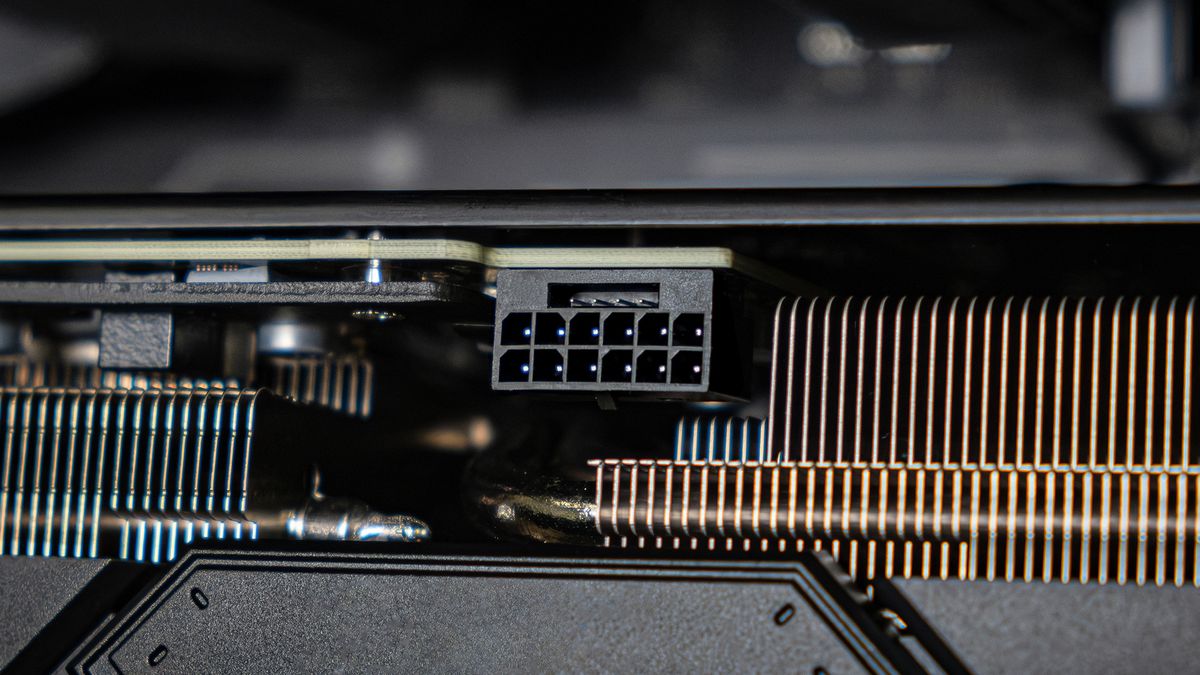
12V-2x6 is the official name of the GPU power connector defined in the ATX 3.1 power supply specification and the PCIe Card Electromechanical (CEM) 5.1 specification. It is not a new connector shape — it is a re-engineered version of the 16-pin 12VHPWR connector that shipped with the RTX 40-series and the original ATX 3.0 spec, with longer power pins, shorter sense pins, and a safety logic change designed to stop a graphics card from drawing full power through a connector that isn't fully seated. If your PSU box says "ATX 3.1" or "12V-2x6," this is the feature that claim is actually about.
- 12V-2x6 replaces 12VHPWR in Intel's ATX 3.1 power supply design guide and PCI-SIG's PCIe CEM 5.1 spec, both published in September 2023.
- The cable and plug are unchanged; the PCB header (the socket on the GPU or PSU) has longer power pins and shorter sense pins, so power pins mate first and sense pins engage only once the connector is fully seated.
- 12V-2x6 supports four power levels over the same 12-pin power section: 150 W, 300 W, 450 W and 600 W, set by two sense pins (SENSE0/SENSE1).
- It carries up to 600 W on 12 pins (9.2 A per pin) at up to 55 A, plus 4 smaller sideband pins.
- Labeled "H++" on the connector body, versus "H+" for the older 12VHPWR.
What is ATX 3.1?
ATX 3.1 is a revision of Intel's ATX power supply design guide — the document PSU manufacturers use to build and certify desktop power supplies. Intel's guide (document 336521) moved from revision 2.0 to revision 2.1 in September 2023, and the single biggest change in that revision was renaming the 12VHPWR auxiliary power connector to 12V-2x6 throughout the document, because, as Intel puts it, "the 12VHPWR connector's PCB Header's internal pin lengths have been modified. Therefore, the connector has been given a new name."
ATX 3.1 also references PCI-SIG's PCI Express Card Electromechanical Specification, Revision 5.1 (PCIe CEM 5.1), which is where the formal electrical and mechanical definition of the 12V-2x6 connector actually lives. ATX 3.1 otherwise keeps the core changes ATX 3.0 introduced for modern GPUs: support for large, short power excursions above a PSU's rated wattage (so a card can briefly spike well past its average draw without tripping over-power protection), and tighter voltage-regulation and transient-response requirements than the older ATX 2.x spec.
In short: ATX 3.1 is the power supply's rulebook, and 12V-2x6 is the connector it describes for high-power GPUs. A PSU can be "ATX 3.1 compliant" on paper for its transient and efficiency behavior without actually having a 12V-2x6 cable in the box, which is why it's worth checking the connector list on the spec sheet separately (see "how many watts you actually need" before you do).
What is the 12V-2x6 connector?
12V-2x6 is a 16-pin auxiliary power connector: 12 power/ground pins arranged in two rows of six (hence the name), plus 4 smaller sideband signal pins beneath them. Per Intel's design guide, the 12 power pins sit on a 3.0 mm pitch, use 16 AWG wire with no depopulation, and are each rated for 9.2 A with a maximum 30°C temperature rise above ambient — which is how the connector supports up to 600 W (55 A) in total through a single plug.
The four sideband pins carry two required signals, SENSE0 and SENSE1, which tell the graphics card how much power the power supply is allowed to deliver, and two optional signals, CARD_PWR_STABLE and CARD_CBL_PRES#, used for power-up sequencing and cable-presence detection. This sideband logic — not the big power pins — is where almost all of the ATX 3.1 safety changes happen.
12V-2x6 vs. 12VHPWR: what actually changed
The two connectors are mechanically compatible — a 12V-2x6 cable will mate with an older 12VHPWR socket and vice versa — and the cable/plug side of the connector is unchanged between the two. The difference Intel's spec calls out is entirely in the PCB header (the socket soldered to the GPU or built into a modular PSU):
| Property | 12VHPWR (ATX 3.0 / PCIe CEM 5.0) | 12V-2x6 (ATX 3.1 / PCIe CEM 5.1) |
|---|---|---|
| PCB header pin lengths | Power and sense pins engage at similar depth | Power pins lengthened, sense pins shortened, for "first-mate/last-break" engagement |
| Connector label | "H+" | "H++" |
| Cable / plug side | Defined in PCIe CEM 5.0 | Unchanged — compatible with the new PCB header |
| SENSE0/SENSE1 power levels | 450 W and 600 W only | 150 W, 300 W, 450 W and 600 W |
| "0 watt" / disconnected state | Not explicitly defined | New Open-Open SENSE0/SENSE1 state explicitly means 0 W: no power may be drawn |
| Power pin current rating | 9.2 A/pin (same hardware target) | 9.2 A/pin, same 30°C T-rise limit, explicitly marked by the H++ label |
The practical effect of the shortened sense pins is a sequencing change: because the power pins are physically longer, they make contact before the sense pins do when you plug the connector in, and they break contact after the sense pins do when you unplug it. Combined with the new Open-Open "0 W" sense state, a 12V-2x6-compliant graphics card is designed to see a loose or partially-seated connector as "no power available" and refuse to draw current, rather than drawing full power through pins that aren't making good contact — which is the failure mode blamed for the 12VHPWR melting reports on early RTX 40-series cards.
Power levels and the sense-pin safety check
SENSE0 and SENSE1 are two low-current pins the power supply uses to tell the graphics card how much 12V power is available through that specific cable, before the card draws any load. Per Intel's ATX design guide, the four possible states are:
| SENSE0 / SENSE1 state | Power level signaled | Max current (12V-2x6 connector) |
|---|---|---|
| Both shorted to ground | 600 W | 55 A |
| One shorted, one open | 450 W | 41.25 A |
| Other combination | 300 W | 27.5 A |
| Shorted to each other, floating to ground | 150 W | 13.75 A |
| Both open (Open-Open) — new in 12V-2x6 | 0 W | No power may be drawn |
A modular PSU with a 12V-2x6 header sets these sense pins internally; a card reads them the moment the cable is attached and before the main 12V rail is ever switched to full load, which is how the system can refuse power to a bad connection rather than discovering the problem after current is already flowing.
Which GPUs use 12V-2x6
Nvidia's GeForce RTX 40-series launched with the original 12VHPWR connector. For the RTX 50-series, Nvidia's own spec pages list a "1x 600 W PCIe Gen 5 cable" option alongside the bundled 4x PCIe 8-pin adapter, and recommend a PCIe CEM 5.1-compliant power supply — the spec that defines 12V-2x6 — for cards like the RTX 5090, which lists a 575 W total graphics power and an 850 W minimum recommended PSU. Most high-wattage RTX 50-series cards, including the 5090 and 5080, use a single 16-pin 12V-2x6 connector rather than multiple 8-pin PCIe connectors; see our breakdown of the RTX 5070 vs. RTX 5070 Ti specs for how connector and power requirements scale down the stack. AMD's Radeon RX 7000/9000-series cards have largely stayed on standard 8-pin PCIe connectors, so 12V-2x6 is primarily an Nvidia flagship-tier concern today, though any PCIe CEM 5.1-compliant add-in card can use it.
Which PSUs are ATX 3.1 / 12V-2x6 compliant
PSU vendors have been shipping ATX 3.1 units with native 12V-2x6 cables since late 2023/2024. According to Intel's design guide, a 12V-2x6 connector is only "Recommended" (not mandatory) for power supplies rated above 450 W — PSUs at or below that rating can skip it entirely and rely on standard 8-pin PCIe connectors. In practice, most current 650 W-and-up "ATX 3.1" or "PCIe 5.1" gaming PSUs from brands like Seasonic, Cooler Master and Corsair include at least one native 12V-2x6 cable or header rated for 600 W, alongside the older 8-pin PCIe connectors for other cards.
A PSU that predates 12V-2x6 but shipped with an original 12VHPWR cable isn't unsafe by itself — the two connector types are electrically and mechanically compatible — but it won't have the shortened sense-pin geometry on the PSU side of a modular cable, so you don't get the "first-mate/last-break" protection unless the cable's GPU-side plug and the card's socket are both the newer 12V-2x6 design. Seasonic's own comparison of the two specs describes the update as responding directly to reported melting incidents, mainly attributed to the GPU side of the connection.
How to tell if your PSU is ATX 3.1 / 12V-2x6 compliant
- Check the box and spec sheet first. Compliant units are explicitly labeled "ATX 3.1" or "ATX12V 3.1," and often "PCIe 5.1" as well. A unit only marked "ATX 3.0" or "PCIe 5.0" predates the 12V-2x6 revision.
- Look for "12V-2x6" by name in the cable/connector list, not just "16-pin" or "12VHPWR" — some retailers and older listings still use the legacy 12VHPWR name for what is now a 12V-2x6-spec cable, so check the connector count and wattage rating (e.g., "1x 600 W 12V-2x6") rather than relying on the name alone.
- Check the physical label on the connector itself. Per Intel's spec, 12V-2x6 hardware is marked with "H++" embossed or printed near the connector; the older 12VHPWR parts are marked "H+."
- For modular PSUs, confirm the cable is the one that shipped with the unit or is sold by the same manufacturer for that model — 12V-2x6 and 12VHPWR cables can look identical from the outside, and mixing an old cable with a new PSU header (or vice versa) gives up the sense-pin benefit even if both ends technically mate.
Does 12V-2x6 actually fix the melting problem?
The connector-level engineering change is real and documented: pin-length sequencing plus the new 0 W sense state are specifically designed to stop a card from drawing power through a bad connection. But 12V-2x6 doesn't eliminate every risk reported around 12VHPWR. Cable bending near the connector, sharp case routing, and cables that aren't pushed in until they click can all still reduce contact area and raise local resistance and heat, even on 12V-2x6 hardware — and reports of connector melting on RTX 5090 cards have continued to surface after the 12V-2x6 transition, several tied to third-party adapters or imperfectly seated connectors rather than the stock cable. The sense-pin logic reduces one specific failure mode — a loose connector silently carrying full current — but good cable management and a fully-seated plug still matter.
Practical safety tips
- Push until it clicks. The connector should seat with an audible/tactile click and sit flush against the GPU's socket shroud; a visible gap on one side usually means it isn't fully home.
- Avoid tight bends right at the connector. Keep a short straight run of cable before the first bend so the plug isn't under constant sideways mechanical load pulling it away from full contact — bent cable right at the connector is the stress case PSU and case makers most often flag for this connector family.
- Prefer a native 12V-2x6 cable over an 8-pin-to-16-pin adapter where your PSU supports one. Fewer junctions means fewer places for a bad connection to form, and a native cable rated by the PSU maker for 600 W removes one variable from the equation.
- If you must use an adapter (bundled with the GPU or from the PSU maker), make sure every 8-pin PCIe connector feeding it is fully seated too — a loose 8-pin input can bottleneck current through the remaining pins on the 12V-2x6 side.
- Don't reuse an old 12VHPWR cable from a previous build with a new 12V-2x6 GPU without checking it's still fully seated and undamaged; inspect the pins for discoloration before reconnecting any high-power cable to a new card.
- Route the cable so nothing presses on it — a side panel or a GPU support bracket pushing against the connector near the plug is a common cause of partial disconnection after a case is closed up.
What to do next
If you're buying a PSU for an RTX 50-series card or another high-wattage GPU, look specifically for "ATX 3.1" plus a listed 12V-2x6 connector rated at or above your card's cable-power requirement — not just an ATX 3.1 badge. If you already own an ATX 3.0 PSU with a 12VHPWR cable, it will still work with a 12V-2x6 GPU, but take extra care to seat the connector fully and avoid tight bends, since you won't have the newer PSU-side sense-pin sequencing. For sizing the rest of your build around a 12V-2x6 GPU, our PSU wattage guide walks through how to budget headroom above the card's rated power draw.
Frequently asked questions
What does "12V-2x6" actually mean?
It describes the connector's layout: 12 volts, delivered through 2 rows of 6 power pins (12 pins total), plus 4 smaller sideband pins underneath for signaling. It's the name Intel and PCI-SIG gave the connector formerly called 12VHPWR after revising its PCB-header pin lengths in the ATX 3.1 / PCIe CEM 5.1 spec.
Is 12V-2x6 the same connector as 12VHPWR?
They're mechanically and electrically compatible and the cable/plug side is unchanged, so a 12V-2x6 cable mates with a 12VHPWR socket and vice versa. The difference is in the PCB header: 12V-2x6 has longer power pins and shorter sense pins so the power contacts mate first and release last, plus an updated sense-pin logic that can signal a 0-watt "no power" state that 12VHPWR didn't define.
Does the RTX 5090 use 12V-2x6?
Yes. Nvidia's official RTX 5090 spec page lists a single 600 W PCIe Gen 5 cable option (the 12V-2x6 connector) alongside a bundled 4x 8-pin PCIe adapter, and recommends a PCIe CEM 5.1-compliant power supply rated at least 850 W.
Can I use an old 12VHPWR cable with a 12V-2x6 graphics card?
Yes, they're compatible, and it will work. You just won't get the newer sense-pin sequencing unless both the cable's connector and the socket it plugs into are the 12V-2x6 revision, so it's worth being extra careful that the connector is fully seated.
How much power can a 12V-2x6 connector deliver?
Up to 600 W through 12 power pins rated at 9.2 A each. The connector's SENSE0/SENSE1 sideband pins can also signal three lower power limits — 450 W, 300 W or 150 W — or a 0 W "no power available" state, depending on what the power supply configures.
How do I know if my power supply is ATX 3.1 / 12V-2x6 compliant?
Check the box or spec sheet for an explicit "ATX 3.1" or "PCIe 5.1" label and a listed 12V-2x6 connector (not just "16-pin"), and look for an "H++" marking on the connector itself — the older 12VHPWR parts are marked "H+."
Sources
- Intel — ATX Multi-Rail Desktop Platform Power Supply Design Guide, Rev. 2.1a (defines 12V-2x6)cdrdv2-public.intel.com
- Nvidia — GeForce RTX 5090 Specificationsnvidia.com
- Seasonic Knowledge Base — Comparison: ATX 3.0 vs ATX 3.1 Standardsknowledge.seasonic.com
- Cooler Master — What Is ATX 3.1: How Cooler Master Protects Your GPUcoolermaster.com
Mara Lindqvist edits the hardware desk. She covers graphics cards, processors, memory and storage, the foundries and chip designers behind them, and what the numbers on a spec sheet mean for people choosing a PC. Specifications in her stories come from manufacturer spec pages and datasheets.