What Is Nintendo Switch 2 GameChat? Price, Setup and FAQ
GameChat is Nintendo's built-in voice and video chat for Switch 2. Here's what it costs, how to set it up, which camera you need, and why it's not quite Discord.
Nintendo Switch 2 GameChat is the console's built-in voice and video chat system: press the C Button on the right Joy-Con 2 and you can talk, video call, and share your screen with up to 11 other people (12 total) without leaving your game. Voice chat uses the console's own microphone and works for free with an active Nintendo Switch Online membership; video chat and the background-hiding camera effects need a separate USB-C camera, such as Nintendo's own $54.99 Switch 2 Camera. A free trial period let anyone use GameChat without a Nintendo Switch Online membership, but that offer ended March 31, 2026, so a membership is now required.
GameChat at a glance
- What it is: Built-in voice/video chat and screen sharing, exclusive to Nintendo Switch 2
- How to open it: Press the C Button on the right Joy-Con 2, or launch it from the HOME Menu
- Cost: Included with an active Nintendo Switch Online membership; the no-membership "Welcome Offer" ended March 31, 2026
- Camera: Optional. Nintendo's official Switch 2 Camera costs $54.99; third-party USB-C cameras may also work
- Limits: Up to 12 people in voice chat; up to 4 can share video or their game screen at once
- Parental controls: Required for accounts under 16, managed through the Nintendo Switch Parental Controls app
What is Nintendo Switch 2 GameChat?
GameChat is a system-level feature of Nintendo Switch 2 that Nintendo describes as letting a group of up to 12 people voice chat while playing games, with the option to add video and share your screen in real time, even when everyone in the session is playing something different. It isn't a separate app you download; it's built into the console's system software and sits one button-press away from whatever you're doing, whether that's playing a game, browsing the eShop, or sitting on the HOME Menu.
The feature launched alongside the Nintendo Switch 2 console on June 5, 2025, and Nintendo has since published a developer interview describing the thinking behind it: the goal was "no setup required" voice chat that works whether the console is docked to a TV, propped up on a table, or held in your hands, with a dedicated audio chip tuned to isolate voices from game sound and background noise. According to Nintendo, the system automatically favors chat audio over game sound when someone is speaking, then switches back once they stop, since voice chat and game audio share the same speaker output.
GameChat bundles a few related features under one roof:
- Voice chat using the console's built-in microphone, no camera required
- Video chat with a compatible USB-C camera, so everyone can see each other while playing
- Screen sharing, so you can show your gameplay to the group even if friends are playing a different title
- CameraPlay, which puts your camera feed and up to three friends' feeds directly inside supported games, such as the Jamboree TV mode in Super Mario Party Jamboree
- GameShare, which lets friends in your chat try select modes of certain games without owning a copy themselves
How to set up GameChat
Setup happens once, and Nintendo's support site walks through the requirements directly. Before you can start or join a session you need:
- A Nintendo Switch 2 console with a persistent internet connection (the system runs a connection test during setup)
- A phone number registered to your Nintendo Account, which Nintendo verifies by text message
- Mutual approval with anyone you want to chat with — both sides have to approve each other for GameChat specifically, not just be regular friends
- The latest system software update installed
Once that's done, you can open GameChat from the HOME Menu icon or by pressing the C Button on the right Joy-Con 2 controller (if your controller doesn't have a C Button, the HOME Button opens it instead). From there you can start a new session, respond to an invite, or mute yourself instantly without pausing whatever you're playing. Everyone you chat with has to be on your friend list and specifically approved for GameChat; Nintendo keeps this as a deliberate guardrail so sessions don't fill up with strangers the way an open Discord server might.
If you're under 16, you can't complete this setup on your own. A parent or guardian has to link the Nintendo Switch Parental Controls app to your console and register their own phone number on your behalf before GameChat unlocks at all — more on exactly how that works below.
How much does GameChat cost?
GameChat itself doesn't have a separate price tag, but it isn't unconditionally free either. Nintendo's official Switch 2 feature page states plainly that an "Internet, Nintendo Switch Online membership and Nintendo Account" are required for online features, "including GameChat." For roughly the console's first ten months on the market, Nintendo ran what it called a GameChat Welcome Offer, letting anyone use the feature without a paid Nintendo Switch Online membership between launch on June 5, 2025, and March 31, 2026.
That grace period has now ended. As of this writing, using GameChat requires an active Nintendo Switch Online membership on top of owning a Switch 2 and a Nintendo Account — Nintendo doesn't list a separate fee specifically for chat, so the cost is whatever you're already paying (or would pay) for Switch Online itself. Voice chat, screen sharing, and CameraPlay are all covered under that same membership; the only extra cost most people will actually run into is optional, and it's the camera.
| Requirement | Needed for voice chat | Needed for video chat / CameraPlay |
|---|---|---|
| Nintendo Switch 2 console | Yes | Yes |
| Nintendo Account + phone verification | Yes | Yes |
| Nintendo Switch Online membership | Yes (since April 1, 2026) | Yes (since April 1, 2026) |
| Compatible USB-C camera | No | Yes |
| Parental Controls setup (under 16) | Yes | Yes, plus per-session camera approval |
The Switch 2 Camera: price and specs
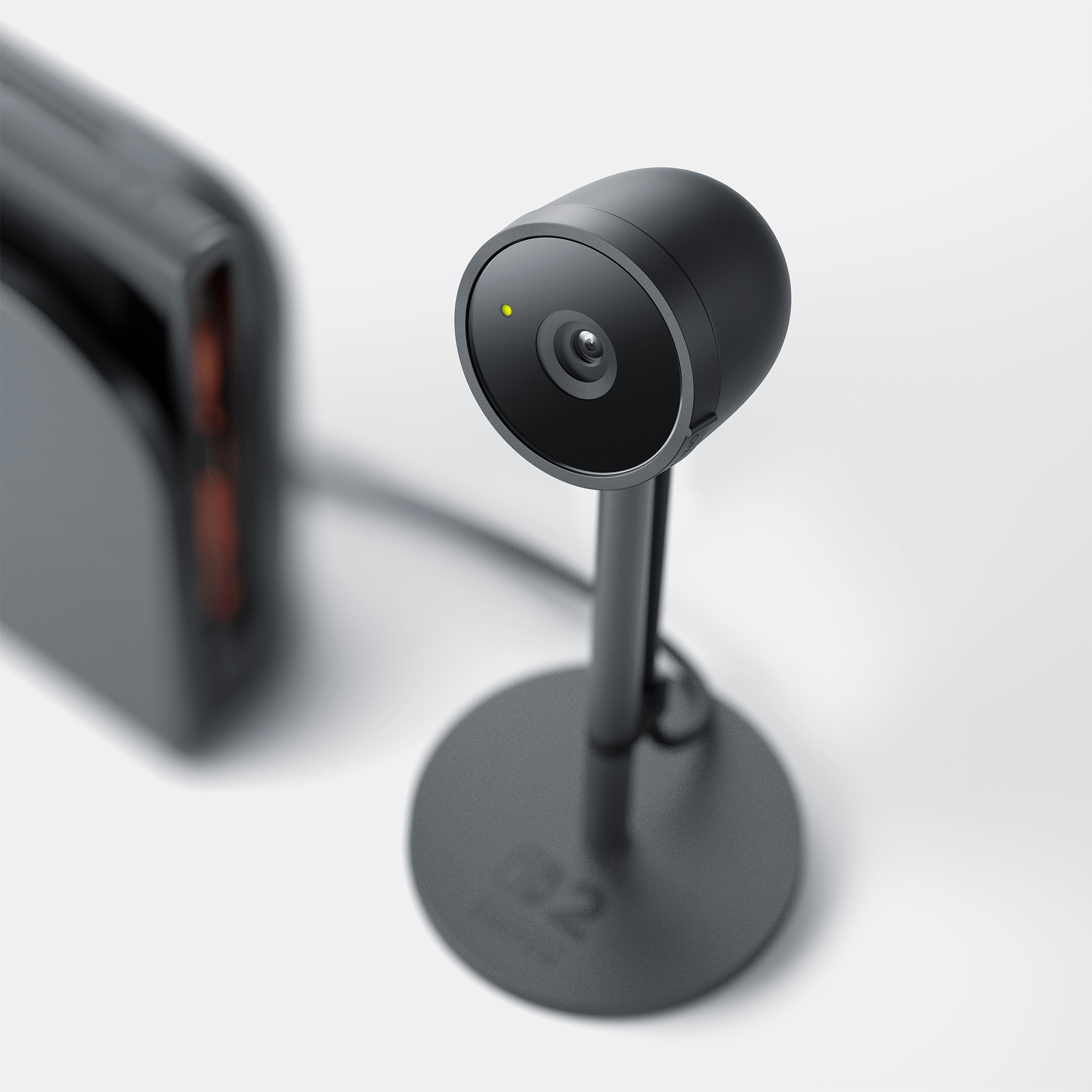
Voice chat needs nothing extra, but video chat and CameraPlay both require a compatible USB-C camera, and Nintendo sells its own: the Nintendo Switch 2 Camera, officially listed on Nintendo's own store at $54.99. It launched the same day as the console, June 5, 2025, carries the product code 123682, and is sold separately from every Switch 2 bundle.
Per Nintendo's own product listing and its developer interview on GameChat, the camera is built specifically around how people actually sit around a Switch 2:
- Connects to the USB-C port on top of the console and works in TV, tabletop, and handheld modes
- A wide-angle lens with an adjustable angle, so it can fit a small room or a full group on a couch
- A high-sensitivity image sensor that automatically adjusts brightness and detects faces, prioritizing them at the highest resolution even when you're sitting back from the screen
- A built-in privacy shutter that physically covers the lens, plus a green LED that lights up near the lens whenever the camera is actually capturing video
- Software that hides your background by default and processes the image to reduce blur when it zooms in on a face from across the room
- Includes one USB-C charging cable in the box
Nintendo also says the Switch 2 Camera isn't the only option: "typical" third-party USB-C or USB cameras may work too, though compatibility isn't guaranteed the way it is with Nintendo's own hardware. The console includes a built-in way to check before you buy — go to System Settings > Controllers & Accessories > Test USB Camera to confirm whatever camera you plug in is actually recognized.
Parental controls: how GameChat works for kids
Because GameChat opens a live voice-and-video line to other players, Nintendo locks it down by default for any account registered as under 16. According to Nintendo's own parental controls guide, a parent or guardian has to actively set a few things up before a child can use it at all:
- Link the Nintendo Switch Parental Controls smart device app to the child's console
- Register a phone number on the parent's own Nintendo Account on the child's behalf, since the child can't verify one themselves
- Individually approve which friends the child is allowed to use GameChat with — a child can't just chat with anyone on their friend list
Camera use gets an extra layer of control. Parents can choose, in the Parental Controls app, to either disable the camera entirely or require a request for permission every single time the child wants to turn it on for a new session. When a request comes in, the parent sees who else is in the session before deciding whether to allow it, and can adjust exactly how much the child's camera shows: full camera off, face only, background hidden, or filter effects off. Permission can also be withdrawn mid-session if a parent changes their mind, and the app lets parents review details of past sessions and revoke approval for specific friends at any time.
Does GameChat work across different games and platforms?
Across games, yes — that's one of GameChat's core selling points. Because it's a system-level feature rather than something built into any single game, everyone in a session can be playing completely different software and still talk, video chat, and see each other's screens the whole time. One friend can be in Mario Kart World while another is browsing the eShop, and the chat keeps running. Nintendo's chat system also underpins GameShare, which lets friends in your GameChat session try select modes of certain games they don't own a copy of themselves, up to four people per group in supported titles.
Across platforms, the answer is much more limited. GameChat is exclusive to Nintendo Switch 2 hardware — it does not exist on the original Nintendo Switch, and there's no Discord-style bridge that lets a PC, phone, or other console join a session. Nintendo's own support documentation is explicit that the separate voice chat feature inside the mobile Nintendo Switch App does not connect into GameChat sessions, so you can't use that app as a workaround to join from a phone. Original Switch consoles have a narrow exception: they can join a Switch 2 owner's GameShare session, but only over local wireless, not over the internet, and original Switch units can't host or fully participate in GameChat itself. Nintendo also notes that GameChat "is not available in all countries," so regional availability can vary.
GameChat not working? Common fixes
Nintendo's own troubleshooting pages group most GameChat problems into a handful of causes, and most of them are fixable without contacting support.
Can't start or join a session: Nintendo lists the most common culprits as no persistent internet connection, a phone number that isn't registered to your Nintendo Account, first-time GameChat setup not yet completed, an out-of-date system software version, a temporary Nintendo network outage, or simply not being mutually approved for GameChat with the friend you're trying to reach. Before digging into network settings, it's worth checking Nintendo's network status page for an outage, confirming your console is fully updated, and double-checking that both you and your friend have completed GameChat setup and approved each other specifically (being regular "friends" on your list isn't automatically enough).
If the connection itself is the problem, Nintendo's standard fixes are the usual home-networking checklist: move the console closer to the router (or undock it, since Wi-Fi performance can suffer while docked), keep it away from cordless phones, metal cabinets, and other electronics, restart the console, power-cycle your router and modem, and as a last resort update or factory-reset the router itself. For wired connections, check that the Ethernet cable is fully seated at both the dock and the router, try a different cable, and try a different LAN port.
Camera or video not working: Nintendo's camera-specific troubleshooting page points to a shorter, more specific list: a closed privacy shutter (the Switch 2 Camera won't show anything until you twist the outer rim to open it), a loose USB-C connection, outdated camera firmware, limited network conditions temporarily disabling video, or Parental Controls blocking camera use on an under-16 account. The fix path is: restart the console, check for system updates, unplug and replug the camera (or try a different USB port on the dock), make sure the shutter is open, then update the camera's firmware and run a check under System Settings > Controllers & Accessories > Update Nintendo Switch 2 Camera and Test USB Camera. A working camera should show a live preview in that test screen along with a lit green LED.
No sound or can't hear others: Nintendo's support site has dedicated articles for microphone and audio problems specifically, which largely point back to the same basics — system updates, restarting the console, and checking in-session mute and volume settings in the GameChat menu — alongside confirming the other person hasn't been blocked or muted on your end.
How GameChat compares to Discord and console party chat
GameChat gets compared to Discord constantly, and the comparison is useful mainly for what it reveals about the trade-off Nintendo made. Discord is a free, third-party app that runs on practically everything — PC, phone, browser, and (unofficially, via screen-mirroring workarounds) consoles — and it isn't tied to owning any particular piece of hardware. GameChat is the opposite: it's built directly into Nintendo Switch 2's system software, which means zero setup friction once your account is configured, a dedicated physical button to open it, and chat audio that automatically ducks under or over game sound without you touching a mixer. The cost of that convenience is that it only exists on one console, and it can't talk to anyone who isn't also on a Switch 2 with GameChat set up.
Against the native party chat systems on other consoles, GameChat's standout differences are video and screen sharing being part of the same built-in feature rather than something layered on separately. Sony's and Microsoft's console-level party chat tools have historically focused on voice first, with video calling and camera accessories treated as more of an add-on; GameChat ships camera support, CameraPlay, and live screen sharing as native options from the same menu you use to simply talk. The flip side is Nintendo's heavier guardrails: both sides must explicitly approve each other for GameChat specifically, and sessions top out at 12 total participants with only four able to share video or a screen at once — tighter limits than an open-ended Discord voice channel, but in line with how Nintendo has designed Switch 2's social features around smaller, approved friend groups rather than large open communities.
| Feature | Nintendo Switch 2 GameChat | Discord | PS5 / Xbox native party chat |
|---|---|---|---|
| Built into the hardware | Yes, system-level | No, third-party app | Yes, system-level |
| Video chat | Yes, with a USB-C camera | Yes, with any device camera | Varies by platform and app |
| Live game-screen sharing | Yes, built in | Yes, via screen share | Typically a separate feature |
| Cross-platform reach | Switch 2 only | PC, mobile, browser, consoles | Platform-specific |
| Cost | Included with Nintendo Switch Online | Free (paid tiers optional) | Included with console service tiers |
| Who you can chat with | Mutually approved friends only | Anyone in a shared server/DM | Friends list / invited players |
None of this makes GameChat a Discord replacement, and Nintendo doesn't pitch it as one. It's better understood as a console feature aimed at the specific scenario of "I'm already playing a Switch 2 game and want to talk to a friend who's also on a Switch 2," rather than a general-purpose communications platform.
What's next for GameChat
With the free Welcome Offer window closed and Nintendo Switch Online now effectively a requirement, GameChat has settled into being a standard part of the Switch 2 ecosystem rather than a launch-window freebie. Nintendo has continued to expand what plugs into it — GameShare and CameraPlay both launched after GameChat itself and have been extended to more games since — so it's reasonable to expect more titles to add CameraPlay-style integrations and more GameShare-compatible modes over time, especially as Nintendo keeps shipping first-party software for the platform.
If you're still deciding whether a Switch 2 is the right handheld for your group chats and co-op sessions in the first place, it's worth weighing GameChat and GameShare against what you'd get from a more open platform like Valve's Steam Deck OLED, which can run Discord natively but has nothing resembling a built-in, no-setup voice button. And since most new Switch 2 software increasingly ships digitally, it's also worth understanding how Nintendo's Virtual Game Cards work if you want your whole GameChat group playing without passing a physical cartridge around. For now, the simplest way to know whether GameChat will work the way you expect is to check Nintendo's own support pages for your region before you buy a camera or promise a friend you'll be heard clearly over voice chat — availability, pricing, and exact feature behavior can still vary by country.
Frequently asked questions
How much does Nintendo Switch 2 GameChat cost?
GameChat doesn't have its own separate price, but it requires an active Nintendo Switch Online membership to use. A free "Welcome Offer" let anyone use GameChat without a membership from the Switch 2's June 5, 2025 launch until March 31, 2026; that offer has since ended.
Do I need the Nintendo Switch 2 Camera to use GameChat?
No. Voice chat, screen sharing, and GameShare all work with just the console's built-in microphone. You only need a compatible USB-C camera, such as Nintendo's own $54.99 Switch 2 Camera, for video chat or CameraPlay.
Can kids use GameChat?
Only with setup from a parent or guardian. Accounts under 16 are restricted by default until a parent links the Nintendo Switch Parental Controls app, registers a phone number on the child's behalf, and approves specific friends the child can chat with; camera use can be limited or disabled entirely from the same app.
Does GameChat work across different games, or with Discord and other consoles?
GameChat works across different games on the same console - friends can be playing completely different titles and still voice chat, video chat, and share screens together. It does not connect to Discord, the Nintendo Switch App's voice chat, or other consoles, and it isn't available on the original Nintendo Switch.
Why isn't my GameChat working?
Nintendo's most common causes are a missing internet connection, an unverified phone number, incomplete GameChat setup, outdated system software, a closed camera privacy shutter, or friends who haven't mutually approved each other for GameChat. Restarting the console, checking for updates, and running the Test USB Camera tool in System Settings resolve most reported issues.
How many people can join a GameChat session?
Up to 12 people total can join a single voice chat session. Of those, up to four can share video or their game screen at the same time; the rest are limited to voice.
Sources
- Nintendo: Switch 2 GameChat feature pagenintendo.com
- Nintendo: Switch 2 Camera product pagenintendo.com
- Nintendo Support: GameChat Guide and FAQnintendo.com
- Nintendo Support: Managing a Child's GameChat Experience with Parental Controlsnintendo.com
- Nintendo: Ask the Developer Vol. 17 - GameChat Part 2nintendo.com
- Nintendo Support: Video Camera Doesn't Work During GameChatnintendo.com
Jonah Reyes leads Pandromeda's gaming coverage: console and handheld hardware, release dates, pricing changes, patch notes and the business moves behind the biggest franchises. He sources every date and price from the platform holders and publishers themselves, and says plainly when something is still only a rumour.