Nintendo Switch 2 GameShare Explained: How It Works, Game List
GameShare lets Nintendo Switch 2 owners loan a game to friends in person or online through GameChat, no extra copy required. Here is how it works, what it supports, and its limits.
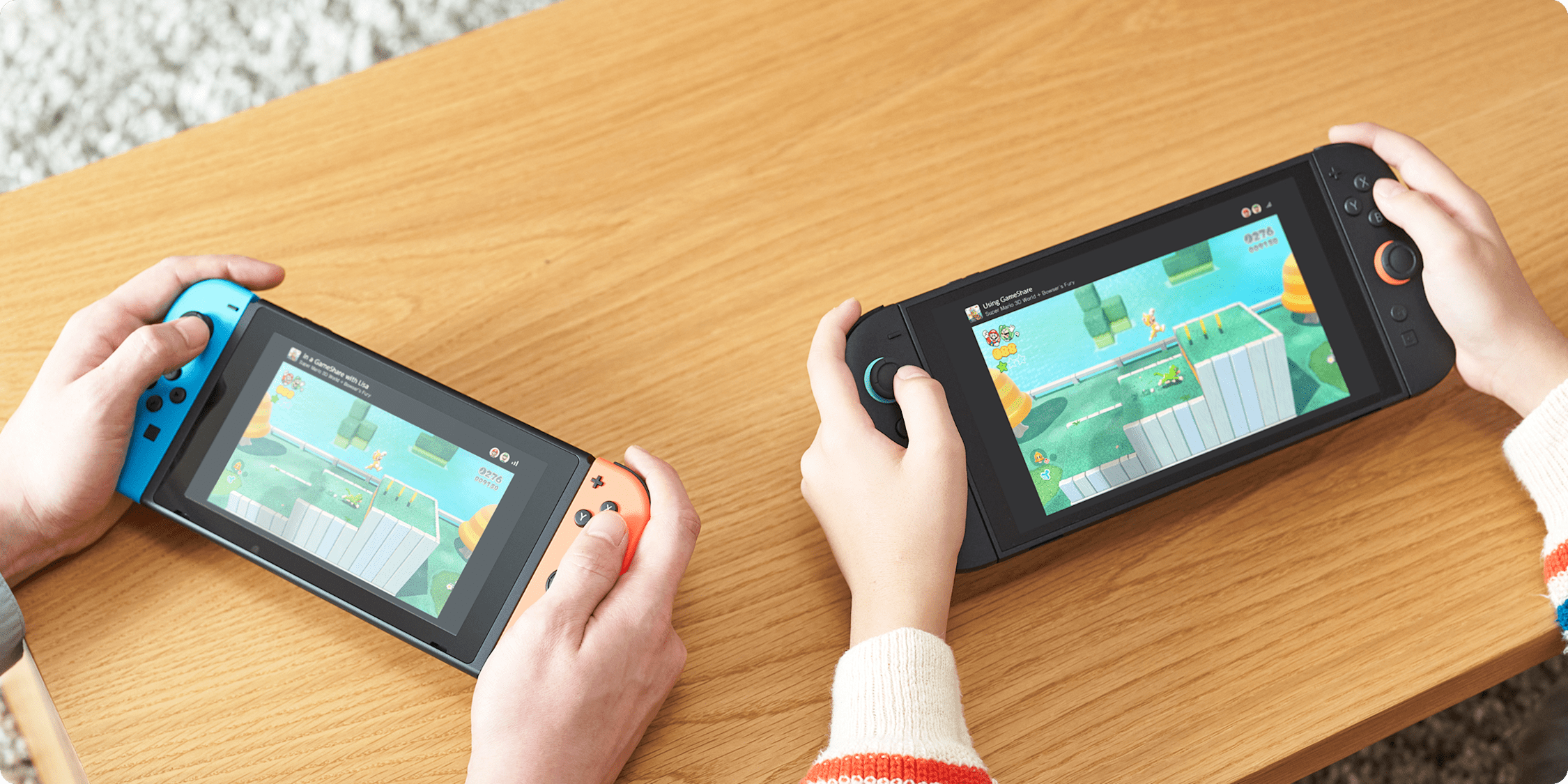
GameShare is a Nintendo Switch 2 feature that lets you loan a compatible game to someone else temporarily—over local wireless or online through GameChat—without them needing to own a copy, using streaming technology instead of a file transfer. It's a session-based, play-together tool, not a way to permanently give someone a game: once the GameShare session ends, the borrowed game stops working on the guest's system. Here's exactly how it works, which titles currently support it, and the limits Nintendo has confirmed.
Quick facts
- What it does: Lets a Nintendo Switch 2 owner share a compatible game with others temporarily, with no second copy needed
- Connection methods: Local wireless (Switch 2 and original Switch) or online via GameChat (Switch 2 only)
- Who can host: Only a Nintendo Switch 2 system can start (host) a GameShare session
- Max participants: Up to four Nintendo Switch 2 or Nintendo Switch systems per session
- Access after the session: Guests lose access to the shared game once the session ends
- Online requirement: A GameChat room, a Nintendo Account, and (since April 1, 2026) a Nintendo Switch Online membership
What is GameShare?
According to Nintendo's own GameShare Overview and FAQ, GameShare is "a feature that allows Nintendo Switch 2 users to share compatible software and play together" with people who don't own the game themselves. Rather than copying a game file to another console, GameShare streams the experience to the guest's system in real time. Nintendo describes each participant as getting their own independent view of the game, not a mirrored copy of the host's screen—so in a supported multiplayer title, everyone sees their own character, camera, and menus as if they were running the software locally.
This is a deliberately different mechanism from two other sharing-related systems already built into the Switch 2 ecosystem: Game-Key Cards and Virtual Game Cards. Both of those govern how a single purchased license is stored or temporarily moved between systems you control. GameShare instead lets you bring in people who have never purchased the game at all, for the length of one play session (more on how all three compare later in this guide).
How GameShare works: local wireless vs. online
Nintendo's official GameShare feature page lays out two distinct ways a GameShare session can connect people, and the hardware requirements differ between them:
- Local wireless: A Nintendo Switch 2 system can share a compatible game with anyone nearby, and the guest can be using either a Nintendo Switch 2 or an original Nintendo Switch console. No internet connection is required for this method.
- Online via GameChat: Sharing happens inside a GameChat room, Nintendo Switch 2's built-in group voice/video and screen-sharing space. Because GameChat itself is exclusive to Nintendo Switch 2 hardware, every participant in an online GameShare session—host and guests alike—must be using a Nintendo Switch 2.
In both cases, only a Nintendo Switch 2 system can act as the host that initiates and shares the session. An original Nintendo Switch can join as a guest over local wireless, but it cannot host or share a game of its own via GameShare.
Nintendo also notes that all participating systems need to be running the latest system software update before GameShare will work, and that streaming does reduce image quality somewhat compared to playing a local copy—though Nintendo states the goal is to "maintain a high-quality image as much as possible." Online sessions can also introduce input delay depending on each player's network connection and physical distance from the host.
How to start a GameShare session, step by step
Nintendo is explicit in its How to Play Together via GameShare support article that the exact hosting steps, supported session types, and maximum player counts vary by game—so the fastest way to get precise instructions for a specific title is to search Nintendo's support site for "How to Start a Multiplayer Game" plus that game's name. That said, the general flow for joining a session is consistent across titles:
Joining a GameShare session over local wireless:
- Select the GameShare icon on the HOME Menu
- Select "Join GameShare"
- Select "A Local User"
- Choose the user whose session you want to join
- Your system will search for nearby sessions—select the one you want
- Select "Join GameShare" again to confirm
- Wait for the host to start the session once everyone has joined
Joining a GameShare session over the internet (via GameChat):
- Start or join a GameChat room with the host
- When the host sends an invite, press the C Button to open the C Menu
- Select "See Invites to GameShare"
- Select "Join GameShare"
- Wait for the host to begin the session
Hosting works the same way in reverse—from inside a compatible game, the host selects a GameShare option (usually from that game's in-game menu) and either searches for nearby local players or invites people already in their GameChat room. Because the host-side menu differs by game, Nintendo directs players to each game's own support article rather than publishing one universal set of hosting steps.
Which games support GameShare right now
GameShare only works in software that has specifically been built or updated to support it—it isn't a system-wide feature that works with every game. Nintendo's official GameShare feature page lists the following titles as compatible, and specifies whether each supports local wireless only or both local and online (GameChat) sharing:
| Game | Local wireless | Online via GameChat |
|---|---|---|
| Donkey Kong Bananza | Yes | Yes |
| Hyrule Warriors: Age of Imprisonment | Yes | Yes |
| Super Mario Odyssey | Yes | Yes |
| Super Mario 3D World + Bowser's Fury | Yes | Yes |
| Clubhouse Games: 51 Worldwide Classics | Yes | Yes |
| Big Brain Academy: Brain vs. Brain | Yes | Yes |
| Captain Toad: Treasure Tracker | Yes | Yes |
| Super Mario Party Jamboree (Nintendo Switch 2 Edition + Jamboree TV) | Yes | No |
Nintendo frames this as a starting list rather than a final one, stating on its own feature page that "select Nintendo Switch games will become compatible with GameShare after free software updates." In other words, the compatible-game list is explicitly still expanding, and any list published today—including this one—should be checked against Nintendo's own GameShare page for the current roster before you plan a session around a specific title.
It's also worth noting that some of these are original Nintendo Switch games (like Super Mario Odyssey, Captain Toad: Treasure Tracker, and Clubhouse Games) that have been made GameShare-compatible on Switch 2, while others, like Donkey Kong Bananza and Hyrule Warriors: Age of Imprisonment, are newer Switch 2 titles. Whether a Switch 2 exclusive can be shared with an original Switch owner over local wireless depends entirely on that specific game's implementation, since control schemes and performance targets differ between the two consoles.
Does Mario Kart World support GameShare?
As of this writing, Mario Kart World is not included on Nintendo's own published list of GameShare-compatible games. That list is limited to the titles in the table above, and Nintendo's dedicated Mario Kart World pages describe its online and local multiplayer options separately, without listing GameShare support. If you want to race with friends who don't own Mario Kart World, each player currently needs their own copy of the game rather than borrowing access through a GameShare session.
Because Nintendo has already stated that more games will pick up GameShare support through free updates, it's possible that could change in the future. Until Nintendo's GameShare page is updated to include it, though, treat any claim that Mario Kart World already supports GameShare as unconfirmed.
Participant limits, save data, and what happens when a session ends
Nintendo's GameShare FAQ confirms a specific ceiling on session size: "Up to four Nintendo Switch 2 or Nintendo Switch systems can participate in a GameShare session." That cap includes the host, so a single GameShare session supports one host plus up to three guests—though the real number playable at once still depends on how many players a given game supports in multiplayer at all.
On save data, Nintendo's language is deliberately conditional: "Depending on the software, some save data may be created on guest systems for use with the full game." That means certain titles may let a guest's progress carry over if they later buy the full game themselves, but this isn't guaranteed across every GameShare-compatible title—it varies by game.
The firmest limit Nintendo states is about access after the session ends. Guests who receive a game through GameShare "can only play the software during the session in which it was shared," and the game "will not be playable after the session ends." There's no offline window or grace period built in—once the host closes the session or leaves the GameChat room, the borrowed game simply stops being playable on the guest's system until another GameShare session is started.
Requirements: accounts, updates, and Nintendo Switch Online
A few requirements apply across the board. Every system involved—host and guests—needs to be updated to the latest system software, since GameShare depends on features built into more recent firmware. A Nintendo Account is required for online features, and parental control age ratings apply to a shared game based on the guest's own console settings, not the host's.
The membership requirement is the piece most likely to catch people out, because it changed partway through 2026. Nintendo allowed GameChat—and by extension, any GameShare session that goes through GameChat—to be used free of charge through March 31, 2026, without a Nintendo Switch Online membership. From April 1, 2026 onward, GameChat requires an active Nintendo Switch Online membership, which also covers GameShare sessions started through a GameChat room. Local wireless GameShare sessions don't go through GameChat at all, so they aren't subject to that membership requirement. Nintendo first detailed both features in its own GameChat and GameShare announcement.
GameShare vs. Game-Key Cards vs. Virtual Game Cards
Switch 2 now has three different mechanisms that all touch on how games get shared, licensed, or moved between systems, and it's easy to conflate them. They solve different problems:
| Feature | What it actually does | Who needs to own the game |
|---|---|---|
| GameShare | Streams a compatible game from a host's Switch 2 to guest systems for the length of one session | Only the host owns it; guests borrow access temporarily |
| Game-Key Cards | A physical cartridge that holds a license key; the full game still has to be downloaded to the system's storage | Whoever has the physical card, after downloading the game |
| Virtual Game Cards | The digital equivalent of a cartridge—lets you move a single digital license between your own linked systems, or lend it the way a physical card can be lent | The license holder; it can be moved, but not duplicated |
For a closer look at either of the other two systems, see our explainers on how Nintendo Switch 2 Game-Key Cards work and how Virtual Game Cards let you move a license between consoles. GameShare doesn't touch licensing at all—it's a temporary streaming session layered on top of whichever ownership model the host's copy already uses. The Nintendo Switch 2, which launched in June 2025, is the only hardware that can host a GameShare session; GameShare is one of several social features exclusive to the newer console.
What's next
GameShare's compatible-game list is still short relative to the overall Switch 2 library, and Nintendo has already committed to expanding it through free software updates rather than a one-time rollout. The practical approach is to check Nintendo's official GameShare page before planning a session around a specific title, especially for newer releases—support isn't automatic just because a game is multiplayer-capable on Switch 2. The Switch 2 library itself keeps growing in the meantime, including newly native ports like the Kingdom Hearts trilogy's native Switch 2 release, so it's worth watching whether GameShare support becomes a standard checkbox for big multiplayer titles going forward or stays limited to a smaller set of party and co-op games.
Frequently asked questions
What is GameShare on Nintendo Switch 2?
GameShare is a Nintendo Switch 2 feature that lets a host stream a compatible game to other people's systems for a single play session, so they can play along without owning a copy. It works over local wireless or online through GameChat.
Do I need a Nintendo Switch Online membership to use GameShare?
Only for online GameShare sessions started through GameChat. GameChat was free to use without a membership through March 31, 2026; from April 1, 2026 onward, an active Nintendo Switch Online membership is required. Local wireless GameShare sessions do not require a membership.
How many people can join a GameShare session?
Nintendo states that up to four Nintendo Switch 2 or Nintendo Switch systems can participate in a single GameShare session, including the host, though the actual number of players possible also depends on the specific game's own multiplayer support.
Does Mario Kart World support GameShare?
No, not as of this writing. Mario Kart World is not on Nintendo's official list of GameShare-compatible games, so each player currently needs their own copy to play together.
What happens to my progress after a GameShare session ends?
Depending on the game, some save data may be created on the guest's system for use if they later buy the full game, but this varies by title. In every case, the shared game itself stops being playable on the guest's system once the GameShare session ends.
Can an original Nintendo Switch use GameShare?
An original Nintendo Switch can join a GameShare session as a guest over local wireless, but only a Nintendo Switch 2 system can host or share a game, and only a Nintendo Switch 2 can join an online GameShare session via GameChat.
Sources
- Nintendo Support: GameShare Overview and FAQen-americas-support.nintendo.com
- Nintendo Support: How to Play Together via GameShareen-americas-support.nintendo.com
- Nintendo: GameShare feature pagenintendo.com
- Nintendo: GameChat and GameShare announcementnintendo.com
- Wikipedia: Nintendo Switch 2en.wikipedia.org
Jonah Reyes leads Pandromeda's gaming coverage: console and handheld hardware, release dates, pricing changes, patch notes and the business moves behind the biggest franchises. He sources every date and price from the platform holders and publishers themselves, and says plainly when something is still only a rumour.