Nintendo Switch 2 Game-Key Cards Explained: How They Work
A Game-Key Card looks like a normal Switch 2 cartridge but stores no game data — here's how the download, storage, and resale rules actually work.
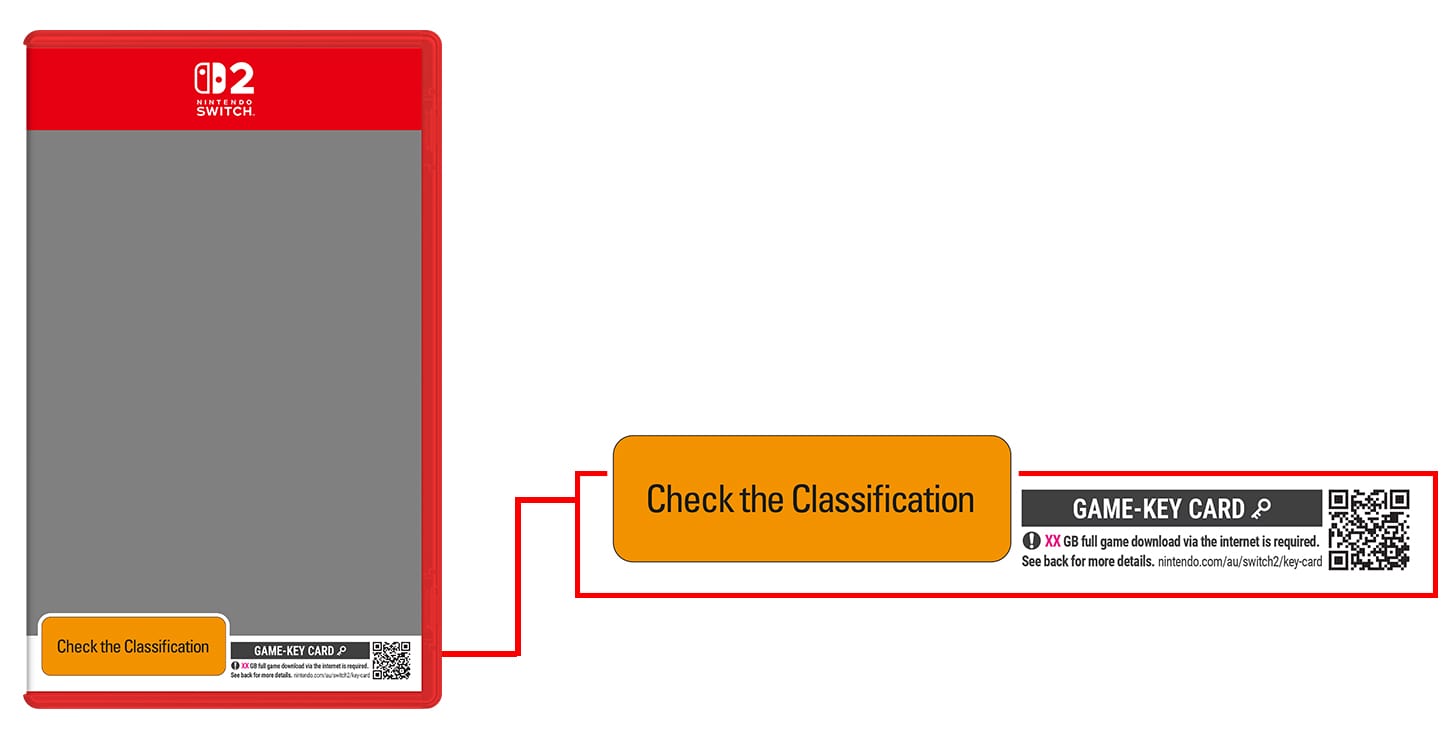
A Game-Key Card is a physical card for Nintendo Switch 2 that does not contain the game itself. Instead, it holds a license — a "key" — that unlocks a full download of the game to your console's storage the first time you insert it. You still buy it in a box, on a shelf, like a normal cartridge, and you still need to have the card in the system to play. But the actual game data comes from the internet, not the card. It sits in between a traditional Game Card (which stores the whole game on the cartridge) and a fully digital purchase (which has no physical object at all) — and it has become one of the most-searched Switch 2 topics because the difference is easy to miss at the store shelf.
Quick answer: A Game-Key Card looks and works like a normal Switch 2 cartridge, but it stores no game data — only a license key. Insert it, connect to the internet once to download the full game, and from then on you just need the card in the console (no internet required) to play. Packaging and the card itself carry a small key icon so shoppers can identify them before buying.
What is a Nintendo Switch 2 Game-Key Card?
Nintendo's own support documentation on Game-Key Cards puts it plainly: "Game-key cards are different from regular game cards, because they don't contain the full game data" — instead, "the game-key card is your 'key' to downloading the full game to your system via the internet." In a companion explainer on its news site, Nintendo describes Game-Key Cards as a format that "combine[s] aspects of the two previous methods," meaning regular cartridges and digital downloads.
Physically, there is no difference in how you use one. It is "a little physical card that you insert into your system," just like any other Switch 2 Game Card. The difference is entirely about what's stored on the chip inside it: a regular Game Card holds the complete game, while a Game-Key Card holds only the license data needed to authorize and trigger a download. Nintendo flags the distinction visually — packaging and the card face carry a small key icon so shoppers can spot a Game-Key Card release before buying it.
How a Game-Key Card works, step by step
According to Nintendo's official Game-Key Card overview, using one is a three-step process:
- Insert the card. Put the Game-Key Card into your Nintendo Switch 2 like any other cartridge.
- Download the game. The HOME Menu shows on-screen instructions to download the full game. This step requires an internet connection and enough free space in either your console's internal storage or a microSD Express card.
- Play. Once the download finishes, you launch and play the game normally — as long as the Game-Key Card stays inserted.
Nintendo of America also published a short official walkthrough video covering this same process on its YouTube channel.
The required storage amount isn't universal — it's specific to each game and is printed on the Game-Key Card's packaging, as well as listed on that game's Nintendo eShop page. Before buying a Game-Key Card title, it's worth checking your available space via HOME Menu → System Settings → Data Management, the same place Nintendo's FAQ points buyers to.
Do you need an internet connection every time you play?
No — only for the very first launch. Nintendo's official Nintendo Switch 2 FAQ is explicit on this: "An internet connection is only required when you launch the game for the first time." After that initial download completes, "the game can be started even without an internet connection." The catch, shared with regular physical games, is that the card itself must be physically inserted in the system to play; there's no way to "unlock" the game permanently onto the console and set the card aside.
One detail that surprises some buyers: a Nintendo Account is not required to download the game data from a Game-Key Card, and the card isn't tied to any account. That means, per Nintendo, you can hand a Game-Key Card to someone else and it will work — insert it into another Nintendo Switch 2, run through the same insert-download-play steps, and that console can play the game too, no account transfer needed.
Game-Key Card vs. Game Card vs. digital: what's the difference?
All three formats end with a playable game on your console, but they differ in what you're actually buying and how you access it afterward.
| Format | Game data stored on | Internet needed to play | Needs card inserted to play | Resale / lending |
|---|---|---|---|---|
| Regular Game Card | The cartridge itself | No (aside from day-one patches) | Yes | Yes — sell, trade, or lend freely |
| Game-Key Card | Downloaded to system storage or microSD Express | Only for first-time download | Yes | Yes — card can be lent or resold; buyer re-downloads on their own console |
| Digital download (eShop) | Downloaded to system storage or microSD Express | Only for the download; not needed to launch afterward | No | No — tied to the purchasing Nintendo Account |
The practical takeaway: a Game-Key Card behaves like a physical game for ownership purposes (you can resell it, lend it, or trade it in, and it isn't locked to your Nintendo Account), but it behaves like a digital purchase for storage purposes — you need free space and, at least once, an internet connection before you can play.
Why did Nintendo introduce Game-Key Cards?
Nintendo hasn't published a single-sentence rationale on its consumer-facing pages, but the practical driver follows directly from the specs Nintendo itself has published. Standard Nintendo Switch 2 Game Cards top out at 64 GB, with smaller 16 GB and 32 GB variants also in use, while Nintendo's own tech specs list 256 GB of internal system storage (a portion of which is reserved by the system itself). Modern game installs — especially ports of large, cross-platform third-party titles — increasingly run well beyond what a 64 GB cartridge can physically hold.
Rather than force publishers to either ship a card that still needs a huge day-one patch anyway, cut a game down to fit, or skip a physical release entirely, Nintendo built an officially labeled format that keeps a physical object, a resale market, and a box on store shelves, while letting the actual multi-gigabyte install live in system storage or on a microSD Express card. It's the same underlying storage pressure that has already pushed other consoles toward mandatory day-one downloads; Nintendo's answer keeps that download but keeps a purchasable, lendable physical card as the access method.
Which Nintendo Switch 2 games use Game-Key Cards?
Not every physical Switch 2 game is a Game-Key Card — Nintendo's own Game-Key Card hardware page says plainly that the system "supports both regular game cards and game-key cards," and publishers choose per title. In practice, Game-Key Cards have mostly shown up on larger third-party releases and re-releases where the install size is the deciding factor — early examples confirmed on retail packaging included Capcom's Street Fighter 6: Years 1–2 Fighters Edition and Square Enix's Bravely Default: Flying Fairy HD Remaster, both of which launched in Game-Key Card format alongside Switch 2 at launch. Because the format is decided game-by-game, the safest way to know before you buy is to check the product packaging or the game's Nintendo eShop listing for the key-icon label, rather than assume based on genre or publisher.
If you're weighing whether a specific upcoming release is worth buying physically versus digitally at all, it's also worth comparing against confirmed digital-only or hybrid plans — for example, CD Projekt's Switch 2 upgrade plans for The Witcher 3 show how differently publishers are handling the platform's storage and format questions from one title to the next.
Storage requirements and microSD Express
Because the download is the whole point, storage is the main practical constraint with Game-Key Cards. Nintendo Switch 2 ships with 256 GB of internal storage, part of which the system reserves for itself, and its card slot is built for the newer microSD Express standard exclusively — Nintendo's own tech specs confirm the slot is "compatible with microSD Express cards only," supporting cards up to 2 TB, and that older, standard microSD cards from the original Switch can only be used to copy screenshots and videos, not to store games. If you were planning to reuse an old Switch microSD card for Game-Key Card downloads, it won't work for that purpose on Switch 2.
Before buying a Game-Key Card, check three things Nintendo calls out directly: the free space listed on the card's packaging, your console's current free internal storage (HOME Menu → System Settings → Data Management), and whether you'll need to add a microSD Express card to fit it. This is functionally the same planning digital-only buyers already do — it's worth reading up on how storage and access tiers compare across platforms if you're weighing a heavily digital library, the way many players already do with Xbox Game Pass's storage and cloud-play tiers.
Resale, trade-in, and lending: what actually changes
The single biggest practical question buyers have is whether a Game-Key Card behaves like a "real" physical game for resale and lending — and per Nintendo, it does. Because the card isn't tied to a Nintendo Account, you can lend it to a friend, sell it, or trade it in, exactly as you would a regular cartridge. The buyer or borrower simply repeats the insert-download-play process on their own console. What doesn't carry over is the download itself — the new owner needs their own internet connection and free storage to re-download the game; they aren't inheriting your save data or account entitlements, just the physical license card.
For trade-in shoppers, the main thing to watch is that a used Game-Key Card is only as useful as the download it can still trigger — the card format itself doesn't expire, but always confirm a used copy is genuinely a Game-Key Card (versus a "code in a box" release, which some publishers have also used) so you know what you're buying before you leave the store.
Game-Key Card vs. cartridge vs. digital: which should you buy?
There's no universally "better" choice — it depends on what you value:
- Buy a regular Game Card if you want to play immediately without a mandatory day-one download, or if you frequently play offline right out of the box.
- Buy a Game-Key Card if you want the resale, lending, and shelf-collection benefits of a physical purchase, don't mind a one-time download, and have enough storage (internal or microSD Express) to hold the installed game.
- Buy digital if you don't care about resale value, want your whole library tied to your account and available across a download on any console signed into it, and are comfortable managing storage the same way Game-Key Card owners do.
If storage is tight either way, it's worth sizing up your console's needs against other recent big releases — big open-world and hardware-hungry titles are a good stress test for whether your setup can keep up, similar to how buyers comparing PS5 and PS5 Pro storage and performance trade-offs weigh internal versus expandable storage before buying.
Common misconceptions about Game-Key Cards
"It's basically a code in a box." Not quite. A download code is redeemed once, tied permanently to whichever Nintendo Account activates it, and can't be resold or reused. A Game-Key Card is not account-locked — the physical card itself is the re-usable key, so it can be lent or resold repeatedly, with each new holder downloading the game fresh on their own console.
"You need internet every time you play." Only the first launch requires a connection, per Nintendo's own guidance. After the initial download, the game runs offline as long as the card is inserted.
"It's the same as buying digital." The download step is similar, but ownership isn't. A digital eShop purchase is permanently tied to the buyer's Nintendo Account and can't be resold, lent, or traded in. A Game-Key Card is a physical good you can pass along like any cartridge — the new owner just has to redo the download on their own system.
"All third-party Switch 2 games use Game-Key Cards." Not necessarily — Nintendo has confirmed the system supports both regular Game Cards and Game-Key Cards, and publishers decide per title, often based on that specific game's install size. Always check the packaging or eShop listing for the key icon rather than assuming.
What to check before you buy
If you're shopping for a physical Switch 2 game, look for the key icon on the front of the box — it's Nintendo's own marker for a Game-Key Card release. Confirm you have enough free internal storage or a microSD Express card ready, and plan on a one-time internet connection before your first play session. Beyond that, treat it like any other physical purchase: it's yours to keep, lend, resell, or trade in whenever you're done.
Frequently asked questions
What is a Game-Key Card on Nintendo Switch 2?
It's a physical card that looks and plays like a normal Switch 2 cartridge, but it doesn't contain the game itself. Instead it holds a license key that triggers a full download of the game to your console's storage the first time you insert it, per Nintendo's official support documentation.
Do I need an internet connection every time I play a Game-Key Card game?
No. Nintendo's official FAQ confirms an internet connection is only required the first time you launch the game, to download it. After that, you can play offline as long as the Game-Key Card is inserted in the system.
Can I resell or lend a Game-Key Card?
Yes. Unlike a digital eShop purchase, a Game-Key Card isn't tied to a Nintendo Account, so you can sell it, trade it in, or lend it to someone else. The new owner just needs to redo the insert-download-play steps on their own console.
How much storage does a Game-Key Card game need?
It varies by title — the required free space is printed on the card's packaging and listed on the game's Nintendo eShop page. You can check your console's free space under System Settings > Data Management, and add a microSD Express card if you need more room.
Which Nintendo Switch 2 games use Game-Key Cards?
Not all physical Switch 2 games do — Nintendo supports both regular Game Cards and Game-Key Cards, and publishers choose per title, generally for larger releases. Early examples on retail packaging include Street Fighter 6: Years 1-2 Fighters Edition and Bravely Default: Flying Fairy HD Remaster. Always check the box or eShop listing for the key icon to confirm.
Is a Game-Key Card the same as a digital download code?
No. A download code is redeemed once and permanently tied to the Nintendo Account that activates it. A Game-Key Card is a reusable physical object that isn't account-locked, so it can be resold or lent multiple times, with each new holder downloading the game on their own console.
Sources
- Nintendo Support: Nintendo Switch 2 Game-Key Card Overviewen-americas-support.nintendo.com
- Nintendo: What Is a Game-Key Card?nintendo.com
- Nintendo Switch 2 FAQnintendo.com
- Nintendo Switch 2 Tech Specsnintendo.com
- Nintendo UK: Nintendo Switch 2 – Game-Key Cardsnintendo.com
Jonah Reyes leads Pandromeda's gaming coverage: console and handheld hardware, release dates, pricing changes, patch notes and the business moves behind the biggest franchises. He sources every date and price from the platform holders and publishers themselves, and says plainly when something is still only a rumour.


