ChatGPT GPT-6 Release Date, Free Access and Intelligent UI
OpenAI's GPT-6 reached every ChatGPT tier by October 8, 2026, adding Intelligent UI that turns answers into charts, forms and tools automatically.
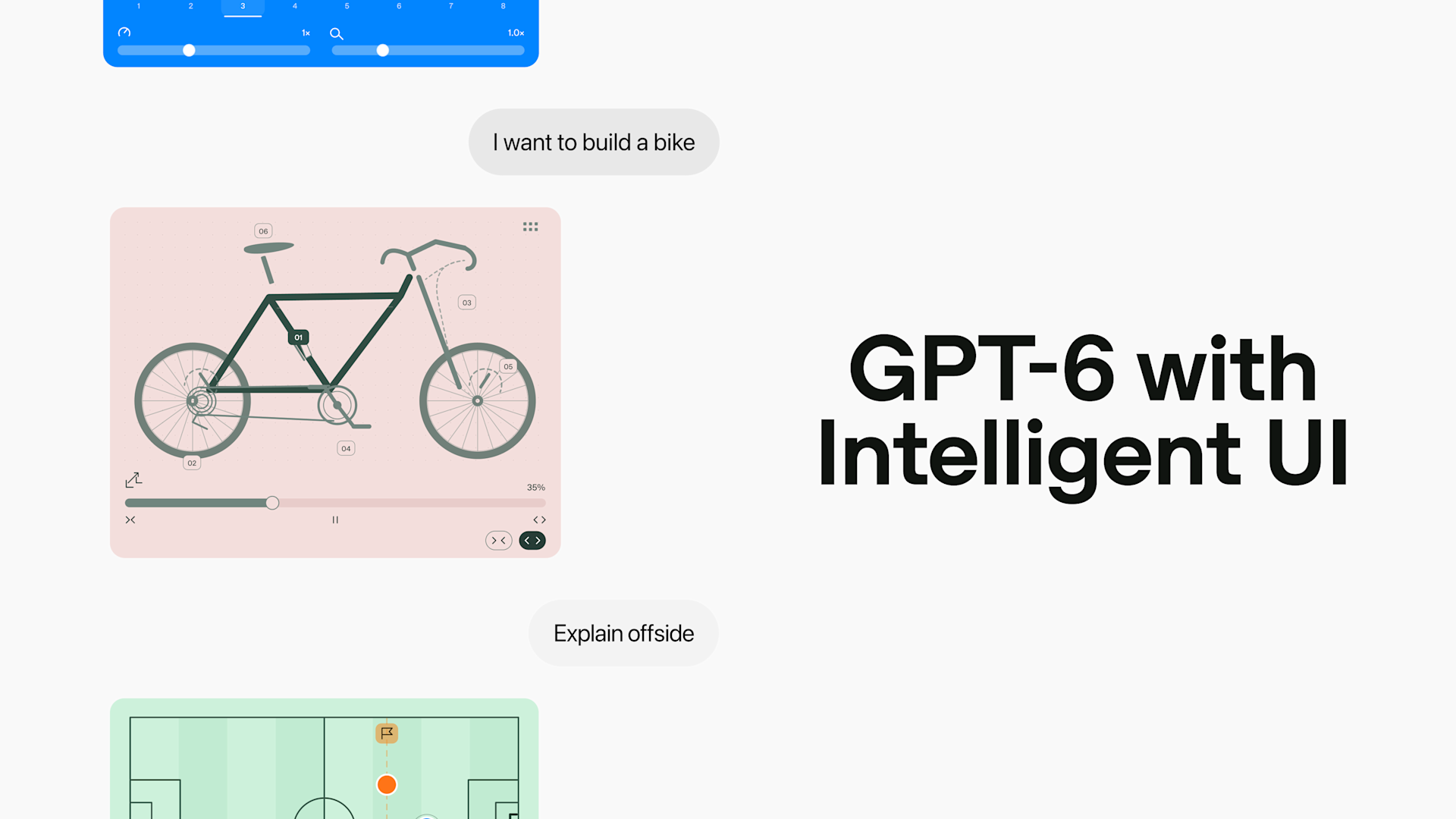
GPT-6 is now live across every ChatGPT tier. OpenAI began rolling out GPT-6 with a new feature called Intelligent UI to Plus, Pro, Business and Enterprise accounts on October 7, 2026, and extended it to Free and Go users the next day, October 8. The headline change isn't just a smarter model — it's that ChatGPT can now build its own charts, comparison tables, forms and small interactive tools inside a chat, automatically, without anyone asking for them. Paid tiers run on a model OpenAI calls GPT-6 Sol; Free and Go run on a lighter model called GPT-6 Luna.
- Release date: October 7, 2026 (Plus/Pro/Business/Enterprise) and October 8, 2026 (Free/Go)
- New feature: Intelligent UI — interactive charts, forms, buttons and mini-tools inside chat answers
- Paid-tier model: GPT-6 Sol
- Free-tier model: GPT-6 Luna
- Cost: No price change — it replaces the existing "Latest" option in the model picker
- Scope: Applies to the Chat tab only; ChatGPT Work and Codex are unaffected
What is GPT-6, and what is Intelligent UI?
GPT-6 is OpenAI's newest ChatGPT model, following GPT-5.6. In its own announcement, OpenAI describes GPT-6's main consumer-facing addition as Intelligent UI, "a new capability that allows ChatGPT to answer quickly with fully interactive user interfaces that make everyday answers more visual, make learning complex topics easier and that can quickly create a tool to solve a task right in the moment."
In practice, that means ChatGPT no longer answers everything with a scrolling block of text. The model decides, question by question, whether a reply is better served as plain text, a side-by-side comparison, an interactive diagram, or a small working tool — and builds that interface itself, in real time, as part of the response.
GPT-6 release date: the staged rollout
OpenAI split the rollout by plan rather than shipping it to everyone at once. Paid subscribers got access first; free users followed about 24 hours later. The table below summarizes who got what, and when, based on OpenAI's announcement and its Help Center documentation.
| ChatGPT plan | Model powering GPT-6 | Rollout start | Notes |
|---|---|---|---|
| Plus | GPT-6 Sol | October 7, 2026 | Medium and High thinking included; Extra High and Pro are not |
| Pro | GPT-6 Sol (Pro effort: GPT-6 Astra) | October 7, 2026 | Full access to Medium, High, Extra High and Pro effort levels |
| Business | GPT-6 Sol | October 7, 2026 | Admin controls may restrict which effort levels are available |
| Enterprise | GPT-6 Sol (Pro effort: GPT-6 Astra) | October 7, 2026 | Availability depends on workspace admin settings |
| Free | GPT-6 Luna | October 8, 2026 | Unlimited everyday text chats, subject to abuse safeguards |
| Go | GPT-6 Luna | October 8, 2026 | Go is a paid plan but shares the Free tier's model |
Two details are worth flagging if you're trying to find GPT-6 in your own account. First, GPT-6 replaces "Latest" in the ChatGPT model picker rather than appearing as a brand-new entry — if your account previously had "Latest" selected, you're moved to GPT-6 automatically, at the same effort level. Second, if you don't see GPT-6 yet, OpenAI's own guidance is that the rollout is staged and it may simply not have reached your account or workspace, so there's no separate opt-in to chase down.
GPT-6 Sol vs. GPT-6 Luna: which tier gets what
OpenAI is powering this release with two distinct models rather than one. Per the company's official post on X: "GPT‑6 in ChatGPT is powered by GPT‑6 Sol for Plus, Pro, Business, and Enterprise tiers, and GPT‑6 Luna for Free and Go tiers. Both are tuned for everyday conversation." OpenAI's Deployment Safety Hub publishes a dedicated system-card update for this exact pairing, titled "GPT-6 Sol and GPT-6 Luna: October 2026 update," which covers the safety testing both models went through before release.
Sol is the larger, paid-tier model, built to handle the Medium, High and Extra High thinking levels. Luna is a faster, lower-cost model tuned for high-volume everyday use, and is what powers the unlimited free-tier chat experience. Pro-tier users get a further option: selecting "Pro" effort in the model picker switches to GPT-6 Pro, which OpenAI says is powered by the separate, more capable GPT-6 Astra model — the same model line OpenAI introduced for the hardest reasoning, coding and computer-use tasks.
It's worth noting that OpenAI's help documentation still describes some older-generation routing (GPT-5.6 Sol, Terra and Luna remain selectable models, and Free/Go's baseline "Instant" experience can fall back to GPT-5.6 Luna in some cases). GPT-6 does not retire those options — it sits alongside them as a new default.
What's new in GPT-6 versus GPT-5.6
Outside of Intelligent UI, OpenAI is also pitching GPT-6 as faster to start answering. The company says GPT-6 can "begin answering while it continues to think" by interleaving reasoning with writing, instead of making users wait for a model to finish its internal reasoning before anything appears. According to OpenAI, "for questions that need web search, GPT‑6 Instant starts answering 44% sooner, on average, than GPT‑5.6 Instant," and in an internal evaluation of "high-value, everyday agentic tasks," GPT‑6 Extra High began answering as quickly as GPT‑5.6 Medium while scoring higher overall than GPT‑5.6 Extra High.
OpenAI also says GPT-6 makes better decisions about when to search the web at all, and more reliably finds information that actually supports its answer, which the company frames as a quality improvement independent of Intelligent UI. None of these performance figures come with independently reproducible benchmarks in the public announcement, so they should be read as OpenAI's own internal measurements rather than third-party verified results.
What Intelligent UI actually does
The core idea behind Intelligent UI is that ChatGPT chooses its own response format based on the question, rather than always defaulting to a paragraph of text. OpenAI's announcement lays out three broad categories of what this looks like in practice:
- More visual everyday answers. A weekend cooking plan can show timing for each dish laid out alongside the recipe; a road-trip itinerary can appear as stops plotted on a map, with notes on what's worth a detour.
- Easier explanations for complex topics. Instead of a wall of text, ChatGPT can produce an interactive diagram you can manipulate — changing an input to see what happens, or stepping through a process one stage at a time.
- Tools built on the spot. Ask for something practical, and ChatGPT can generate a working mini-tool inside the conversation: a retirement savings calculator, a bill-splitter for a dinner with friends, or even a small game.
OpenAI is explicit that this doesn't mean every answer gets turned into a widget. As the company puts it, "the format depends on what you're asking. A comparison might work best side by side. An explanation might be easier to understand through an interactive diagram. And when a simple text answer is the most useful response, ChatGPT can give you that."
How Intelligent UI works under the hood
OpenAI's write-up describes two pieces of infrastructure behind the feature. The first is "a library of native, streamable components" that gives every generated interface a consistent design foundation, so answers look and feel familiar even though the model is deciding the layout on the fly. The second is a compiler that renders the interface progressively as GPT-6 generates it, so you see charts, buttons and forms appear piece by piece rather than waiting for the entire response to finish before anything shows up.
Training GPT-6 to use this well reportedly involved teaching the model to evaluate its own interface choices for clarity, usefulness and completeness — deciding not just what information to include, but how to organize it, when interactivity actually helps, and when a plain text reply is genuinely the better answer. OpenAI frames this as early-stage: "there's still work ahead to improve the model's design judgment and expand what it can create," but calls it "a significant shift in how people interact with ChatGPT."
Is GPT-6 free in ChatGPT?
Yes. GPT-6, via the Luna model, is included in ChatGPT's Free tier at no added cost — it reached Free and Go accounts on October 8, 2026, a day after paid tiers. There's no separate upgrade or toggle required; eligible accounts are simply moved onto GPT-6 as the rollout reaches them. Free and Go users get unlimited everyday text chats on GPT-6 Luna, subject to OpenAI's standard abuse-prevention limits, though separate caps still apply to file uploads, image generation, voice and other tools, according to OpenAI's Help Center.
What free users don't get is access to GPT-6 Sol, the Extra High thinking level, or GPT-6 Pro — those remain gated to Plus, Pro, Business and Enterprise. If you're deciding between ChatGPT and other AI assistants for everyday use, it's worth weighing what each one actually includes for free; our comparison of NotebookLM, Claude Projects and ChatGPT walks through how the free tiers of major assistants differ beyond just the headline model name.
How to turn off or dial back Intelligent UI
Not everyone wants charts and buttons in every answer, and OpenAI built in a way to reduce them. On ChatGPT on the web, opening Settings and turning off "Layout and visuals" reduces how often visual elements appear. OpenAI's documentation notes this isn't an all-or-nothing switch back to a classic, text-only experience — some visual elements may still show up — but it does cut down the volume for people who'd rather read a plain answer by default.
It's also worth knowing that Intelligent UI doesn't come with its own separate usage quota. It draws on your existing model, tool and plan allowances, so using it doesn't eat into a special separate limit, and turning it down in one conversation has no effect on the appearance of your other chats.
What changed in GPT-6 safety testing
Alongside the UI changes, OpenAI says GPT-6 carries safety improvements built on work it describes as coming from Astra. The company says it updated GPT-6's safety training "based on lessons from real-world use to strengthen protections against high-risk misuse involving cyberattacks, biological threats, and violence," and that in adversarial testing, GPT-6 "showed stronger resistance to attempts to bypass its safety training, particularly attacks that adapt across multiple turns." OpenAI also says the model is trained to recognize risk using conversation history and context, not just a single prompt, while trying to avoid unnecessary refusals of harmless requests. Full detail is published in OpenAI's GPT-6 system card.
What it means for everyday users
For most people, the practical change is less about raw model capability and more about how answers show up on screen. A question about splitting a restaurant bill, planning a trip, or comparing two options can now come back as something you click and adjust, rather than a paragraph you have to re-read to extract the numbers. That mirrors a broader shift across the industry, where assistants are increasingly judged less on raw text quality and more on how well they fit into the actual task at hand — the same pressure that's pushed products like Claude's persistent memory feature and OpenAI's own Decisions API toward making assistants feel less like a chat box and more like software built around what you're trying to get done.
There are trade-offs worth watching. Interfaces generated on the fly are, by definition, less predictable than a fixed app — the same question could render differently next time, and OpenAI itself says the model's "design judgment" is still a work in progress. For anyone who just wants fast, plain-text answers, the Settings toggle to reduce visual elements is the easiest way to keep things closer to the old experience. For everyone else, this is OpenAI's clearest bet yet that the next phase of chatbot competition is about interface, not just intelligence.
What's next
OpenAI has framed Intelligent UI as a first step rather than a finished feature. The company says it wants ChatGPT to eventually "create more of the interfaces people need for everyday tasks," moving toward a model where "you should be able to describe what you want to accomplish and work with an experience built around it" instead of learning a fixed piece of software. For now, that vision is limited to the Chat tab — OpenAI has confirmed the models powering ChatGPT Work and Codex are not changing as part of this release, and separate model lines like GPT-6.1 Sol and GPT-6 Astra continue to serve coding- and research-focused workflows, as described in OpenAI's own practical guide to building with GPT-6 and its GPT-6 Astra announcement. Expect OpenAI to keep expanding where and how Intelligent UI appears as the staged rollout completes and the company gathers more data on how people actually use it.
Frequently asked questions
When did GPT-6 release in ChatGPT?
OpenAI began rolling out GPT-6 with Intelligent UI to Plus, Pro, Business and Enterprise users on October 7, 2026, and expanded it to Free and Go users on October 8, 2026.
Is GPT-6 free in ChatGPT?
Yes. Free and Go users get GPT-6 via the GPT-6 Luna model at no added cost, with unlimited everyday text chats, though GPT-6 Sol, Extra High thinking and GPT-6 Pro remain limited to Plus, Pro, Business and Enterprise plans.
What is Intelligent UI?
Intelligent UI is a GPT-6 capability that lets ChatGPT answer with text, visuals and interactive elements such as charts, forms, buttons and small tools, choosing the format automatically based on the question.
What's the difference between GPT-6 Sol and GPT-6 Luna?
GPT-6 Sol powers Plus, Pro, Business and Enterprise tiers and handles Medium, High and Extra High thinking levels. GPT-6 Luna powers Free and Go tiers and is tuned for fast, high-volume everyday conversation.
Can I turn off Intelligent UI's visual answers?
On ChatGPT on the web, you can open Settings and turn off "Layout and visuals" to reduce how often visual elements appear, though OpenAI says this does not switch to a fully text-only mode.
Does GPT-6 change ChatGPT Work or Codex?
No. OpenAI says this update applies to the Chat tab only; the models powering ChatGPT Work and Codex are not changing as part of this release.
Sources
- OpenAI: GPT-6 and Intelligent UI for everyoneopenai.com
- OpenAI (@OpenAI) on X: GPT-6 Sol and Luna rollout announcementx.com
- OpenAI Help Center: GPT-6 and other models in ChatGPThelp.openai.com
- OpenAI Deployment Safety Hub: GPT-6 Sol and GPT-6 Luna, October 2026 updatedeploymentsafety.openai.com
- OpenAI: GPT-6 Astra, a new generation of intelligenceopenai.com
- OpenAI: A practical guide to building with GPT-6openai.com
Theo Park runs the AI desk at Pandromeda. He follows model launches from the frontier labs and the open-weight community, tracks the assistants and developer tools built on them, and explains what each release changes on pricing, capability and safety. His reporting leans on primary sources: model cards, technical reports, API documentation and the companies' own announcements.