What Is an AI Agent? A Plain-English Explainer
AI agents use a large language model as a reasoning engine to plan, call tools and take multi-step actions toward a goal, with far less hand-holding than a chatbot.
An AI agent is a system that uses a large language model as a reasoning engine to plan, choose tools, and carry out a multi-step task toward a goal with little or no step-by-step human direction. Instead of answering one prompt and stopping, an agent breaks a goal into steps, decides which tools or data sources it needs, acts, checks the result, and repeats that loop until the task is done or it needs a human to weigh in. The term covers everything from coding assistants that write and test their own code to "computer-use" systems that click and type inside a real desktop, and the agentic browsers now built into mainstream web browsers.
There is no single, universally agreed definition — Anthropic, OpenAI, and Google Cloud each describe agents slightly differently in their own engineering and product documentation. But their descriptions converge on the same core idea, and that's what this guide walks through: what an agent actually is, how it differs from a chatbot, the parts every agent needs, and the kinds of agents people are building and using in 2026.
- Chatbot / single LLM call: you ask, it answers in one turn — it doesn't act on its own.
- AI agent: it plans, calls tools (search, code execution, APIs, a browser or a desktop), checks what happened, and keeps going across multiple steps toward a goal.
- Four building blocks: a model (the reasoning engine), tools (ways to act), memory/context (what it knows and remembers), and an orchestration loop (the logic that decides what happens next).
- Examples in the wild: coding agents, computer-use agents, and agentic browser features.
What is an AI agent, in simple terms?
Strip away the branding and an AI agent is software that is given a goal rather than a single instruction, and is trusted to figure out the steps on its own. OpenAI's own engineering guide, A Practical Guide to Building Agents, puts it plainly: "Agents are systems that independently accomplish tasks on your behalf." That same guide is explicit about what doesn't count — it says applications that "integrate LLMs but don't use them to control workflow execution — think simple chatbots, single-turn LLMs, or sentiment classifiers — are not agents."
Anthropic draws a similar line in its own research on agent design, distinguishing between workflows, which it defines as "systems where LLMs and tools are orchestrated through predefined code paths," and agents, where "LLMs dynamically direct their own processes and tool usage, maintaining control over how they accomplish tasks." In other words, a workflow follows a flowchart a human wrote; an agent writes and rewrites its own flowchart as it goes, based on what it observes at each step.
Google Cloud's own explainer frames it in terms of autonomy: AI agents, it says, "are software systems that use AI to pursue goals and complete tasks on behalf of users," showing "reasoning, planning, and memory" along with "a level of autonomy to make decisions, learn, and adapt." The common thread across all three descriptions is autonomy over multiple steps, not just a single clever reply.
AI agent vs. chatbot: what's actually different
This is one of the most common follow-up questions, and it has a concrete answer. A chatbot — or any single call to an LLM — takes an input, produces one output, and stops. It has no built-in way to check its own work, call outside tools, or keep going if the first answer isn't good enough. An agent is built around a loop: it takes an action, observes the result, decides on the next action, and repeats, often dozens of times, before reporting back.
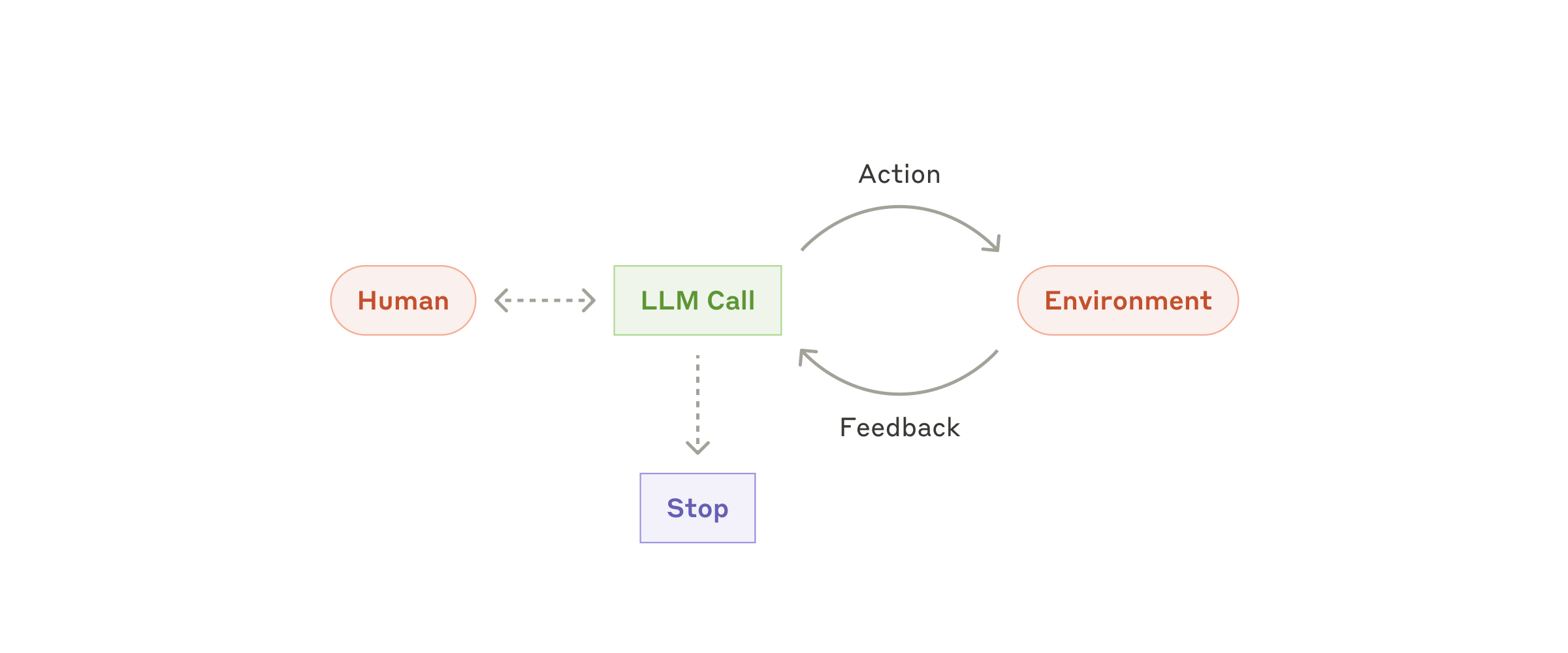
Anthropic describes the simplest agentic building block as the "augmented LLM" — a model enhanced with retrieval, tools, and memory — and notes that a full agent typically operates as "LLMs using tools based on environmental feedback in a loop." That feedback loop is the piece a plain chatbot lacks: an agent reads the result of its own tool call (a search result, a test failure, an API response) and uses that to decide what to do next, rather than simply generating the next most likely sentence.
| Trait | AI agent | AI assistant / chatbot | Simple bot |
|---|---|---|---|
| Purpose | Autonomously and proactively perform tasks | Assist users with tasks | Automate simple, pre-set interactions |
| Capabilities | Multi-step, multi-tool actions; can adapt its own plan | Responds to prompts; can recommend actions but the user decides | Follows fixed rules; little to no learning |
| Interaction style | Proactive, goal-oriented | Reactive, responds to requests | Reactive, triggered by commands |
| Who's in control at each step | The system, within guardrails | The human, assisted by the system | A fixed script |
Adapted from Google Cloud's own comparison of AI agents, AI assistants, and bots.
The core building blocks of an AI agent
However a given company brands its product, nearly every working agent is assembled from the same four pieces.
1. A model. The large language model is the reasoning engine — Google Cloud's explainer calls it the agent's "brain," the part that lets it "process and generate language" while other components handle acting on the world. Different tasks can use different models: a fast, cheap model for simple classification steps, a more capable one for the step that actually requires judgment.
2. Tools. Tools are how an agent reaches outside the conversation and actually does something. OpenAI's own developer guide groups them into three broad categories: data tools that retrieve information (querying a database, reading a file, searching the web), action tools that change something in the world (sending an email, updating a record, committing code), and orchestration tools, where other agents themselves are exposed as callable tools. Anthropic's documentation similarly stresses that clear, well-documented tool definitions are what let a model "select tools and generate its own queries" reliably.
3. Memory and context. An agent needs to track what it has already tried, what it has learned, and what still needs doing. Google Cloud's agent explainer breaks this down into short-term memory for the current task, long-term memory for information that should persist across sessions, and shared memory for coordinating with other agents. Without this, an agent would repeat failed steps or lose track of the original goal halfway through a long task.
4. An orchestration loop. This is the control logic that ties everything together: decide the next step, call a tool, read the result, decide again. Anthropic describes this as the model "directing its own processes," checking results against its environment at each turn, and — critically — being able to pause and hand control back to a human when it's blocked, uncertain, or has hit a safety limit. That human checkpoint is what most production agent systems add as a deliberate guardrail, not an afterthought.
Anthropic's own published research on agent design includes a diagram of exactly this loop: a model repeatedly calling tools against its environment, with a human and a stop condition sitting on either side of it — the same shape pictured above.
How the agent loop actually works, step by step
Walking through a concrete example makes the loop easier to picture. Say an agent is asked to fix a failing test in a codebase:
- Goal received: "Make this test pass."
- Plan: the model decides it first needs to see the test output and the relevant source file.
- Act: it calls a tool to run the test suite and another to read the file.
- Observe: it reads the error message and the code, and reasons about what's wrong.
- Act again: it edits the file and reruns the test — a second tool call, not a prediction.
- Check: if the test passes, it stops and reports success; if not, it loops back to planning with the new error in hand.
Every one of those steps after the first is the agent reacting to real feedback from its environment — the actual test output — rather than guessing in one shot the way a single chatbot reply would. That's the mechanical difference between "an LLM that's good at writing code" and "a coding agent."
Real-world examples: the agents people are actually using
Three categories account for most of what people encounter today:
Coding agents. These read a codebase, plan a change, edit files, run tests or a linter, and iterate until the change works — the loop described above, applied to software. This is the fastest-growing category of agent and the one with the clearest, most checkable feedback signal (does the test pass, does the build succeed), which is part of why OpenAI's guide flags "easy to verify" outcomes as a strong signal that a task is a good fit for an agent in the first place.
Computer-use agents. Rather than calling an API, a computer-use agent operates a graphical interface directly — taking a screenshot, deciding where to click or what to type, and repeating that, exactly as OpenAI's guide notes for "legacy systems without APIs" where an agent "can rely on computer-use models to interact directly with those applications and systems through web and application UIs — just as a human would." This is what lets an agent use software that was never built with agents, or any API, in mind.
Agentic browsers. The newest category folds the agent loop into the web browser itself: instead of a human clicking through a multi-step task (comparing prices across tabs, filling out a form, booking something), the browser's own built-in agent is handed the goal and carries out the clicks, page reads, and form fills across multiple sites, checking in with the user before anything consequential — a payment, an email sent — actually happens.
These aren't the only shapes agents take; customer-service and research agents that gather and synthesize information across many sources are common in enterprise settings too. But coding, computer-use, and browser agents are the ones most people are now searching for by name.
Single agents vs. multi-agent systems
Google Cloud's agent documentation also draws a distinction worth knowing. A single agent works independently toward one goal, using its own tools and a single underlying model — the right fit for a well-scoped task that doesn't need outside collaboration. A multi-agent system splits a larger job across several agents that each specialize in a piece of it (one might research, one might write, one might check facts), coordinating or even running different underlying models for different sub-roles. Multi-agent setups can tackle more complex jobs, but they also add coordination overhead and more places where something can go wrong — which is why both Anthropic's and OpenAI's own guides recommend starting with the simplest single-agent or even non-agent workflow and only adding this complexity once it's clearly needed.
When does a task actually need an agent?
Not every AI feature benefits from being agentic, and the companies writing these systems are candid about that. OpenAI's guide lists the clearest signals that a workflow is a good candidate: complex decision-making with nuanced judgment calls, rules that have become too unwieldy to maintain as fixed logic, and heavy reliance on unstructured data that's hard to parse with conventional code. Anthropic goes further, warning developers to "look for the simplest solution possible" first, since added autonomy trades predictability and cost for flexibility — a plain, deterministic workflow is often cheaper, faster, and easier to debug than a full agent, and should be the default until a task proves it needs more.
Limitations and open challenges
Agents are not a universal replacement for simpler software, and both vendors and independent researchers are upfront about where they still struggle. Google Cloud's own documentation flags tasks that require deep empathy or nuanced human judgment (therapy, conflict resolution), high-stakes ethical decisions, and unpredictable physical environments as areas where current agents fall short. Reliability over long task chains is also a known limit: the more steps an agent takes without a checkpoint, the more chances there are for a small error early on to compound into a wrong result later — which is exactly why both Anthropic's and OpenAI's guidance treat guardrails, stopping conditions, and human checkpoints as required parts of the design, not optional extras.
AI agent vs. chatbot, recap
If you only remember one distinction, make it this: a chatbot answers; an agent acts, checks, and keeps going. That's also the test worth applying to any product that calls itself an "agent" — if it can't take an action in the world, observe the result, and adjust, it's a well-dressed chatbot, not an agent.
What's next: how to go deeper
For readers who build software rather than just use it, Anthropic's and OpenAI's own engineering write-ups (linked above) are worth reading in full — they're written for practitioners deciding whether and how to build an agent, not marketing copy. If you're specifically interested in how agents are changing software development, Pandromeda's coverage of what vibe coding is and how it differs from traditional programming and the practical comparison of Claude Code against GitHub Copilot both dig into coding agents specifically. And if sandboxing and safety limits for coding agents interest you, see how GitHub Copilot's local sandboxing feature puts a guardrail around exactly the kind of autonomous code-editing loop described above.
Frequently asked questions
What is an AI agent?
An AI agent is a software system that uses a large language model as its reasoning engine to plan and carry out a multi-step task on a user's behalf, calling tools, checking results, and deciding what to do next with limited ongoing human direction. Anthropic's own research describes this as an LLM 'dynamically directing its own processes and tool usage' rather than following a fixed, pre-written sequence of steps.
What is an AI agent and how does it work?
It works as a loop: the agent receives a goal, plans a step, calls a tool (such as a search, a database query, or running code), reads the real result of that action, and uses it to decide the next step. This repeats until the goal is met or the agent hits a stopping condition and hands control back to a person. OpenAI's own guide to building agents describes the model as the component that 'manages workflow execution and makes decisions' throughout that loop.
What is an AI agent in simple terms?
In simple terms, it is a program that doesn't just answer a question once — it is handed a goal, figures out the steps itself, uses tools to actually do things (not just describe them), and keeps going across several steps until the job is finished.
AI agent vs chatbot: what is the difference?
A chatbot (or a single call to an LLM) takes one input and returns one output in a single turn, with no built-in way to act in the world or check its own work. An AI agent operates in a loop across multiple steps, calling tools, observing real results, and adjusting its plan, which is what lets it complete a multi-step task rather than just reply to one.
Do AI agents require a human in the loop?
Most production agent systems are designed to include human checkpoints by deliberate choice, not because the technology requires it. Anthropic's agent guidance notes that agents can 'pause for human input at checkpoints or when encountering blockers,' and both Anthropic's and OpenAI's own documentation recommend guardrails and stopping conditions as a core part of agent design.
What are examples of AI agents?
Common examples include coding agents that edit and test software until it works, computer-use agents that operate a graphical interface by clicking and typing the way a person would, and agentic features now built into some web browsers that carry out multi-step tasks like comparing options or filling in forms across sites.
Sources
- Anthropic: Building Effective Agents (engineering research)anthropic.com
- OpenAI: A Practical Guide to Building Agents (PDF)cdn.openai.com
- OpenAI Developers: Agents guidedevelopers.openai.com
- Google Cloud: What are AI agents? Definition, examples, and typescloud.google.com
Felix Moreau writes Pandromeda's software coverage and how-to guides. He covers Windows, macOS and Linux updates, the apps people rely on, emulators and developer tools, and turns official documentation into clear, numbered steps that work on the current version.