What Is a PWA (Progressive Web App)? A Plain-English Guide
Progressive Web Apps blur the line between a website and an app — here is how installability, offline support, and push notifications actually work.
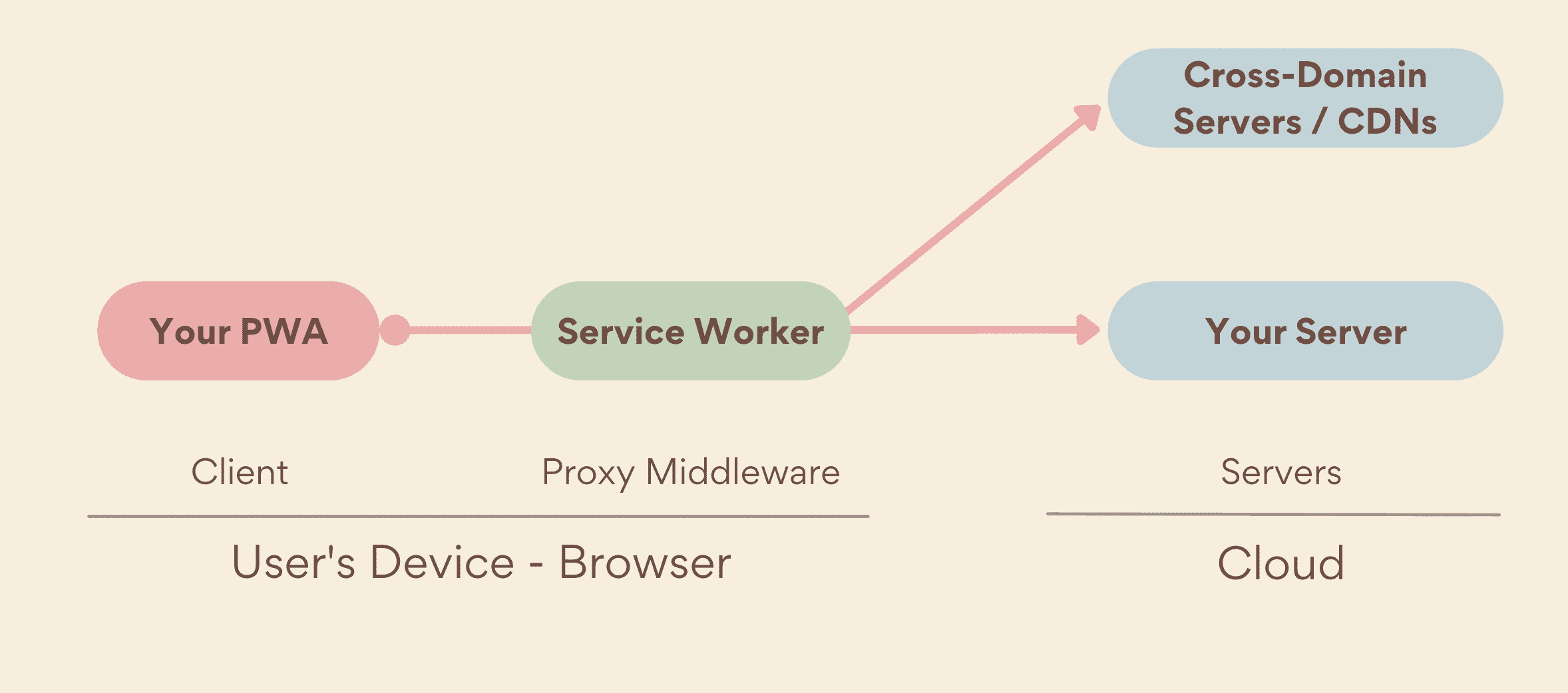
A Progressive Web App, or PWA, is a website built with modern browser APIs so it can be installed on a phone, tablet, or computer, work offline, and send push notifications — all without going through an app store. It is not a separate technology from the web; it is a regular site that meets a few technical criteria (a secure connection, a web app manifest, and a service worker) that let the browser treat it more like an app. The result sits in between a plain website you only ever open in a browser tab and a fully native app you download from the App Store or Google Play.
- What it is: A website enhanced with a web app manifest and a service worker so it can be installed and run more like a native app.
- Core requirements: HTTPS, a web app manifest (name, icons, display mode), and a registered service worker.
- Installable via: A browser install prompt on Chrome/Edge/Android, or "Add to Home Screen" on Safari for iOS/iPadOS.
- Offline support: Handled by a service worker that intercepts network requests and serves cached responses.
- Push notifications: Delivered through the Push API and Notifications API, supported on iOS/iPadOS since version 16.4 for apps added to the Home Screen.
- Apple/EU note: Apple briefly announced plans to remove Home Screen web apps in the EU in early 2024, then reversed that decision before it shipped.
What exactly is a PWA?
"Progressive Web App" describes a set of capabilities layered onto an ordinary website, not a separate app format. Google's web.dev documentation frames a good PWA around three qualities: it should be capable (able to tap into modern web APIs for things like file access and notifications), reliable (fast and functional even on a flaky connection), and installable (able to run in its own window, launched from a home screen, dock, or app switcher, rather than living only inside a browser tab). Any site can add these capabilities progressively, which is where the name comes from — a basic site keeps working everywhere, and browsers that support more features unlock a richer experience.
Under the hood, three things make a website eligible to become a PWA, per MDN's Progressive web apps documentation: the site must be served over HTTPS, it needs a web app manifest (a JSON file describing the app's name, icons, start URL, and display mode), and it needs a registered service worker with at least a basic fetch handler. Meet those criteria and a supporting browser will treat the site as installable.
How a PWA differs from a regular website and a native app
A plain website runs only inside a browser tab, has no offline behavior beyond whatever the browser's own cache provides, and cannot send push notifications or be "installed" in any meaningful sense — bookmarking it just saves a link. A native app, by contrast, is built per platform (often with different codebases for iOS and Android), is usually distributed through an app store, and has deep access to device hardware and OS-level features. A PWA sits between the two: one codebase, reachable instantly by URL like a website, but with the installability, offline resilience, and notification support usually associated with native apps.
| Capability | Regular website | PWA | Native app |
|---|---|---|---|
| Reached by URL, no install needed | Yes | Yes | No |
| Installable to home screen / app list | No (bookmark only) | Yes, where supported | Yes |
| Works offline | Rarely | Yes, via a service worker cache | Yes, app-dependent |
| Push notifications | No | Yes, via Push API (support varies by OS) | Yes |
| Distributed through an app store | No | Optional — can be, but usually isn't | Yes, typically |
| Single codebase across platforms | Yes | Yes | No, usually separate builds |
| Deep OS/hardware access | No | Limited, improving | Yes, extensive |
The web app manifest and "Add to Home Screen"
Installability starts with the web app manifest — a small JSON file linked from the page's HTML that tells the browser the app's name, icon set, theme color, start URL, and display mode (for example standalone, so the installed app opens without browser chrome like the address bar). Browsers that support one-tap installation, such as Chrome and Edge, evaluate a site against their own install criteria and surface an install icon in the address bar, or a native install prompt, once those criteria are met, according to web.dev's installation guide.
On iOS and iPadOS, there has historically been no automatic install prompt. Instead, the user opens Safari's Share menu and taps "Add to Home Screen" — the manual route MDN's documentation calls the standard installation method on iOS. If the site has a valid manifest, the result is a genuine installed web app that opens in its own standalone window; if it doesn't, the user just gets a bookmark-style shortcut that opens the page back inside Safari. Since iOS and iPadOS 16.4, that manual install route works from any browser on the device, not only Safari, though the resulting app is still rendered by WebKit, the engine behind Safari.
Service workers and offline support
The feature that makes offline support possible is the service worker: a script the browser runs separately from the page, sitting between the app and the network. Web.dev's documentation describes it as middleware that intercepts every request a PWA makes within its scope and decides how to answer it — forward it to the network, serve a cached copy, or generate a response locally, even with no connection at all. Responses are stored using the Cache Storage API, and the service worker's fetch event handler is what gets to choose, request by request, whether to go to the network or the cache.
A few details matter in practice. A service worker is not guaranteed to be in control the very first time someone visits a site — registration happens on that first load, so there's nothing yet to intercept, which is why web.dev treats offline support as a progressive enhancement rather than something to rely on for a first visit. Updates to the worker's code install in the background but only take over once every open tab running the old version has been closed. And because browsers can terminate an idle service worker at any time and restart it later, anything that needs to persist has to go into IndexedDB or similar storage rather than a variable in memory.
Push notifications and background features
Push notifications on the web are built from two separate pieces working together, per web.dev's push notifications overview: the Push API, which manages a subscription between the browser and a push service, and the Notifications API, which actually displays something on screen. After a user interacts with a prompt (never automatically), the page requests permission and creates a push subscription; the app's own server later sends an encrypted message to the browser vendor's push service, which queues it until the device is reachable and then wakes the service worker to show a notification — all without the PWA needing to be open. "Silent" push with no visible notification generally isn't allowed, and most browsers also expect requests to be signed with VAPID keys identifying the sending server.
On iOS and iPadOS, this capability arrived later than on other platforms. WebKit's engineering blog announced Web Push support for apps added to the Home Screen starting with iOS and iPadOS 16.4, alongside support for the Badging API (so an installed web app can show an unread-count badge on its icon) and the manifest's id field. Critically, that post notes the permission prompt still has to follow a direct user action, such as tapping a "subscribe" button — the browser won't let a site ask for notification permission just because the page loaded.
Apple, Safari, and the EU: a rockier history
Of the major browser engines, WebKit — which powers Safari and, on iOS, every other browser as well — has been the slowest and most cautious about PWA features. Manifest support on iOS Safari has historically been partial rather than complete, with a lot of app configuration (status bar style, splash screens, and so on) still done through Apple-specific meta tags rather than the standard manifest fields, and macOS Safari did not support installing PWAs at all until macOS Sonoma (14.0), per MDN's installation guide.
The most visible stumble came in the European Union in 2024. Citing its obligations under the EU's Digital Markets Act — which requires Apple to let iOS support browser engines other than WebKit — Apple announced in an iOS 17.4 beta that it would remove the Home Screen web apps feature for EU users entirely, arguing it could not guarantee the same security sandboxing for web apps if they had to support non-WebKit engines too. Within weeks, and before the change shipped to the public, Apple reversed course and said it would continue to offer the existing Home Screen web apps capability in the EU, built directly on WebKit as before. The episode was brief, but it's a useful reminder that on iOS, PWA capabilities are something Apple grants through Safari/WebKit rather than a baseline every browser can guarantee on its own, and that regulatory pressure can move the feature's availability with little notice.
Where PWA support stands in 2026
Chrome, Edge, and most Chromium-based browsers on Windows, macOS, Android, and Chrome OS offer the fullest PWA experience: automatic install prompts, offline caching, push notifications, background sync, and OS-level integration like file-type handling. Firefox's desktop and mobile browsers need an extension to install PWAs as standalone apps, even though the underlying web platform features they rely on, like service workers, work fine. Safari and WebKit support the core trio of manifest, service worker, and installability everywhere Safari runs, plus Web Push and badging on iOS/iPadOS since version 16.4 — but installation on iOS/iPadOS is still manual ("Add to Home Screen" from the Share sheet) rather than prompted, and some manifest fields and install-related APIs that Chromium browsers support are still missing. None of the major app stores require PWAs to be submitted the way native apps are, though Google Play and the Microsoft Store both accept PWAs for listing if a developer chooses to package one; Apple's App Store does not.
For developers, this unevenness is exactly why PWAs are often pitched as a pragmatic middle ground rather than a drop-in replacement for native apps: the same underlying web technologies that make a WebAssembly-accelerated web app fast can also back a PWA, and the browser you ship through — whether that's a mainstream engine or one of the newer Arc alternatives built on Chromium — still determines exactly which install and notification features actually show up for a given user.
When a PWA makes sense
A PWA is a strong fit when a team wants one codebase to reach the widest possible audience — anyone with a browser — while still offering an app-like experience to the subset of users who install it: an icon on the home screen, a standalone window, offline access to previously viewed content, and notifications for people who opt in. It tends to make less sense for apps that need deep, OS-specific hardware access (certain camera features, Bluetooth peripherals, or background processing limits that vary by platform) or that depend on app-store discovery and the trust signals that come with it, since Apple's App Store still doesn't list PWAs directly. Plenty of products — the kind of large consumer sites and news platforms web.dev has documented in its own PWA case studies — run both: a full native app for power users and a PWA that lets everyone else get an installable, app-like experience with nothing to download from a store.
What's next for PWAs
The practical gap between PWAs and native apps has been narrowing for years, mostly through individual browsers shipping new web APIs — file system access, background sync, badging, and Web Push among them — rather than through any single new standard. Safari's pace on iOS remains the one variable every cross-platform team has to plan around, both technically (which APIs WebKit has implemented) and, as 2024's EU episode showed, politically, since regulatory requirements can change what Apple is willing to support on short notice. For now, the safest approach for anyone building or relying on a PWA is the one web.dev and MDN both already recommend: treat installability, offline support, and push notifications as progressive enhancements layered on top of a website that still has to work for everyone, on whatever browser they happen to be using.
Frequently asked questions
Is a PWA the same thing as a native app?
No. A PWA is a website enhanced with a web app manifest and a service worker so it can be installed and run in its own window, but it still runs on one shared codebase inside the browser's engine rather than being compiled separately for each platform the way most native apps are.
Do I have to download a PWA from an app store?
Usually not. Most PWAs are installed directly from the browser — via an install prompt on Chrome and Edge, or Add to Home Screen on Safari — though a developer can choose to list one in stores such as Google Play or the Microsoft Store if they want to.
Can a PWA really work with no internet connection?
Yes, for content it has already cached. A service worker intercepts network requests and can serve previously stored responses, which is what lets a PWA show cached pages or data when the device is offline, but anything it hasn't cached yet still needs a connection.
Why do some PWA features not work on iPhone?
Safari and WebKit have historically implemented PWA capabilities more slowly and partially than Chrome or Edge. Push notifications and app badging only arrived for Home Screen web apps with iOS and iPadOS 16.4, and installation on iOS is still a manual Add to Home Screen step rather than an automatic prompt.
Did Apple remove PWA support in the EU?
Apple announced in an iOS 17.4 beta in early 2024 that it would remove Home Screen web apps in the EU, citing Digital Markets Act compliance concerns, but reversed that decision within weeks and continued offering the existing capability, built on WebKit, to EU users.
Is building a PWA cheaper than building a native app?
It can be, mainly because a single PWA codebase can reach desktop and mobile browsers at once, instead of maintaining separate native builds — though the right choice still depends on how much OS-level integration or app-store presence a product needs.
Sources
- web.dev — What Are Progressive Web Apps?web.dev
- MDN — Progressive web appsdeveloper.mozilla.org
- MDN — Installing and uninstalling web appsdeveloper.mozilla.org
- web.dev — Push notifications overviewweb.dev
- WebKit Blog — Web Push for Web Apps on iOS and iPadOSwebkit.org
- Wikipedia — Progressive web appen.wikipedia.org
Felix Moreau writes Pandromeda's software coverage and how-to guides. He covers Windows, macOS and Linux updates, the apps people rely on, emulators and developer tools, and turns official documentation into clear, numbered steps that work on the current version.