VS Code 1.146 Adds Inbox Mode, Chat Windows and Copilot Fusion
Released November 11, 2026, VS Code 1.146 adds an experimental Inbox mode for agent sessions, preview Chat windows and model comparison, and sets a February 2027 end date for the Local harness.
Visual Studio Code 1.146 shipped on November 11, 2026, and the headline changes are all about managing AI agent sessions at scale: an experimental Inbox mode that surfaces agent sessions needing attention across every open project, a preview of Chat windows that can be popped out and arranged alongside editors and terminals, model comparison tooling that now covers GitHub Copilot Fusion, and the start of a formal countdown to retire the old Local harness in February 2027.
Quick facts: VS Code 1.146
- Released: November 11, 2026 (Stable)
- Headline features: Inbox mode (Experimental), Model comparison with Copilot Fusion (Preview), Chat windows (Preview), Extensions in the Agents window (Experimental)
- Deprecation notice: Local harness removal planned for February 2027; Copilot harness is now default for new sessions
- Source: code.visualstudio.com/updates/v1_146
Most of this release is concentrated in the Agents window rather than the core text editor, which tracks with how much of VS Code's recent development has shifted toward managing GitHub Copilot agent sessions rather than just writing code by hand. Below is a rundown of what actually changed, what's still experimental, and what to do about the Local harness before it disappears.
Inbox mode brings every agent session into one view
The biggest organizational change in 1.146 is Inbox mode, an experimental view in the Agents window's session list. Anyone running several Copilot agent sessions across multiple projects has had to check each project separately to see which sessions finished, which need a decision, and which are still running. Inbox mode collapses that into a single list.
It's off by default. Turning on the sessions.list.inboxEnabled setting and then choosing Grouping > Inbox Mode from the session list reorganizes sessions into categories, with anything needing attention pinned above Working, Ready to merge, On hold, and Done. From there, each session gets a small set of triage actions: Dismiss from Inbox, Put on Hold, Snooze, and Undo. Dismissing a session clears it from the inbox without archiving it — only Mark Session as Done actually closes it out. That distinction matters if you're trying to keep an accurate record of what's still open versus what you've simply decided not to look at right now.
A related, equally experimental addition is session list inline actions, turned on with sessions.list.inlineActions. It adds buttons directly in the list for fixing failing checks or addressing review comments, and those actions run in the background without opening the session itself — useful for clearing small issues across a pile of agent-generated pull requests without context-switching into each one.
Model comparison now covers Copilot Fusion
VS Code's model comparison tooling — which lets you run the same prompt against multiple models and judge or synthesize the results — picked up two upgrades in this release, both still in preview. Judge and synthesizer comparisons can now work on chat-only responses, not just agent-tool-driven ones, and the comparison tooling explicitly supports GitHub Copilot Fusion and its effort tiers.
Copilot Fusion is the model-picker option where GitHub's Copilot chooses and coordinates which underlying model handles a given task based on a selected effort level (Standard, High, or Max) rather than you picking a specific model yourself. GitHub's November 17 Copilot changelog post describes Fusion Max scoring 71.2% on the Terminal-Bench 4.1 agentic benchmark — ahead of Opus 5.5 and Fable 5.2 — while costing meaningfully less to run, and lists Claude Sonnet 5.5, GPT-6.1 Terra, and MAI-Code-2 as the models backing Fusion's Max, High, and Standard tiers respectively. Being able to drop Fusion into VS Code's side-by-side comparison view gives developers a way to check whether Fusion's automatic model selection actually keeps pace with manually picking a specific model for their own codebase.
On top of that, there's a new experimental option, sessions.chat.compareAgents.tools.enabled, that lets an agent run the comparisons for you rather than doing it manually. It's off by default and requires Compare Models to already be enabled.
Chat windows let you pop a session out and build a layout around it
Chat windows, also in preview and controlled by sessions.chatWindows.enabled, let you move an agent chat out of the sidebar and into its own window. From there you can arrange that chat alongside editors and terminals the way you'd lay out any other task-specific workspace — the terminal, for instance, can sit under the editor, under the chat, or span the full width of the window. New commands that ship with this feature include Configure Layout, Agents: Toggle Chat Conversation, Move to Main Window, and Developer: Reset Chat Window Layout, and a chat window can also be created by opening a session via Open in > New Window or by dragging a chat tab out of the main window.
The feature is already on by default in VS Code Insiders, but it's off by default in Stable, so most people running the regular release channel will need to flip the setting on to try it.
Managing extensions without leaving the Agents window
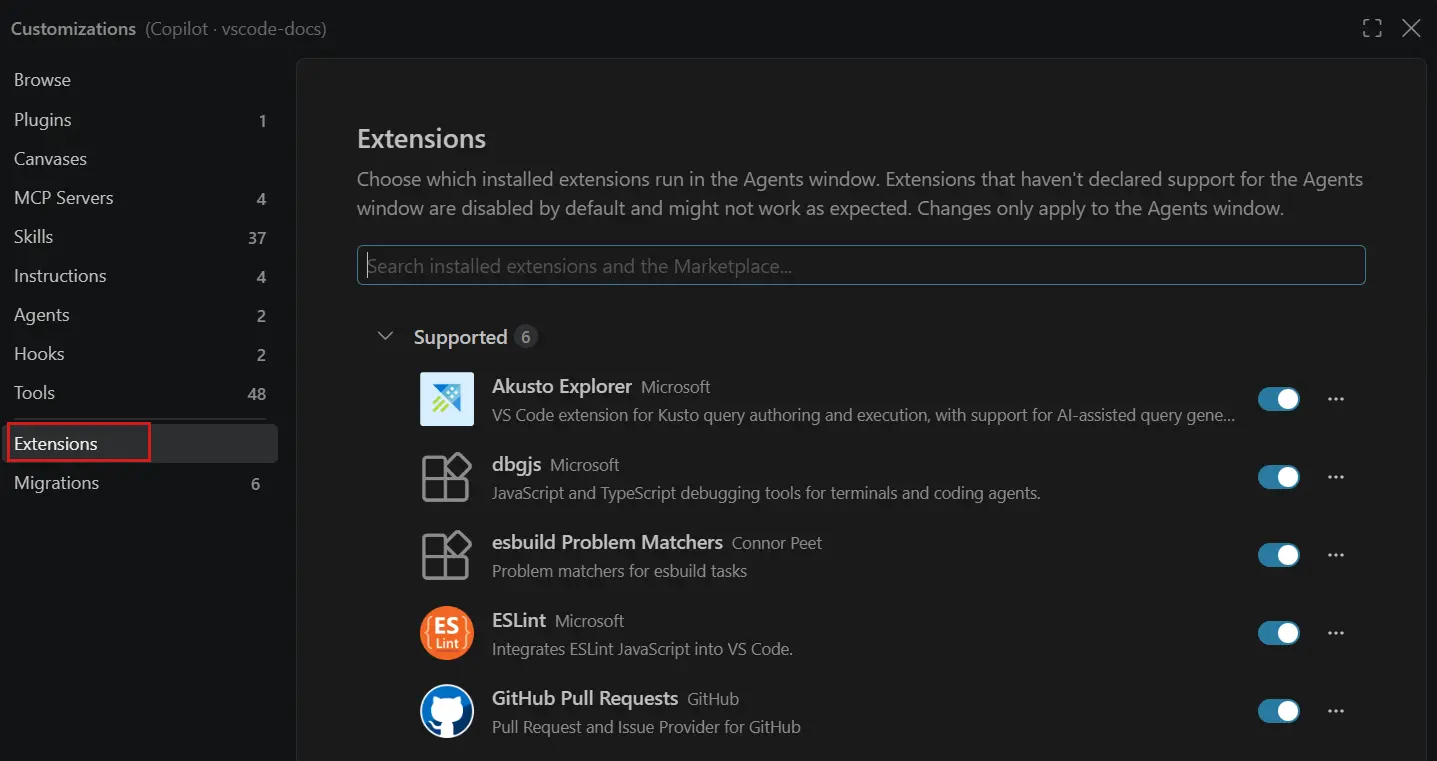
Another experimental addition addresses a smaller but common annoyance: needing an extension mid-session and having to leave the Agents view to install it. The Extensions section of Agent Customizations can now search the Marketplace, install, and uninstall extensions directly, without navigating away. It also surfaces warnings when an extension doesn't support Agents-window features and explains why an install might be blocked by policy. It's reachable with the standard Extensions shortcut (Ctrl+Shift+X, or ⇧⌘X on macOS) or the Extensions: Manage Extensions command.
Local harness deprecation: a February 2027 deadline
The most consequential non-experimental change in 1.146 is procedural rather than visual. The Copilot harness — which runs agent sessions through the Agent Host — has been the default for new sessions since VS Code 1.143, and as of 1.146 the older Local harness is officially deprecated, with removal planned for February 2027, roughly three months out. Microsoft says the Local harness is now "functionally frozen": it will keep working until then, but new agent features are being built against the Copilot harness only.
The vscode.temporaryDefaultToLocalHarness setting, which some teams have been using to keep new sessions on the old harness, is also going away along with the harness itself. Anyone still relying on Local harness behavior — custom setups, specific extension integrations, or workflows that haven't been tested against the Copilot harness — has until the February 2027 removal to migrate, and VS Code's release notes link out to a dedicated transition guide for that move.
MCP skills, sandbox changes, and smaller fixes
A handful of other changes round out the release. On the MCP side, VS Code added preview support for "Skills over MCP," implementing SEP-2640: connecting to an MCP server that offers skills now prompts for permission, and approved skills show up in the Skills tab of the Agent Customizations editor, gated behind chat.agentHost.mcpSkills.enabled. This builds on the kind of tool-and-protocol interoperability also covered in explainers on what gRPC is and how it differs from REST and on API gateway patterns more broadly.
Security and trust got incremental attention too: permission prompts for agent actions now default to specific domains, commands, and directories instead of broad session-wide grants; a new chat.agent.sandbox.credentials.envVars setting lets you mask environment variable values inside the sandbox, sending real values only to hosts explicitly listed in injectHosts; and the chat input area now shows a "(sandbox enabled)" label when terminal sandboxing is active. Enterprise admins also got proxy support for Copilot sessions (including PAC and Kerberos setups across local, WSL, and Dev Container configurations) and a new strictPluginOnlyCustomization policy option that can restrict standalone canvas extensions.
Smaller quality-of-life items include an upgrade to Mermaid 12 for diagrams rendered in chat, Markdown previews, and notebooks (adding new diagram types such as use-case diagrams), the ability to copy local file:// addresses from the Integrated Browser, visible keyboard focus on the Welcome page for accessibility, and a fix so agent edit metrics no longer count unchanged text between edits as added or deleted.
Feature status at a glance
| Feature | Status | How to enable |
|---|---|---|
| Inbox mode | Experimental | sessions.list.inboxEnabled, then Grouping > Inbox Mode |
| Session list inline actions | Experimental | sessions.list.inlineActions |
| Model comparison with Copilot Fusion | Preview | Compare Models feature |
| Agent-run model comparisons | Experimental | sessions.chat.compareAgents.tools.enabled |
| Chat windows | Preview (on by default in Insiders) | sessions.chatWindows.enabled |
| Extensions in the Agents window | Experimental | Agent Customizations > Extensions |
| Skills over MCP | Preview | chat.agentHost.mcpSkills.enabled |
| Copilot harness | Stable (default for new sessions) | Default since VS Code 1.143 |
| Local harness | Deprecated, removal February 2027 | N/A — migrate to Copilot harness |
Why this release matters
Taken together, 1.146 is less about the text editor and more about treating VS Code as a control surface for multiple concurrent AI agents. Inbox mode and inline session actions exist because developers running several agent sessions at once needed a way to triage results without hunting through separate project windows. Chat windows and layout controls exist because an agent session increasingly behaves like its own task context, not just a sidebar panel. And expanding model comparison to cover Copilot Fusion reflects how model choice itself has become a variable developers want to test empirically rather than take on faith — the kind of comparison work that matters as teams weigh options the way they might compare Redis against Valkey or any other infrastructure trade-off with real cost and performance implications. The Local harness deprecation, meanwhile, is a reminder that VS Code's agent plumbing is still consolidating around a single, Microsoft-hosted execution path.
None of the headline items are stable yet, which is typical for VS Code's monthly cadence — features commonly spend one or more releases in Preview or Experimental status, gated behind settings, before graduating to the default experience. Teams that want to use Inbox mode or Chat windows today will need to opt in manually and should expect behavior to keep shifting release to release.
FAQ
What version of VS Code introduced Inbox mode?
VS Code 1.146, released November 11, 2026, introduced Inbox mode as an experimental feature, off by default behind the sessions.list.inboxEnabled setting.
Is VS Code 1.146 the same as Visual Studio 2026?
No. VS Code is Microsoft's free, cross-platform code editor, while Visual Studio 2026 is a separate, full Windows IDE. Pandromeda covered a Visual Studio 2026 update, which dropped Live Share in its 18.12 update, separately.
When will the Local harness be removed from VS Code?
Microsoft says the Local harness is planned for removal in February 2027, about three months after the 1.146 release. It is now deprecated and functionally frozen in the meantime.
What is GitHub Copilot Fusion?
Copilot Fusion is a model-picker option in GitHub Copilot that automatically selects and coordinates which underlying model handles a task, based on a chosen effort tier (Standard, High, or Max), rather than requiring a manually picked model.
Do I need to do anything to get these new features?
Yes, for the headline items. Inbox mode, session list inline actions, Chat windows, agent-run model comparisons, and Skills over MCP are all off by default in Stable VS Code and need to be turned on through their respective settings.
What's next
With the Copilot harness now the default and the Local harness on a fixed retirement timeline, expect VS Code's next few monthly releases to keep pushing Inbox mode, Chat windows, and the Agents-window extension manager toward Preview or Stable status, along with continued expansion of Skills over MCP as more MCP servers adopt the SEP-2640 spec. Anyone still depending on Local harness behavior should start testing the Copilot harness now rather than waiting for the February 2027 cutoff. Full details, including setting names and transition guidance, are in Microsoft's official release notes for VS Code 1.146.
Frequently asked questions
What version of VS Code introduced Inbox mode?
VS Code 1.146, released November 11, 2026, introduced Inbox mode as an experimental feature, off by default behind the sessions.list.inboxEnabled setting.
Is VS Code 1.146 the same as Visual Studio 2026?
No. VS Code is Microsoft's free, cross-platform code editor, while Visual Studio 2026 is a separate, full Windows IDE that Pandromeda has covered separately.
When will the Local harness be removed from VS Code?
Microsoft says the Local harness is planned for removal in February 2027, about three months after the 1.146 release. It is now deprecated and functionally frozen in the meantime.
What is GitHub Copilot Fusion?
Copilot Fusion is a model-picker option in GitHub Copilot that automatically selects and coordinates which underlying model handles a task, based on a chosen effort tier (Standard, High, or Max), rather than requiring a manually picked model.
Do I need to do anything to get these new features?
Yes, for the headline items. Inbox mode, session list inline actions, Chat windows, agent-run model comparisons, and Skills over MCP are all off by default in Stable VS Code and need to be turned on through their respective settings.
Sources
- VS Code 1.146 release notes (official)code.visualstudio.com
- VS Code updates archivecode.visualstudio.com
- GitHub Changelog: Copilot Fusion updates (availability, benchmarks, models)github.blog
Felix Moreau writes Pandromeda's software coverage and how-to guides. He covers Windows, macOS and Linux updates, the apps people rely on, emulators and developer tools, and turns official documentation into clear, numbered steps that work on the current version.