Model Context Protocol (MCP) Explained: What It Is, How It Works
A plain-English guide to MCP: the open protocol behind how Claude, ChatGPT, Copilot and Cursor connect AI models to real tools and data.
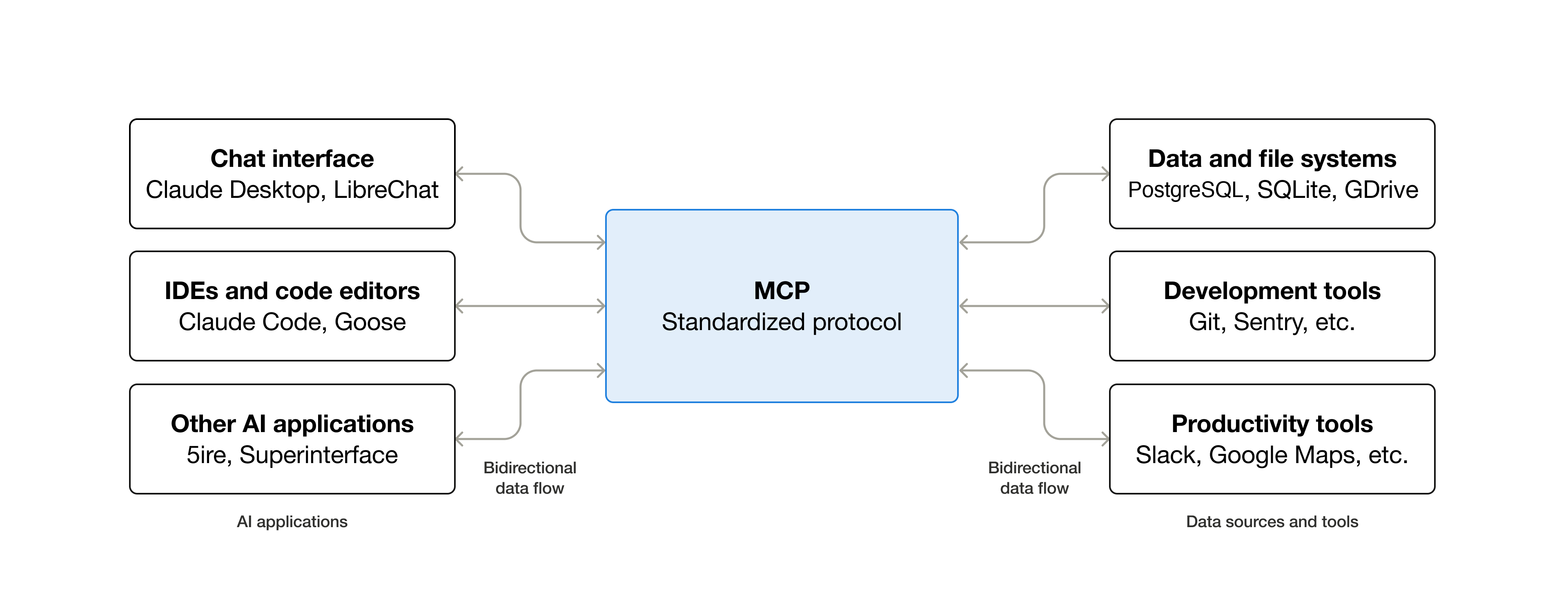
Model Context Protocol, or MCP, is an open standard that lets AI assistants and autonomous agents connect to outside tools, files, databases and services using one common language instead of a custom-built integration for every pairing. Anthropic released it in November 2024 and open-sourced it from day one; by 2026 it has been adopted, in some form, by OpenAI, Microsoft, Google DeepMind and most of the popular AI coding tools, turning what used to be a tangle of one-off plugins into something closer to a shared plug-and-play standard for AI.
Quick answer: MCP (Model Context Protocol) is an open protocol, created by Anthropic in November 2024, that standardizes how AI applications ("hosts," like Claude or an IDE) talk to external tools and data ("servers," like a filesystem, a database or a SaaS API). A host runs one MCP client per server it connects to; each server exposes tools, resources and prompts that the AI model can use. Anthropic calls it "a USB-C port for AI applications." It is now supported, to varying degrees, by Claude, ChatGPT/OpenAI's API, Microsoft's VS Code and Copilot Studio, Cursor, and Google's Gemini SDK.
What Model Context Protocol actually is
According to the protocol's own documentation site, modelcontextprotocol.io, "MCP (Model Context Protocol) is an open-source standard for connecting AI applications to external systems." The same page spells out what that unlocks in practice: AI applications such as Claude or ChatGPT can reach into local files, databases, search engines, calculators or "specialized prompts," and then act on what they find.
Before MCP, if a company wanted its chatbot to read from Google Drive, query a Postgres database, and post to Slack, each of those was typically a separate, hand-built integration — Anthropic's original announcement describes the issue plainly: "every new data source requires its own custom implementation, making truly connected systems difficult to scale." MCP replaces that patchwork with a single protocol that any compliant AI application can speak to any compliant server, regardless of who built either side.
Who built it, and when
Anthropic introduced the Model Context Protocol on November 25, 2024, crediting Anthropic engineers David Soria Parra and Justin Spahr-Summers with the design, according to Anthropic's announcement and corroborated by the protocol's Wikipedia entry. Anthropic open-sourced the specification, software development kits and a set of reference servers at launch, rather than keeping MCP as an internal or proprietary feature of its own products.
At launch, Anthropic's announcement named early adopters including Block and Apollo, which had already built MCP into their internal systems, plus developer-tool companies Zed, Replit, Codeium and Sourcegraph, which were working MCP support into their own platforms. Anthropic also shipped a first batch of pre-built servers for common systems such as Google Drive, Slack, GitHub, Git, Postgres and Puppeteer, so developers had working examples to copy rather than starting from a blank page.
Governance has since moved beyond Anthropic alone. Per the protocol's Wikipedia page, Anthropic donated MCP in December 2025 to the Agentic AI Foundation, a directed fund hosted under the Linux Foundation and co-founded with Block and OpenAI — a structure meant to keep the standard vendor-neutral as more companies build on it. The GitHub organization that hosts the spec and reference servers today describes itself as a Linux Foundation open-source project.
The client-server architecture: hosts, clients and servers
MCP's own architecture documentation defines three participants. The MCP host is the AI application a person actually uses — Claude Desktop, Claude Code or an IDE like VS Code are the docs' own examples. The host creates one MCP client for every server it wants to talk to, and each client keeps a dedicated connection open to its matching server. The MCP server is the program that actually provides the context or capability — a connection to a filesystem, a ticketing system, a code-search tool, and so on.
That connection can run two different ways. A local server, launched and run on the same machine as the host, typically uses what the spec calls the "Stdio transport" — standard input/output streams, with no network overhead. A remote server, hosted somewhere else and potentially serving many clients at once, uses "Streamable HTTP transport": HTTP requests with optional streaming, authenticated the normal web way, with the documentation specifically recommending OAuth for obtaining tokens. The official docs use the Sentry MCP server as their example of a remote, HTTP-based server, versus a local filesystem server that runs as a child process.
Underneath both transports sits the same messaging format: JSON-RPC 2.0. Every request and response — discovering what a server can do, listing its tools, calling one, or receiving a notification that something changed — is a JSON-RPC message. That separation of a transport layer from a shared data layer is what lets the same MCP client code talk to a local filesystem server one moment and a remote, cloud-hosted server the next, without the AI application needing to know the difference.
What a server actually hands the model: tools, resources, prompts
The architecture docs describe three core things a server can expose, which they call "primitives":
- Tools — executable functions the AI can invoke to take an action, such as a file operation, an API call or a database query.
- Resources — data the server makes available for context, such as file contents, database records or API responses.
- Prompts — reusable templates that structure an interaction, like a system prompt or a set of few-shot examples.
A client discovers what's on offer by calling list methods (tools/list, for example) before it ever tries to use anything, which means a server's capabilities can change at runtime and the client just asks again. Servers can also request things back from the user — the current spec calls this "elicitation," used when a server needs confirmation or extra input before it proceeds. Two earlier client-side features, "sampling" (letting a server borrow the client's own model) and server-side logging, are marked deprecated in the current specification in favor of direct provider APIs and standard logging practices.
Why MCP matters: "USB-C for AI" and the N×M problem
MCP's documentation leans on a specific analogy to explain the appeal: "Think of MCP like a USB-C port for AI applications. Just as USB-C provides a standardized way to connect electronic devices, MCP provides a standardized way to connect AI applications to external systems." The point of the comparison is the same reason USB-C replaced a drawer full of proprietary cables — one connector standard means any compliant device works with any compliant port.
The underlying technical problem is sometimes described as "N×M": without a shared protocol, every one of N AI applications that wants to talk to every one of M tools or data sources needs its own bespoke integration, so the number of integrations to build and maintain grows with N multiplied by M. MCP turns that into an "N+M" problem — a tool builder writes one MCP server, and it works with any MCP-compatible AI application, while an AI application builder writes one MCP client implementation, and it can reach any MCP server, without either side coordinating directly with the other.
For much the same reason that agentic coding features in tools like GitHub Copilot depend on being able to reach real files, terminals and services rather than just generating text, MCP's practical value shows up most clearly in agents: a model that can only talk is a chatbot, but a model that can call a tool, read a resource and act on the result starts to look like an assistant that actually gets things done.
Who supports MCP today
MCP's own documentation describes "broad ecosystem support," naming Claude, ChatGPT, Visual Studio Code, Cursor and the testing tool MCPJam as examples of clients that support the protocol, "making it easy to build once and integrate everywhere." Individual companies' own documentation fills in more detail on how each one implements it:
| Product | Company | What their own docs say |
|---|---|---|
| Claude (Desktop, Code, claude.ai) | Anthropic | Native support since MCP's 2024 launch; local servers are installed as "Extensions" in Claude Desktop, remote servers as "Connectors," both managed from in-app Settings. |
| ChatGPT / OpenAI API | OpenAI | OpenAI's developer docs describe MCP as "becoming the industry standard," with support for calling remote MCP servers through the Responses API and for MCP-based connectors in ChatGPT's deep research and company-knowledge features. |
| Visual Studio Code + GitHub Copilot | Microsoft / GitHub | MCP support reached general availability in VS Code 1.102 (July 14, 2025, per GitHub's changelog); servers are installed from the Extensions view or an mcp.json file and used by Copilot's agent mode. |
| Copilot Studio | Microsoft | Microsoft's Copilot Studio blog describes letting no-code "makers" connect an agent to an MCP server so its tools are added automatically, over an SSE transport. |
| Cursor | Anysphere | Cursor's own docs describe built-in support for stdio, SSE and Streamable HTTP MCP servers, installable from a built-in directory or toggled on and off per-server in Settings. |
| Gemini API / SDK | Google DeepMind | Per the Model Context Protocol's Wikipedia entry, Google DeepMind has publicly committed to native MCP support in the Gemini SDK, announced at Google I/O 2025. |
That list is a snapshot, not a ceiling — MCP's documentation is explicit that this is "a wide range of clients and servers," not a closed list, and new integrations are continuously added by both Anthropic's own ecosystem pages and third-party tool vendors. Editors covering specific products, such as the comparison of Cursor and Windsurf, are generally the better place to check a given tool's current feature set in detail; this piece is about the protocol underneath all of them.
How a non-technical person actually uses an MCP server
Using MCP does not require writing any code, provided the AI application already has a point-and-click way to add servers — several of the biggest ones do. In Claude Desktop, Anthropic's own support documentation describes the easiest path as opening Settings > Extensions, clicking "Browse extensions" to see a directory of ready-made options, selecting one, clicking "Install," and completing any setup it asks for, such as entering an API key. The extension then shows up automatically in conversations, and users can confirm it's connected via the "+" button in the chat box under "Connectors."
Cursor's documentation describes a similar flow: a one-click "Add to Cursor" button for official entries in its marketplace (with OAuth handled automatically), or community servers listed separately, with every installed server shown in Settings > Customize, where a simple toggle turns it on or off. VS Code follows the same basic shape — users can search an Extensions view for @mcp, install a server with one click, and then manage it from a dedicated "MCP Servers" section, where the documentation notes that disabling a server removes its tools from chat without needing to uninstall anything.
The common thread across all three: someone who has never heard of JSON-RPC can still add an MCP server the same way they'd install a browser extension — browse, click install, grant any permissions or API keys it asks for, and start using it in a normal chat.
Where to find — or build — an MCP server
The protocol's own site, modelcontextprotocol.io, is the starting point for both directions. For people who just want to connect to something, individual AI applications increasingly ship their own built-in directories, as described above, and the protocol's GitHub organization (github.com/modelcontextprotocol) hosts a servers repository of reference and community implementations covering things like filesystems, Git, databases and common SaaS tools.
For developers building a new server, that same GitHub organization also maintains the core specification repository and official SDKs in Python, TypeScript, Go, Rust, C#, Kotlin, Ruby and more, plus a visual testing tool called MCP Inspector, so a server can be built and checked without a full AI application in the loop. The documentation site's own "Build servers" and "Build clients" guides walk through the data layer, the available transports, and how to declare the tools, resources and prompts a server wants to expose — the same primitives this piece described above.
How MCP differs from a plugin or a plain API
A conventional API integration is written for one specific caller and one specific service; a ChatGPT plugin, similarly, was historically built against one specific AI product's plugin interface. MCP's data layer is designed to be caller-agnostic: a server declares its tools, resources and prompts once, using a standard discovery mechanism, and any MCP-compatible host can find and use them without the server's author writing anything host-specific. The protocol documentation frames this as the structural reason MCP "reduces development time and complexity" for developers compared with bespoke integrations, while giving AI applications a shared ecosystem of tools to draw on rather than a closed one.
What's next for MCP
MCP's governance has already shifted from a single-vendor project to a multi-company one, with the specification now stewarded through the Agentic AI Foundation under the Linux Foundation, co-founded by Anthropic, Block and OpenAI, according to the protocol's Wikipedia entry. That kind of neutral home is typically what lets a technical standard keep growing past its original creator — similar in spirit to how other connectivity standards ended up outliving the single company that first proposed them.
The practical trend to watch is simply how many more "hosts" and "servers" show up on each side of the standard. Anthropic's own documentation already points to agents booking calendar events, generating code from a Figma file, querying multiple enterprise databases through chat, and even driving a 3D printer, as the kind of use cases MCP is meant to unlock — and as more companies the size of Microsoft, OpenAI and Google DeepMind build MCP support into mainstream products, the more that "write once, connect anywhere" pitch gets tested at scale rather than in demos.
Frequently asked questions
What does MCP stand for?
MCP stands for Model Context Protocol, an open standard that Anthropic created in November 2024 to let AI applications connect to external tools, data and services using one shared protocol instead of custom integrations.
Who created the Model Context Protocol?
Anthropic introduced MCP on November 25, 2024, crediting Anthropic engineers David Soria Parra and Justin Spahr-Summers with its design, and open-sourced the specification and SDKs from launch.
Is MCP only for Claude?
No. MCP is an open protocol, not a Claude-only feature. According to the protocol's own documentation, it is also supported by ChatGPT and OpenAI's API, Microsoft's VS Code and Copilot Studio, and Cursor, among others.
Do I need to know how to code to use an MCP server?
No. In Claude Desktop, Cursor and VS Code, each company's own documentation describes installing an MCP server from a built-in directory or extensions view with a few clicks, then toggling it on or off in settings — similar to installing a browser extension.
What is the difference between an MCP server and a regular API?
A regular API integration is typically built for one specific caller. An MCP server exposes its tools, resources and prompts through a standardized discovery process that any MCP-compatible AI application can use, so the same server works across different AI products without custom code for each one.
Where can I find MCP servers to install?
The protocol's own site, modelcontextprotocol.io, and its GitHub organization host reference and community MCP servers, and several AI applications — including Claude Desktop, Cursor and VS Code — now include their own built-in directories for browsing and installing servers directly.
Sources
- Anthropic: Introducing the Model Context Protocolanthropic.com
- Model Context Protocol docs: Architecture overviewmodelcontextprotocol.io
- GitHub: modelcontextprotocol organizationgithub.com
- OpenAI developer docs: Model Context Protocol (MCP)developers.openai.com
- VS Code docs: Use MCP servers in VS Codecode.visualstudio.com
- Wikipedia: Model Context Protocolen.wikipedia.org
Felix Moreau writes Pandromeda's software coverage and how-to guides. He covers Windows, macOS and Linux updates, the apps people rely on, emulators and developer tools, and turns official documentation into clear, numbered steps that work on the current version.