GitHub's Slack and Teams Integration Is Now Generally Available
GitHub's @GitHub assistant for Slack and Microsoft Teams exited preview on November 6, 2026, adding a Teams Canvas view for reviewing plans and code changes in chat.
Quick facts
- What it is:
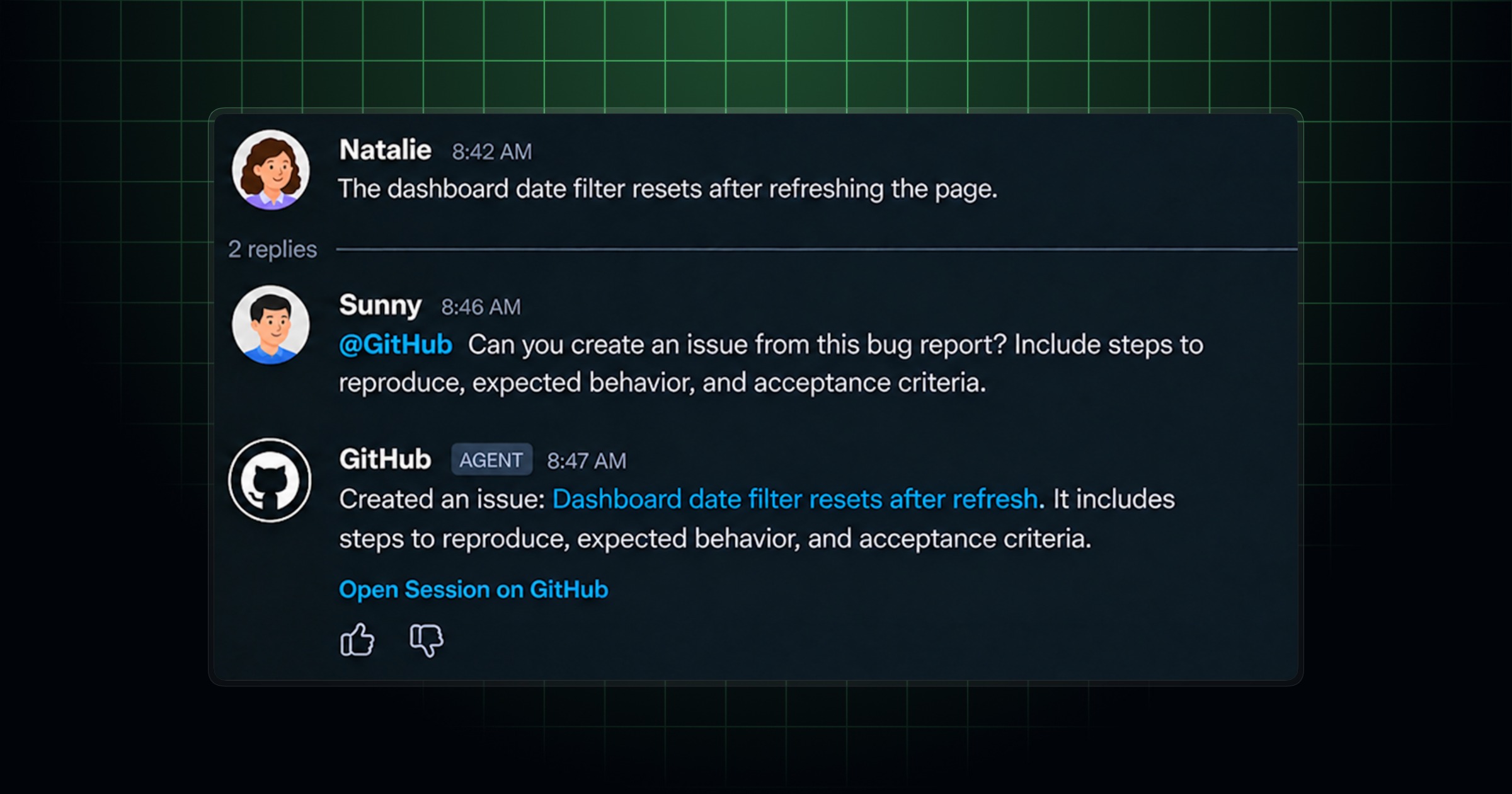
@GitHub, GitHub's chat-based assistant for Slack and Microsoft Teams, that can investigate bugs, open issues, and create pull requests from a conversation. - GA date: November 6, 2026 — the integration has exited public preview in both Slack and Teams.
- New in Teams: A side-by-side "Canvas" view for following a plan, code changes, and a pull request as they're built.
- Setup: Install from slack.github.com (Slack) or the Teams app store via teams.github.com, then connect your GitHub account.
- Cost: GitHub's own announcement and setup docs do not list a specific paid-plan requirement for the integration itself.
GitHub's @GitHub integration for Slack and Microsoft Teams is now generally available, GitHub confirmed in a changelog post published November 6, 2026. The chat-based assistant — which can look into failing builds, open GitHub issues, and create pull requests without anyone leaving Slack or Teams — had been in public preview; GitHub says the move to general availability also brings a new "Canvas" view in Teams for reviewing a plan and its code changes alongside the conversation, plus faster onboarding and clearer attribution on anything the bot creates.
Here's what actually changed, how the integration works in each platform, how to turn it on, and how it differs from the webhook-based notifications GitHub has offered inside Slack and Teams for years.
What GitHub announced on November 6
In a post titled "@GitHub in Slack and Teams is generally available and more," GitHub's changelog team summarized the release as turning "conversations into code" by letting teams and individuals direct a coding agent entirely from chat. The post frames the launch around three changes beyond the general-availability status itself:
- Canvas in Teams — a panel next to the conversation that shows the implementation plan, code changes, and previews as the agent works, so teammates can keep talking while watching the work take shape.
- Faster onboarding — fewer steps between a request and an active coding session, because
@GitHubcan now infer the repository from the message itself rather than requiring it to be specified every time. - Clearer attribution — issues and pull requests the bot opens now include a line noting they were "created from a Slack/Teams conversation with @username," so reviewers can trace a change back to the thread that started it.
The changelog entry also notes a reliability fix for a bug that could block replies to follow-up messages in an ongoing conversation — a rough edge from the preview period that GitHub says is now resolved.
How @GitHub in Slack and Teams actually works
The integration is built around mentioning the bot directly in a message. According to GitHub's own setup documentation for using GitHub in Slack and the equivalent guide for Teams, you type @GitHub followed by a description of what you need, and the assistant can:
- Ask clarifying questions, investigate a failing workflow, and explain the cause before touching any code.
- Create, comment on, and manage GitHub issues and pull requests, with or without invoking the Copilot agent.
- Make a code change and open a pull request directly from the thread.
- Work across more than one repository in a single conversation — for example, changing an API in a backend repo and its corresponding client in a frontend repo, then opening linked pull requests for both.
GitHub's documentation is specific about one access requirement that applies regardless of platform: you need write access to every repository the bot touches before it will start or steer any work on your behalf. Pull requests the bot opens are also attributed to the GitHub App's own identity rather than to a person, so if a repository's branch protection rules require at least one approval before merging, a bot-authored pull request needs one additional human sign-off — a safeguard GitHub says is on by default.
Investigating bugs, opening issues, and creating pull requests
The three capabilities GitHub highlights most are bug investigation, issue creation, and pull-request creation — all without switching out of the chat app. In practice, a thread might start with a stack trace pasted from a failed CI run; a teammate tags @GitHub and asks it to look into the failure, and the bot can trace the error back to a recent commit, explain its likely cause, and propose a fix before anyone opens an editor.
From there, the same conversation can produce a tracked artifact. GitHub's Slack documentation describes a shorthand command, /github open OWNER/REPO, that prompts for a title and description and files a new issue directly from the command, while asking the bot in natural language can produce "issues, pull requests and other artifacts" as the conversation progresses. A task that grows beyond a quick fix can be moved into a dedicated Slack channel — what GitHub calls a Code Channel — where the plan, branch, and pull request stay visible as the work continues.
Multi-repository support, added before general availability and highlighted again in the GA post, means a single conversation isn't limited to one codebase. GitHub's October 15 changelog update on multi-repository support and other improvements describes being able to list open pull requests across several repositories, flag which ones need attention, or investigate a bug using code pulled from both a frontend and a backend repository in the same thread — all before the GA announcement folded that capability into the generally available release.
Canvas: the new review surface in Microsoft Teams
The feature most specific to this GA release is Canvas, and it's scoped to Microsoft Teams rather than Slack. GitHub's own Teams documentation describes it in a single line: you can "follow the plan, changes, and pull request in a canvas beside your conversation." The GA changelog post expands on that slightly, saying Canvas lets you "review implementation plans, code changes, and previews alongside your conversation," with teammates able to keep discussing and refining the work while watching it happen in the panel.
Neither GitHub's changelog post nor its Teams documentation describes an equivalent Canvas view inside Slack as of this release — the capability is presented specifically as a Teams addition. GitHub also doesn't publish configuration options for Canvas beyond it appearing automatically once a task is underway; there's no separate toggle or settings page documented for turning it on.
How to set up @GitHub in Slack
Getting the integration running in a Slack workspace follows a short, admin-gated process, per GitHub's documentation:
- A Slack workspace administrator installs the GitHub app from slack.github.com — unless the workspace allows members to add apps without approval, in which case any user can install it directly.
- Open a direct message with the GitHub app inside Slack.
- Follow the prompts in both Slack and your browser to connect and authorize your GitHub account.
- Run
/github helpto see the available commands once your account is connected.
If the connection ever needs to be re-established, GitHub's documentation notes that /github signin restarts the authorization flow. Teams can also subscribe a channel to a repository to get mention alerts, threaded notifications, link previews, and scheduled pull-request reminders independent of the conversational assistant — that notification layer predates this GA release and continues to work the same way.
How to set up @GitHub in Microsoft Teams
The Teams setup, documented at docs.github.com's integration guide, mirrors the Slack flow with a Teams-specific install step:
- Open the GitHub integration listing in the Microsoft Teams app store and select Add, or install it via teams.github.com.
- Follow the prompts to sign in to Teams and approve the requested access.
- In a Teams message or channel, @mention
@GitHuband follow the prompts to connect your GitHub account. - @mention the app with "help" in a thread to see the full list of commands.
GitHub's documentation notes that anyone already using the older, separate "GitHub Notifications" app for Teams can update to the combined app without losing existing repository subscriptions or scheduled reminders. For organizations that get Copilot through an enterprise agreement, the Copilot cloud-agent policy that lets the bot run coding sessions in a sandboxed environment is on by default, though an organization owner can disable it.
What changed on the way to general availability
General availability didn't arrive all at once — GitHub shipped several incremental updates to the Slack and Teams integration during its preview period. The October 15, 2026 changelog post, published under the title "Multi-repository support and other improvements for GitHub in Slack and Teams," listed several changes that carried into the GA release:
| Capability | Slack | Microsoft Teams |
|---|---|---|
| Investigate bugs via chat | Yes | Yes |
| Create/manage issues from chat | Yes | Yes |
| Open pull requests from chat | Yes | Yes |
| Work across multiple repos in one thread | Yes | Yes |
| Dedicated side panel for reviewing work | Code Channel (separate channel) | Canvas (inline panel) |
| Mention @GitHub anywhere in a message | Yes | Documented for Slack; not separately specified for Teams |
| Repository notifications, link previews, PR reminders | Yes (predates GA) | Yes (predates GA) |
| Attribution note on generated issues/PRs | Yes, since GA | Yes, since GA |
The same October update also made @GitHub easier to invoke naturally — the bot can now be mentioned anywhere in a message rather than only at the start — and said the assistant can use shared Slack messages and threads as context, reducing how much detail a user has to copy in manually. GitHub also reported fewer errors, faster task startup, and smoother recovery from interrupted sessions as part of that update.
How this differs from GitHub's existing notifications and webhooks
GitHub has offered a Slack and Teams presence for years in the form of channel notifications: subscribing a channel to a repository to see issue and pull-request activity, get link previews when someone pastes a GitHub URL, or receive scheduled reminders about pull requests awaiting review. That notification layer is passive — it tells a channel what happened on GitHub, but it can't act on GitHub's behalf.
@GitHub is a different, conversational layer on top of that. Rather than only reporting activity, it can take write actions — filing an issue, pushing a commit, opening a pull request — when a user with the right repository access asks it to, directly inside the chat. The two systems coexist: a team can keep repository notifications flowing into a channel for visibility while also using @GitHub in that same channel, or in direct messages, to act on specific tasks. Organizations that already run GitHub's package firewall to block malicious dependency installs or that track GitHub's recent changes to repository-security tooling, such as the plan to pause Dependabot alerts on inactive repositories, will recognize the pattern: GitHub has been steadily moving more of its day-to-day repository work into the tools developers already have open, rather than requiring a trip back to github.com for every task.
Availability, access, and plan requirements
Neither the GA changelog post nor GitHub's Slack and Teams setup documentation states a specific GitHub or Copilot subscription tier required to use @GitHub itself. The documented requirements are narrower and relate to access rather than billing: a GitHub account, a Slack workspace or Teams tenant where you're allowed to install apps, and write access to any repository the bot is asked to act on. GitHub's Teams documentation separately notes that when Copilot is provisioned through an organization or enterprise account, the cloud-agent policy that lets the bot run sessions in a sandboxed environment is enabled by default, with the option for an owner to turn it off — a governance control rather than a paywall.
GitHub Enterprise Server customers are on a different path entirely: the Marketplace-distributed Slack and Teams apps don't connect to a self-hosted GitHub instance. Enterprise Server administrators instead configure a private Slack app or register an app in Microsoft Azure and upload a manifest through the Teams admin center, per GitHub's enterprise documentation.
What's next
With general availability now official, the near-term signal to watch is whether GitHub brings Canvas, or something like it, to Slack — the GA post and GitHub's documentation are both specific that the feature is currently a Teams-only addition. GitHub has also shown a pattern of shipping incremental updates to this integration roughly every few weeks during preview, so further changes to multi-repository handling, context awareness, or the Code Channel workflow in Slack are plausible as usage scales beyond preview users. Teams already using repository notifications or link previews don't need to change anything to keep those working; @GitHub sits alongside that existing setup rather than replacing it, and can be installed by a workspace admin at slack.github.com or through the Teams app store at teams.github.com whenever a team is ready to turn it on.
Frequently asked questions
What is @GitHub in Slack and Teams?
It's GitHub's chat-based assistant for Slack and Microsoft Teams. You mention @GitHub in a conversation and it can investigate bugs, create and manage issues, and open pull requests without anyone leaving the chat app.
When did @GitHub in Slack and Teams become generally available?
GitHub announced general availability on November 6, 2026, in a changelog post titled "@GitHub in Slack and Teams is generally available and more," moving the integration out of public preview in both platforms.
How do I set up @GitHub in Slack or Microsoft Teams?
A workspace or Teams admin installs the app from slack.github.com or the Microsoft Teams app store, then each user opens a direct message with @GitHub and follows the prompts to connect and authorize their GitHub account.
What is Canvas in Microsoft Teams?
Canvas is a panel that appears beside a Teams conversation showing the implementation plan, code changes, and previews as @GitHub works, so teammates can review and discuss the work without switching apps. GitHub's documentation describes it as specific to Teams, not Slack.
Do I need a specific GitHub or Copilot plan to use @GitHub in Slack or Teams?
GitHub's general-availability announcement and setup documentation do not state a required paid plan. The documented requirements are a GitHub account, a Slack workspace or Teams tenant where you can install apps, and write access to any repository @GitHub is asked to act on.
Can @GitHub work across multiple repositories in one conversation?
Yes. GitHub added multi-repository support before general availability, letting a single conversation span repositories — for example, changing an API in one repo and its client in another and opening linked pull requests for both.
Sources
- GitHub Changelog: @GitHub in Slack and Teams is generally available and moregithub.blog
- GitHub Changelog: Multi-repository support and other improvements for GitHub in Slack and Teamsgithub.blog
- GitHub Docs: Use GitHub in Slackdocs.github.com
- GitHub Docs: Use GitHub in Teamsdocs.github.com
- GitHub Docs: Integrate GitHub with Teamsdocs.github.com
Felix Moreau writes Pandromeda's software coverage and how-to guides. He covers Windows, macOS and Linux updates, the apps people rely on, emulators and developer tools, and turns official documentation into clear, numbered steps that work on the current version.