GitHub Package Firewall: How It Blocks Malicious npm Installs
GitHub's package firewall, now in public preview, screens npm installs from CI runners and coding agents for malware and risky updates before they land.
GitHub package firewall is now in public preview: a policy layer that sits between CI runners, coding agents and developer machines on one side and upstream package registries on the other, inspecting every package metadata request and download for signs of malware, compromised maintainer accounts or risky supply-chain changes before the install ever completes. GitHub announced the preview on its own changelog on October 20, 2026, pitching it as a direct answer to a year of npm-focused supply-chain attacks that have targeted the automated, human-free installs CI jobs and AI coding agents run every day.
What is GitHub package firewall?
Package firewall is an enterprise-level proxy that GitHub places in front of a package registry. Instead of an endpoint talking to npm's registry directly, it talks to GitHub's firewall endpoint, which forwards the request upstream, evaluates the response against policies an administrator has configured, and either lets the install proceed or blocks it. The firewall inspects two kinds of traffic: metadata requests, where a package manager asks what versions exist, and the actual package downloads (tarballs) that get unpacked onto disk. Both are checked before anything lands on a runner or a laptop, which is the point at which most npm supply-chain incidents this year have actually done damage.
Why GitHub built a firewall for npm installs
GitHub's changelog post is explicit about the threat model: coding agents and CI/CD runners install dependencies with no human reviewing each package before it runs, which makes them especially exposed to install-time malware, including malicious preinstall and postinstall scripts that execute automatically. That threat model lines up with a rough stretch for the npm ecosystem, which has dealt with maintainer-account phishing, trojanized package versions and dependency-confusion attempts throughout the year. Pandromeda has covered a trusted-publishing flaw that put npm packages at risk as one example of the kind of incident the firewall is designed to catch further upstream, before a compromised version ever reaches an install step.
How the package firewall works
The mechanics are straightforward once a policy exists:
- An enterprise administrator or security manager configures policy controls once, at the enterprise level.
- Endpoints, meaning GitHub Actions runners, GitHub-hosted or self-hosted coding-agent sessions, and even a developer's own machine, are pointed at the firewall's URL instead of the public npm registry.
- Every metadata request and every package download that passes through is evaluated against the enterprise's policy in real time.
- A package that fails any check is blocked at install time, before its code can run on the endpoint.
For npm specifically, GitHub's documentation describes pointing a user-level .npmrc registry setting at a firewall endpoint scoped to the enterprise, authenticated with a token that only needs read-only access to public repositories. That makes the switch largely a configuration change rather than a rewrite of CI pipelines, which matters for teams that already run large workflows through GitHub Actions rather than a self-hosted CI system like Jenkins.
What the package firewall checks
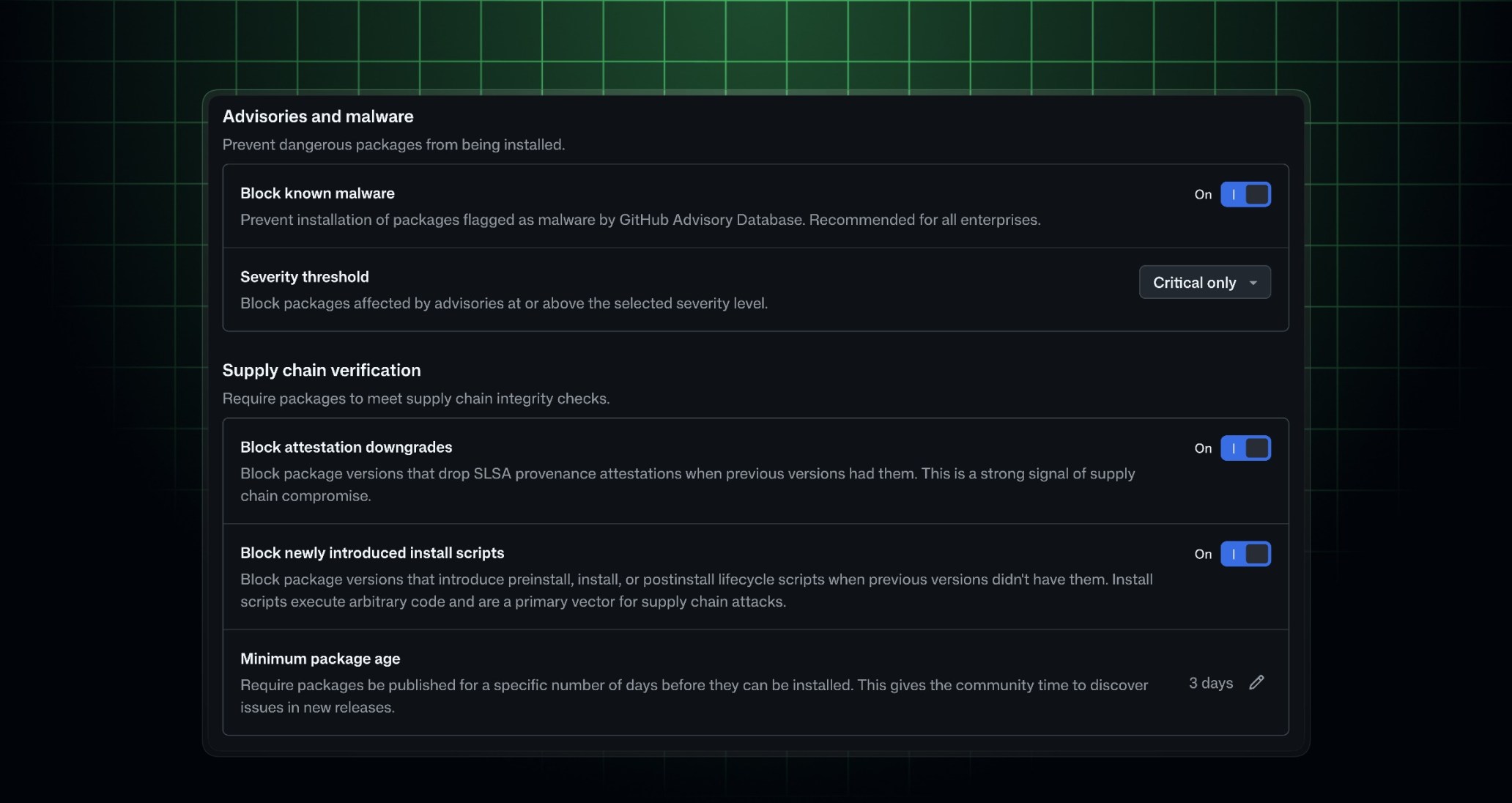
According to GitHub's own documentation, administrators get five policy controls, each with its own default:
| Policy control | Default state | What it does |
|---|---|---|
| Block known malware | On | Checks each package against active malware advisories in the GitHub Advisory Database. |
| Block vulnerability advisories | Critical severity only | Blocks versions flagged by advisories at or above a chosen severity: critical only, high or higher, medium or higher, or any severity. |
| Block attestation downgrades | On | Blocks a version if earlier versions of the same package shipped SLSA attestations and the new one does not. |
| Block newly introduced install scripts | On | Blocks a version that newly adds install-time scripts, such as preinstall or postinstall, that a prior version did not have. |
| Minimum package age (cooldown) | 1 day | Delays installability of a freshly published version for a configurable window of 1 to 365 days; setting it to 0 disables the cooldown. |
The cooldown control is worth sitting with. A large share of malicious npm releases are caught and pulled within hours or days of publication, so simply refusing to let a brand-new version be the first thing a CI job installs closes off a common attack window without requiring any signature or advisory to exist yet.
- Entered public preview on October 20, 2026, for all GitHub Enterprise Cloud customers, including Enterprise Cloud with data residency.
- Supports npm only at launch; GitHub says further ecosystems will depend on customer demand.
- Free during the public preview; general availability will move to metered, usage-based billing similar to how GitHub Actions is billed.
- Sits in front of CI runners, coding-agent sessions and developer machines, not just hosted workflows.
npm today, other registries later
At launch, package firewall only supports npm packages. GitHub's changelog is direct about this limitation and does not commit to a specific timeline for additional ecosystems, saying only that future support will be driven by customer demand. GitHub's own setup documentation does describe one additional, explicitly experimental path: pointing a JFrog Artifactory remote npm repository at the firewall endpoint, so that organizations already standardized on Artifactory as their package proxy can route npm traffic through the firewall before it reaches a virtual repository. GitHub's guidance there also warns admins to remove any other remote in that virtual repository that reaches the public npm registry directly, since that would let traffic bypass the firewall entirely. There is no mention, in either the changelog or the documentation, of support for PyPI, Maven, NuGet, RubyGems or other package ecosystems, so treat any claim of broader coverage as unverified for now.
Who can use it today
Package firewall is scoped to GitHub Enterprise Cloud. GitHub's changelog lists availability for GitHub Enterprise Cloud customers generally, including those using GitHub Enterprise Cloud with data residency, and does not mention it being available on GitHub Team, GitHub Free, or GitHub Enterprise Server. Within an enterprise, policy is configured centrally, and by default only administrators and security managers can edit it, though that access can be extended to other teams or individuals by granting a fine-grained permission for editing the enterprise-level package firewall policy.
Pricing: free in preview, metered at general availability
GitHub is not charging for package firewall during the public preview. The changelog is explicit that at general availability, it moves to metered, usage-based billing, comparable to how GitHub Actions minutes are billed today. GitHub has not published specific per-request or per-gigabyte rates for the metered model, so enterprises evaluating the preview should expect that proxying all of their npm traffic through the firewall will eventually carry a usage-based cost once the feature leaves preview.
How it differs from other GitHub Advanced Security tools
Package firewall is not a replacement for the scanning tools GitHub already offers; it occupies a different point in the pipeline. Secret scanning and code scanning look at code that is already sitting in a repository, after someone has written or pulled it in. Dependabot and the GitHub Advisory Database flag dependencies that are already declared in a manifest. Package firewall runs earlier than either of those: it evaluates a package the moment an endpoint tries to pull it down, before the files exist on disk and before any scanner gets a chance to look at them. That ordering matters most for the exact failure mode GitHub calls out in its own changelog, a malicious postinstall script that runs automatically the instant npm install finishes, with no step in between for a human or a scanner to intervene. By gating the download itself, the firewall is positioned to stop that class of attack before it executes rather than after.
What happens when a package is blocked
A blocked install is not necessarily the end of the story. When a package fails a policy check, the npm client's output or the CI job log includes a bypass-request URL. The developer who hit the block opens that URL and fills in the repository, ecosystem, package name, version, and a reason for the request, then submits it. From there, an administrator or security manager reviews the request under the enterprise's security settings, can optionally widen the approval to cover every version of that package rather than just the one requested, adds a comment, and approves or denies it. GitHub describes this flow as similar to the exception process already used elsewhere in GitHub Advanced Security, so teams that have requested exceptions for secret-scanning or code-scanning alerts will recognize the shape of it. Approved overrides are stored as part of the enterprise policy and can be reviewed or revoked later from the same policy screen.
How admins turn it on
Enabling the firewall is a two-sided change. On the policy side, an administrator or security manager goes to the enterprise's policy settings, turns on package firewall, and sets the five controls described above to whatever posture fits the organization, from leaving every default in place to requiring a long cooldown and blocking any severity of advisory. On the endpoint side, each machine or job that should be protected needs its npm configuration pointed at the firewall's registry URL for that enterprise, authenticated with a token scoped to read-only access on public repositories and stored as a secret rather than checked into a repository. Because the change happens at the registry-configuration level, it applies equally to a GitHub-hosted Actions runner, a self-hosted runner, a coding-agent session, or a developer's own laptop, provided each of those is pointed at the firewall rather than at npm's public registry directly. That endpoint-level reach is also why GitHub frames coding agents specifically as a reason to adopt it: as more of Pandromeda's software desk has covered with GitHub's AI-driven scanning and agentic autofix tools reaching general availability, autonomous agents are increasingly the ones running npm install with no person watching the output in real time.
What it means for developers day to day
For a developer on a team that turns this on, the most visible change should, ideally, be no change at all: packages that are already established, unflagged and old enough to clear the cooldown continue to install exactly as before, because the firewall is only designed to interrupt the installs that look risky. The difference shows up at the edges. A dependency that just shipped a new major version an hour ago may now fail to install on a CI runner until it clears the enterprise's cooldown window, which is a deliberate trade-off between staying current and giving a malicious or compromised release time to be caught and pulled. A package that quietly adds a postinstall script it never had before, or that drops a build provenance attestation it previously shipped, can get flagged even if nothing is yet publicly known to be wrong with it, because those are exactly the kinds of changes GitHub's own threat research treats as suspicious in isolation. None of that requires a developer to change how they write code or declare dependencies; it mostly changes what happens in the seconds after npm install runs on a runner, an agent session, or a laptop that has been pointed at the firewall.
What's next
Package firewall is explicitly a preview, and GitHub has flagged several open questions rather than answering them. Ecosystem coverage beyond npm is tied to customer demand with no committed roadmap, Artifactory support remains experimental, and the metered pricing model at general availability has not been detailed beyond the comparison to Actions billing. GitHub has also opened a public discussion thread for feedback on the preview, which is typically where early signals about ecosystem priority and pricing specifics surface before they reach the changelog. For enterprises already standardized on GitHub Enterprise Cloud and worried about install-time malware reaching CI runners or coding agents, the preview is free to turn on now; everyone else is effectively waiting to see which registries, and what price, the general-availability version settles on.
Frequently asked questions
What is GitHub package firewall?
It is a GitHub Enterprise Cloud feature, now in public preview, that sits between endpoints such as CI runners, coding agents and developer machines and upstream package registries. It inspects package metadata requests and downloads for malware, risky advisories and supply-chain changes before an install completes.
Which package registries does it support?
Only npm at launch. GitHub says it will add support for other ecosystems based on customer demand, with no committed timeline. GitHub's own documentation also describes experimental support for routing traffic through a JFrog Artifactory remote npm repository.
Who can use GitHub package firewall right now?
GitHub Enterprise Cloud customers, including those using GitHub Enterprise Cloud with data residency, during the free public preview that started October 20, 2026.
How much does GitHub package firewall cost?
It is free during the public preview. GitHub has said that at general availability it will move to metered, usage-based billing, similar to how GitHub Actions is billed, though specific rates have not been published.
What checks does the package firewall run?
By default it blocks known malware flagged in the GitHub Advisory Database, blocks critical-severity vulnerability advisories, blocks versions that drop a prior SLSA attestation, blocks versions that newly add install scripts such as preinstall or postinstall, and enforces a minimum package age, or cooldown, of one day before a new version can be installed.
What happens if a legitimate package gets blocked?
The developer can open a bypass-request URL shown in the blocked install's output, submit the repository, package, version and a reason, and an administrator or security manager reviews and approves or denies the request, similar to existing GitHub Advanced Security exception workflows.
Sources
Felix Moreau writes Pandromeda's software coverage and how-to guides. He covers Windows, macOS and Linux updates, the apps people rely on, emulators and developer tools, and turns official documentation into clear, numbered steps that work on the current version.