What Is Passwordless Authentication? How It Works
Passkeys, magic links, one-time codes, and biometrics all skip the password — here’s how passwordless sign-in actually works, and how it differs from MFA.
Passwordless authentication is any sign-in method that proves who you are without you typing a memorized secret. Instead of a password, your device holds a private cryptographic key that never leaves it, and you unlock that key with your fingerprint, face, or a PIN. The method shows up today as passkeys (FIDO2), magic links, one-time codes, authenticator-app approvals, and biometric unlock — and major platforms including Microsoft, Google, and Apple now support at least one of them for account sign-in.
What Is Passwordless Authentication?
Passwordless authentication replaces the password itself, rather than adding a check on top of one. According to Microsoft's Entra documentation, passkeys (the most common passwordless credential) are "phishing-resistant credentials that provide strong authentication and can serve as a multifactor authentication (MFA) method when combined with device biometrics or PIN." That single sentence captures the shift: there is no password field to fill in and no password sitting in a database to be stolen, guessed, or reused from another breach.
The FIDO Alliance, the industry body that co-developed the underlying standards with the World Wide Web Consortium, describes a passkey as a "FIDO cryptographic credential that is tied to a user's account on a website or application." Users approve a sign-in "with the same method they use to unlock their device" — a fingerprint, face scan, PIN, or pattern — and that approval step is what stands in for the old password prompt.
How It Actually Works: Public and Private Keys
The mechanics are the part most explainers skip, and it's the part that matters most for understanding why the approach is considered phishing-resistant. Passwordless credentials built on the FIDO2 standard — the combination of the WebAuthn browser specification and the CTAP device protocol — rely on asymmetric (public/private key) cryptography rather than a shared secret.
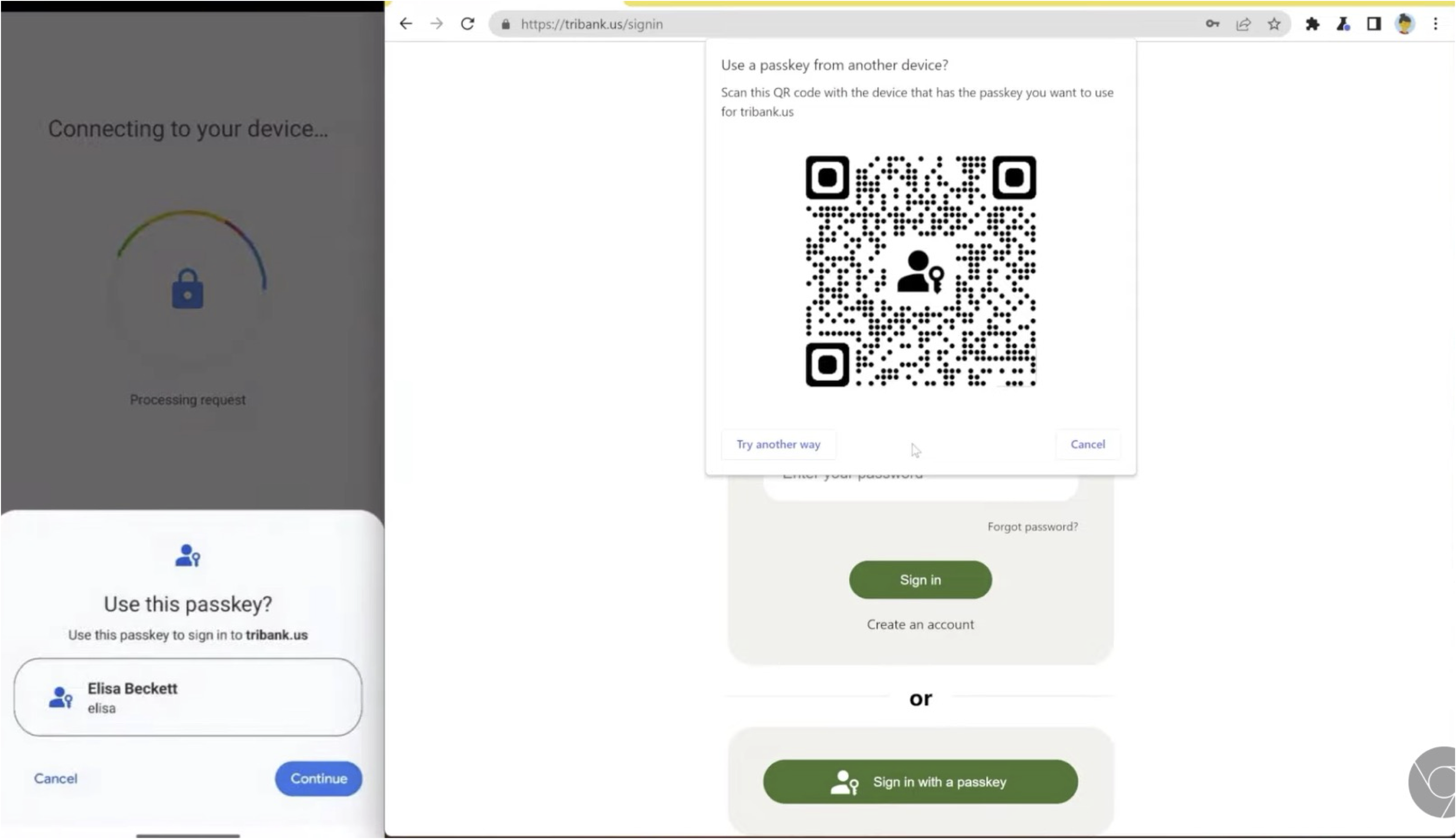
Per Microsoft's documentation, the sign-in flow runs like this:
| Step | What happens |
|---|---|
| 1 | You start signing in and choose a passkey (on this device, another device via QR code, or a security key). |
| 2 | The website or app sends a one-time cryptographic challenge (a "nonce") to your authenticator. |
| 3 | Your device locates the matching key pair for that site. |
| 4 | You unlock the private key locally with a fingerprint, face scan, or PIN. |
| 5 | The device signs the challenge with the private key and sends back only the signature. |
| 6 | The site verifies that signature using the public key it stored when you registered, and signs you in. |
Two things never cross the network. First, the private key itself stays on the device (or, for synced passkeys, inside an encrypted cloud keychain); only the corresponding public key and a signed response are ever sent to the website. The FIDO Alliance notes this is what "eliminat[es] sensitive secrets on the server," so a breach of the website's database no longer hands attackers anything they can replay or crack. Second, your biometric data itself is not transmitted at all. Google's own account-help documentation states plainly that "your biometric data, used for fingerprint or face unlock, stays on your device and is never shared with Google" — the server only learns that the local unlock succeeded, not what your fingerprint or face actually looks like.
Apple describes the same trade-off from the relying party's side of the connection: "because servers only keep public keys, servers are less valuable targets for hackers." Apple also notes that a passkey is "intrinsically linked with the app or website they were created for," which is why a convincing fake login page can't trick your device into using the wrong credential — there's no password for you to accidentally type into it in the first place.
Passwordless Authentication vs. Traditional MFA
It's easy to conflate passwordless sign-in with multi-factor authentication (MFA), since both can involve a phone, a fingerprint, or a code. The distinction is architectural. Traditional MFA keeps the password as the first factor and bolts on a second check — an SMS code, an email one-time code, or a push approval — after you've typed it. Passwordless authentication removes the password from the flow entirely; there's no first factor to protect with a second one.
Wikipedia's summary of the topic puts the confusion plainly: passwordless authentication "is sometimes confused with" MFA, but MFA "is often used as an added layer of security on top of password-based authentication," whereas passwordless login "does not require a memorized secret" and typically authenticates with one strong factor, such as a device-bound credential, instead. When a passkey is itself unlocked with a biometric or PIN, Microsoft's documentation notes it can still count as multi-factor — because it combines something you have (the device holding the key) with something you are or know (the biometric or PIN) — but it does so without ever involving a password.
That architectural difference also explains why security teams increasingly rank passwordless methods above SMS- or email-based MFA. Microsoft's guidance on phishing-resistant authentication warns that "traditional MFA with SMS, email OTP, or authenticator apps... introduc[es] friction" and remains "prone to remote phishing attacks," since a code or push approval can still be relayed by an attacker running a fake site in real time. A passkey's signature, by contrast, is cryptographically bound to the real site's origin, which is what makes it resistant to that kind of relay in the first place.
The Main Passwordless Methods in Use Today
"Passwordless" isn't one single technology — it's a category that covers several methods with different trade-offs between convenience and phishing resistance.
| Method | How you prove it's you | Phishing-resistant? |
|---|---|---|
| Passkeys (FIDO2) | Local biometric/PIN unlocks a private key stored on your phone, computer, or security key | Yes |
| FIDO2 hardware security keys | A physical USB/NFC key holds the private key; a tap or PIN activates it | Yes |
| Authenticator app push/passwordless sign-in | App-based approval tied to a registered device (e.g., Microsoft Authenticator passwordless) | Partial — still phishable via real-time relay in some configurations |
| Magic links | A one-time sign-in link emailed to a verified address | Partial — depends on email account security |
| One-time codes (email/SMS OTP) | A short code sent to a verified email or phone, entered manually | No — codes can be phished or relayed |
| Device biometrics (e.g., Windows Hello, Platform Credential for macOS) | Face or fingerprint unlocks a key tied to that specific device | Yes |
Microsoft's own list of supported sign-in methods is a useful reference point for how these sit alongside each other in practice: its authentication overview separately tracks Windows Hello for Business, Platform Credential for macOS, synced and device-bound passkeys (FIDO2), Microsoft Authenticator's passwordless sign-in, and plain email one-time codes — and flags only the biometric and passkey options as "phishing-resistant."
Passkeys and Security Keys, Specifically
Passkeys are the method getting the most attention because they can work with nothing but the device you already carry. Microsoft's documentation distinguishes two flavors: device-bound passkeys, where the private key is generated on one physical device and never leaves it (this includes FIDO2 hardware security keys and passkeys stored in Microsoft Authenticator), and synced passkeys, where an encrypted copy of the key is synced across a person's own devices through a platform's cloud keychain, such as Apple's iCloud Keychain or Google Password Manager. Synced passkeys trade a small amount of device-level provenance for convenience — you don't lose access to every account just because you lose one phone.
Hardware security keys remain the option Microsoft recommends for "highly regulated industries or users with elevated privileges," precisely because the private key never touches a synced cloud backup at all. For a deeper walkthrough of how those physical keys work, see our explainer on hardware security keys.
Magic Links, One-Time Codes, and Authenticator Apps
Not every passwordless method uses public-key cryptography. Magic links and one-time codes are passwordless in the sense that you never type a stored secret, but they rely on possession of an email inbox or phone number rather than a locally held key. Wikipedia's overview of the category groups these under "ownership factors" — something the user has, such as a phone or token — alongside cryptographic devices, and treats them as a separate, generally weaker tier than device-bound credentials, since an attacker who compromises your email or phone number can often intercept the same link or code.
Authenticator apps sit in between. Microsoft's authentication-methods overview lists "Microsoft Authenticator passwordless" sign-in as a distinct primary-authentication option from push-notification MFA: instead of a password plus an approval, the app itself becomes the credential, tied to the registered device. It's more convenient than typing a code, though Microsoft still classifies plain push approvals (as opposed to passkeys stored in the Authenticator app) as a step below its phishing-resistant tier.
Which Major Services Support Passwordless Sign-In Today
Passwordless sign-in has moved from an enterprise pilot feature to something most large consumer platforms now offer directly in account settings:
- Microsoft supports passkeys (FIDO2), Windows Hello for Business, Platform Credential for macOS, and passwordless sign-in through the Microsoft Authenticator app across Microsoft Entra ID and personal Microsoft accounts.
- Google lets users sign in to a Google Account with a passkey using a fingerprint, face scan, or a device's screen-lock PIN, and documents support across Windows 10+, macOS Ventura+, ChromeOS 109+, Android 9+, iOS 16+, and compatible FIDO2 hardware security keys.
- Apple builds passkey creation and sign-in directly into iOS, iPadOS, and macOS through iCloud Keychain, with end-to-end encrypted syncing across a user's own Apple devices.
Password managers have followed the same shift: several now generate, store, and sync passkeys alongside traditional passwords, which is worth weighing if you're choosing a manager built around passwordless credentials rather than one that only autofills passwords — see our comparisons of Proton Pass and Bitwarden's passkey support and of 1Password and NordPass for how two popular options handle it.
Benefits and Current Limitations
The security case for passwordless methods is grounded in removing what attackers actually go after. The FIDO Alliance points out that when there are "no shared secrets" and no password database to leak, "breaches of password databases no longer pose a threat as there are no passwords to steal." The same design also removes the single biggest weakness of passwords: reuse across sites, since a passkey's key pair is unique to the site it was created for and simply won't function anywhere else.
The trade-offs are mostly about account recovery and ecosystem maturity rather than the cryptography itself:
- Device loss matters more. Device-bound passkeys and hardware security keys don't leave the device, so losing it without a synced backup or a second registered authenticator can lock you out — which is why most services still keep a fallback method on file.
- Synced passkeys depend on the platform's cloud security. The FIDO Alliance itself flags that "passkeys backed by passwords or synced across devices are vulnerable to theft" if that cloud account isn't itself well protected — one reason Microsoft recommends unsynced, device-bound keys for its highest-privilege users.
- Not every site supports it yet. Passwordless sign-in has to be built into a service's login flow; until a site adds it, you're still stuck with a password there.
- Regulatory recognition is still catching up. The FIDO Alliance also notes that "some regulatory regimes still have to evolve to recognize passkeys" as satisfying existing authentication requirements, which can slow adoption in regulated industries.
NIST's Special Publication 800-63B, the U.S. government's digital identity guidelines, backs the underlying approach even though it predates the "passwordless" marketing term: it describes verifiers that "store a public key" corresponding to a private key held only by the authenticator as a way to achieve what it calls verifier-impersonation resistance — the formal name for phishing resistance in that framework.
How to Turn On Passwordless Sign-In
Enabling a passwordless method generally takes a few minutes per account, and the steps are similar across major platforms: open your account's security settings, look for "passkeys," "security keys," or "sign-in options," and follow the prompt to create a passkey using your device's existing screen lock or biometric unlock. Google's help documentation notes that before creating a passkey, a user simply needs to "turn on your phone's screen lock" if one isn't already active. Most services let you register more than one authenticator — for example, a passkey on your phone and a hardware security key as backup — so a single lost device doesn't cut off access entirely.
What's Next for Passwordless Authentication
Passwordless sign-in is past the early-adopter stage for consumer accounts but still mid-rollout for many businesses, where password-based legacy systems, compliance requirements, and account-recovery processes take longer to replace. According to Microsoft's documentation, the clearest trend is less about any single new technology and more about consolidation: synced passkeys for everyday users, device-bound passkeys and hardware keys for higher-risk accounts, and a slow phase-out of SMS and email codes as the primary line of defense. The common thread across the FIDO Alliance's, Microsoft's, Google's, and Apple's own documentation is the same: the password itself, not just the extra steps around it, is the thing being designed out.
Frequently asked questions
What is passwordless authentication?
It's a way to sign in without typing a memorized password. Your device proves your identity using a private cryptographic key, unlocked locally with a fingerprint, face scan, or PIN, instead of a secret you type and the server stores.
Is passwordless authentication the same as MFA?
No. Traditional MFA adds a second check on top of a password. Passwordless authentication removes the password entirely, though a passkey unlocked by a biometric or PIN can still satisfy multi-factor requirements on its own, according to Microsoft's documentation.
What are the main types of passwordless authentication?
The most common methods are passkeys (FIDO2), FIDO2 hardware security keys, device biometrics like Windows Hello, authenticator-app passwordless sign-in, magic links, and one-time codes sent by email or SMS.
Does Microsoft support passwordless authentication?
Yes. Microsoft Entra ID and personal Microsoft accounts support passkeys (FIDO2), Windows Hello for Business, Platform Credential for macOS, and passwordless sign-in through the Microsoft Authenticator app.
Is passwordless authentication more secure than a password?
Generally yes for key-based methods like passkeys, because the server only ever stores a public key, not a secret that can be stolen or reused, and the credential is bound to the specific site it was created for, per the FIDO Alliance.
What happens if I lose the device holding my passkey?
Synced passkeys can be recovered through a platform's encrypted cloud keychain, such as iCloud Keychain or Google Password Manager. Device-bound passkeys and hardware security keys don't sync, so most services recommend registering a backup authenticator.
Sources
- FIDO Alliance: Passkeysfidoalliance.org
- Microsoft Learn: Passkeys (FIDO2) authentication method in Microsoft Entra IDlearn.microsoft.com
- Microsoft Learn: Microsoft Entra authentication overviewlearn.microsoft.com
- Google Account Help: About passkeyssupport.google.com
- Apple Developer: Passkeysdeveloper.apple.com
- NIST SP 800-63B: Digital Identity Guidelines - Authentication and Lifecycle Managementpages.nist.gov
Sana Qureshi runs the security and privacy desk. She reports on actively exploited vulnerabilities, vendor patches and data breaches, and covers the password managers, VPNs and authentication tools readers use to protect themselves. Her alerts cite vendor advisories, CISA and the CVE record directly.