What Is a Rootkit? How It Works and How to Remove It
A rootkit is malware built to hide — from you and from your antivirus. Here's how these stealth infections work, the warning signs, and what actually gets rid of one.
A rootkit is malware built for one purpose: to hide. Once installed, it gives an attacker continued privileged access to a device while actively concealing its own files, processes and network connections from the operating system, antivirus software and the person using the computer. That's what makes rootkits different from — and often more dangerous than — ordinary viruses or trojans: a rootkit can let other malware run undetected for months or years.
Quick facts: A rootkit isn't a single piece of malware — it's a category of techniques used to hide malicious activity. NIST's official glossary defines it as "a set of tools used by an attacker after gaining root-level access to a host" to maintain that access covertly. Rootkits can live in software, in the boot process (bootkits), or in device firmware — and the deeper they sit, the harder they are to find and remove.
What Is a Rootkit?
The name combines "root," the all-powerful administrator account on Unix-like systems, with "kit," the set of tools used to get and keep that access. According to Wikipedia's history of the term, the earliest documented rootkits date to around 1990 on Sun's SunOS, and the concept traces conceptually back to Ken Thompson's 1983 Turing Award lecture describing a compiler that could insert a hidden backdoor. On Windows, two of the most notorious examples were NTRootkit (1999) and HackerDefender (2003).
Microsoft's own security documentation puts it plainly: malware authors use rootkits to hide malware on a device, allowing it to persist as long as possible, and a successful rootkit can remain in place for years undetected while it steals information and resources. A second official definition, from NIST Special Publication 800-83, describes a rootkit as "a collection of files that is installed on a host to change the host's normal behavior in a malicious, stealthy way." Both descriptions point to the same core trait: concealment, not just infection.
How Rootkits Work
A rootkit doesn't usually break into a system on its own — it's typically delivered as the final stage of an attack, after an attacker has already gained privileged (root or administrator) access through a phishing email, a software vulnerability, a malicious download, or stolen credentials. Once installed, the rootkit intercepts and rewrites the standard calls a computer uses to report on itself. If you ask the device to list its running programs, open files or network connections, the rootkit filters that list before it ever reaches you, stealthily removing any entry it doesn't want you to see.
That's the part that makes rootkits uniquely hard to deal with: after a device is infected, you can no longer trust anything that device tells you about itself. Microsoft's documentation notes that modern rootkits are typically used to conceal other payloads — like banking trojans, spyware or botnet software — rather than to break in on their own. Well-known malware families that have relied on rootkit techniques include Alureon, Rustock, Sinowal and Sirefef, according to Microsoft's threat encyclopedia.
User-Mode vs. Kernel-Mode Rootkits
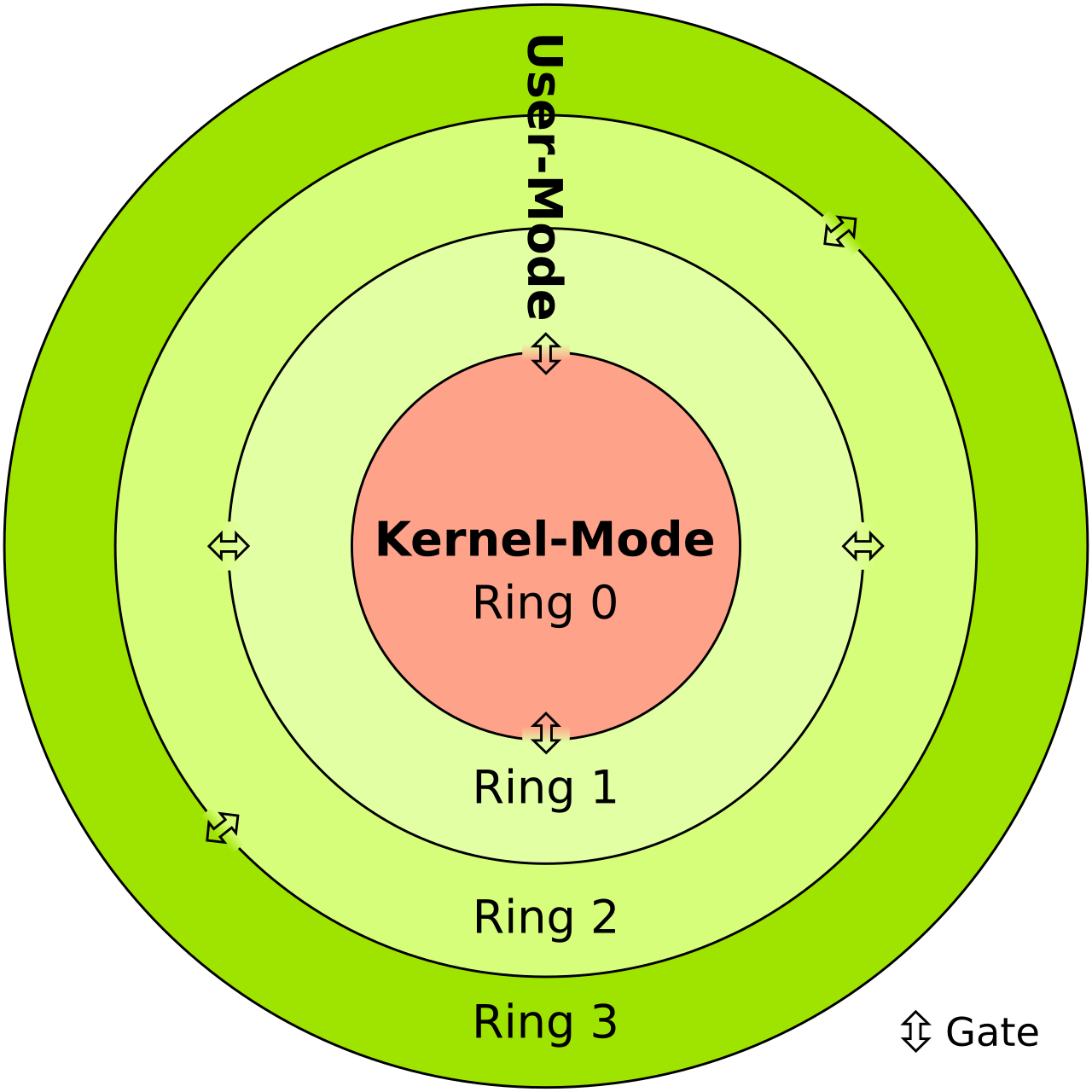
Not all rootkits operate at the same depth inside a system. Security researchers generally split them into two tiers, based on the CPU's protection rings:
- User-mode (Ring 3) rootkits run as ordinary applications. They typically hook or patch the functions that other programs call, often by injecting a malicious library into a legitimate process, to hide specific files, processes or registry entries. They're easier to write, but also easier to detect, since they're still operating at the same privilege level as normal software.
- Kernel-mode (Ring 0) rootkits run with the operating system's own highest level of trust, usually installed as a driver or kernel module. They can hook the system call table directly or manipulate kernel objects in memory. They're harder to build — a bug can crash the whole system and expose the infection — but when they work, they're far harder to detect, because the security software trying to find them is running at a lower privilege level than the rootkit itself.
| Detection method | What it catches | Main limitation |
|---|---|---|
| Signature-based antivirus scan | Known rootkit variants with a matching signature | Misses new or custom rootkits entirely |
| Behavioral monitoring | Unusual network traffic, CPU use or API timing | Can produce false positives; sophisticated rootkits throttle their own footprint |
| Offline / boot-time scan | Kernel-mode rootkits that hide while Windows is running | Requires a reboot into a trusted scanning environment |
| Integrity checking | Unexpected changes to system files, against a known-good hash | Needs a trusted baseline captured before infection |
| Firmware / Secure Boot verification | Bootkits and firmware-level implants | Requires hardware-level support (TPM, Secure Boot) to be configured correctly |
Bootkits and Firmware Rootkits
The most persistent rootkits don't live in the operating system at all — they live underneath it. A bootkit infects the earliest code that runs when a computer starts, such as the master boot record, so it loads before the operating system and its defenses do. A firmware rootkit goes even deeper, hiding in a device's BIOS/UEFI, network card or other hardware firmware, which is rarely checked for integrity. Because firmware runs independently of the OS, these rootkits can survive a full operating system reinstall or even a hard drive swap.
This isn't a theoretical threat. In its December 2025 guidance on managing UEFI Secure Boot, the NSA pointed to real-world bootkits — including BlackLotus, which specifically targets the UEFI boot process — as the reason organizations need to actively verify their Secure Boot configuration rather than assume it's working. The same guidance also flags PKFail and BootHole as recent weaknesses attackers have used to get a bootkit past Secure Boot's checks.
Rootkit vs. Virus, Trojan and Ransomware: What's the Difference?
A rootkit is defined by what it does — hide — not by how it spreads, which is why it's often confused with other malware categories. A virus or worm is defined by how it replicates and spreads to new files or systems. A trojan is malware disguised as something legitimate to trick a user into installing it. Ransomware is defined by its goal — encrypting files and demanding payment. None of those three require stealth to succeed; a rootkit's entire reason for existing is to stay invisible while something else — a trojan, a banking credential stealer, a cryptominer — does the actual damage underneath it. In practice, a rootkit is frequently a component bundled with one of those other threats, cloaking it rather than replacing it.
Warning Signs of a Rootkit Infection
Because rootkits are specifically designed to hide, there's rarely an obvious red flag — but a few symptoms are consistent with reports from security researchers and Microsoft's own guidance:
- Antivirus software that stops updating itself, won't run, or disables itself without explanation
- Settings that revert on their own after you change them, or security tools that silently turn back off
- Unusual outbound network activity, especially when no applications appear to be using the network
- A device that is unexpectedly slow, unstable, or crashes in ways that don't match normal usage
- Files, folders or running processes that you know exist but that don't show up when you look for them directly
None of these symptoms is proof of a rootkit on its own — they're also common signs of ordinary malware or a failing drive — but a combination of them, especially alongside security software that won't cooperate, is a reason to investigate further.
How to Detect a Rootkit
Standard, real-time antivirus running on an already-infected system is often not enough, because a sufficiently capable rootkit can hide itself from the very tools checking for it. The most reliable approach, per security researchers' long-standing guidance (reflected in the detection table above), is to scan from outside the running operating system — using a bootable rescue disk or a dedicated offline scanner — since a rootkit that isn't currently running has a much harder time hiding. Microsoft's own tooling follows this model: Microsoft Defender Offline, launched from the Windows Security app, boots into a trusted, pre-infection environment specifically to catch threats — including rootkits — that evade detection while Windows is running normally.
For newer PCs, hardware-backed protections add another layer: Windows' System Guard is designed to protect system integrity against rootkits and other threats that tamper with the boot process, and devices that meet Secured-Core PC requirements combine Secure Boot, a TPM and virtualization-based security specifically to make firmware-level rootkits harder to plant in the first place.
How to Remove a Rootkit
Removing a confirmed rootkit is not like removing a typical virus, because you can't fully trust the infected system to clean itself. Microsoft's guidance lays out an escalating approach:
- Run a trusted offline scanner (like Microsoft Defender Offline) rather than relying solely on real-time antivirus, since it scans from outside the compromised environment.
- Update and patch everything — operating system, apps and firmware — since many rootkits ride in through a known, unpatched vulnerability.
- If removal fails or symptoms persist, reinstall. Microsoft is direct about this: if the problem persists after attempted removal, it "strongly recommends reinstalling the operating system and security software," then restoring data from a clean backup — not continuing to trust a system that has already shown it can lie to you.
- For suspected firmware or bootkit infections, a plain OS reinstall may not be enough, since the infection can live below the operating system; that scenario can require reflashing firmware or, in severe cases, replacing the affected hardware.
How to Protect Against Rootkits
Because rootkits are hard to detect and can be difficult to fully remove, prevention matters more than it does for most malware categories. Microsoft's guidance and general security best practice point to the same short list:
- Apply operating system, application and firmware updates promptly, since rootkits frequently exploit vulnerabilities that already have a patch available
- Be cautious with email attachments and unfamiliar downloads, since social engineering remains one of the most common ways a rootkit's companion malware gets an initial foothold
- Keep regular, offline backups using the 3-2-1 rule — three copies of your data, on two different storage types, with at least one copy offsite — so a full reinstall doesn't mean losing your files
- On supported hardware, keep Secure Boot, TPM and virtualization-based security features turned on rather than disabled for convenience
What's Next
Rootkits aren't going away — if anything, the shift toward firmware- and bootkit-level attacks like BlackLotus shows attackers moving to layers that are harder for everyday security software to see. The practical takeaway is the same one security agencies keep repeating: patch early, keep offline backups, and don't assume a device you can't fully trust is telling you the truth about itself. If you're also shoring up related defenses, see how Zero Trust security principles apply to a compromised-by-default mindset, what a real-world root-access exploit looks like once attackers already have a foothold, and how leading antivirus tools compare on detection beyond basic signatures.
Frequently asked questions
What is a rootkit, in simple terms?
A rootkit is malware designed to give an attacker ongoing privileged access to a device while hiding its own presence and activity from the operating system, security software and the user.
Can antivirus software detect a rootkit?
Standard real-time antivirus can miss rootkits, especially kernel-mode or firmware-level ones, because a capable rootkit can hide from tools running at the same or a lower privilege level. Offline or boot-time scanners, like Microsoft Defender Offline, are generally more reliable.
What's the difference between a rootkit and a virus?
A virus is defined by how it spreads and replicates. A rootkit is defined by what it does after an attacker already has privileged access: conceal files, processes and activity so other malware can keep running undetected.
How do I know if I have a rootkit?
There's rarely one obvious sign. Warning signs include antivirus software that won't run or update, settings that silently revert, unusual network activity, unexplained slowdowns or crashes, and files or processes you know exist but can't find directly.
Can a rootkit be removed without reinstalling the operating system?
Sometimes, using a trusted offline scanner. But Microsoft's own guidance recommends reinstalling the operating system and security software, then restoring from a clean backup, if removal doesn't fully resolve the infection.
What is a bootkit?
A bootkit is a type of rootkit that infects the earliest code a computer runs at startup, such as the master boot record, so it loads before the operating system and its defenses. BlackLotus is a well-known real-world example.
Sources
- NIST Computer Security Resource Center: Glossary — rootkitcsrc.nist.gov
- Microsoft Learn: Rootkits (Defender for Endpoint)learn.microsoft.com
- NSA: Guidance for Managing UEFI Secure Boot (press release)nsa.gov
- Wikipedia: Rootkiten.wikipedia.org
Sana Qureshi runs the security and privacy desk. She reports on actively exploited vulnerabilities, vendor patches and data breaches, and covers the password managers, VPNs and authentication tools readers use to protect themselves. Her alerts cite vendor advisories, CISA and the CVE record directly.