QR Code Scams Explained: How to Spot and Avoid Quishing
Scammers hide malicious links inside QR codes on parking meters, packages, and texts. Here is how quishing works, the warning signs, and what to do if you scan a bad one.
A QR code scam — often called "quishing," short for QR code phishing — happens when a criminal swaps a legitimate QR code for a malicious one, or sends you a QR code out of the blue, so that scanning it sends you to a fake website that steals your login credentials, payment details, or money, or quietly installs malware on your phone. The codes typically show up on parking meters, restaurant tables, parcel-delivery notices, and in unsolicited texts or emails, and they work because a QR code hides its destination until you have already scanned it.
- The QR code is on a sticker stuck over another code, is loose, or appears on a sign/poster/package you did not expect.
- It arrived by text or email out of nowhere and pushes urgency: "your package couldn't be delivered," "confirm your account," or "we noticed suspicious activity."
- Scanning it opens a link with misspellings, swapped letters, or a domain that does not match the real company.
- It asks you to log in, enter a password, or pay before you can see what you are actually paying for.
- It prompts you to install an app instead of taking you to a website.
If any of that sounds familiar, do not enter information or tap "allow." Close the browser or app and verify the destination independently, using the guidance below.
What Is a QR Code Scam (Quishing)?
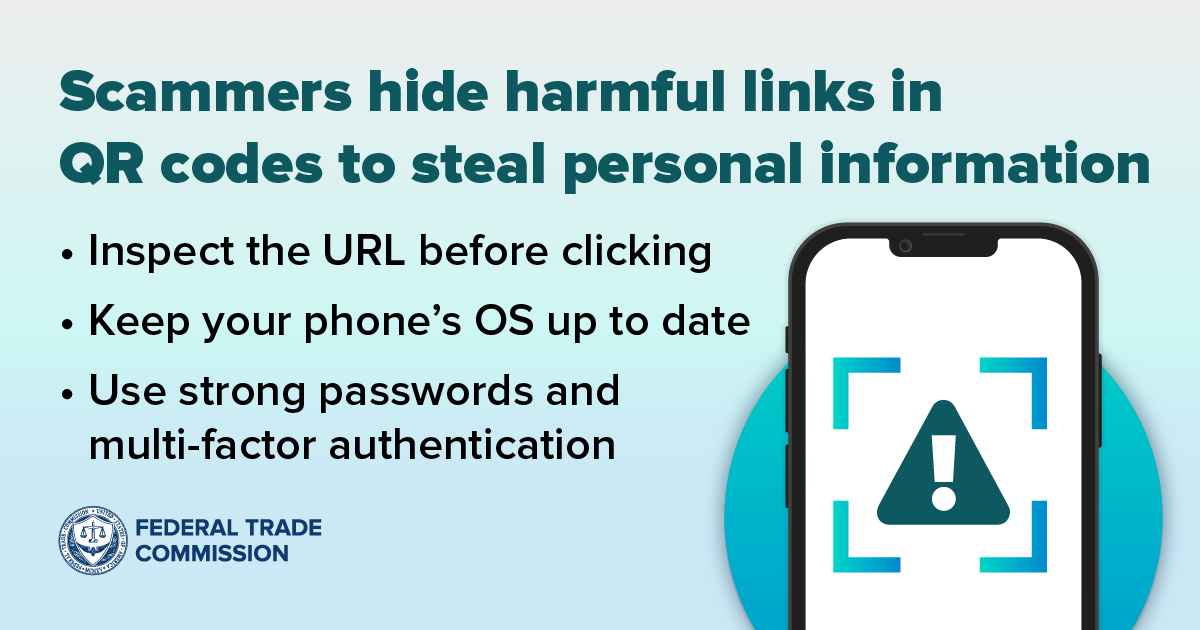
A QR (Quick Response) code is a square barcode that a phone camera can scan to jump straight to a link, app, or payment screen, which is exactly why it is useful — and exactly why it is risky. According to the Federal Trade Commission (FTC), scammers have been caught covering up legitimate QR codes on parking meters with a QR code of their own, so that paying for parking actually sends your card details to a scammer's fake payment page. The FTC also warns that scammers send QR codes directly by text message or email, inventing a reason for you to scan: that a package couldn't be delivered and needs rescheduling, that there's a problem with your account you must confirm, or that they've spotted "suspicious activity" and you need to reset your password.
The FBI's Internet Crime Complaint Center (IC3) describes the same scheme from the criminal's side in a public service announcement on QR code tampering: cybercriminals replace legitimate QR codes — on both digital platforms and physical signage — to redirect scans to sites that harvest login and financial data, to embed malware that gives them access to a victim's device, or to redirect a payment meant for a business straight into their own account. This is the same family of scam as the general email phishing attacks this desk has covered before, except the malicious link is hidden inside an image instead of written out as clickable text — which is exactly what lets it slip past people (and some spam filters) who have trained themselves to hover over suspicious links rather than scan suspicious codes.
How Quishing Attacks Work
Every version of this scam follows the same basic sequence: you scan a code, you land on a page you didn't choose, and you act on that page before verifying it. The FBI's IC3 PSA breaks the payoff into three main outcomes once that scan happens:
- Credential and financial-data theft: the code opens a convincing fake login or checkout page that captures whatever username, password, or card number you enter.
- Malware delivery: the code opens a prompt to install an app or a file that, once granted permissions, can read data stored on the phone.
- Payment redirection: a tampered payment QR code at a business sends the customer's money to the scammer instead of the merchant.
Because the underlying link is encoded as an image rather than readable text, you can't eyeball it the way you might scan a suspicious email for a misspelled domain — you only find out where it leads after your camera has already decoded it. That one step is the entire trick, and it is why the FTC's core advice is simply to stop and look at the link preview your phone shows you before tapping anything further.
Where Scammers Plant Fake QR Codes
The FTC and FBI PSAs describe several distinct settings where tampered or unsolicited QR codes turn up. The table below maps the most commonly reported locations to the warning sign that should make you pause.
| Where it shows up | How the scam typically works | Warning sign |
|---|---|---|
| Parking meters | A sticker with a scammer's QR code is placed over the meter's real payment code. | Sticker looks added-on, slightly peeling, or misaligned with the meter's printed instructions. |
| Unsolicited packages | A package with no sender information arrives containing a QR code urging you to "register" or "claim" the item, per an FBI IC3 advisory on this "brushing scam" variant. | You didn't order it, and there's no return address or retailer name. |
| Text or email "delivery" and "account" alerts | A message claims a package couldn't be delivered or your account needs confirming, per the FTC, and pushes you to scan a code instead of clicking a link. | Urgent tone, unexpected sender, request to scan rather than log in through the official app. |
| Restaurant tables, menus, flyers, posters | A legitimate code used for a menu, payment, or promotion is covered with a duplicate, lookalike code. | Code is a separate sticker, not printed as part of the original menu/flyer design. |
| Payment terminals at businesses | A tampered payment QR code routes the customer's payment to the scammer instead of the merchant, per the FBI's IC3 PSA on QR code tampering. | Terminal's code looks newer or different from the surrounding signage; staff don't recognize it. |
Why QR Codes Are Such an Effective Scam Vector
QR codes succeed as a scam tool for the same reasons they succeed as a legitimate one. People are used to scanning them without a second thought — for restaurant menus, event tickets, flight boarding passes, or parking — so a code in a plausible setting doesn't trigger the same suspicion a stray link in an email might. The destination is also invisible until after the scan, which strips away the one habit a lot of people have built up around ordinary phishing links: hovering over them first. And because the scan happens on a phone, the resulting page often opens in a stripped-down mobile browser view with no visible address bar, making it harder to spot a spoofed domain even if you do think to look.
Warning Signs of a QR Code Scam
Based on FTC and FBI guidance, treat a QR code with caution if any of the following apply:
- It arrived unsolicited, by text, email, mail, or on a package you didn't order.
- It's on a sticker layered over what looks like an existing, printed code.
- The message around it creates urgency — a missed delivery, a locked account, "suspicious activity," or a deadline.
- Scanning it opens a link that doesn't match the organization it claims to be from, or contains misspellings or a swapped letter in the domain.
- It asks you to enter a password, PIN, or payment details immediately, with no way to verify the request independently first.
- It prompts an app install or a permissions request instead of opening a normal web page.
How to Verify a QR Code Before You Scan
The FTC's and FBI's recommendations boil down to a short set of habits:
- Preview the link first. Most phone cameras show you the destination URL before opening it — read it carefully for misspellings or a switched letter before tapping through, as the FTC advises.
- Check the physical code for tampering. The FBI's IC3 PSA specifically recommends looking for a sticker placed over what should be a printed code, and using your phone's native camera scanner rather than a third-party QR app you don't know is trustworthy.
- Don't scan codes from unexpected texts or emails. If a message about a delivery, account problem, or "suspicious activity" includes a QR code instead of a normal link, the FTC recommends contacting the company directly using a phone number or website you already know is real — not anything in the message itself.
- Verify payment QR codes directly with the business. For a restaurant, parking kiosk, or retail payment code, the FBI recommends calling the company through a verified number if anything about the amount or destination looks off, rather than completing the transaction first.
- Type sensitive URLs manually instead of scanning. For banking, tax, or benefits sites, the FBI's guidance suggests entering the address yourself rather than relying on a scanned code at all.
- Keep your phone and accounts hardened. The FTC recommends keeping your phone's operating system and apps updated through official channels (Apple's or Google's own update tools), and protecting accounts with strong, unique passwords plus multi-factor authentication, so that even a successful quishing attempt has less to steal.
These same habits also help against related tricks like SMS-based lures and SIM swap scams, which similarly rely on you acting fast on an unverified prompt instead of confirming it through a channel you control.
How to Check a Link After You've Already Scanned
If you've scanned a code and a link preview or page has opened but you haven't entered anything yet, stop there. Look at the full web address, not just the part your phone chose to display — scammers rely on a domain that looks close enough to the real one at a glance. If it doesn't match the organization's actual website, or you can't tell, close the page and go to the company's site or app the way you normally would, by typing the address or opening your saved bookmark, and check your account from there instead.
How Banks, Retailers and Regulators Are Responding
Regulators and law enforcement have been treating quishing as an active, ongoing threat rather than a one-off trend. The FBI's IC3 has issued more than one public service announcement specifically on QR code abuse: a 2022 PSA on criminals tampering with QR codes to steal funds, and a 2025 PSA warning that unsolicited packages containing QR codes are being used as a new entry point for fraud, building on the "brushing scam" pattern the FBI and Postal Service have tracked for years. The FTC has likewise published and periodically updated consumer alerts specifically about QR code scams, repeating the same core advice — preview the link, don't scan unexpected codes in texts or emails, and verify independently — across multiple alerts rather than treating it as settled guidance. Parking authorities and many retailers have responded at the practical level by printing payment codes directly onto permanent signage rather than removable labels, precisely because a sticker is the easiest part of the scam to tamper with.
What to Do If You Scanned a Malicious QR Code
If you already entered information, installed something, or sent a payment through a scanned QR code, the FTC and FBI recommend acting quickly along these lines:
- Stop interacting with the scammer. The FTC warns that reaching out further through the fake site or a number it provides only gives a scammer another opening to extract money or information.
- Change your passwords immediately for any account where you entered a username or password on the scanned page — and anywhere else you reused that same password, since the FTC notes a stolen password is often tried across multiple accounts.
- Review your bank and credit card statements for transactions you didn't make, as the FTC recommends, and dispute anything unfamiliar with your bank or card issuer right away.
- Check what the scanned code actually installed. If you granted an app permissions or installed something from the link, uninstall it and consider a factory reset if you suspect malware, then restore from a clean backup.
- Watch your credit reports. The FBI's IC3 advisory on QR codes sent with unsolicited packages recommends monitoring your credit reports from Equifax, Experian, and TransUnion, and requesting a free report if you believe you were targeted.
- Report it. File a report with the FTC at ReportFraud.ftc.gov, and file a complaint with the FBI's Internet Crime Complaint Center at IC3.gov, including the sender's details, how you were contacted, and any app or file you downloaded. The FBI notes that people age 60 and over can also call the Department of Justice's Elder Justice Hotline at 1-833-372-8311.
If identity theft follows — for example, new accounts opened in your name — pairing that report with a review of your exposure through data broker and people-search sites can help limit how much of your personal information remains easy for a scammer to find and reuse. Treat every unexpected QR code the way you'd treat an unexpected link: pause, read the preview carefully, and verify independently before you log in, pay, or install anything.
Frequently asked questions
What is a QR code scam?
A QR code scam, sometimes called quishing, is when a criminal places a malicious QR code where a legitimate one should be, or sends you one directly, so that scanning it opens a fake website that steals your login or payment details, or installs malware. The FTC has documented this happening on parking meters and through unsolicited texts and emails about fake package deliveries or account problems.
QR code scams are possible when what happens?
They are possible because a QR code hides its destination until after you scan it. A scammer only needs to cover an existing code with a sticker of their own, or send you a code with an urgent-sounding message, and your phone's camera does the rest by opening whatever link is encoded inside, according to FTC and FBI IC3 guidance.
What do QR code scams typically attempt to do?
Per the FBI's IC3 public service announcement on QR code tampering, these scams typically attempt one of three things: steal login credentials and financial information through a fake site, install malware that gives the attacker access to your device, or redirect a payment meant for a legitimate business into the scammer's own account.
Is it safe to use a QR code scanner app?
Your phone's built-in camera scanner is generally the safer option because it shows you a link preview before opening anything. The FBI's IC3 recommends using your phone's native scanner rather than a third-party QR scanner app whose trustworthiness you cannot verify, and checking the previewed URL carefully before tapping through.
How do I verify a QR code before scanning it?
Preview the destination link your phone shows before opening it and check for misspellings or a swapped letter in the domain, per FTC guidance. Inspect the physical code for a sticker placed over an original, avoid scanning codes from unexpected texts or emails, and contact the business or agency directly through a phone number or website you already know is real if anything looks off.
What should I do if I already scanned a malicious QR code?
Stop interacting with the site or anyone it connects you to, change any password you entered (and anywhere you reused it), and review your bank and credit card statements for unfamiliar transactions, as the FTC recommends. The FBI's IC3 also advises monitoring your credit reports and filing a report at IC3.gov or ReportFraud.ftc.gov, including details of the sender and any app you downloaded.
Sources
- FTC: Scammers Hide Harmful Links in QR Codes to Steal Your Informationconsumer.ftc.gov
- FTC: See a QR Code Parked Somewhere? Don't Scan It...Yet!consumer.ftc.gov
- FBI IC3 PSA: Cybercriminals Tampering with QR Codes to Steal Victim Fundsic3.gov
- FBI IC3 PSA: Unsolicited Packages Containing QR Codes Used to Initiate Fraud Schemesic3.gov
- FTC: How To Recognize and Avoid Phishing Scamsconsumer.ftc.gov
- Wikipedia: QR Codeen.wikipedia.org
Sana Qureshi runs the security and privacy desk. She reports on actively exploited vulnerabilities, vendor patches and data breaches, and covers the password managers, VPNs and authentication tools readers use to protect themselves. Her alerts cite vendor advisories, CISA and the CVE record directly.