iOS 27.2 Is Out for iPhone: Release Date and Everything New
Apple's October 26 update adds Siri AI in French, Japanese, Korean, Portuguese and Spanish, smarter Messages suggestions, and 163 security fixes — but skips the redesigned Health app.
iOS 27.2 is out now. Apple shipped the update on October 26, 2026, alongside iPadOS, macOS, watchOS, tvOS and visionOS 27.2, bringing five new Siri AI languages, smarter Messages suggestions, Group FaceTime dual-camera sharing and 163 security fixes — but not the redesigned Health app that leaked in earlier betas. It's a bigger feature list than the last point release, and it touches Siri, Messages, FaceTime, Photos, the Apple TV app and even the iPhone Duo's Apple Pencil support all at once. Here's everything that changed, which iPhones qualify, and what to check before you tap Install.
iOS 27.2 at a glance
- Released: October 26, 2026 (build 24B119)
- Compatible: iPhone 11 and later
- Headline feature: Siri AI adds French, Japanese, Korean, Portuguese and Spanish
- Also new: Messages Suggested Actions, Group FaceTime Dual Capture, Apple TV app profiles
- Missing: the redesigned Health app, pulled from the betas and pushed to a later update
- Security: 163 CVEs patched across 67 components, including 26 in WebKit
iOS 27.2 Release Date: It's Available Now
Apple's iOS and iPadOS release notes list iOS 27.2 and iPadOS 27.2 with a release date of October 26, 2026, carrying build 24B119 (Apple's release index also lists an alternate build string, 24B91020, for the same version, which likely covers a specific carrier or regional variant). The update arrived about six weeks after iOS 27.1, and Apple skipped a standalone "27.1.x" point release in between — the jump goes straight from iOS 27.1's launch-day fixes to this broader 27.2 update, which Apple also shipped simultaneously for iPadOS, macOS, watchOS, tvOS and visionOS.
To install it, go to Settings > General > Software Update on an eligible iPhone. The update is free and installs over the air; Apple recommends charging to at least 50% or plugging in before you start, and keeping the phone connected to Wi-Fi so the roughly multi-gigabyte download doesn't eat into a cellular data plan. Apple keeps a running index of every current OS release, with build numbers and direct links to each version's release notes, on its software releases support page — useful if you want to confirm exactly which build your device is on before and after updating.
Which iPhones Support iOS 27.2?
iOS 27.2 supports the same device list as iOS 27: iPhone 11 and later. That includes every iPhone from the iPhone 11 lineup through the iPhone 18 Pro models and the foldable iPhone Duo. Apple hasn't dropped support for any additional model with this point release, so if your iPhone was eligible for iOS 27 or iOS 27.1, it's eligible for 27.2.
iPadOS 27.2, released the same day, covers iPad Pro 12.9-inch (4th generation and later), iPad Pro 11-inch (2nd generation and later), iPad Air (4th generation and later), iPad (9th generation and later) and iPad mini (6th generation and later) — relevant if you're also weighing the latest iPad Pro against a rival tablet. Not every new feature reaches every device equally: Siri AI's expanded languages and context features still depend on Apple Intelligence support, which Apple ties to specific chips rather than just an OS version number.
Siri AI Finally Speaks Five More Languages
The headline change in iOS 27.2 is Siri AI's language expansion. Since launching in English with iOS 27 in September, Siri AI has been limited to U.S. English. With 27.2, Apple is adding French, Japanese, Korean, Portuguese (Brazil and Portugal) and Spanish — the five languages Apple first committed to when it unveiled the next generation of Apple Intelligence and Siri AI at WWDC26.
Siri AI still requires an iPhone 15 Pro, iPhone 15 Pro Max, or any iPhone 16 or newer model with Apple Intelligence enabled — Apple's Siri product page lists the current feature and device breakdown — and it's still not available in the European Union or mainland China on iOS, iPadOS or watchOS. Apple has not published a region-by-region rollout schedule for each new language, so availability may stagger over the following days even after you update, and some server-side responses can be subject to daily usage limits during peak demand.
Beyond new languages, Siri AI itself gained range in 27.2: it can now recall earlier parts of a conversation, pull context from a wider set of sources (photos attached in Messages, Calendar attendees, voicemail transcripts, Safari history and your Reading List), and offer an Excluded Apps setting so you can block specific apps from being used as Siri's context. You can also select and copy part of a Siri response, the same way you'd copy text anywhere else on iPhone, and the side button can now be configured to open either voice Siri or Type to Siri depending on preference.
For U.S. users specifically, there's also a smaller Accessibility-adjacent change: AirPods' Hearing Aid feature, which already shipped in the U.S. with AirPods Pro 2 and later, continues to expand internationally alongside this release — a reminder that Apple treats hearing health features as part of the same yearly software cadence as Siri AI, not a separate track.
Messages Gets Suggested Actions
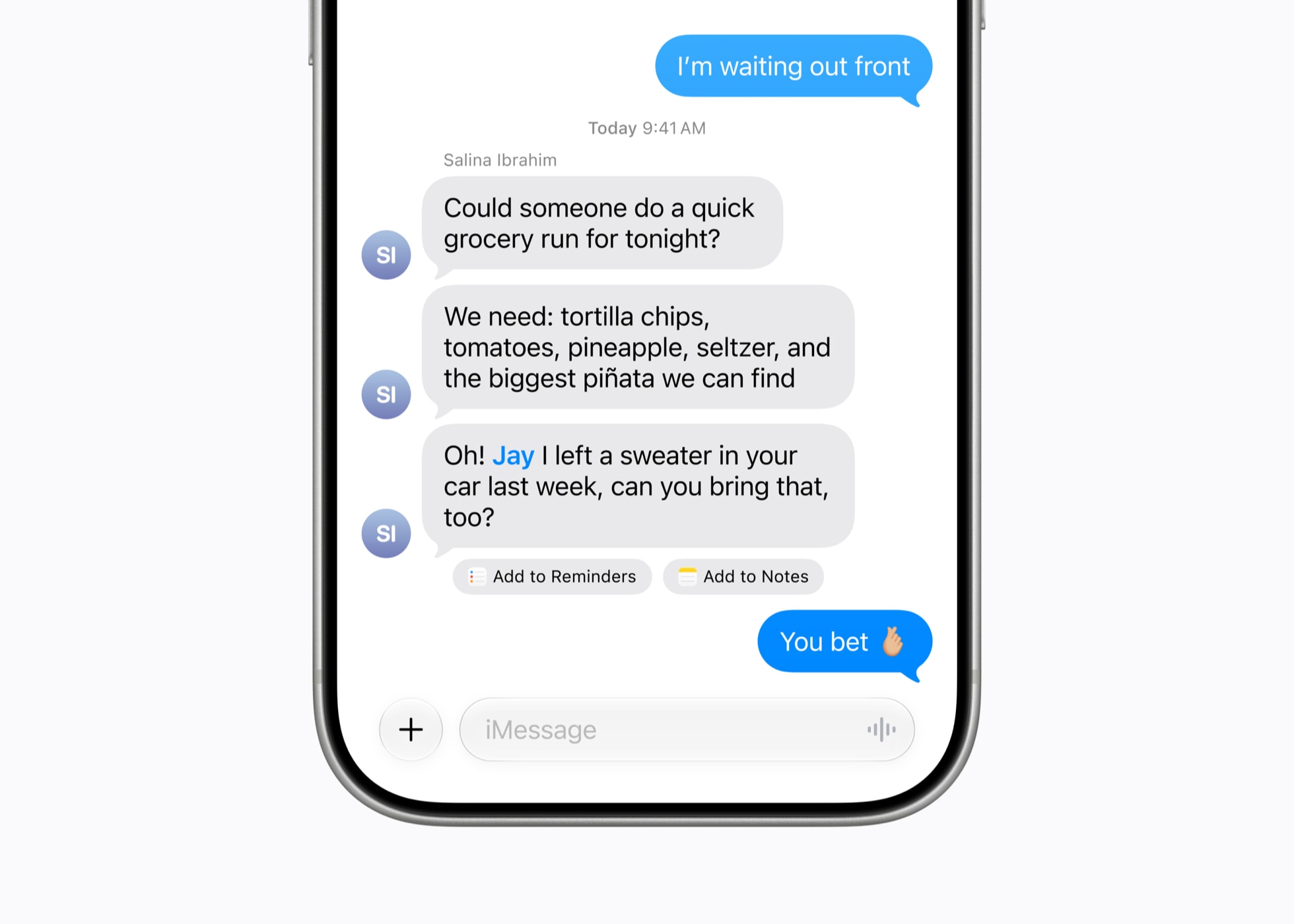
iOS 27.2 adds Suggested Actions to Messages — one-tap shortcuts that read the context of a conversation and offer to create a calendar event, set a reminder, add a note, drop a pin in Maps, or surface flight and package-tracking details, all without leaving the thread. A new Messages setting lets you turn off specific suggestion categories if you'd rather not see them. It builds on the on-screen suggestions Apple first introduced with iOS 27 itself.
Group FaceTime, Photos and Apple TV Profiles
A handful of other changes round out the release:
- FaceTime: Dual Capture, which shares your front and rear camera at once, now works in Group FaceTime calls, not just one-on-one. FaceTime also supports adding a third-party sign language interpreter or live captioner to a call.
- Photos: Shared Albums can now have their captions and comments edited after posting, flag likely duplicate photos, and warn you before an album is set to expire. Apple is also rolling out SynthID watermarking to help identify AI-generated or AI-modified images created in Photos and Image Playground.
- Apple TV app: Simple Profiles give each person in a household their own watch history and recommendations, with a four-digit code to lock kids' profiles and a selectable profile picture.
- Podcasts: The Home tab now splits into separate New Episodes and Continue Playing sections.
- Games: The Friends tab shows more context about what friends are playing and recently downloaded.
- Home and HomePod: Compatible smart locks gain Lock After Closing and Door Left Open alerts, and a new HomePod Lock Controls setting stops accidental taps from starting audio while still allowing timers and alarms to be dismissed by touch.
- iPhone Duo: Gains support for the USB-C Apple Pencil (Apple Pencil Pro and other Pencil models still aren't supported on the foldable).
None of these individually would justify a headline, but together they're a reasonably substantial list for a ".2" release — closer in scope to what Apple historically saved for a ".1" update. That's likely a side effect of Apple folding the originally planned iOS 27.1 feature set into 27.2 instead, after choosing to ship 27.1 itself as a smaller, launch-focused bug-fix release for the iPhone Duo and iPhone 18 Pro line.
What's Missing: No Redesigned Health App
One widely expected feature isn't in this release. Early iOS 27.2 betas included a visibly redesigned Health app with new Insight and Longevity tabs, and it was covered extensively during the beta cycle. Apple pulled it before the release candidate shipped, and the feature is now expected in a later software update rather than in 27.2 itself. If your Health app looks the same after updating, that's expected — nothing broke.
Security Fixes: 163 CVEs Patched
Apple's security content page for iOS 27.2 and iPadOS 27.2 lists 163 CVE entries across 67 affected components, one of the larger point-release security batches of the year and noticeably bigger than the fix set that shipped with iOS 27.1. The table below shows where most of the fixes landed.
| Component | CVEs patched | Typical impact |
|---|---|---|
| WebKit | 26 | Malicious web content leading to memory corruption or code execution |
| Kernel | 15 | Apps gaining elevated privileges or crashing the system |
| ImageIO | 11 | Crafted images triggering memory corruption |
| AVEVideoEncoder | 6 | Video processing memory corruption |
| Model I/O | 6 | Malicious 3D model files causing crashes |
| CoreAudio | 5 | Crafted audio files leading to crashes or code execution |
| SceneKit / FontParser | 4 each | Memory corruption via crafted content |
None of the fixes are flagged by Apple as already under active exploitation, unlike some of this year's emergency patches in other ecosystems. Even so, the sheer volume of WebKit and kernel fixes means it's worth updating promptly rather than waiting.
iOS 27.2 vs. iOS 27.1: What Actually Changed
| Area | iOS 27.1 | iOS 27.2 |
|---|---|---|
| Siri AI languages | English only | Adds French, Japanese, Korean, Portuguese, Spanish |
| Messages | No change | Adds Suggested Actions (calendar, reminders, Maps, flights/packages) |
| FaceTime | No change | Dual Capture in Group FaceTime; third-party interpreter/captioner support |
| Health app | No change | Redesign still not included (delayed again) |
| Security content | Smaller, launch-focused fix set | 163 CVEs across 67 components |
Known Issues After Updating
Early reports flag two minor, non-critical bugs still present in 27.2: some photo wallpapers can lose color saturation when you swipe to the Home Screen, and the "clear" style app icons can lag slightly when animating. iOS 27.2 does fix a separate widget bug that could freeze the Home Screen until a restart, which was one of the more commonly reported annoyances left over from 27.1. None of the remaining issues should stop you from updating, but if you rely heavily on a specific wallpaper or a widget-heavy Home Screen layout, know what to expect going in. As with any point release, Apple is likely to address the remaining cosmetic bugs in a future 27.2.x update rather than hold up the broader rollout. If you do hit an unexpected issue after updating, a restart followed by checking Settings > General > Software Update for a subsequent patch is the standard first troubleshooting step before filing feedback with Apple.
What to Do Next
If Siri AI's new languages or the Messages suggestions are what you're after, install iOS 27.2 from Settings now — there's no beta requirement, and the update is rolling out to every eligible iPhone simultaneously rather than in waves. If you were specifically waiting for the redesigned Health app, you can skip this update's headline feature for now and watch for a later release; Apple has said the redesign is still planned, just not ready. And if you're deciding what to buy rather than what to install, Apple's next hardware event lands October 28 — see what Apple has confirmed for that event before you shop. Owners dealing with the unrelated iPhone Duo hinge-screen reports should note that iOS 27.2 does not address that hardware issue on its own; it's a software update, not a repair.
Frequently asked questions
When was iOS 27.2 released?
Apple released iOS 27.2 on October 26, 2026, alongside iPadOS, macOS, watchOS, tvOS and visionOS 27.2.
Which iPhones support iOS 27.2?
iOS 27.2 supports the same devices as iOS 27: iPhone 11 and later, including the iPhone 18 Pro models and iPhone Duo.
Does iOS 27.2 include the redesigned Health app?
No. The redesigned Health app appeared in early betas but was removed before release. Apple says it's still planned for a later update.
What languages did Siri AI add in iOS 27.2?
Siri AI adds French, Japanese, Korean, Portuguese (Brazil and Portugal) and Spanish. It still requires an iPhone 15 Pro or newer and isn't available in the EU or mainland China.
How many security issues does iOS 27.2 fix?
Apple's security content page lists 163 CVE fixes across 67 components in iOS 27.2 and iPadOS 27.2, including 26 in WebKit and 15 in the kernel.
How do I install iOS 27.2?
Go to Settings > General > Software Update on an eligible iPhone. The update is free and installs over Wi-Fi.
Sources
- Apple Developer: iOS & iPadOS 27.2 Release Notesdeveloper.apple.com
- Apple Support: About the security content of iOS 27.2 and iPadOS 27.2support.apple.com
- Apple Support: Apple security releases (software releases index)support.apple.com
- Apple Newsroom: Apple unveils the next generation of Apple Intelligence, Siri AI and moreapple.com
- 9to5Mac: Apple releases iOS 27.2, here's what's new9to5mac.com
- iPhone in Canada: iOS 27.2 for iPhone is out now, minus one feature you were expectingiphoneincanada.ca
Nadia Osei covers mobile and consumer gadgets for Pandromeda: smartphones, tablets, smartwatches, earbuds and smart-home devices. She tracks launches, software updates and pricing across Apple, Google, Samsung and the rest, and builds comparisons from the manufacturers' published specifications.