CAMM2 RAM Explained: What It Is, and CAMM2 vs DDR5
CAMM2 is JEDEC's SO-DIMM successor for laptops and desktops. Here's what it actually changes, which devices support it, and why it's still niche.
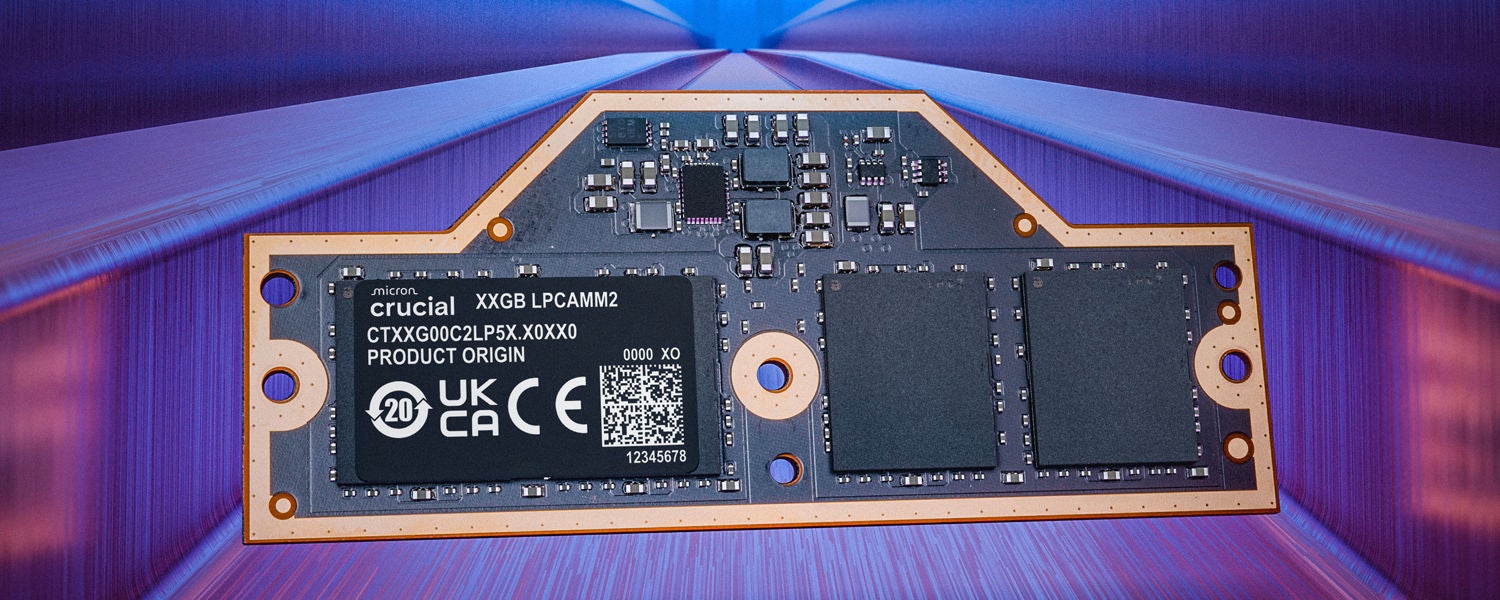
CAMM2 (Compression Attached Memory Module, second generation) is a JEDEC-standardized memory format built to replace SO-DIMM in laptops, and increasingly in some desktops and mini PCs. Instead of a memory stick that plugs in edge-first and stands upright, CAMM2 is a flat, single-piece module that lies parallel to the motherboard and connects through a land-grid array of hundreds of contact pads, held down with screws rather than clips. JEDEC published the standard, JESD318, on December 5, 2023, covering both DDR5-based CAMM2 and low-power LPDDR5X-based CAMM2 (commonly called LPCAMM2) in a single document. It is real, it is shipping in a small number of products, and it is still far from mainstream — this piece lays out exactly what has changed, what hasn't, and where things actually stand today.
CAMM2 in brief
- What it is: A JEDEC-standardized (JESD318) flat memory module that replaces SO-DIMM, using a compression land-grid-array connector instead of an edge connector.
- Two flavors: DDR5 CAMM2 for standard system memory, and LPCAMM2 (LPDDR5X) for the low-power memory that used to be soldered to the board.
- Key benefit: Full dual-channel memory from a single module, less board space, shorter signal traces, and — unlike soldered memory — modules you can still remove and upgrade.
- Availability now: A handful of workstation laptops (Lenovo ThinkPad P1, Dell's mobile workstation line), Crucial's retail LPCAMM2 kits, and early/demo-stage desktop motherboards from MSI and ASUS. It is not yet a mainstream option.
What Is CAMM2, Exactly?
CAMM2 stands for Compression Attached Memory Module, second generation. The name describes the connector, not the memory chips inside it: rather than the row of gold edge contacts you'd find on a SO-DIMM or a desktop DIMM, a CAMM2 module has a large grid of flat contact pads on its underside. The module sits flush against a matching pad array on the motherboard, and a set of screws compresses the two surfaces together to make the electrical connection — hence "compression attached."
The idea predates the standard. Dell engineer Tom Schnell designed the original CAMM as a proprietary format, and Dell shipped it first in the Precision 7000-series mobile workstations in 2022. JEDEC — the industry body that also standardizes DDR and LPDDR memory itself — then took the concept, reworked the connector and pinout, and ratified it industry-wide as JESD318 in December 2023. That standard is deliberately split into two module families that share a physical connector concept but not a pinout: one for conventional DDR5 SDRAM, and one for the low-power LPDDR5/5X SDRAM that has historically been soldered directly to a laptop's motherboard.
CAMM2 vs SO-DIMM: What Actually Changed
SO-DIMM has been the standard laptop memory format since 1997, and it works by plugging a small vertical card into a slot at roughly a 30-degree angle before snapping it flat, with metal clips holding it in place. Its edge connector concentrates all the electrical contacts along one thin strip of the board, and getting two sticks running in dual-channel mode means finding room, and battery/thermal budget, for two separate modules standing up inside the chassis.
CAMM2 removes that stack entirely. A single module lies flat against the board and is secured with screws, and because a land-grid array can carry far more independent contact points than an edge connector, one CAMM2 module wires up all the channels a pair of SO-DIMMs would have needed — so a single module natively delivers dual-channel memory. The flat, low-profile design is also why component makers pitch it as good for thin-and-light and workstation designs at once: it doesn't need the vertical clearance a SO-DIMM slot does, and its shorter, more uniform trace lengths are the reason JEDEC could certify higher factory speeds on it than on SO-DIMM of the same DRAM generation.
The trade-off is mechanical, not electrical: a CAMM2 socket is a fixed footprint sized for one specific module family (a 32GB module and a 64GB module are physically different parts), so there's no equivalent of buying a single extra SO-DIMM stick to add to an existing one. You replace the module, you don't add to it.
CAMM2 vs Soldered LPDDR (On-Board Memory)
The other memory format CAMM2 is competing with isn't a socket at all — it's LPDDR5 or LPDDR5X chips soldered directly onto the motherboard, which is how most thin laptops, all Apple silicon Macs, and most Chromebooks currently handle memory. Soldering exists because it lets designers route incredibly short, tightly matched traces between the SoC and the memory chips, which is what lets LPDDR hit its low-power, high-bandwidth targets — but it also means the memory capacity you buy is the memory capacity you're stuck with for the life of the device, and a memory failure means replacing the whole board.
LPCAMM2 is JEDEC's attempt to have it both ways. It uses the same LPDDR5X silicon that would otherwise be soldered down, but mounts it on a small, removable module instead — Micron, which supplies the DRAM inside Crucial's LPCAMM2 kits, describes it as "the ability to upgrade low power DRAM for the first time." The tightly controlled trace lengths that make soldered memory efficient are preserved because the compression connector sits so close to the chips; what's added back is the ability for an OEM or an IT department to service or upgrade the module later, something soldered memory never allowed.
CAMM2 vs DDR5: Performance, Upgradability, and Repairability
"CAMM2 vs DDR5" isn't really an apples-to-apples question, because DDR5 is the DRAM generation and CAMM2 is the connector it's mounted on — a DDR5 CAMM2 module and a DDR5 SO-DIMM both run the same underlying DDR5 memory chips. The real comparison is CAMM2's connector and form factor against SO-DIMM's, and on that front the differences are mechanical, thermal, and — at the top end — a speed ceiling.
On paper, JEDEC's CAMM2 spec allows for higher certified speeds than SO-DIMM of the same generation supports, and Micron's own figures for its LPCAMM2 modules claim up to 9,600 Mbps versus 5,600 Mbps on the DDR5 SO-DIMMs it was comparing against at launch, along with up to 61% lower active power, up to 80% lower standby power, and up to 64% less board space than a pair of stacked SO-DIMMs. Those are Micron's own published marketing figures for its specific LPCAMM2 parts, not independent, cross-brand benchmark results, and they compare LPCAMM2 (low-power) memory against SO-DIMM rather than DDR5 CAMM2 against DDR5 SO-DIMM specifically — so treat them as one manufacturer's best case rather than a universal number for the whole standard.
Where CAMM2 clearly does something DDR5 SO-DIMM can't is serviceability in a market that has been shifting toward soldered memory: Lenovo has framed LPCAMM2 explicitly around IT-department serviceability for its workstation line, and Dell's original CAMM effort was pitched the same way. If you care about being able to open a laptop and swap the memory yourself — the same instinct that makes people check how to check RAM speed in Windows 11 after an upgrade — CAMM2 keeps that option alive in designs thin enough that manufacturers would otherwise solder the memory down.
| Trait | DDR5 SO-DIMM | DDR5 / LPCAMM2 | Soldered LPDDR5/5X |
|---|---|---|---|
| Connector | Edge connector, vertical, clip-retained | Land-grid array, flat, screw-retained | None — chips soldered to board |
| Dual-channel from one part | No — needs two sticks | Yes — one module wires both channels | N/A (fixed at design time) |
| User/tech upgradable | Yes, widely | Yes, where the socket exists | No |
| Board space / height | Highest — needs vertical clearance | Lower profile, flat mount | Lowest — no module at all |
| Device support today | Nearly all current laptops and desktops | A short list of workstation laptops and a few desktop boards | Most ultrathin laptops, Chromebooks, Apple silicon Macs |
| Standard body | JEDEC (SO-DIMM outline specs) | JEDEC JESD318 (CAMM2) | JEDEC (LPDDR5/5X chip standard, no module standard) |
LPCAMM2 vs CAMM2: Two Modules, One Standard
It's easy to see "CAMM2" and "LPCAMM2" used almost interchangeably in coverage of the format, but JESD318 actually defines two distinct module families under one umbrella standard. Standard CAMM2 carries conventional DDR5 SDRAM and is aimed at higher-performance systems — gaming laptops, mobile workstations, and now some desktops — where raw DDR5 memory is already the norm. LPCAMM2 carries LPDDR5 or LPDDR5X SDRAM, the same low-power memory family used in soldered designs, and is aimed at thin-and-light laptops chasing battery life. The two use the same underlying compression-connector concept and a shared mechanical family, but different pinouts, so a DDR5 CAMM2 module and an LPCAMM2 module are not interchangeable in the same socket. When people search "CAMM2 RAM" for a laptop, they usually mean LPCAMM2; when the context is a gaming desktop or workstation motherboard, it's almost always the DDR5 variant.
Which Laptops Support CAMM2 So Far
The list of shipping CAMM2/LPCAMM2 laptops is still short. Lenovo's ThinkPad P1 Gen 7, launched in 2024, was the first laptop built around LPCAMM2, using Micron's LPDDR5X-7467 modules in a single-slot dual-channel configuration; Lenovo's own published specification lists it starting at 32GB and configurable up to 64GB via a single upgradeable module. Dell, which originated the pre-standard CAMM design in its Precision 7000-series workstations in 2022, has continued using the connector concept in later mobile-workstation models as the JEDEC-standard version matured. A few other OEMs have begun shipping or announcing LPCAMM2-equipped machines aimed at the same workstation-and-thin-and-light segment, but availability is concentrated in premium and business-oriented lines rather than mainstream consumer laptops — you will not find LPCAMM2 in a typical budget laptop today.
It's worth being direct about the current reality: this is still a workstation and enthusiast story, not a consumer one. Most laptops sold in 2026, including plenty of premium ones, still use either DDR5 SO-DIMM or plain soldered LPDDR5X. CAMM2 support is a specification line to check for, not something you can assume.
Which Motherboards and Mini PCs Support CAMM2
On the desktop side, CAMM2 is younger still and largely a proof-of-concept category rather than a retail one. MSI built the first publicly demonstrated desktop motherboard with a CAMM2 socket, the Z790 Project Zero Plus, showing it in 2024 in partnership with a memory partner, and other board makers have since shown their own CAMM2-equipped prototypes at trade shows, paired with DDR5 CAMM2 modules from memory vendors including Kingston, whose FURY Impact DDR5 CAMM2 line targets exactly this space alongside notebooks and mobile workstations. None of this has translated into CAMM2 being a shelf option next to ordinary DDR5 DIMMs at a typical retailer yet. Mini PCs are the most logical long-term destination for DDR5 CAMM2 — the format's flat, compact footprint suits a small chassis better than upright DIMMs do — but as of now that's a direction component makers are pointing toward, not a lineup of shipping mini PC models you can buy with CAMM2 inside.
CAMM2 Price and Availability: The Honest Picture
Pricing and availability are the parts of the CAMM2 story most likely to disappoint anyone hoping to upgrade a laptop cheaply. Crucial sells LPCAMM2 kits directly for a handful of specific laptop models through its own site, but CAMM2 modules are not stocked the way SO-DIMM or desktop DIMMs are at general retailers, and because each module is tied to a specific capacity and speed bin for a specific socket, there isn't yet a broad, interchangeable secondary market the way there is for SO-DIMM. Desktop DDR5 CAMM2 modules and motherboards remain effectively unavailable to ordinary buyers — what exists publicly is demo and trade-show hardware rather than retail SKUs. None of this is unusual for a new JEDEC format in its first couple of years; SO-DIMM itself took time to become the default. But if you're comparing sticker prices against a DDR5 SO-DIMM kit today, expect CAMM2 to cost more per gigabyte and to require a laptop or motherboard specifically built for it — not a drop-in swap for anything you already own. This is also happening against a backdrop where RAM prices generally are elevated in 2026, which affects newer, lower-volume formats like CAMM2 more than it affects commodity DDR5.
Should You Wait for CAMM2?
For most people shopping for a laptop or building a desktop right now, the answer is no — not yet. CAMM2 solves a real problem (upgradability in thin designs that would otherwise solder memory down, plus some headroom at the top of the speed range), but it solves it for a narrow slice of the market: mobile workstations, some gaming laptops, and eventually mini PCs and enthusiast desktops. If your priority is simply fast, upgradable memory today, a DDR5 SO-DIMM or desktop DIMM system remains the far more available, far cheaper, and far more broadly supported option — see our DDR6 RAM explainer for where standard DIMM memory is headed next. CAMM2 is worth caring about if you specifically need a thin or workstation laptop with memory you can still service later, or if you're watching the desktop CAMM2 story out of genuine interest in where motherboard design is headed.
What's Next for CAMM2
The near-term trajectory is more of the same: a slowly growing list of workstation and premium laptops, continued trade-show demonstrations of desktop CAMM2 motherboards from board partners working with memory vendors, and Crucial expanding its direct-to-consumer LPCAMM2 catalog as more machines support it. Longer term, JEDEC's DDR6 and future LPDDR6 memory generations are expected to be paired with CAMM-style module options as those standards mature, which would put CAMM2's connector concept on a much longer road map than a single DRAM generation. Whether CAMM2 actually displaces SO-DIMM the way SO-DIMM displaced full-size DIMMs in laptops decades ago will depend on whether mainstream, budget-tier laptop makers ever adopt it — something that, as of today, simply hasn't happened yet.
Frequently asked questions
What does CAMM2 stand for?
Compression Attached Memory Module, second generation. It refers to JEDEC's JESD318 standard, which defines a flat memory module that connects to a motherboard through a land-grid-array compression connector instead of the edge connector SO-DIMM and DIMM modules use.
Is CAMM2 the same thing as LPCAMM2?
No. JESD318 defines two related module families: standard CAMM2 for conventional DDR5 SDRAM, and LPCAMM2 for low-power LPDDR5/LPDDR5X SDRAM. They share the same compression-connector concept but use different pinouts, so a CAMM2 module and an LPCAMM2 module are not interchangeable.
Can I install a CAMM2 module in a laptop that currently uses SO-DIMM?
No. CAMM2 requires a motherboard built with a CAMM2 socket. There is no adapter that lets a CAMM2 module work in a SO-DIMM slot, or vice versa.
Is CAMM2 actually faster than DDR5 SO-DIMM?
JEDEC's standard allows for higher certified speeds on CAMM2 than on SO-DIMM of the same DRAM generation, and Micron has published figures claiming notable speed and power advantages for its LPCAMM2 parts specifically. Those are one manufacturer's figures for its own products, not an independent, universal benchmark of the whole standard.
Where can I actually buy CAMM2 or LPCAMM2 memory right now?
Crucial sells LPCAMM2 kits directly for a limited set of supported laptop models. Desktop DDR5 CAMM2 modules and motherboards remain largely trade-show and prototype hardware rather than something available to buy at general retail.
Will CAMM2 eventually replace SO-DIMM entirely?
The industry, including JEDEC and OEMs like Lenovo and Dell, positions CAMM2 as SO-DIMM's long-term successor, but adoption is still early and concentrated in workstation and premium laptops. Most laptops sold today still use SO-DIMM or soldered memory, not CAMM2.
Sources
- JEDEC — JEDEC Publishes New CAMM2 Memory Module Standard (JESD318)jedec.org
- Micron Technology — Micron First to Market With LPDDR5X-based LPCAMM2 Memory, Transforming User Experiences for PCsmicron.gcs-web.com
- Crucial (Micron) — LPCAMM2 Memory product catalogcrucial.com
- Kingston Technology Europe — COMPUTEX 2024 press release (FURY Impact DDR5 CAMM2)media.kingston.com
- Lenovo — ThinkPad P1 Gen 7 official specification sheet (PSREF)psref.lenovo.com
- Wikipedia — CAMM (memory module)en.wikipedia.org
Mara Lindqvist edits the hardware desk. She covers graphics cards, processors, memory and storage, the foundries and chip designers behind them, and what the numbers on a spec sheet mean for people choosing a PC. Specifications in her stories come from manufacturer spec pages and datasheets.